


The rise of AI models for content generation has been meteoric. Practical scenarios for using AI in everyday work are emerging alongside sample applications. Highlights include online services or Photoshop’s AI tools for advanced photo editing. However, not everyone wants to pay a subscription fee. We’ll explore what the open-source graphics editor Krita lets users achieve with free local AI models and how to run them on a common gaming graphics card.
How nimble the work with images depends primarily on the resolution of the image, the size of the areas where content is generated, and the models used. Higher resolution increases the demands on your graphics card’s memory and performance. I tested Krita on a 16GB GeForce RTX 4070 Ti Super, but even 16GB of video memory isn’t essential.
Working with full HD images was smooth, with most operations taking just a few seconds or at most a few dozen seconds. At 4K resolution, the system was under more strain; on a 16GB card, generating an image with the Cinematic XL model took just under a minute longer. Upscaling images to 4K was also no issue. Additionally, operations can run in a background queue, allowing you to continue working in Krita without interruption.

Give it a try, it’s not boring!
Comprehensive documentation of all the functions does not exist. The development of both the AI models and the software has been quite turbulent and a few months old tutorials, videos, screenshots and descriptions no longer accurately reflect the current interface and settings. Also, documentation is now lagging behind development, and unless you can devote yourself to AI full time, it’s not easy to keep track of and keep up with everything that’s happening around AI models.
I did not have the space to research and discuss all the tools within the scope of this article. But that wasn’t the intention either, it was to let more people know that this option is there and how to access it. Learning how all the add-on tools work and what settings they offer is not a matter of just a few hours.
You can switch between models directly in the dock, and it’s worth experimenting to see which one delivers better results in a given situation.
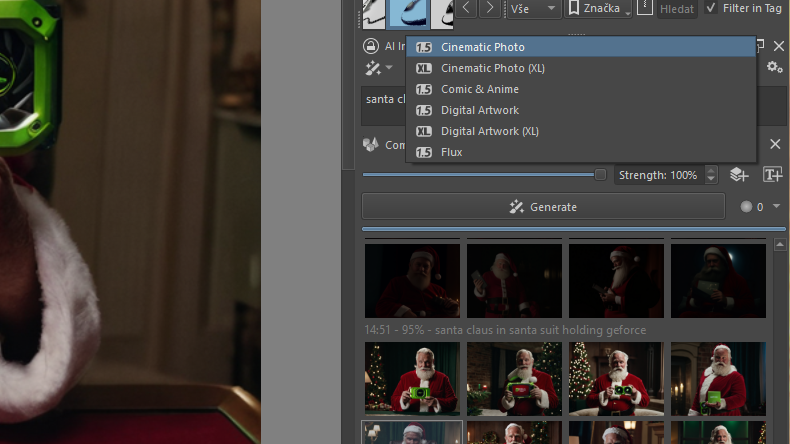
In addition to content generation, features like upscaling to increase resolution, animation modes, and a live preview are available. The live preview responds quickly to any adjustments you make to the source image.

Not all of them are always accessible for all tasks – many of them are used for selections, for example, others work with already generated content, and some, like “Pose” for adjusting the position of generated characters, work on vector layers, others work on layer masks and so on.

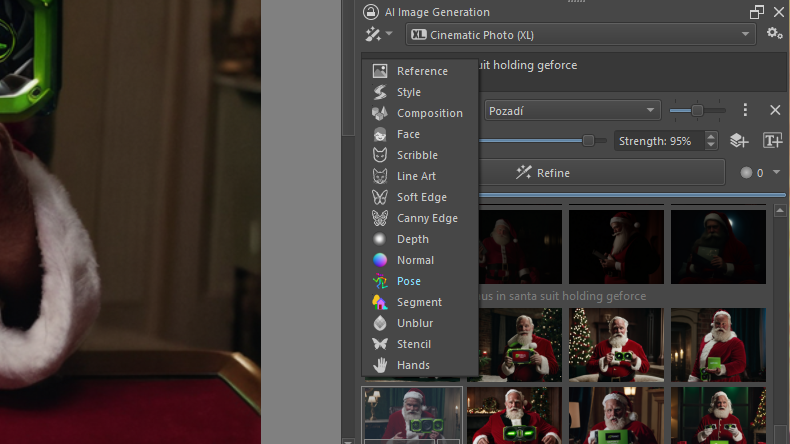
You can also set the weights of individual functions, the number of iterations, and influence the speed and complexity of content generation in terms of both time and resources.

A very illustrative demonstration of how to work with some of the many features has been uploaded to YouTube directly from the author of the AI Diffusion add-on.
The whole process can still be fine-tuned directly via the ComfyUI server. You can also add other models for AI that are not natively supported by the plugin itself.
I guess there’s no other way than to try out how it all works. There are already a bunch of tools and modes to play with. You can browse the project discussion on GitHub. Online AI chatbots that handle web search, filtering information and linking to sources will also be a great help and signpost for further exploration.
Count on the fact that you won’t always get a perfect result, not everything will always work, and at least initially you won’t always be able to define exactly what you want from the AI. And it won’t always get it right. There are multiple ways to achieve a similar result, you just need to spend some time on it, like with anything you want to learn a little bit about.
English translation and edit by Jozef Dudáš

