Yesterday we reported on an update to the Nvidia App utility for GeForce graphics cards, which brought owners of the latest‑generation GPUs the ability to use 6× frame generation and a dynamic mode in DLSS 4.5. But that’s not the only new feature the company has prepared. This version of Nvidia App includes another improvement that can free you from the annoying waiting for shader compilation, which often takes several minutes.
Modern games contain an extremely large number of visual effects and GPU‑executed compute tasks using shaders. However, shader programs cannot run directly on GPUs; drivers must first compile them to match the architecture and instruction set of the specific GPU. Some of this happens at runtime, but a large portion must be prepared in advance. That’s why, when launching a game for the first time after installation, you usually see a long progress bar while the game compiles its shaders.
Unfortunately, this compilation isn’t required only after game installation (or when you swap GPUs), but also after every driver update—because shaders must be compiled for the specific driver version. So if, for example, Nvidia recently released several driver hotfixes over roughly two weeks and you installed them one after another, you would have to wait for shader recompilation each time in the games you wanted to play.
The Nvidia App 11.0.6 version released this week accompanied with the GeForce 595.97 driver adds a solution to this problem, for now in a beta try-out version. It’s a feature called Nvidia Auto Shader Compilation (ASC), which you can optionally enable. This feature takes over shader recompilation and performs it automatically in the background after every driver installation, while you’re using the PC for other tasks than gaming. If everything lines up, this means that by the time you get around to playing after a driver update, everything will already be compiled—so when you launch a game, you won’t see the annoying waiting screen and can jump straight into playing.
The feature is disabled by default; if you want to try it, you can enable it in the settings under the Shader Cache section (shader caching already existed before—compiled shaders from games were stored there, and the same cache is used by ASC). In addition to enabling ASC itself (the option is called “Precompile Shaders”), you can also set how much system load ASC is allowed to use. Shader compilation is a multithreaded workload, so your CPU fans may spin up noticeably (shader compilation was, after all, the “trial by fire” that exposed unstable degraded Intel Raptor Lake CPUs in 2024).
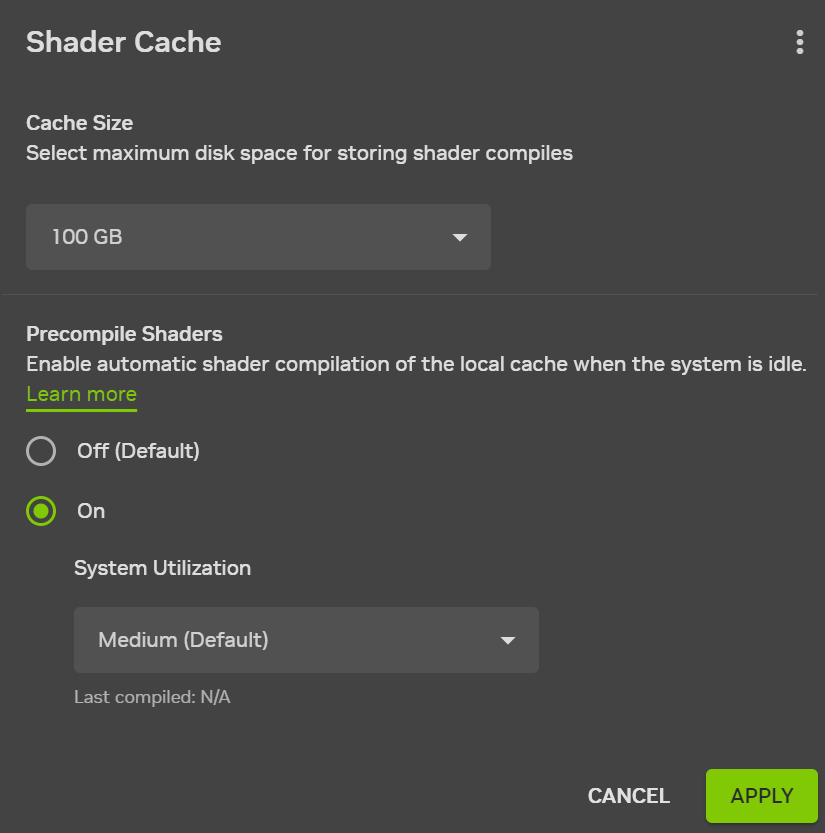
How beneficial this feature will be probably depends. If you have automatic driver updates enabled, ASC will likely manage to precompile shaders ahead of time, and you won’t notice updates when launching games. But if you update drivers manually just between gaming sessions and want to jump back into a game immediately, the feature won’t help much.
This feature will be especially useful if you don’t have a large number of games installed. If you have, say, thirty games on your SSD, ASC will likely recompile shaders for all of them, meaning your fans may run loudly for quite a while—even though you may not be playing most of those titles, making it it unnecessary to recompile their cached shaders after every driver update. Nvidia does not state whether ASC checks which games were played recently to prioritize those. In the future, it would make sense to add a setting that limits ASC to recently launched games..
The tool has another limitation—it runs only after each driver installation and is not a permanently resident service. For now, it cannot detect when you install a new game and precompile shaders for it before you actually launch it. It will only do so after the next driver update and only after the game has compiled its shaders at least once on its own, populating the cache. It appears that the shaders have to be present in the shader cache so that ASC becomes aware of the particular game.
An alternative approach: Advanced Shader Delivery
This tool is not the only solution currently being developed to address long shader compilation times. Microsoft added a feature called Advanced Shader Delivery to Windows this month, which replaces on‑device shader compilation with downloading precompiled shaders from the internet. Because shaders are specific to driver versions and different GPUs, this requires precompiling many different versions—and it likely makes the most sense for a smaller number of popular hardware configurations. The feature could therefore be particularly interesting for gaming handhelds, which tend to have limited configuration variability.
Nvidia also plans to add this ability to download shaders from the internet instead of compiling them locally, both in drivers and in Nvidia App. For many users, this may be more convenient than using ASC. This feature may appear in drivers sometime in the second half of the year. Interestingly, Intel has already implemented it before Nvidia. On March 18, Intel released Arc GPU drivers version 101.8626, which provide Advanced Shader Delivery—apparently as the first platform to do so. It is supported on Arc B580 and B570 (Battlemage) dedicated GPUs and on the integrated GPUs of Core Ultra 200 “Lunar Lake” and Core Ultra 300 “Panther Lake” processors.
Qualcomm is also expected to add support with its Snapdragon X2 Elite processors (the feature is supported by their Adreno X2 GPUs). It should also work in Radeon drivers, as AMD has announced support. But so far the capability has only been mentioned in the context of Xbox ROG Ally handhelds, so it’s unclear whether standalone Radeon GPUs will be able to use it.
Sources: Nvidia, VideoCardz, Microsoft
English translation and edit by Jozef Dudáš
⠀