


The just launched Arrow Lake processors do bring a new platform and the LGA 1851 socket, but that doesn’t mean incompatibility with coolers. Although Arrow Lake has more contacts, the processor size and mounting holes have remained the same, so all the coolers compatible with the LGA 1700 socket will keep working. However, there is one thing Arrow Lake is not compatible with – aftermarket socket mods used to prevent CPU bending.
Incompatibility of contact frames
You may still remember that after the release of Alder Lake processors, complaints about the bending of the LGA 1700 socket processors (Alder Lake and Raptor Lake) began to appear. This has been occurring throughout their market life, and for example the new Noctua NH-D15 G2 cooler has a special version with a convex base to better fit CPUs that are already bent after some time of use. This bending seems to be due to a combination of the elongated shape of the CPU and the design of the locking mechanism.
Tip: Noctua NH-D15 G2 – Meeting all our expectations?
In any case, for users who do not like the risk of a bent CPU, various companies have started to offer so-called contact frames. These are adapters that are mounted on the CPU and screwed to the motherboard – the CPU is then held by their shape, while the original mechanism from the board manufacturer is removed beforehand. A contact frame typically wraps around the raised part of the heat spreader. This is where the snag occurred. It turns out that while it’s not a problem to mount an LGA 1700 CPU cooler on an Arrow Lake processor in an LGA 1851 socket, this only applies to coolers whose base does not extend below the top of the heat spreader (IHS).
But Arrow Lake processors do have one difference – their heat spreader does not collide with the bases of existing coolers, but its contact surface is larger than on LGA 1700. For one thing, the elevated portion of the IHS extends closer to the edge on one side, but also the base plate “rim” extending on the substrate around the raised section covers more space. These various differences don’t interfere with cooler compatibility when the processor is in the standard clamping mechanism on the motherboard, but they do mean that a contact frame designed for Alder Lake and Raptor Lake CPUs cannot be fitted to Arrow Lake.
This incompatibility does not necessarily have to apply to all of the available adapters. The Tom’s Hardware website, which pointed out the matter, noted that for example the contact frame from ID Cooling does not fit due to the changed IHS dimensions. But in general, it’s probably not a good idea to try to install an LGA 1700 contact frame, even if it looks like it coul fit. Unless the manufacturer directly confirms compatibility with LGA 1851, it cannot be ruled out that the adapter might damage an SMD component on top of the substrate somewhere for example, if you installed it on an Arrow Lake CPU.

Reduced-Load ILM to counter
However, there should be other option to fight bending of Arrow Lake processors. Some time ago we reported that on the LGA 1851 platform, higher-end boards can use an alternative socket design, the so-called Reduced-Load ILM (or RL-ILM). And this has now been officially confirmed.
It uses a modified metal CPU holder that is straight, while the standard holder (POR ILM) is bent in towards the PCB at a two-degree angle. The RL-ILM has a couple of disadvantages – the part is more expensive and will not be compatible with the stock (“boxed”) coolers that are bundled with some retail CPUs. The reason for that is that RL-ILM requires a cooler that exerts at least 35 pounds of mounting pressure. Those with less mounting pressure will probably have a issues with less effective heat transfer due to not pushing the CPU down with enough force. For these reasons, the Reduced-load ILM will not be used on inexpensive boards. However, the advantage of this more expensive socket design is supposed to be that it will eliminate or greatly reduce the risk of the processor bending.

We can now confirm that this socket will indeed be used on LGA 1851 boards. The use of RL-ILM has been confirmed by Noctua, which says that this socket should be featured on most of the more expensive LGA 1851 platform boards. Noctua also openly says that this solution is supposed to reduce or completely prevent CPU bending. For the aforementioned NH-D15 G2 cooler, it also recommends using the version with the standard universal base with Arrow Lake processors because of this, not the HBC version (with a more convex base) that is recommended for processors on the LGA 1700 platform.
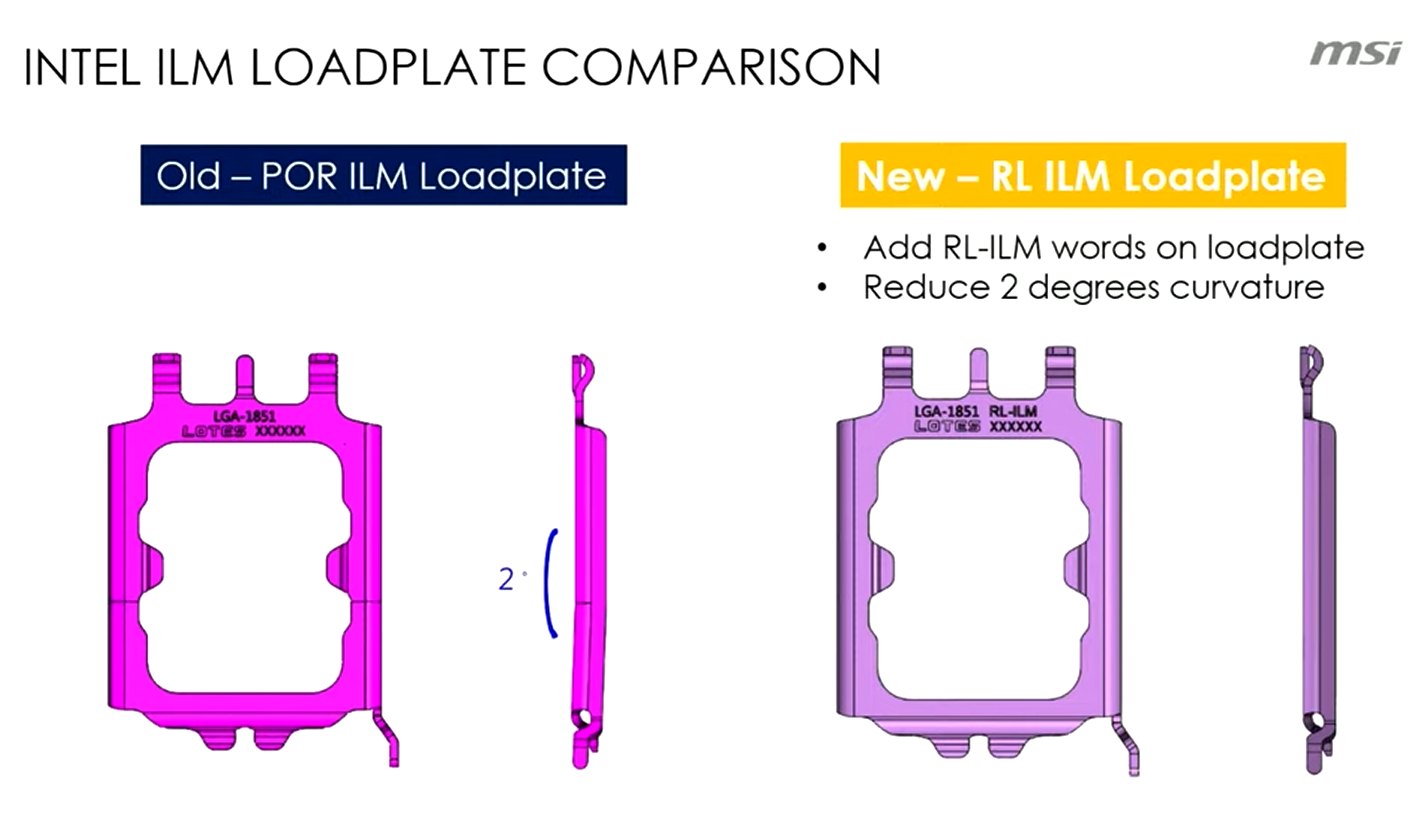
RL-ILM usage has also been confirmed by MSI. According to this company, this design is supposed to improve the functioning with liquid coolers, which will sit better on the processor. The RL-ILM can supposedly improve CPU temperatures by one or two degrees (this figure given by MSI is possibly for usage with AIO coolers).
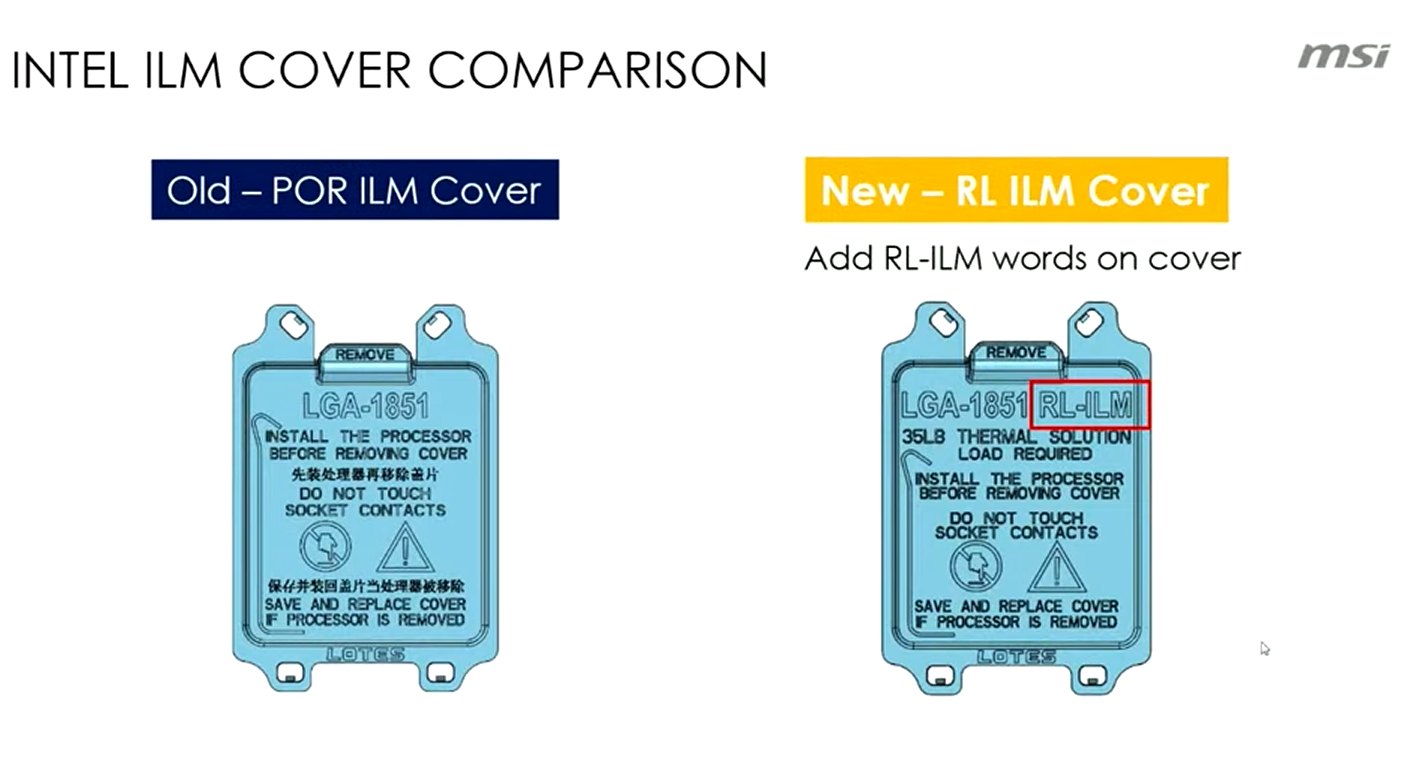
It should be easy to tell if you have this socket design on your board, by looking at the plastic cover of the socket where the designation “RL-ILM” will be. Also, there will usually be a notice that a 35lb cooler is required (most of the better aftermarket coolers ar supposed to meet this requirement, Noctua for example states that all of their models meet the requirement). If you don’t see any of this, the board has a regular socket. This notice should probably be stated in the manuals as well.
“Hotspot” shift
One change, which may not apply to all LGA 1851 socket processors but will apply to at least the 125W Arrow Lake models, is hidden under the heat spreader. In Arrow Lake, the spot with the highest temperatures (called the hotspot) should be a little higher or “further north” if you look at the processor. This changes the cooling requirements a bit, as ideally the center of the cooler base should be above the hotspot as well, and this ideal location will change for Arrow Lake compared to the past (the hotspot on AMD AM5 processors should be further “south”).
This could probably be solved by systems that allow mounting a cooler with an offset, which was something offered by Noctua for AM4 and AM5 sockets. In practice, however, cooler manufacturers will likely mostly stick to more or less symmetrical bases, because it is probably not feasible to change the design with each generation of processors.
Some adjustment to accomodate this design is probably possible with liquid coolers though. Der8auer, who pointed this out, suggests using the upper one of the terminals in the CPU block for the inlet and the lower one for the outlet, due to the “northern” hotspot. This is to allow colder liquid to reach the hotspot first (unfortunately this won’t work with AIO coolers without active pump, where you have to fit it exactly the other way around).
Sources: Overclock3d (1, 2), Tom’s Hardware (1, 2), Noctua, MSI
English translation and edit by Jozef Dudáš
⠀


