


For a long time, Fractal Design didn’t have fans with impeller geometry that looked “efficient” at first glance. Now come the Momentum fans, which finally do, and the improvement (compared to Aspect models) is clear. This puts the competition on alert, and more importantly, it finally opens up the potential to improve FD’s coolers and cases on the fan level. We’re starting off by testing the most affordable 120 mm model – the Momentum 12.
Base 6 equal noise levels…
There are several options by which to normalize the test modes for fans. In the previous chapter, we wrote that perhaps the least appropriate option is equal speed.
Settings according to the same static pressure or flow are for consideration, but we find it most sensible in the long term to normalize the measurement modes according to the same noise levels. Firstly because decibels are a logarithmic unit and all others scale linearly, but mainly because you can orientate fastest by the same noise levels. The easiest way to compare the efficiency of fans is just by how they perform at the same sound pressure level. Of all the options, this is the one that most people can best imagine and bounce off of when considering other variables.
The individual noise level modes are adjusted from low levels continuously to higher levels. All users will find their results in the tests, regardless of whether they prefer very quiet operation at the limit of audibility or whether high performance is paramount.
The quietest mode corresponds to 31 dBA, followed by 33 dBA, and for each additional mode we add 3 dBA, which always doubles the noise level (36, 39, 42 and 45 dBA). Finally, we measure the fans at maximum power. Here, each one already has a slightly different noise level, which we also report. If there are missing measurements between the results for any of the fans, this means that it was not possible to set the target noise level. Either because its minimum speed exceeds the quietest mode of 31 dBA or vice versa because the fan is quieter than 45 dBA at maximum power.
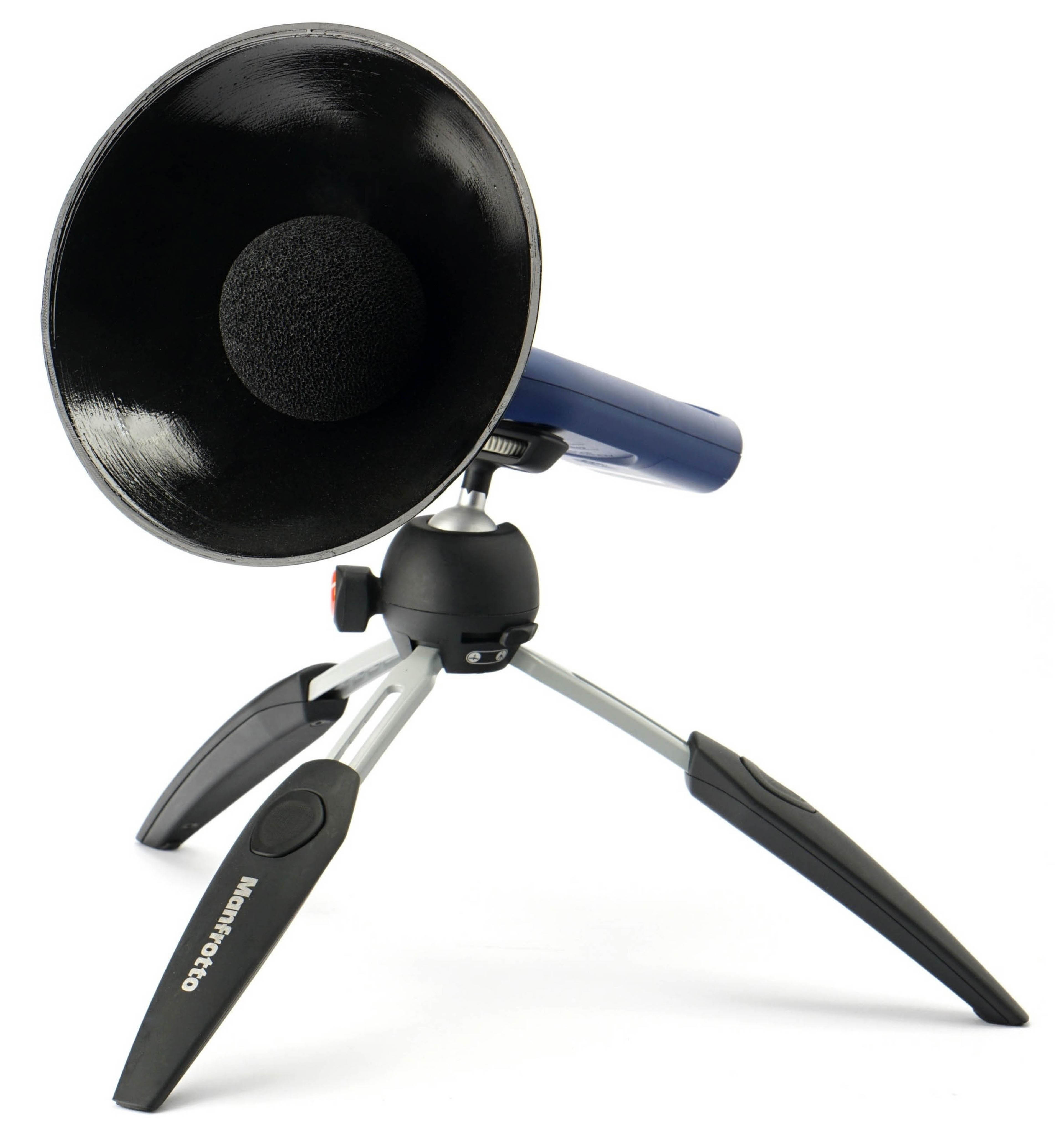
It is important to add that our noise level measurements are incomparable to the values quoted by the fan manufacturers in their specifications. One of the reasons is because we use a parabola-shaped collar around the sensor of the noise meter, which increases sensitivity. This is important in order to distinguish and set to the same noise level even modes at very low speeds, especially 31 dBA.
The noise meter next to the fan is quite close for sufficient resolution. The distance between the frame and the sensor is 15 centimeters. The sensor is positioned in such a way that there is no distortion or that the noise level measurements are not affected by airflow. Therefore, the noise meter is centered perpendicularly to the frame that defines the depth of the fan. Everything is always at the same angle and at the same distance. We use an inclinometer and markers to set the distances precisely and always the same.

We use a Reed R8080 noise meter to measure noise levels. This allows real-time averaging of samples, which is important for fine-tuning individual modes. We tune the fans until the specified noise level is reached to two decimal places, for example 31.50 dBA. The noise meter is the only instrument we calibrate inside our testlab. The other instruments have been calibrated by the relevant technical institutes. However, in the case of the noise meter, calibration is required before each test and we therefore have our own calibrator. This is already calibrated externally according to the standard.



Here are some head‑to‑head comparisons with the (old) NF-A12 (filter, grille). Really interesting results in the low RPM range for the price, aren’t they?
Thank you! 🙂
I’m looking for a decent set of system fans for the top of my NR200. Vibrations are quite a problem there, the top mount is a rather plasticky thing. I’ve noticed that more airflow-focused fans keep the rest of the case cooler – such as the 2.5″ SSD’s mounted in front. Could you tell me what are my best options?
in the case of exhaust fans, I would probably follow the results on radiators… and therefore P14 Pro … if you don’t mind their sound performance… plus they also have an economic charm 😉
… assuming you don’t want them on max…it will probably vibrate there 😛
Thank you. I’ll likely go for P12 Pro. The NR200 cannot mount 140mm fans at the top, or anywhere else in the case for that matter.
yes, as soon as I posted it, I realized that (in 4 minutes 😛 I am already old)… see the following comment 😛
I think that’s a good choice. P12 Pro fans will definitely be beneficial on the exhaust side of system cooling. 🙂
and …my mistake, there only go 120… then NF-A12x25 G2… if you don’t mind the price 😉
Slowed-down P12 Pro fans could also work, but I’m guessing Yamato is looking for a more premium fan (with a higher MTBF rating, for example), since the comment appears under the Momentum 12 review — and those are… not exactly cheap. 🙂
By the way, here you can see other set of the fans but, exactly, in the desired position
https://quasarzone.com/bbs/qc_qsz/views/1990602?_method=post&_token=77tISizcEvoOceE21OKiaZd7VtvfOE6CU5uCdKek&category=%EC%BF%A8%EB%A7%81%EC%86%94%EB%A3%A8%EC%85%98&direction=DESC&kind=subject&page=2&sort=num%2C%20reply#p5c
Some slower LCP fans might be a good fit. Their operation should generally involve lower vibrations while still maintaining a high airflow even through a grille. The first models that come to mind are the Noctua NF-A12x25 G2 LS (and of course the NF-A12x25 G1 LS as well — especially if you can get them at a better price). But naturally, there can be more options. The key is modern aerodynamic geometry and lower speeds. You can, of course, also slow down fans that don’t have their maximum RPM capped as strictly as Noctua’s LS variants. And the Fractal Design Momentum 12 fans would certainly be suitable too. 🙂