


Among other things at Computex, a rather interesting board for compact Mini-ITX systems made an appearance. Recently there is a push for boards with connectors on the backside of the PCB, allowing cables to be hidden from view. Maxsun has however come up with a board that even puts the PCI Express ×16 slot on the back side. Normally, that wouldn’t make much sense, but in Mini-ITX builds, this idea could be very useful.
This board is called the Maxsun Terminator B850BKB WiFi and is designed for Ryzen 7000/8000/9000 processors using the AM5 socket (the chipset is AMD B850). Maxsun’s Terminator brand actually refers to several boards, as there is also a Terminator B760BKB D5 version for Intel Core CPUs on socket LGA 1700. Unfortunately, Maxsun is one of the brands focusing mostly on China, so these boards likely won’t appear in EU distribution. Which is a pity in this case.

The Maxsun Terminator B850BKB WiFi is a standard 17 × 17 cm Mini-ITX board with two DDR5 DIMM slots, two SATA ports (the B760BKB model has four), and standard ATX power input. What makes it interesting is that, in the position typically used for the PCI Express ×16 graphics card slot, it only has a short PCI Express 3.0 ×4 slot, which is not meant for GPUs but for additional expansion boards instead. Essentially, it’s a second PCIe slot, which is something that normally wouldn’t fit on a Mini-ITX board.
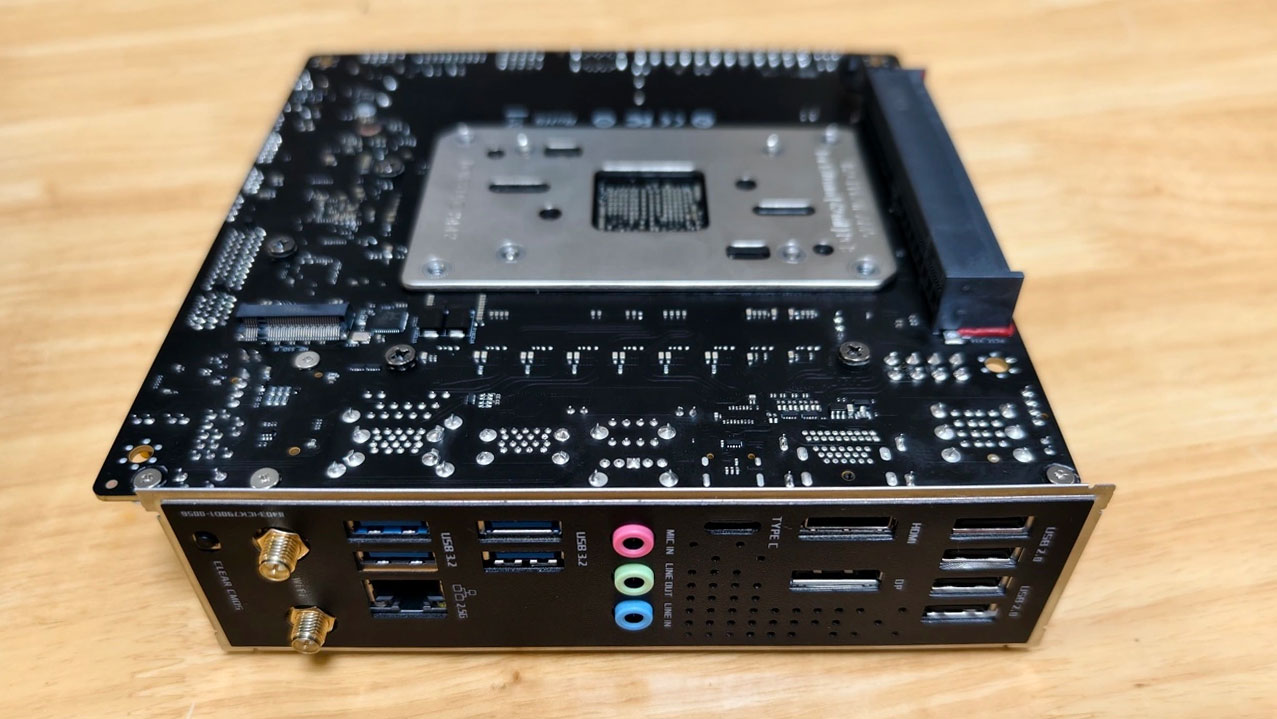
Maxsun instead placed the main PCI Express 4.0 ×16 slot (5.0 ×16 on the B760 version) on the back side of the PCB. It’s also routed in the opposite direction from the socket – toward the top edge instead of the bottom. The slot is rotated 90 degrees downward, so the GPU won’t be inserted perpendicular to the motherboard, but vertically – the GPU PCB will lie parallel to the board’s PCB.
This board therefore effectively integrates what many Mini-ITX cases achieve with a PCIe riser – a cable extension that routes PCIe ×16 connectivity to a different place in the case. In today’s ITX enclosures, that’s often the space behind the motherboard, for space-efficiency reasons.

Of course, this PCIe ×16 position won’t work with standard case layouts, so this board will require a specially designed chassis. The benefit, however, is the ability to provide that second auxiliary PCI Express slot. It’s unclear whether this is also in part meant as a fallback for someone attempting to install the board in a conventional case (which might not even work in some cases, due to the PCIe ×16 slot thickness on the back).
With a properly designed case, though, it should be possible to install a full-size graphics card in the rear slot and virtually any low-profile PCI Express card in the front slot: a high-speed NIC, sound card, capture card, a SSD adapter – or even a lower-power GPU. In fact, there’s a GeForce RTX 5060 now available in such low-profile form factor.

Low-profile cards should requore only 65–70 mm of clearance above the board, which is easily achievable in a dual-chamber Mini-ITX case – these typically provide enough headroom above the motherboard for 65–70 mm high air coolers. The two PCIe slots aren’t the only unusual aspect of this board. In addition to two M.2 slots (one of them located on the back, above the graphics card slot), there’s also a SlimSAS (SFF-8654) port, which can be used to connect an additional PCI Express 4.0 ×4 interface, typically for an NVMe SSD.

For installation into dual-chamber Mini-ITX cases with a GPU slot behind the motherboard tray, this is a pretty clever idea. The lack of a riser improves the quality of the PCI Express signal between the CPU and GPU (there’s no need to worry about issues at PCIe 5.0 speeds, for example), and it saves both volume inside the case and some cost.
One downside could be that the GPU’s backplate will sit very close to the rear side of the motherboard, creating a narrow gap where heat may accumulate and be difficult to vent. Ironically, graphics cards without a backplate might be more suitable in this configuration.
At least the PCIe ×16 slot – which blocks airflow between the two PCBs – is placed at the top. If intake fans are installed in the bottom of the case, they could at least push some air into the narrow channel between the graphics card and the board. That’s only true if the motherboard isn’t mounted upside down, which often is the case. At least one chassis that Maxsun seems to pair with these boards appears to use such a layout, meaning heat from between the GPU and board would have to rise out naturally – and likely quite slowly.
Sources: IThome, Tom’s Hardware
English translation and edit by Jozef Dudáš
⠀

