


After testing the low-profile Noctua NF-A12x15 fans, we moved on to another appealing alternative for replacing the stock fans on the Asus TUF GeForce RTX 5070 Ti—a set of three Arctic P12 Slim fans, which you might already know from HWCooling tests. While they don’t outperform Asus’s original solution, which is tailor-made for the heatsink, they deliver slightly better results than the Noctua low-profile fans—and at a much lower price.
If everything works as expected, replacing Asus’ stock fans should give you the following results.
The first and probably most important point: Arctic fans don’t reach nearly the same maximum RPM as Asus’ originals. This means the cooler has much less overhead. They top out at around 2000 RPM—barely two-thirds of the Asus fans—and under load, you’ll have just a few hundred RPM of headroom at the same operating temperatures. While the noise curve sits much lower, the stock fans operate in the first third of their range under load, whereas the Arctics are already close to their limit at about 1700 RPM. At that point, they’re no longer quiet.
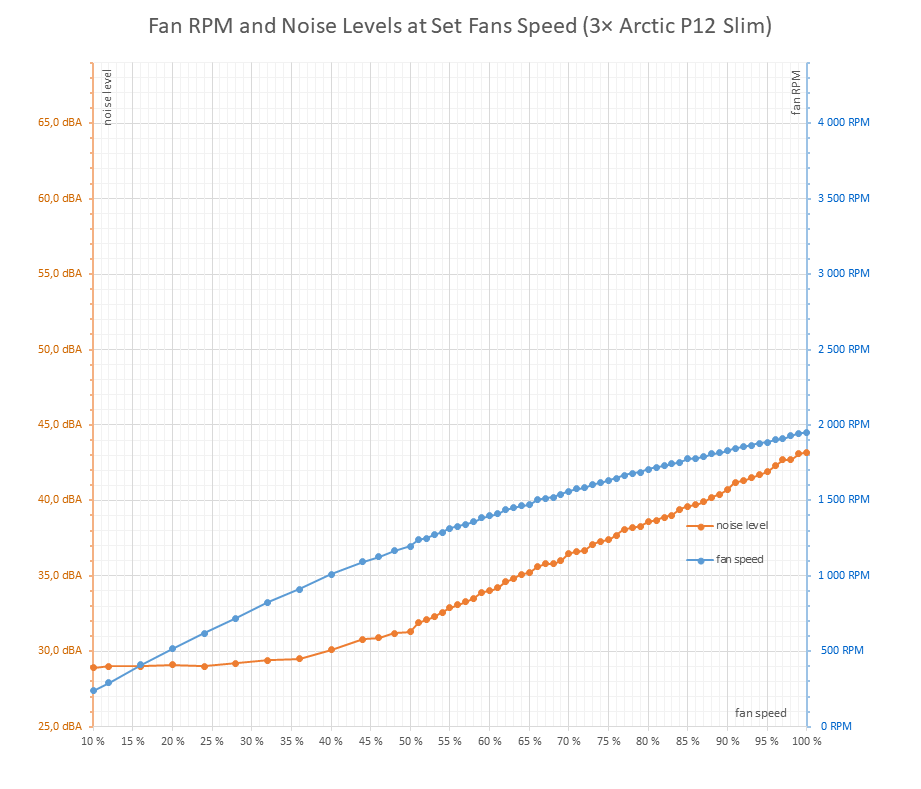
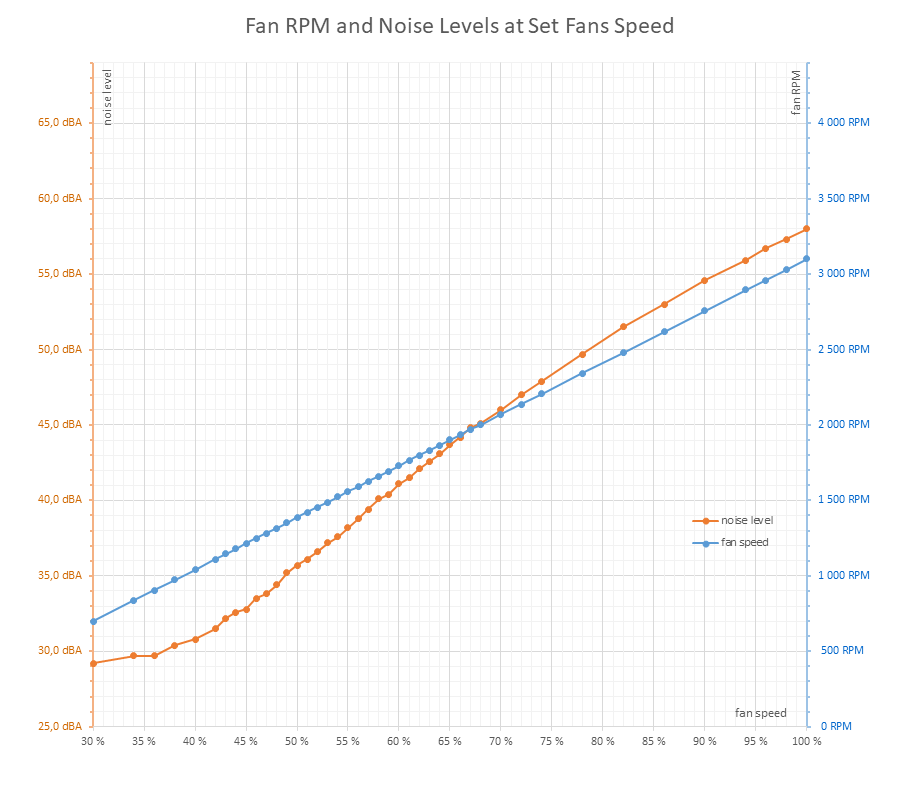
Deshroud with three Arctic P12 Slim fans | Stock shroud with three Asus Axial-tech fans
Small headroom and higher noise level
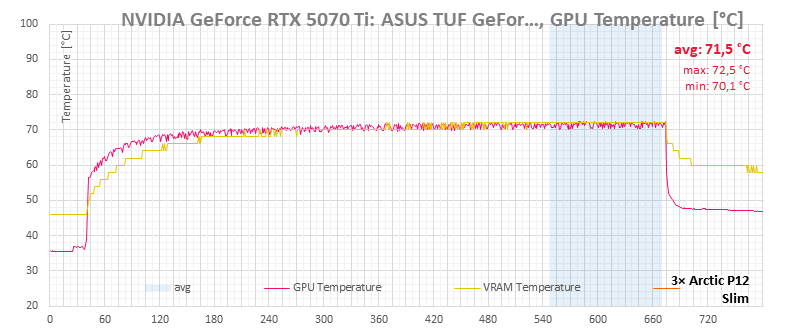
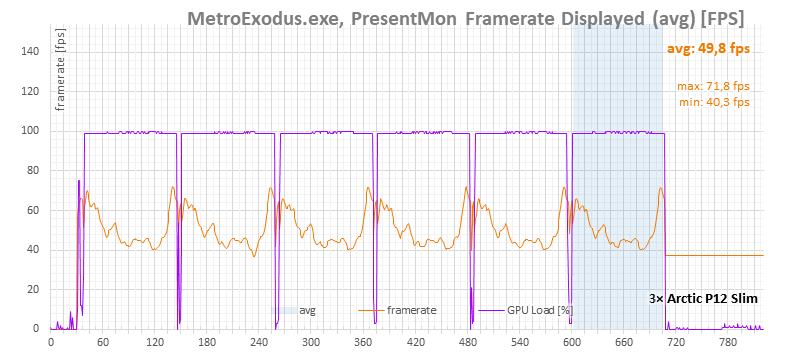
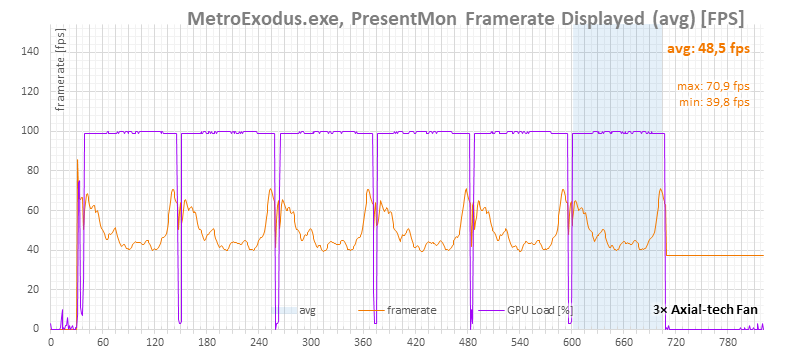
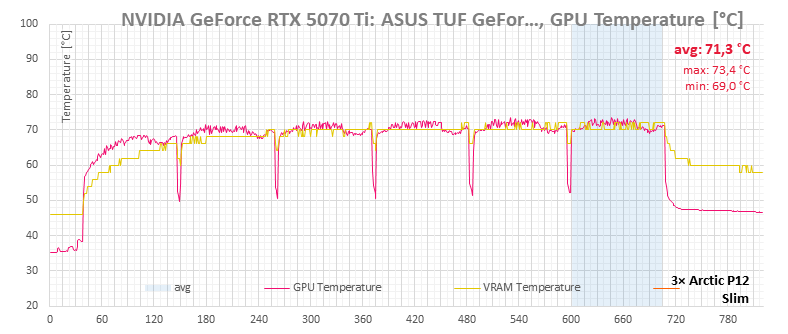
The easiest way to make the card run quieter is to lower fan speeds and let components run hotter. That’s always an option. For our comparison, though, we’ll focus on which solution is quieter at the same temperatures. The next set of charts compares all operating characteristics between the original shroud with three Axial-tech fans and the deshroud setup with three Arctic P12 Slim fans.
You can achieve similar results with a curve like the one shown below. To keep GPU temperatures at comparable levels, the Arctic P12 fans need to spin at around 1750–1800 RPM.

Below are operating characteristics tests.
The chart always shows measurements with the Arctic P12 Slim fans. When you hover over it, it should switch to readings with the original fans. Both measurements are also available as expandable images below the charts.
Cyberpunk 2077 Benchmark, 4K
asus-tuf-gaming-geforce-rtx-5070-ti-16gb-oc-edition-o16g-non-factory-quiet-3nf-a15-25x-


3× Arctic P12 Slim fan | 3× Asus Axial-tech fan
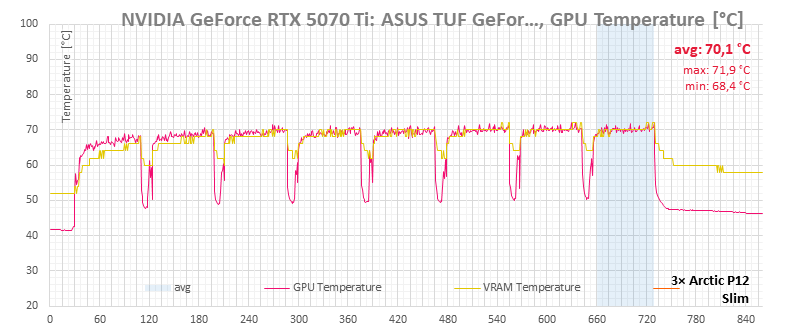

3× Arctic P12 Slim fan | 3× Asus Axial-tech fan
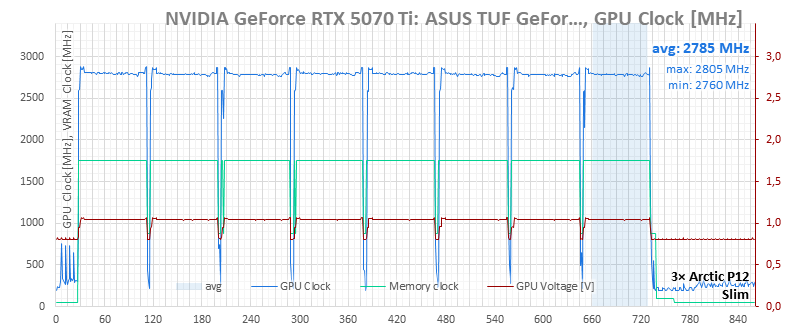

3× Arctic P12 Slim fan | 3× Asus Axial-tech fan
One note about the charts: the operating logs come from HWiNFO. With the Corsair Commander Pro controller, it’s not possible to log the set fan output, only the RPM.
The purple curve representing fan output does not reflect the actual performance of the fans connected to the controller, but rather what the GPU BIOS would set for its own fans. However, since the fans are connected elsewhere and controlled via software, the real values differ.
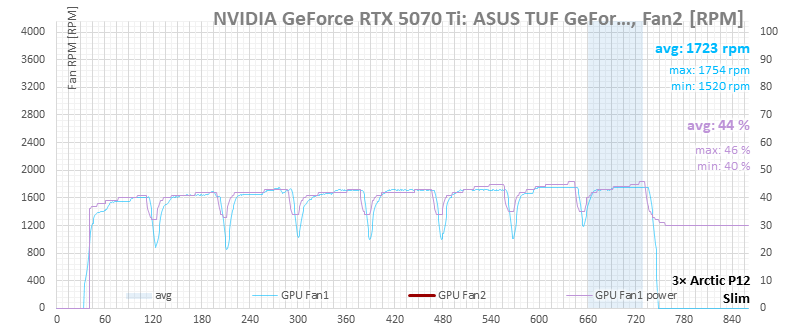
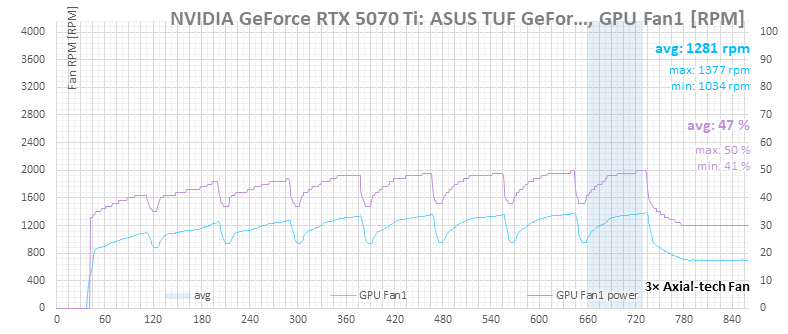
3× Arctic P12 Slim fan | 3× Asus Axial-tech fan
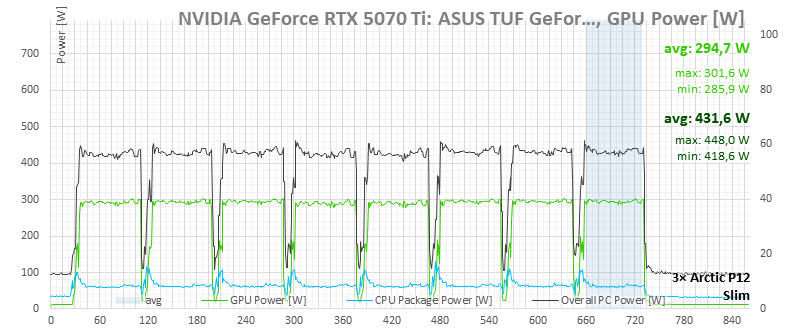

3× Arctic P12 Slim fan | 3× Asus Axial-tech fan
F1 24, 4K
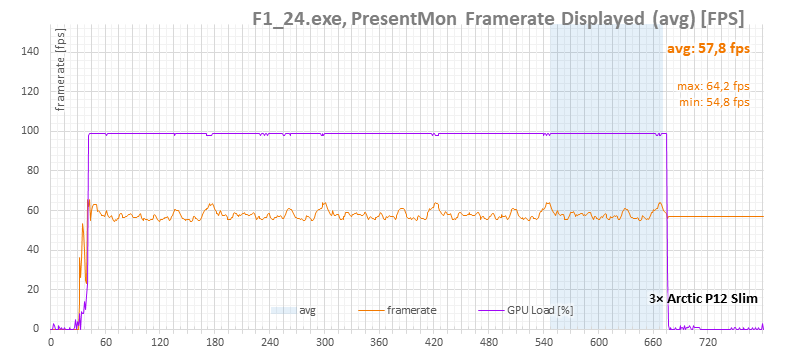

3× Arctic P12 Slim fan | 3× Asus Axial-tech fan

3× Arctic P12 Slim fan | 3× Asus Axial-tech fan


3× Arctic P12 Slim fan | 3× Asus Axial-tech fan
Again, the purple curve for fan power comes from the card’s BIOS, which is trying to regulate the original fans that are disconnected. It shows the power level the BIOS would apply to onboard fans based on temperature. The actual power set via the Corsair Commander Pro cannot be logged—only the fan speeds, shown in light blue.

3× Arctic P12 Slim fan | 3× Asus Axial-tech fan


3× Arctic P12 Slim fan | 3× Asus Axial-tech fan
Metro Exodus Benchmark, 4K
3× Arctic P12 Slim fan | 3× Asus Axial-tech fan

3× Arctic P12 Slim fan | 3× Asus Axial-tech fan

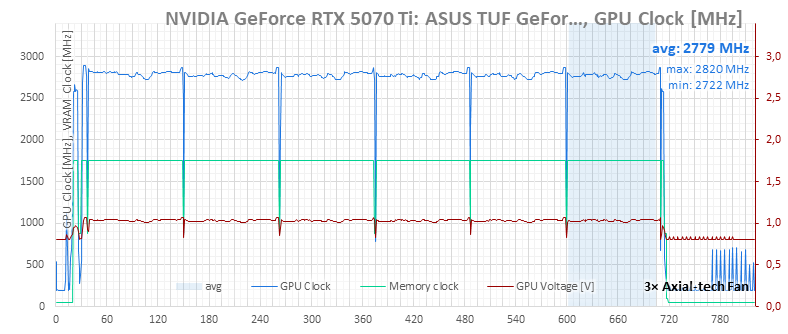
3× Arctic P12 Slim fan | 3× Asus Axial-tech fan
Again, the purple curve for fan power comes from the card’s BIOS, which is trying to regulate the original fans that are disconnected. It shows the power level the BIOS would apply to onboard fans based on temperature. The actual power set via the Corsair Commander Pro cannot be logged—only the fan speeds, shown in light blue.
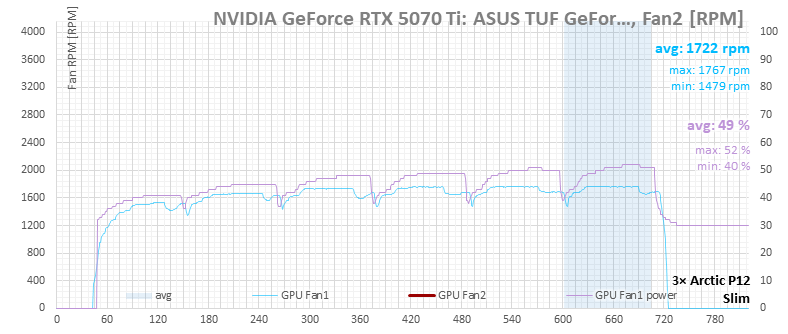
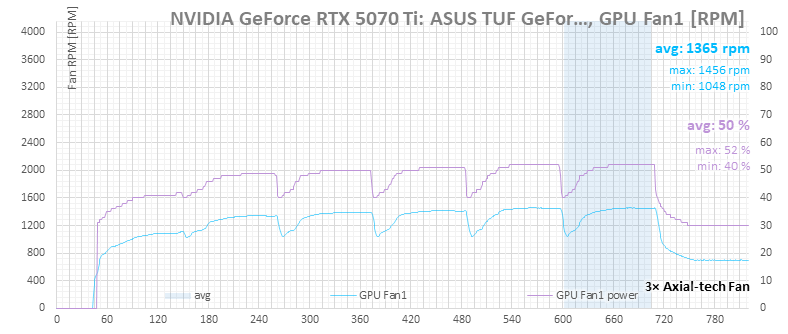
3× Arctic P12 Slim fan | 3× Asus Axial-tech fan


3× Arctic P12 Slim fan | 3× Asus Axial-tech fan
⠀




I don’t understand this statement: “Standard fans, which are generally designed for system airflow rather than large heatsinks with dense fin stacks, simply don’t perform as well.”
Then, a configuration of 2x NF-A12x25 is shown to beat the default fans.
You’re right—the wording should have said “typical slim-profile case fans,” not “standard fans”. Those are built for general case airflow, not for pushing air through tight, dense fin stacks. Dense heatsinks need higher static pressure, which is why the stock Axial-tech fans—designed for this—do better than slim case fans.
A pair of NF-A12x25s is a different story. They’re full-height 25 mm fans with much higher static pressure, so on the same heatsink they can beat the stock fans at similar temperatures. There’s no contradiction: the warning was about slim case fans, while the other test used pressure-optimized 25 mm fans.
In a later test, I also compared an Arctic P12 to the smaller-diameter Axial-tech fans on the Prime RTX 5070 (one of the three had rattling bearings). At roughly the same temperatures, even the P12 was quieter than those lower-quality individual units, so in this case it would make a suitable replacement.
https://www.hwcooling.net/en/asus-prime-geforce-rtx-5070-deshroud-with-dual-arctic-p12-slim/