


The artificial intelligence hype is driving up the prices of system memory and storage, including SSDs. Prices have risen significantly, so you may now be forced to look for cheaper instead of “premium” SSD when on a tighter budget. We got the opportunity to briefly test one such drive: the WD Blue SN5100 module, which represents a lower product tier but offers solid performance and the “premier-league” brands.
The WD Blue SN5100 NVMe modules are still a fairly fresh product. They arrived on the market only this August as successors to the previous WD Blue SN5000 series—you could read about it in this news piece. The Blue series represents the company’s more affordable SSDs, which means the use of a mainstream-tier four-channel controllers and, in this case, a so-called DRAMless design. If you want maximum performance with a high-end eight-channel controller and DRAM cache (and possibly a PCI Express 5.0 interface), you have to look at modules from the Black series.

The controller supports the NVMe 2.0 protocol, has a physical PCIe 4.0 ×4 interface, and it is once again an in-house design, not one of the Phison or Silicon Motion chips that appear in many competing modules.
The previous WD Blue SN5000 series used relatively slower memory (5th and 6th generation BiCS dies), which was a weakness—maximum read speeds topped out at around 5000 MB/s, even though the controller itself had a PCI Express 4.0 ×4 interface (which allows speeds up to roughly 7200–7400 MB/s).
The new WD Blue SN5100 modules, which are the subject of this test, feature significantly newer NAND memory—BiCS8, the eighth generation of 3D NAND from WD/SanDisk with 218 layers. This allows these modules to reach read speeds of over 7 GB/s, meaning they almost fully utilize the PCI Express 4.0 ×4 interface.

What must be mentioned, however, is that the NAND uses QLC recording with 4 bits per cell. This technology increases chip capacity but worsens performance (especially write performance) and, perhaps most importantly, endurance. QLC chips should withstand fewer re-write cycles than those using TLC. Nevertheless, WD apparently believes that the practical endurance of such NAND dies has been improved enough not to be an issue—the module carries a write endurance rating corresponding to 600 write cycles for the smaller versions. For the 2TB model, the number drops to 450 cycles (900 total TB written), and for the 4TB version to 300 cycles per cell (1200 total TB written). The modules come with a five-year warranty.

SSD with HMB technology: What is it about?
As mentioned, this is a “DRAMless” SSD, which means it lacks a DRAM cache that more expensive SSDs use mainly to cache mapping tables that the SSD controller needs to locate user data on the drive. In the past, removing DRAM was a recipe for poor performance, because the controller had to load mapping table information from NAND for every data access (and modify it again in the case of writes).
Modern DRAMless SSDs, however, use HMB (Host Memory Buffer) technology, which replaces the DRAM cache with a block of memory allocated in the system’s main memory. This is usually much smaller capacity (typically around 200 MB), but it has been observed that even a relatively small substitute cache of this type eliminates the disadvantages of DRAMless SSDs to a large degree. Since the adoption of HMB, there is therefore no longer a need to outright shun these modules.
DRAMless SSDs using HMB have their advantages—by eliminating the DRAM chip, manufacturing costs are reduced and the module can be cheaper. Because there is no need to constantly refresh data in DRAM, the module can also have slightly lower idle power consumption (and also lower power usage under load, because reading or writing also consumes a bit of extra power for DRAM chip activity). These SSDs therefore have their place in the market—you do not always need maximum performance, and sometimes choosing one of these cheaper SSDs can save part of the cost and help you, for example, step up to a higher capacity class.
Software bundle
WD SSDs come with a Windows management utility called SanDisk Dashboard. Although the module name still carries the WD branding, the company has transferred all SSD-related activities under its subsidiary brand SanDisk. The program is available in Czech (not Slovak), including the installer language. It is not a lightweight application—the offline installer is 113 MB—but unfortunately this is now the norm for similar programs, and you do not need to have this tool installed or permanently running for everyday use.

In addition to displaying information about the installed module, the application provides a firmware update tool that can also check whether updates are available. You can run SMART diagnostics and it also offers the option to create bootable media which can be used when a complete drive erase needs to bebe performed—something that cannot be done from within Windows if the OS is running on the device (Erase Drive function).
The application also allows you to set the Trim policy in Windows or trigger Trim manually. You can also control file cache options (enable write caching, disable buffer flushing). These settings are otherwise available in Windows, but here you do not have to search for them if you use this app. That said, it is not advisable to touch these two settings—leave them at their default values.

WD and SanDisk also provide the Acronis True Image tool for disk cloning with their SSDs, which can come in handy, and not all SSDs include something similar. It is not a necessity, though—the same job can be done, for example, by Macrium Reflect, which is available free of charge for everyone.
The 2TB module tested
WD Blue SN5100 SSDs come in the usual 80 mm M.2 (2280) form factor and are single-sided (which can matter for compatibility with some notebooks). They are available in capacities of 500 GB, 1 TB, 2 TB, and 4 TB. For testing, we had the 2TB model (WDS100T5B0E-00CPE0)—the one for which WD guarantees at least 900 TB of total writes.
The module is notable by having a very clean PCB. Besides the controller, there is only a single NAND package containing all the NAND chips—there should be eight of them stacked inside. It would therefore be possible to manufacture this SSD even in the shorter M.2 2230 format for gaming handhelds.
| Capacity / model | 500 GB | 1 TB | 2 TB | 4 TB |
| NAND | QLC BiCS8 | QLC BiCS8 | QLC BiCS8 | QLC BiCS8 |
| Cache (DRAM) | N/A, HMB | N/A, HMB | N/A, HMB | N/A, HMB |
| Sequential read speeds | 6600 MB/s | 7100 MB/s | 7100 MB/s | 6900 MB/s |
| Sequential write speeds | 5600 MB/s | 6700 MB/s | 6700 MB/s | 6700 MB/s |
| Random reads (4K) | 660 000 IOPS | 1 000 000 IOPS | 1 000 000 IOPS | 900 000 IOPS |
| Random writes (4K) | 1 100 000 IOPS | 1 300 000 IOPS | 1 300 000 IOPS | 1 100 000 IOPS |
| Maximum power draw | 3,8 W | 3,9 W | 4,1 W | 4,3 W |
| Warranty TBW | 300 TB | 600 TB | 900 TB | 1200 TB |
| MSRP | 55 USD | 80 USD | 150 USD | 300 USD |
The SSD’s packaging is simple but sufficient. Moduled is protected in a sturdy plastic blister, which is then placed in a cardboard box, providing adequate protection—transport should not be an issue unless the package is subjected to a very destructive incident. Besides the SSD, the package includes a small leaflet, although you will most likely download the manual from the web anyway.

The SSD was tested inside this build:
- AMD Ryzen 9 7950X with Deepcool AK620 cooler, MSI B650 Gaming Plus WiFi motherboard (UEFI version 7E26v1M6), 32 GB Patriot Viper Elite 5 RGB memory, set to EXPO profile 2 (DDR5-6000 42-42-42-82), Sapphire Radeon RX 7700 XT Pure graphics card, Aorus Gen4 SSD 500GB system SSD, Deepcool PQ650M power supply.
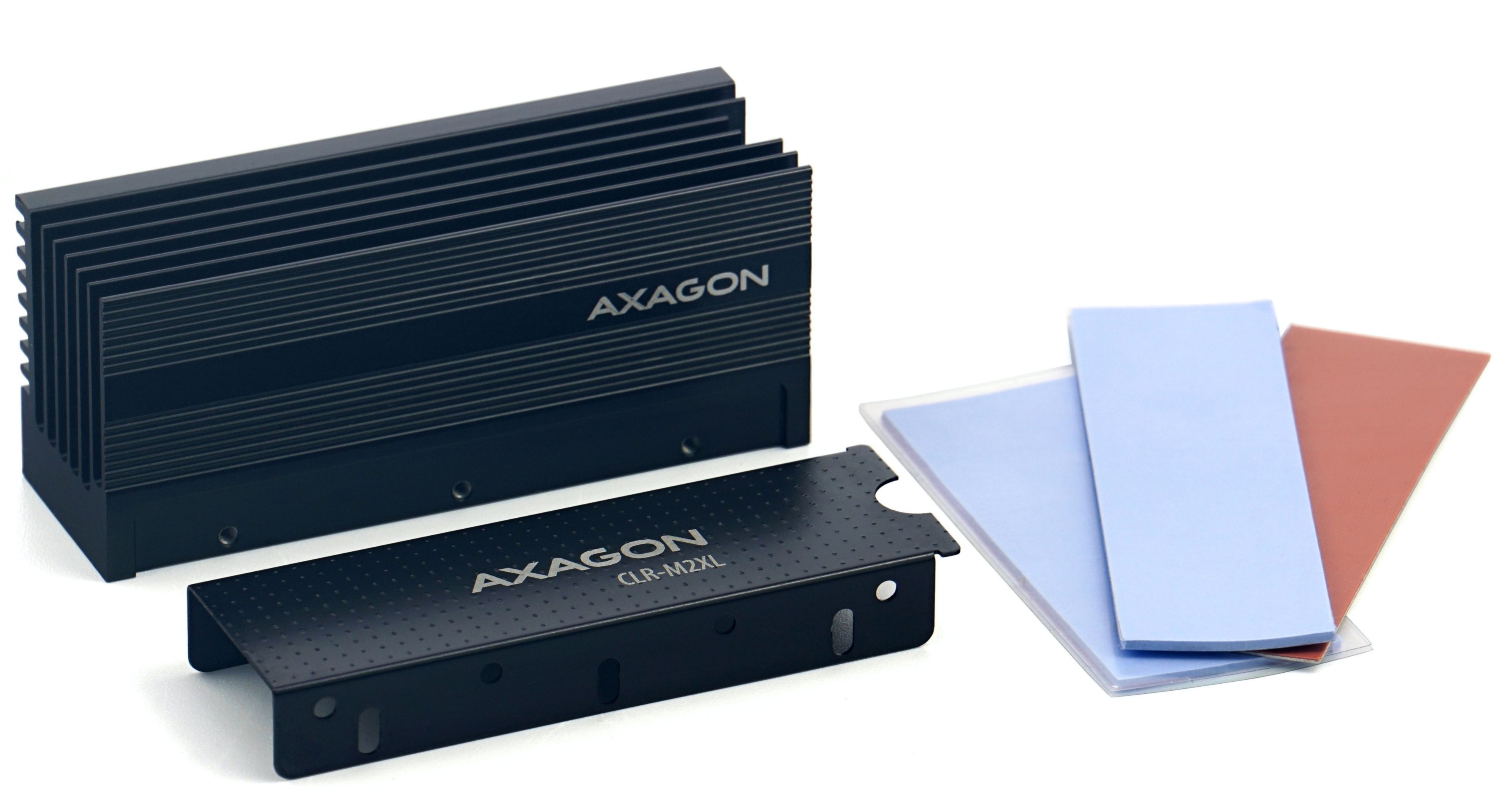
- Deepcool CH560 WH case with stock fan configuration (3× 140mm front intake, 1× 120mm rear exhaust), front panel nylon dust filter added. Default motherboard fan and cooler control; SSD cooler: Axagon CLR-M2XL.
- Operating system: Windows 11 Pro 25H2, VBS enabled, High performance power plan. AMD Chipset Drivers 7.06.02.123 drivers. Avast Internet Security (protections disabled during testing).
- SSD tested: WD Blue SN5100 2TB (WDS100T5B0E-00CPE0).
Performance tests
We pitted this module against a Kingston Fury Renegade SSD, also in the 2TB capacity, which happened to be available for comparison. This module is not new, however—it has been in use for some time and its storage space is roughly half full with data. It represents a high-end SSD with a Phison E18 controller, TLC NAND, and chips on both sides of the PCB, from the era before this role was taken over by PCIe 5.0 ×4 SSDs.
The goal of the WD Blue SN5100 is precisely to offer performance that approaches such modules at a much lower price (and likely with quite a bit lower power consumption). It should therefore be a fairly good comparative counterpart. Keep in mind, however, that the tested WD Blue SN5100 is boxing above its weight class, so it does not necessarily have to win. Consider the more expensive older SSD to be more of a reference or benchmark.
CrystalDiskMark 8.3.0


In the CrystalDiskMark test (NVMe preset), the module performs very well and indeed delivers numbers comparable to the high-end Kingston, with sequential speeds that fully utilize PCI Express 4.0 ×4—so the combination of controller and NAND has succeeded here. Note that random write performance at queue depth Q1 and single thread (T1) is weaker, but random read performance in this situation is better, with the WD Blue achieving higher throughput. The WD Blue module is also better at random reads in 16 threads (which is simulating a more parallel load).
OCCT (Storage) 15.0.5

Testing in OCCT turns out similarly—the WD Blue SN5100, as a cheaper module, again manages to reach very similar numbers to the more expensive drive used as a benchmark. It fares slightly better in random write performance. (Results for the CrystalDiskMark and OCCT tests are averages from three consecutive runs.)
ATTO Disk Benchmark 5.00.2

A somewhat larger difference to the detriment of the WD Blue SN5100 is shown by ATTO Disk Benchmark. This tool tests operations with various block sizes and reports separate read and write speeds. According to its results, the WD Blue SN5100 always has slightly worse performance for small blocks from 0.1 KB up to 128 KB.
In general, SSDs have lower performance the smaller the data blocks being transferred. But while the Kingston module is able to reach its maximum speeds already with 128KB data blocks, the WD Blue SN5100 still shows lower read performance at that size and only reaches full speed with 256KB blocks. With larger blocks, the drives are comparable again. This may reflect the fact that the 2Tb QLC NAND chips used in the WD Blue SN5100 may have larger blocks and pages.
At least in situations where the module can make use of its pseudo-SLC cache, performance is very solid—and this is the mode in which the vast majority of typical usage should occur. The module is surprisingly close to the high-end Kingston serving as a reference. There are certain deviations one way or the other, but they are relatively small.
Temperatures: Low for PCIe 4.0 SSD standards
When installed in the motherboard’s second slot, located under the graphics card, the module settled at an idle temperature of 34 degrees Celsius after prolonged operation. This is the temperature reported via SMART; I did not have physical temperature probes available.
In OCCT or HWiNFO, the module reports two temperatures. During a benchmark suite that lasted around 20 minutes in total with short breaks, the “Drive Temperature” reached a maximum of 48 degrees, and “Drive Temperature 3” reached 53 degrees. One of these values might be the controller temperature and the other the temperature of the NAND package. However, during testing it seemed that the second temperature was always exactly five degrees higher (39 degrees at idle), so it is questionable whether these are truly two independent sensors. CrystalDiskInfo and the manufacturer’s own SanDisk Dashboard app show only the first, lower of the two temperatures.
The reported temperatures are taken with the Axagon CLR-M2XL heatsink used for cooling. This is one of the most massive M.2 coolers available on the market and should therefore also be one of the better performers. However, since the temperature with it is quite low, the module should have plenty of thermal headroom even with weaker coolers.
For comparison: the powerful, more expensive Kingston Fury Renegade 2TB module typically reports idle temperatures of around 45 degrees via SMART (with the same cooler and slot), and during testing in the same benchmark suite the temperature rose to 57 degrees. Maximum temperature under long-term, truly brutal load would likely be higher, but this scenario is probably closer to real-world use. Take this comparison as a rough indication only, because sensor readings may not be perfectly accurate and may not be directly comparable between the two modules.

Verdict
The WD Blue SN5100 2TB is currently priced at around 159.90 EUR. Even at this price, it remains practically the cheapest SSD from one of the large, most reputable manufacturers—those who also produce their own NAND memory and can therefore be expected to deliver the best overall polish and reliability. Some Crucial models (Micron’s brand) can be had for a couple of EUR less, but WD Green or the older WD Blue SN5000 ironically cost more now. The only competition from this top-tier group that also offers full PCIe 4.0 ×4 performance with reads around 7 GB/s is the Crucial P310, which should be a similarly fast QLC SSD module (possibly slightly slower than the SN5100). This SSD used to be available for about a dozen EUR less, but is now a dozen more expensive than the WD Blue SN5100, and Crucial will cease operations in a few weeks, so future support may be problematic—for example, the SSD may not receive necessary firmware updates—whereas this should not be an issue with WD.
What was a bigger hurdle for the WD Blue SN5100 just last month were competitors that cost slightly more. For not that much more (a difference of just a dozen or so EUR), you could buy some TLC-based modules—for example, the 2TB WD Black SN7100 and Samsung 990 Evo Plus. These SSDs were significantly eroding the price advantage of the Blue SN5100. However, in the past few week, they have become much more expensive than the Blue SN5100. The higher-end WD Black SN7100 now costs 175 EUR (about 15 EUR more). The 2TB SSD 990 Evo Plus is listed at 170 EUR in some stores, while others show it as unavailable, so it is unclear whether this price will hold (the Samsung 990 Pro is already at 200 EUR). Price-wise, the closest alternatives to the SN5100 are currently modules from smaller brands, for the most part.
Prices are changing rapidly currently, and all SSDs will likely continue to get more expensive. It is therefore uncertain whether these positions will remain. The price of TLC SSDs may rise more steeply in the future, while QLC modules could theoretically have better prospects for keeping their prices more in check during the coming era of rising costs (moreso in the cases of DRAMless modules). If you are going to buy an SSD later in the future, the price gap between the WD Blue SN5100 and more expensive alternatives may be wider at the time. Even at current prices, you will not make a mistake with the WD Blue SN5100 based on our performance tests—but if the price difference compared to the mentioned TLC competitors grows to say 20 EUR or more, there will be even more reason to consider this QLC module.
Usable for the system, ideal for a game library
Although the WD Blue SN5100 is a QLC SSD, this disadvantage did not show up in any particularly noticeable way during our testing. The controller used apparently handles this type of memory well enough that it is possible to run an operating system on such an SSD—helped significantly by the fact that QLC’s slower nature is mainly encountered when writing data, not so much when reading. And for operating system operation and application launch times, it is read speed that most often limit performance. So if you aren’t one of those people that have a “psychological problem” with the potentially reduced endurance of QLC NAND, you can successfully use this SSD as a primary system drive.

Even if you do have such a nagging concerns in your mind, there is one use case where the high performance at a low price makes this SSD an attractive option—when using it for your game library. Modern games can easily exceed one hundred gigabytes, so you need a lot of space if you do not want to constantly delete and re-download them. A QLC SSD, if it is fast (as this one is), can therefore be a good solution. High read speed should have a positive impact on loading times and game startup speed. And in this use case, you do not need to worry as much about rapid write wear as with a system SSD. While using it as a primary SSD is still something to consider carefully, for a Steam library (or Epic Games Store, GOG, etc. game library) we think we can recommend this SSD with confidence—even if it is not a standout choice that would clearly outperform all other alternatives in value.
Of course, you can also use the drive for completely ordinary data of other types as a secondary storage device alongside a system OS. In this role, its low idle power consumption (and thus low temperatures, even in more poorly cooled secondary M.2 slots) should be an advantage.
The low power consumption is advantageous, and it should allow this SSD to operate even without additional cooling—sometimes a necessity, for example in atypical Mini-ITX cases. Many similarly priced TLC-based alternatives mentioned above usually have higher power draw under load, which could give the WD Blue SN5100 a small edge.
| WD Blue SN5100 2TB (WDS100T5B0E-00CPE0) |
|
+ Benchmark scores on the level of the best PCIe 4.0 SSDs − Potentially lower write endurance of QLC NAND. The tested module is rated for 900 TBW |
| Approximate retail price incl. VAT: 160 EUR |
English translation and edit by Jozef Dudáš
⠀



Really great review
Stumbled upon your website while suggesting the SN5100 to some other people. I didn’t want to write a lengthy explanation, you summarized exactly everything I think about this SSD. Really nice & well explained review.
Thank you for the comment. We are glad that the article was helpful. 🙂