


The Asus Prime GeForce RTX 5070 from the new GeForce generation is aimed at the budget segment. If, like me, you come across a card with a noisy fan bearings, there’s a simple fix—replace it with a quieter one. On the Prime you can even do it without breaking the warranty seal. I swapped the original fans for two 120mm Arctic P12 Slim to see how much the noise has been reduced and what happens to the card’s temperatures and behavior.
The article format differs from the previous deshroud tests, where I only compared operating characteristics at identical temperatures. This time I went through the full operating range of 30–100% fan performance. In all tests, the card held steady at the maximum power limit of 250 W and never hit the temperature limit, neither on the GPU nor on the memory.
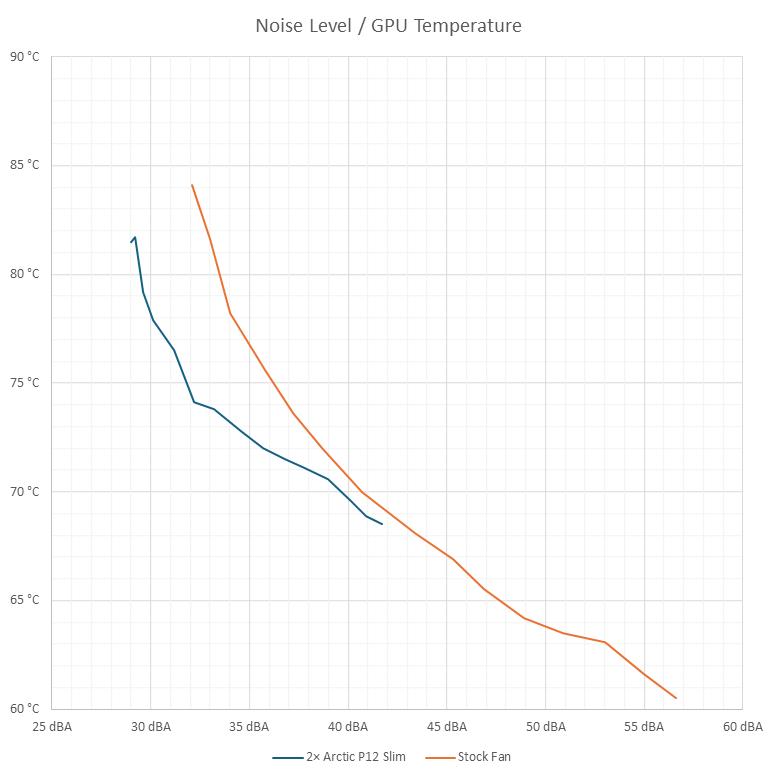
What will probably interest us most is how much quieter the card became at various temperatures. This is shown in the following graph, where the horizontal axis is noise level and the vertical axis is temperature. You can see the greater headroom of the stock fans, which can cool the chip down to 60 °C. With the Arctic fans, topping out at about 2050 RPM, I couldn’t get below 68 °C.
In the overlap region, especially at lower RPM, the card with Arctic fans is noticeably quieter. If one of the stock fans hadn’t been of lower quality, the card would have been a few decibels quieter, but even so the Arctic pair comes out ahead at lower speeds.
Below are the most important values in relation to fan performance—GPU temperature, memory temperature, noise level, and fan RPM.
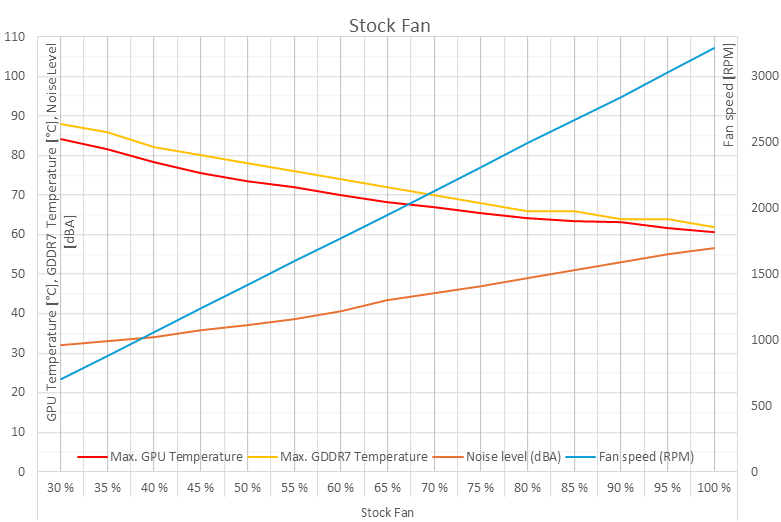
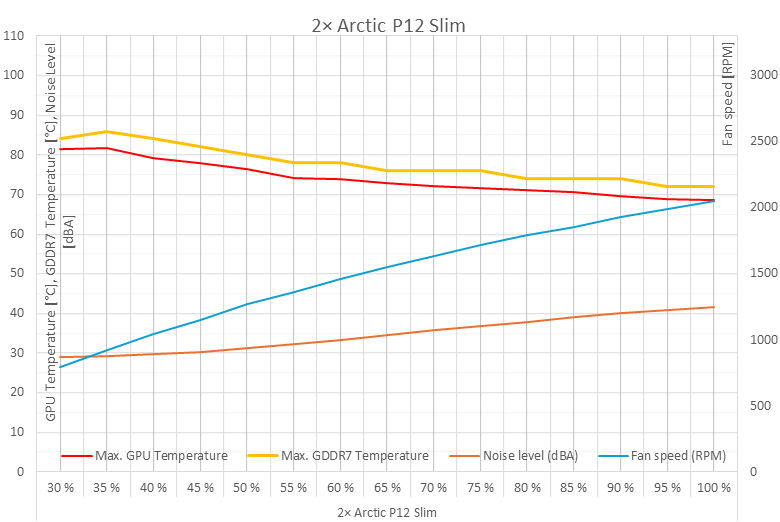
After swapping the fans, the card’s results are better in most respects. The main drawback is the smaller performance headroom—with the stock fans, temperatures can be lowered by about 9 °C more. And of course, there’s also the question of how to control the fan speed. While preparing this article, I ran into the issue that Microsoft Defender blocked the driver for the Fan Control app because it uses overly elevated permissions for monitoring and was flagged as a security risk. Adding a Defender exception didn’t solve it, most of the sensors disappeared from monitoring, and it was no longer possible to access the motherboard fan headers either.

This doesn’t happen often, but if you rely on software for fan control, it could stop working for similar reasons. You can have the fans controlled by the card itself, but that won’t be flawless either—the tuning is meant for different fans. You’ll most likely need to define custom curves for fan speed control, which again requires some background app to take care of it.
English translation and edit by Jozef Dudáš



