


Most mid-range Asus card models allow easy removal of the shroud. We have already tried classic 120mm fans on the card, which do not fit very well on a narrow and long card. With them, the card becomes significantly wider and they do not cover the heatsink along its entire length. A trio of smaller 92mm fans fits a 30cm card better. After testing the low-profile NF-A9x14, we will try how the NF-A9 with the standard 25mm height performs.
Before we focus on the results with the Noctua fans, let’s look at the behavior of the card with the original fans. In the first graph, you can see how the card performed in terms of noise with the supplied fans. The card’s control allows you to set their output in the range of 30–100%. This corresponds to an operating range of 700–3200 rpm. Because one of the fans was clicking, the noise level of the cooler was 32.1 dBA even at the low 700 rpm. This increased the noise of the card across the entire speed range.

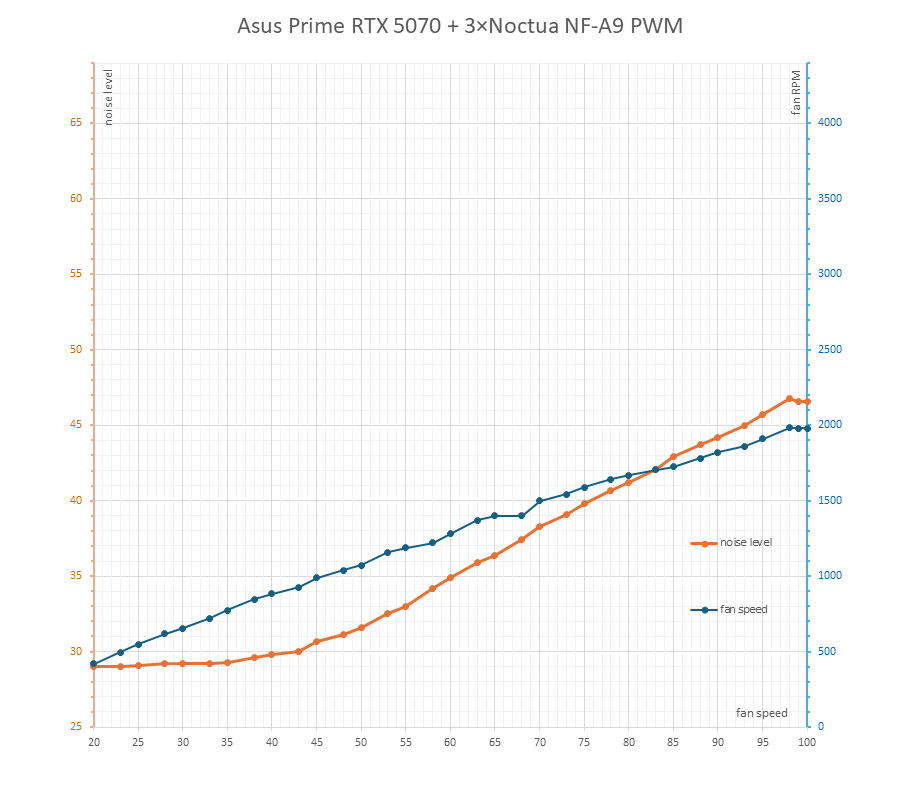
The next graph shows noise levels with the trio of Noctua NF-A9 fans. When connected to the control panel, they start at 10% PWM and run at 98–100% PWM at maximum.
At lower speeds, the noise curve is flat. The reason is that the fan noise is below the measuring range of the sound level meter (30 dBA). At low speeds, the fans are almost inaudible and the intrinsic noise of the sound level meter is higher than the noise of the fans
How the operating characteristics of the card change will be measured across the entire range of fan performance. For time reasons, I will use short loops of the Cyberpunk benchmark with the RT Medium profile and a resolution of 2560 × 1440 pixels with DLAA.
Before the whole batch, one warm-up loop runs with three passes and fan output set to 40%. This is not visible in the graphs below; they start with the first measurement with fans set to 100% output. Fan performance then gradually decreases in 5% steps from 100 to the lower limit of the measured range. With the card using factory fans, this ends at 30%, which corresponds to the minimum adjustable value. With cards with replaced fans, it ends at 20% output. Testing at 15 and 10% usually does not make sense, because at low fan speeds and GPU temperatures above 85 °C, regulation already starts to significantly throttle GPU power and with it clocks and performance, and noise can no longer be measured with the sound level meter used.
With each setting, three test loops are run. Between individual test runs, delays are only a few seconds, so the system remains warmed up during testing. Measured values will be read from the third loop, exceptionally from another one if there is some problem with the last measurement.
Asus Prime GeForce RTX 5070 (stock, 3× Axial-Tech fan)
In this chapter, we will go through how the card behaved across the entire fan performance range. First, these will be simple graphs showing the entire test run, where everything is visible together. Specific measured values for each setting can be found in the interactive graphs in the following chapter.

At the lower limit of the tested range, that is at 30% fan output, the maximum GPU temperature was 85.2 °C and the average was 84.0 °C. At maximum speeds, the average temperature dropped to 59.2 °C.

The next graph shows fan speeds in the light blue data series. The fans were connected directly to the card, but their speeds were set manually using the Fan Control application.
At the lower limit, at 30% output, they start at around 700 rpm; at 100% output they run at 3200 rpm.
The purple curve in the graph shows the set fan output. The light blue values correspond to the current fan speed on the Fan 1 connector.
At minimum speeds, when the GPU temperature goes over 85 °C, power throttling of the chip occurs, clocks are reduced, and with that performance drops.

The next graph shows temperatures (in red) and total CPU utilization (in blue). As fan output on the card decreases, airflow in the case slows down, and CPU temperature rises slightly.

Performance differences do not change dramatically. With a cooler chip, clocks rise slightly and with them performance, but the difference increases only by tenths of frames per second.
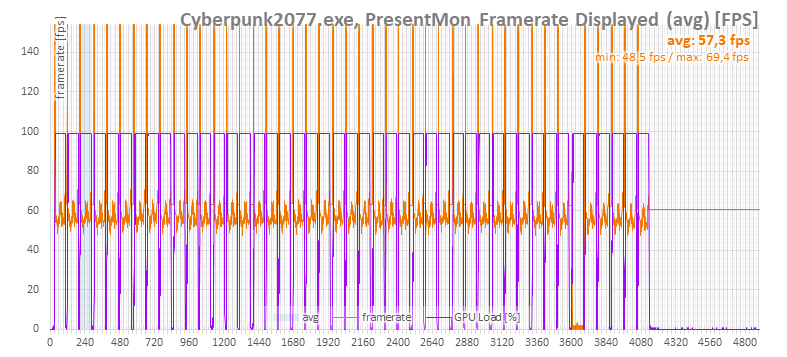
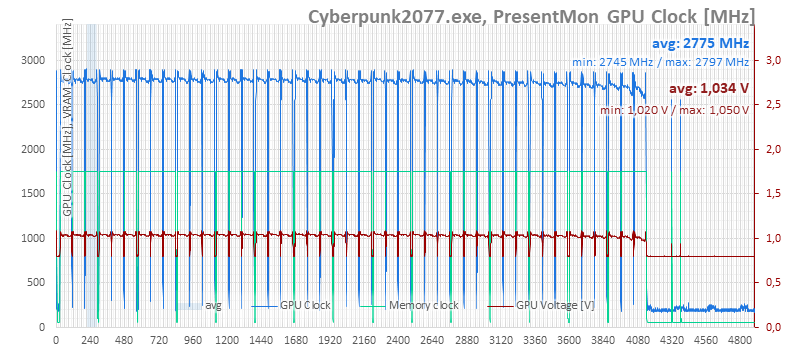
This is more visible on GPU clocks than on performance. Toward the end, at low fan speeds, the card began to overheat; here you can see more significant drops in clock speeds. Between 30% and 100% fan output, the difference is roughly 100 MHz.
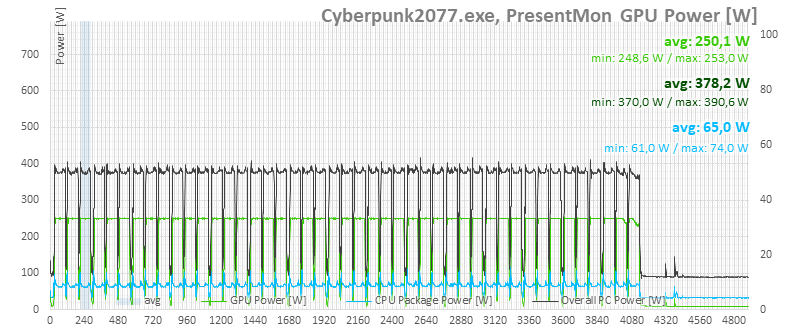
For reference, we also have graphs of power consumption for the entire system and for the card itself, according to what monitoring reports. In the first run, when chip temperatures were already too high, it is visible that GPU Boost also throttled the card’s performance. In subsequent runs, the card is clearly operating at the limits of its power budget.

⠀


Thanks! Test in the series I was waiting for most… until i saw info about 3x P9 from Arctic!
The result surprised me somewhat. I did not expect the A9 to be top performer on a graphics card heatsink due to it’s fin density and their blade design, but I assumed they would make up for it with their thickness and ultimately perform at a level similar to the A9x14. That is why I am very pleased to hear about another test using the Arctic P9’s, especially since it is difficult to find any truly representative tests of 92 mm fans online, aside from a Thermaleft tests of a few models from years ago.
yes, I agree with everything you wrote, 🙂↕️
… but the competition in this size segment is quite low
… about a dozen products, half of which are manufactured by ThermalRight, which are difficult to buy here in Slovakia…sadly 😉
–“… but the competition in this size segment is quite low…
note: of course I meant the DIY sphere, in the pro sphere (servers, racks,…) there are quite a few fans of this size from Sanyo Denki, Delta, Sunon, etc., including 38 mm thick ones.
Unfortunately, it’s not only Slovakia. When I looked for the Thermalright TL-B9, the only option left was AliExpress (not counting local stores, which likely don’t ship internationally anyway). In practice, we’re basically limited to the Arctic or Thermalright P9.
The Pro/Industrial models are potentially interesting, but the main issues are pricing in detail, availability on the secondary market, and the noisy dual-ball bearing design. I’d honestly love to use those 38 mm “fat” fans, but I’m seriously concerned that they only become effective near their rated speed of around 5000 RPM. Unfortunately, if 1500 RPM is already audible, then 3000 RPM would be absolutely deafening.
And on top of that, not every fan even has a P/Q curve published, so it’s really hard to tell at a glance whether the claimed good CFM/mmH2O will translate into something usable in a normal home setup. A lot of the time, where the blade design itself is not optimized much, they’re just brute-forcing it with higher RPM and extra thickness.
yes,..but in the pro-sphere noise is not an obstacle, brute force and durability are important.
That’s why DBB and high RPM (= high static pressure).
Many of the pro solutions usually don’t even have a standard PC header…and 1A is often too little 😉
— „In practice, we’re basically limited to the Arctic or Thermalright P9…“
Among the more affordable fans, there’s also the Endorfy Zephyr 92. Another well-available option is the Noctua NF-A9 PWM, but that one is more expensive.
great job, did you upload the 3d files somewhere? I’d love to try them out too
Thank you for the praise! If I’m not mistaken, we don’t have any 3D models anywhere. And it’s possible that that won’t change either—Adam no longer works for HWCooling. :)⠀
whyyyyyyyyyyy?
What do you mean exactly?
If you’re referring to why Adam no longer works for HWC, it’s because for a long time we weren’t able to find common ground on how things should function and be organized going forward.
And if you’re referring to why we don’t have the 3D models, I personally wanted to keep them, but as far as I remember they were created in free software and supposedly couldn’t be exported. And, of course, there were probably additional restrictions regarding commercial use and similar matters. 🙂
That’s how I remember it, at least. If I’m mistaken, my former colleague can clarify the details. I’ll forward this comment to him. 🙂
Yes, I am not able to work with someone who doesn’t really know what they want, can’t clearly say what they want, and is perfectly capable of changing their mind within ten minutes and is perfectly capable of changing their mind within ten minutes just because someone told them something or suddenly don’t feel like doing something. 😛
Claude> A former colleague eventually bought the software out of his own pocket so he could make the models available, but he didn’t manage to fine-tune and publish them before he had to quit. He then thought he would get it done before he started making a living as a tiler, so he could pay off the debts he had racked up writing articles like that, but he didn’t manage to get it done before he had to start working. Now he gets up at five in the morning and doesn’t get back to his computer until eight in the evening, so all he manages to do is skim through his emails and go to bed and he has no time for modelling and testing.
If he ever gets around to finishing it, he’ll let you know, but for now he’s booked up for at least the next few months. Sorry for that, but I’ll try. 😉
Thank you for the response, Adam. 🙂
You already received the author’s reply regarding the 3D models. And if the question was aimed at why we aren’t continuing the work around graphics card testing (including deshrouds), then I suppose you received that one as well. 🙂