


A graphics card is a computer component that processes graphics in games but can also serve for compute or various professional graphics tasks. Besides compute units, it has another simpler role—it provides the actual video output to the monitor connected to the graphics card’s ports. This role can also be handled by a GPU integrated in the processor (or earlier, in the chipset). Here, however, we will focus on discrete graphics cards.
Compute Units
A GPU is a processor that operates on the principle of highly parallel instruction processing. Therefore, it consists of multiple replicated compute units. In Nvidia GPUs, these compute units are designated as SMs (Streaming Multiprocessor), in AMD GPUs they are labeled as CUs (Compute Unit) or WGPs (Workgroup Processor), and in Intel GPUs as Xe Cores.
These compute units are typically further grouped into higher-level structures, whose hierarchy differs depending on the architecture used. Some GPU compute resources are shared within a certain block level. For example, each SM or CU block may have its own registers and some caches, but texturing or rasterization units may be incorporated in a higher level block that combines several basic compute units. Examples of these bigger blocks are TPCs and GPCs in Nvidia’s GPUs and Shader Engines and Shader Arrays in AMD GPUs.
Shaders („CUDA cores“)
In modern gaming and compute tasks, the units for general-purpose compute operations, located in blocks in quantities of, for example, 64 or 128, play perhaps the biggest role. In simplified maner they are called shaders, stream processors, shader ALUs, or CUDA cores (in Nvidia GPUs). The code you run on the GPU, so-called shader programs, is processed on these units. These were originally simple and had limited use in games (the term shader derives from their use for shading), but over time they gained increasingly universal capabilities and now represent a compute resource usable for both general purpose non-graphics computations. In graphical use, shaders can work with image pixels, but also with the geometry of 3D models, which is also calculated using shaders today.
Texture Mapping Units (TMU)
Texturing units or TMUs are an evolutionarily older feature, present almost from the first 3D accelerators. Their task is to process operations necessary for mapping textures onto models in a 3D scene. A texture is a two-dimensional raster image intended to represent the “surface” of an object. But for the object to be wrapped with this surface, points from the texture raster must be variously adjusted to be displayed in the correct perspective, rotation, and deformation. It is also necessary to scale them to the correct size. These operations are referred to as filtering (which can use various methods—bilinear, trilinear, anisotropic) and require a certain amount of performance.
The task of the texture mapping units is precisely to process filtering operations without consuming the performance of the GPU’s general-purpose units (shaders). They can also work directly with various compressed texture formats that save memory space without needing to decompress them first.
In earlier times, a value called texture fill rate in (mega or giga) texels per second was stated in GPU specifications. This figure indicated how many outputs (texels, which means pixels with applied texture) the TMUs in a given GPU could handle overall. Today, this parameter is no longer in the forefront of interest, as the performance of texturing units is typically not a performance bottleneck.

Rasterization Units (ROP)
ROP units (Render Output Unit, or Raster Operations Pipeline) are another of the basic components of GPUs, present practically from the beginning. The task of these units is to merge all outputs generated during the rendering of the 3D image by other GPU units and create from them the final pixels forming the output two-dimensional frame of the game or 3D scene. ROP units can apply anti-aliasing methods such as MSAA (where multiple input samples are used to create one output frame pixel to suppress so-called aliasing).
A value called pixel fill rate in (mega or giga) pixels per second can be specified for GPUs, which was prominently advertised in the past. This figure indicated how many image pixels (pixels) of the output frames the ROP units in the GPU could render overall. Similar to texture fill rate, this parameter is usually not at the center of attention today.
Memory controller
The GPU has a memory subsystem with its own memory space. This memory is controlled by a special controller, whose function is very important for GPU performance. Very high bandwidth is required for graphics memory, so a wider bus is usually chosen, although cheaper GPUs have 128-bit or even only 64-bit memory widths (the width in bits is often referred to as the “memory bus” width). In reality, multiple controllers are used in parallel; for GDDR-type memories, a controller has a width of 32 bits, so for example, a GPU with a 256-bit bus has eight of them, and a 384-bit bus means twelve controllers. Besides the digital logic of the controllers, the GPU also contains PHY blocks, i.e., circuits generating the actual electrical signal for communication with the memory.
Cache
Similar to a CPU, the GPU uses a more complex hierarchy of the memory subsystem with cache memories at several levels—L0, L1, L2, and sometimes also L3 (Infinity Cache in AMD GPUs is basically an L3 cache). The task of cache memories is to hold the most frequently used data, which is available from them with lower latency and higher data bandwidth than if the GPU had to load it from the main GPU memory.
Serving part of the data requests from the cache memories means that the volume of requests that have to go to the main graphics memory is reduced. Thanks to this, the whole memory subsystem can handle more read operations. Larger caches thus ultimately allow to achieve a higher overall performance level, for a given bandwidth of the main memory. Memory bandwidth has long been one of the most significant limiting factors preventing increases in GPU performance.
AI accelerators
Over the last decade, running artificial intelligence applications has become one of the most important, if not the most important, tasks for GPUs, utilizing their high computational power. For this reason, special units that perform matrix multiplication operations for AI needs were added to GPUs. The performance when using these units is higher than what is available on general-purpose compute units (shaders). However, these special units support a smaller set of computate operations and often also work only with lower-precision data types, which allows them to achieve higher performance. While FP32 (32-bit floating-point value) is the standard precision for GPU compute operations, 16-bit, 8-bit, and even 6-bit or 4-bit values (INT8, FP8, FP6, FP4) are used for artificial intelligence.
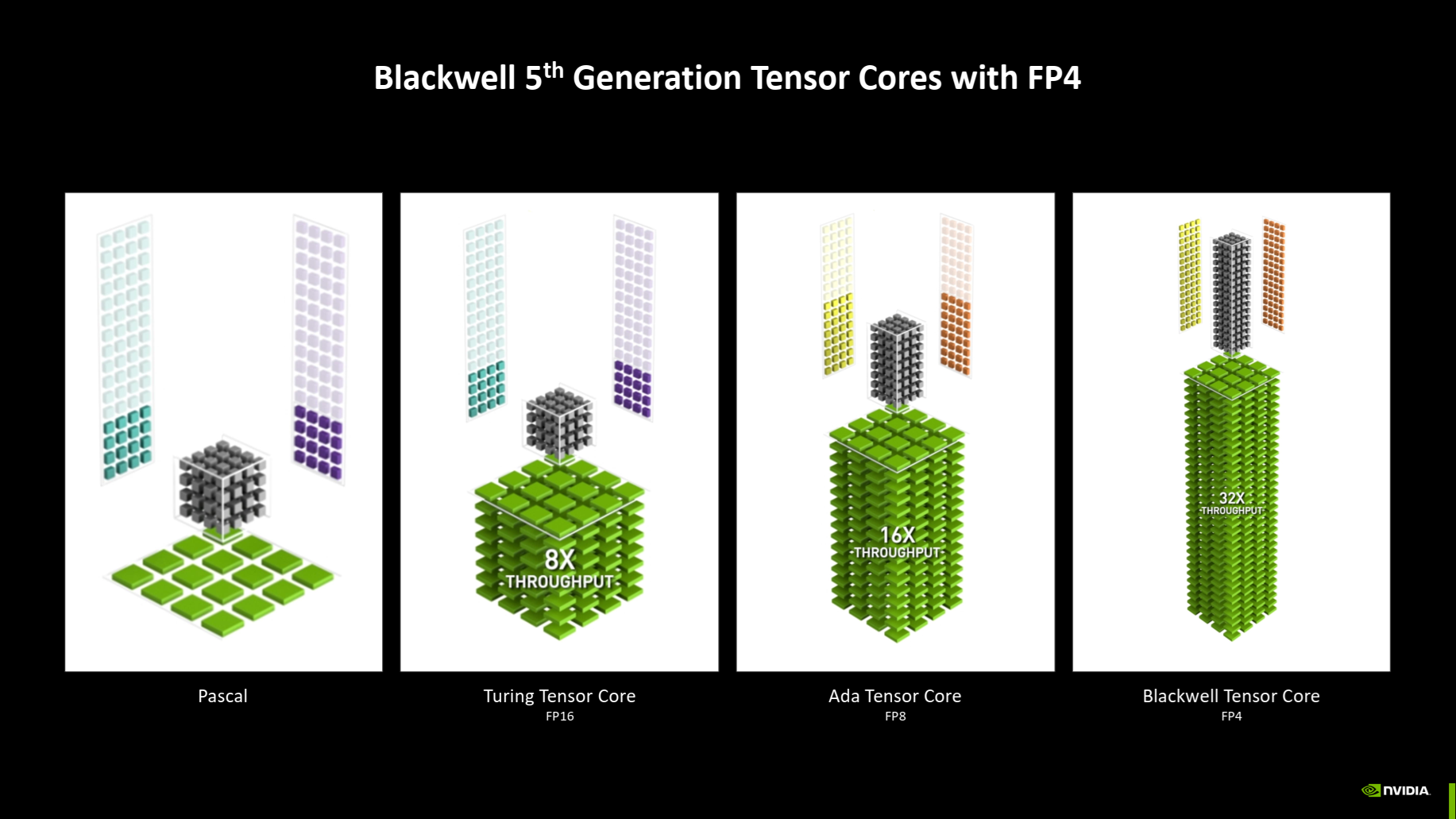
Nvidia GPU architectures contain AI accelerators labeled as Tensor Cores. Intel GPUs have similar dedicated units called XMX. Compute GPUs from AMD use Matrix Cores, but Radeon gaming GPUs do not use this approach yet and have AI acceleration built into the general-purpose compute units.
Ray tracing accelerators
Game graphics cards long used various simplified models for lighting calculations. However, in 2018, ray tracing technology began to appear in games. This is a previously known technology enabling realistic simulation of lighting, as well as shadows, reflections, and light scattering from mirror-like or similar surfaces. Ray tracing simulates the path of light rays and their interaction with objects. It is thus possible to achieve a more realistic image with it. However, this technology was long unattainable due to high performance demands.

Therefore, since 2018 (Nvidia’s Turing architecture), GPUs contain special units aimed at accelerating certain parts of the ray analysis process. Primarily, this entails the analysis of their intersections with the triangles of objects in the scene, which uses so-called BVH auxiliary structures.
These units again have different designations in different GPU families—in Nvidia architectures they are called RT cores, Intel graphics designate them as RTUs, and AMD calls them Ray Accelerators.
Multimedia engine
Over time, besides 3D gaming graphics, multimedia playback functions, especially video, were also transferred to the GPU. Their predecessors were the acceleration of color space conversion between YUV and RGB, image scaling (e.g., enlarging to full screen) or deinterlacing. Then GPUs began to be equipped with full-fledged blocks for complete video format decoding.
These decoders (NVDEC in Nvidia GPUs) are capable of decompressing video with low power consumption and high performance thanks to usage of specialized circuits (during transcoding, it is sometimes possible to achieve hundreds of frames per second). Their use means that it is not necessary to load the computer’s CPU when playing back media.

Following decoders, GPUs later began to integrate similar blocks for encoding, i.e., video compression (in Nvidia, the encoder is called NVENC). Their use is for example for video conferences, for recording or streaming video from games, or for general work in video processing and editing. Today’s multimedia engines in GPUs support H.264, HEVC, VP9 formats and, most recently, the AV1 format.
Video output block (Display Engine)
The output of the ROP units consists of so-called framebuffer data, which the display output block can then send for display on the monitor. This functionality includes the possibility of vertical synchronization (VSync), which ensures that data is sent to the monitor when a new frame is ready, and it does not happen that the frame being sent is replaced by a new one mid-transmission (which causes so-called tearing, where you see an older frame in the top part of the monitor, but somewhere in the middle there is a split and the bottom part of the monitor shows a newer one).
The display output of modern GPUs has also gained more advanced functionality—today, for example, it can refresh the image on the monitor with a variable frequency (this is so-called adaptive refresh using technologies like FreeSync, Nvidia G-Sync, or HDMI Variable Refresh Rate) and also send data to the monitor in a compressed form using VESA DSC technology.
Please note: The article continues in the following chapter.

