


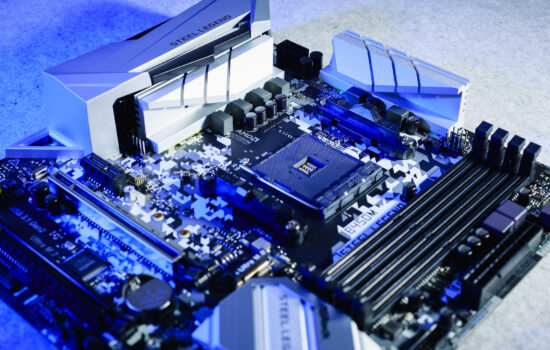
Sapphire and motherboards? It’s a thing now. We’ve focused on analyzing a model for the AMD platform—the Nitro+ B850A WiFi7. Just as with graphics cards, “Nitro+” signifies richer features and more premium design, though it still positions itself more in the mid-range. The use of the B850 chipset (AMD B850) also points to this tier, though its capabilities are more than sufficient, even exceeding the needs of many users.
Yes, Sapphire also makes motherboards. We’re going to “dissect” one such board right now. There won’t be any performance testing, but we’ll zoom in on several details associated with the Sapphire Nitro+ B850A WiFi7.
| Parameters | Sapphire Nitro+ B850A WiFi7 | |
| Socket | AM5 | |
| Chipset | AMD B850 | |
| Format | ATX (305 × 244 mm) | |
| CPU power delivery | 15-phase | |
| Supported memory (and max. frequency) | DDR5 (8000 MHz) | |
| Slots PCIe ×16 (+ PCIe ×1) | 3× (+ 0×) | |
| Centre of socket to first PCIe ×16 slot | 70 mm | |
| Centre of socket to first DIMM slot | 56 mm | |
| Storage connectors | 4× SATA III, 1× M.2 PCIe 5.0 ×4 (80 mm) + 2× M.2 PCIe 4.0 ×4 (42–80 mm) | |
| PWM connectors for fans or AIO pump | 5× | |
| Internal USB ports | 1× 3.2 gen. 1 type C, 2× 3.2 gen. 1 type A, 2× 2.0 type A | |
| Other internal connectors | 1× TPM, 3× ARGB LED (5 V), 1× RGB LED (12 V), 1× Clear CMOS jumper | |
| POST display | no (but has debug LED) | |
| Buttons | Flash BIOS | |
| External USB ports | 1× 3.2 gen. 2×2 type A, 3× 3.2 gen. 2 type A, 4× 2.0 type A | |
| Video outputs | 1× DP 2.1, 1× HDMI 2.1 | |
| Network | 1× RJ-45 (2,5 GbE) – Realtek 8125BG, bezdrôtový modul WiFi 7 (802.11 a/b/g/n/ac/ax) + Bluetooth 5.4 | |
| Audio | Realtek ALC897 (7.1) | |
| Other external connectors | – | |
| Manufacturer's suggested retail price | 170 EUR |
Sapphire Nitro+ B850A WiFi7
This is a motherboard designed for the AMD platform. It is equipped with the B850 chipset, meaning a single Promontory 21 chip acting as the southbridge. This handles connectivity for slower devices that can be connected to the motherboard. For faster devices, there are PCI Express lanes from the processor—for example, for the graphics card (with PCIe 5.0 support) or for SSDs (also PCIe 5.0).

The Nitro+ B850A WiFi7 is an ATX format board, measuring 305 × 244 mm. The layout is traditional and the design is relatively straightforward. By design, we mean elements related to various things like heatsinks, additional buttons, or connectivity.


SSD coolers are present for all M.2 slots, and their mounting is via screws. No tool-less mechanisms—just screws. In this regard, Sapphire is starting with what works well in terms of cooling. Screws and high mounting pressure (through thermal pads) on the SSDs.

The larger of the two passive SSD coolers uses four screws, one in each corner. Installation is more laborious (taking longer to remove the screws), but everything holds well and reliably. Be careful not to lose any screws during the (dis)assembly process, as they don’t have any retainers to keep them attached to the heatsink. You simply unscrew them and separate them from the heatsink—utterly basic.

Sapphire also doesn’t use remote-release latches for the first PCIe slot lock, as most competing manufacturers do. Those others also arrived at this solution over time, and again—Sapphire still has to cover this ground, and perhaps it’s not even the plan to do anything other than the traditional “wings” on the PCIe ×16 slot closest to the CPU socket. Such a solution can be particularly impractical in some situations because the PCIe ×16 slot for the graphics card is very close to the processor socket (AMD AM5), with a center-to-center distance of only 70 mm. This can then cause potential collisions between wider tower CPU coolers and the graphics card.
The power delivery section is robust, with 15 phases for powering, or rather transforming voltage for the CPU and its components. This is a motherboard from the top-tier “Nitro+” class, and it is accordingly expected to handle even the most powerful Ryzen 9-class processors. The intricate, monolithic aluminum heatsinks also assist in cooling the VRM.


Typically, the hottest part with the greatest need for cooling are the integrated Alpha & Omega Semiconductor EX00 5C1U circuits.

There are six 3.5mm audio jacks here, so it’s a full complement, but without an optical S/PDIF output.

Several users will likely have reservations about the use of the Realtek ALC897 audio codec. It relies on an older and cheaper design, but considering the overall board price (the Nitro+ B850A WiFi7) starting at 170 EUR, Sapphire stands behind a fairly attractive configuration, wouldn’t you say? When you factor in the overall feature set relative to the price, it’s reasonable.

English translation and edit by Jozef Dudáš



Personally, I’m averse to spending extra on mobo sound – they all are rubbish, and while a AE-5 plus may be a little pricy on paper, it creams any external DAC with the same capability for price and you’ll be using it in builds until it dies.
You’re right. With external audio adapters and all things related to sound, the cheapest possible onboard audio solution is actually an advantage. It reflects in the price of the motherboard, and users don’t end up paying extra for something they won’t use anyway. 🙂