AORUS GeForce RTX 5080 MASTER 16G sits at the top of Gigabyte’s air-cooled RTX 5080 lineup. The side LCD on the cooler shroud stands out, and the box even includes a fourth fan. Build quality is robust and premium, and the stock overclock is higher than you usually see on OC variants. Not everything is perfect, though—the out-of-the-box fan tuning could be better, and those extras do push up the price.
I guess don’t need to introduce the GeForce RTX 5080 anymore. A detailed description of the new technologies brought by Nvidia’s new graphics cards has been compiled by Jan Olšan in the article Blackwell: GeForce RTX 5000 architecture and innovations. It introduces the individual graphics chips Nvidia is using in the new cards, the new GDDR7 memory type, and also covers changes in cache memory, GPU compute units, updates to shaders and tensor cores, as well as improved compute units for ray tracing. The new generation of GeForce also brings support for new standards such as DisplayPort 2.1b and PCI Express 5.0.
With the new generation of cards, DLSS capabilities are evolving as well. It now supports Multi Frame Generation, which allows the generation of up to three intermediate frames, and introduces Nvidia Reflex 2, the second generation of its latency-reduction technology. This includes Frame Warp, which adjusts object and camera motion in rendered frames based on the player’s most recent input device movement data received just before the already rendered frame is displayed. A more detailed explanation can be found in the aforementioned article.
The GeForce RTX 5080 is not new; we have already tested several models on HWCooling:
- Nvidia GeForce RTX 5080 FE
- Asus ROG Astral GeForce RTX 5080 OC Ed.
- Gigabyte GeForce RTX 5080 Gaming OC
- MSI GeForce RTX 5080 Suprim SOC
Let me recap the basic parameters—the RTX 5080 is the second most powerful model in the GeForce RTX 50 series. It uses the second largest chip, the GB203, with an area of 387 mm² and 45.6 billion transistors. The chip has 10,752 active stream processors, 336 texturing units, and 112 rasterization units. For accelerating ray tracing computations, 84 cores are available, and for tensor computations, 336 cores. The chip has a base clock of 2295 MHz, a boost clock of 2617 MHz, and the stated card power limit is 360 W. The RTX 5080 is equipped with 16 GB of GDDR7 memory at 30 Gb/s, communicating with the chip via a 256-bit bus for a total bandwidth of 960 GB/s.
I’ll add more detailed specifications just in the form of a table comparing it with the nearest models.
| GeForce RTX 5090 | GeForce RTX 5080 | GeForce RTX 4090 | GeForce RTX 4080 Super | GeForce RTX 4080 | |
| Shader cores | Blackwell | Blackwell | Ada Lovelace | Ada Lovelace | Ada Lovelace |
| Nvidia CUDA cores (SP) | 21760 | 10752 | 16384 | 10240 | 9728 |
| Texture Mapping Units | 680 | 336 | 512 | 320 | 304 |
| Render Output Units | 176 | 128 | 176 | 112 | 112 |
| RT cores | 318 TFLOPS | 171 TFLOPS | 191 TFLOPS | 121 TFLOPS | 113 TFLOPS |
| Tensor Cores | 3352 AI TOPS | 1801 AI TOPS | 1321 AI TOPS | 836 AI TOPS | 780 AI TOPS |
| Boost Clock | 2.41 GHz | 2.62 GHz | 2.52 GHz | 2.55 GHz | 2.51 GHz |
| Base Clock | 2.10 GHz | 2.30 GHz | 2.23 GHz | 2.29 GHz | 2.21 GHz |
| Memory | 32 GB GDDR7 | 16 GB DDR7 | 24 GB GDDR6X | 16 GB GDDR6X | 16 GB GDDR6X |
| Memory Bus Width | 512-bit | 256-bit | 384-bit | 256-bit | 256-bit |
| Memory Bandwidth | 1792 GB/s | 960 GB/s | 1008 GB/s | 736 GB/s | 717 GB/s |
| Max. resolution | 4K at 480Hz or 8K at 120Hz with DSC | 4K at 480Hz or 8K at 120Hz with DSC | 4K at 240 Hz or 8K at 60 Hz with DSC, HDR | 4K at 240 Hz or 8K at 60 Hz with DSC, HDR | 4K at 240 Hz or 8K at 60 Hz with DSC, HDR |
| Standard Display Connectors | 3× DisplayPort, 1× HDMI | 3× DisplayPort, 1× HDMI | 3× DisplayPort, 1× HDMI | 3× DisplayPort, 1× HDMI | 3× DisplayPort, 1× HDMI |
| PCI Express | Gen 5 | Gen 5 | Gen 4 | Gen 4 | Gen 4 |
| Nvidia Encoder | 3× 9th gen | 2× 9th gen | 2× 8th gen | 2× 8th gen | 2× 8th gen |
| Nvidia Decoder | 2× 6th gen | 2× 6th gen | 1× 5th gen | 1× 5th gen | 1× 5th gen |
| length | 304 mm | 304 mm | 304 mm | 304 mm | 304 mm |
| width | 137 mm | 137 mm | 137 mm | 137 mm | 137 mm |
| height | 2-slot | 2-slot | 3-slot | 3-slot | 3-slot |
| Total Graphics Power | 575 W | 360 W | 450 W | 320 W | 320 W |
| Supplementary Power Connectores | 4× 8pin PCIe (adapter) or 1× 600 W PCIe Gen 5 | 3× 8pin PCIe (adapter) or 1× 450 W PCIe Gen 5 | 3× 8pin PCIe (adapter) or 1× 450 W PCIe Gen 5 | 3× 8pin PCIe (adapter) or 1× 450 W PCIe Gen 5 | 3× 8pin PCIe (adapter) or 1× 450 W PCIe Gen 5 |
Today we’ll be taking a look at the factory-overclocked GeForce RTX 5080 from Gigabyte.
Testujeme Aorus GeForce RTX 5080 Master 16G
(GV-N5080AORUS M-16GD)
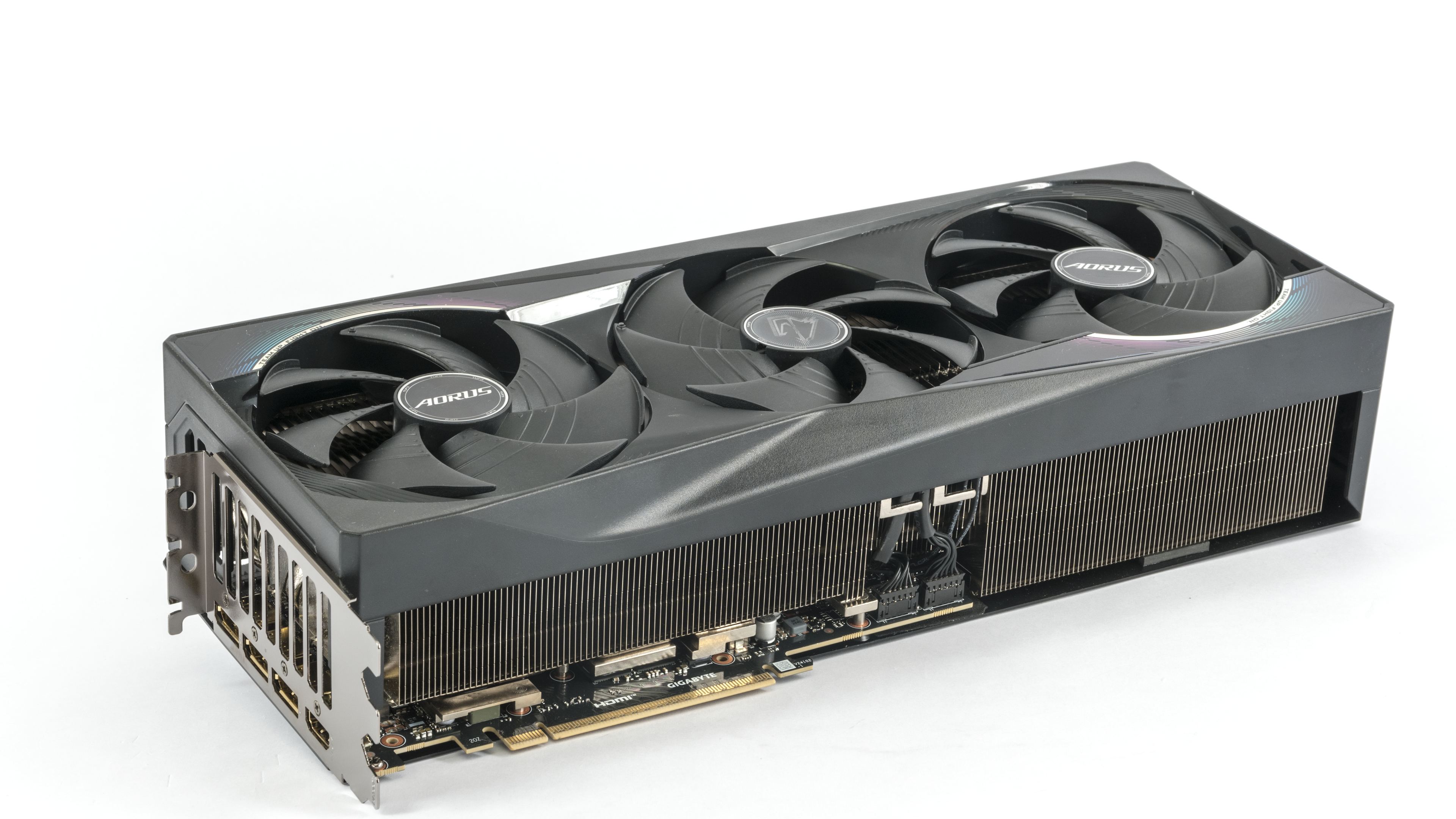
The Aorus GeForce RTX 5080 Master 16G, alongside the all-white ICE variant, is the highest-end air-cooler model in Gigabyte’s lineup. Its current price starts at around 1390 EUR, so compared to the base models priced at around 1000 EUR, you’d be paying a hefty premium.
The stated typical clock speed in BIOS is slightly increased from the reference 2617 MHz to 2800 MHz, which isn’t even close to justifying the price difference. What you’d be paying extra for is thus mainly the features.
The power limit is set to the reference level of 360 W and it’s possible to decrease it by 31% to 250 W, or increase it by up to 25% to 450 W. It’s therefore bordering on what’s possible to power with the adapter with three 8-pins.
The card features a dual BIOS—Silent and Performance. In terms of parameters, you’ll find no dramatic differences. They have the same clock speeds for the GPU and memory, and also the same default power limits. Where you’ll find a difference is the cooling regulation settings.
In Silent mode, the fans run at lower speeds at the same temperatures than in Performance mode. Slightly lower clock speeds and performance are a side effect of a differently configured fan control curve. As temperature increases, the card’s power consumption rises slightly, and with increasing consumption under the same power limit, the GPU clock speeds decrease marginally.

GeForce cards typically have two headers reserved for the fans, with separate regulation and RPM monitoring. The Gigabyte card has all three fan headers monitored and controlled independently in GPU-Z.


The next set of images shows the values stored in the Silent BIOS. In GPU-Z, the only apparent difference is in the BIOS version designation. The differences in performance are smaller than in noise levels, so we will test performance in the silent mode. However, we will measure the operating characteristics in detail on both BIOS versions.


The application HWiNFO can extract the most information from the monitoring systems of most cards. You can see the list of sensors available for the tested card in the latest version of the application in the image below.

On the back of the packaging, the manufacturer presents the features and technologies utilized by the card. The Windforce cooling system introduction takes center stage. It uses three counter-rotating fans with RGB LED on the blade tips. This is followed by a base with a vapour chamber and composite fans, and the option to equip the cooler with a fourth fan, which you can find in the box. It is meant to help exhaust air from the pass-through fin stack.
The metal backplate of the PCB is attached to the bracket and helps reinforce the card. Perhaps the most interesting feature on the card is the LCD display located on the rear part of the side edge.

The accessories include a concise installation manual, leaflets with additional guides, the fourth supplemental fan, and a power adapter from three 8-pin connectors to a 12V-2×6 connector. And a special support bracket that prevents excessive stress on the PCB.
We’ll take a look at the card’s design in the following chapter.
⠀