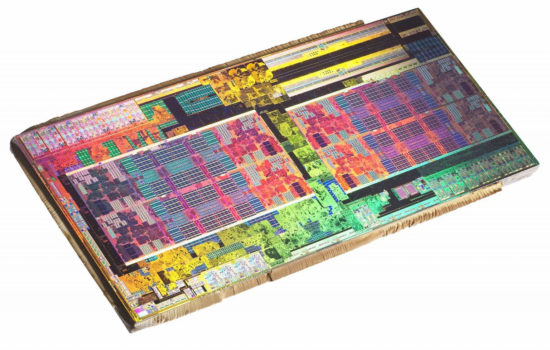
Although Nvidia’s graphics cards of the new generation – the GeForce RTX 5090 and RTX 5080 – won’t be out until the 30th, the embargo is over and the first reviews of the top-of-the-line RTX 5090, which we also tested, are out. In this article, we take a look at the Blackwell architecture that powers these new GPUs, and its new features and functions. From DLSS 4, through compute unit architecture and chip features, to the software side of this new generation.
Mega Geometry
The functioning of RT cores in the Blackwell generation is also set to be enhanced with some new capabilities partially or whole based in software, which will likely only become useful once they are integrated into new games. For example, there is support for new types of objects such as Subdivision Surfaces and Linear Swept Spheres.
The so-called Mega Geometry feature announced for Blackwell appears to be of a software nature, designed to improve performance when working with many objects in a scene where ray tracing calculations are required. It allows triangles to be grouped into larger structures (clusters called CLAS). One practical application of this is that these clusters will be easier to replace in-scene, which is something that happens, for instance, when objects move further away from viewpoint, in which situation the game engine replaces them with models containing fewer triangles (lower levels of detail). However, replacing models when ray tracing effects are used requires constructing a new hierarchy of bounding boxes (BVH) for analyzing these newly swapped-in models. That process is performance-intensive, and changes in detail levels for many objects at once can cause significant FPS drops.
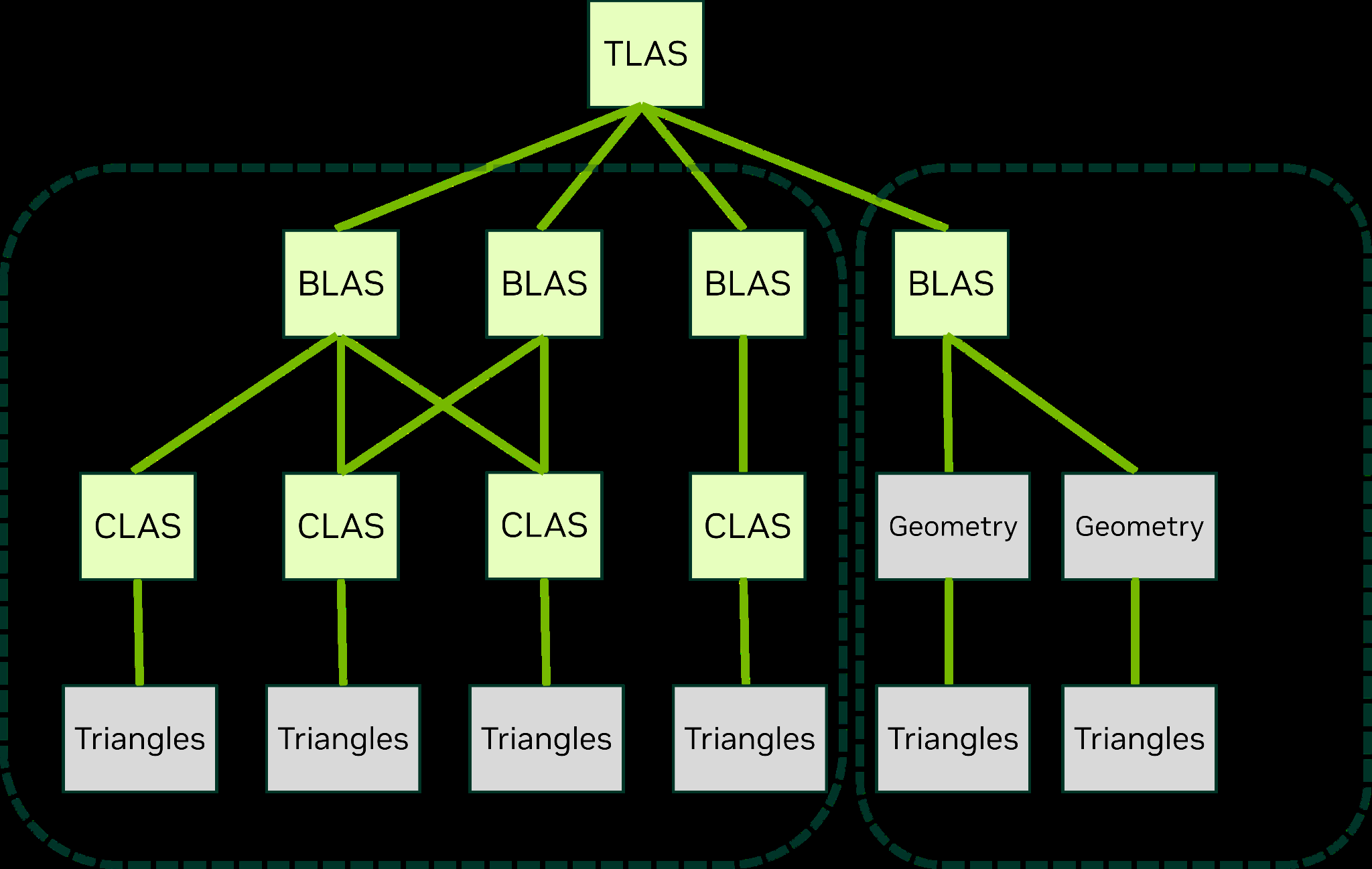
Mega Geometry adds processing of objects in clusters (CLAS) with the aim to make this process easier and more efficient, so such operations in games will require less performance overhead. At the same time, working in this mode is expected to perform more operations entirely within the GPU, without involving the system’s CPU. This means that using these techniques will reduce the game’s overhead in the drivers and potentially alleviate CPU performance bottlenecks. Nvidia notes that this technology could be particularly beneficial for Unreal Engine 5 and its Nanite geometry technology.
In addition to these clusters, the Mega Geometry technology also introduces the organization of geometry and objects into partitions (PTLAS). This can be used to separate static objects in a scene into distinct partitions. Geometry updates running each frame can then be optimized by skipping the partitions (PTLAS) with static objects during processing for that frame, meaning they are not recalculated like the objects that are in motion.

Support also in older GPUs
Mega Geometry is expected to be supported in DirectX 12 via NVAPI, in Vulkan through a vendor extension, and also in the OptiX 9.0 API used for rendering software. Support should also extend to older GPUs starting from the RTX 2000 series and above, indicating that it is not directly dependent on specific architectural features of the Blackwell GPUs (it does not appear to be something integrated directly into the hardware).
However, according to Nvidia, the Blackwell GPUs feature improved compression for BVH structures, which will allow these structures to take up less space in memory. Reportedly, this could save hundreds of megabytes in games with demanding geometry and ray tracing that implement these technologies.
DLSS 4: A new neural network and more artificial images
One of the central “technologies” of the GeForce RTX 5000 series is DLSS 4. At its core, it builds upon the frame generation technique introduced with DLSS 3. Until now, this method added one interpolated (artificial, non-genuine) intermediate frame between every two frames rendered by the game, meaning that 50% of the frames were real, while the other 50% were only interpolated. We have written about how frame generation works and its advantages and disadvantages here:
Read more: Nvidia introduces DLSS 3 with extra frame generation. How does it work?
The new feature in DLSS 4 is called “Multi Frame Generation“, which essentially means that more artificially interpolated frames are now inserted between the real frames. This could involve two interpolated frames (resulting in 66% of the output being interpolated-only frames, theoretically tripling the FPS compared to the actual game’s frame rate) or even three frames, meaning 75% of the frames you see are merely interpolated (potentially leading to worse quality), with only 25% being real. Theoretically, you could achieve 4× higher apparent FPS than what the game and GPU are actually rendering.
The downside is that, while potential errors in the interpolated frames can blend in relatively well at a 50:50 ratio, now it’s the “made-up” frames you’re seeing most of the time. This could have the opposite effect, where the “interpolated quality” dominates the overall experience.

As a reminder: the insertion of generated frames slightly increases game latency, as both border frames of the sequence (between which interpolation occurs) need to be fully rendered and available before generation can begin. This means that the display must always lag slightly behind the game’s state. Only when generated frames are not used can a newly rendered frame be immediately displayed on the monitor.
Nvidia compensates for this with Reflex technology, which can also be enabled without DLSS 3 or DLSS 4 and independently reduces latency on its own. (The impact of Reflex is not in any way a benefit of frame generation or DLSS, even though company’s marketing messaging often tries to conflate the two.)
Generated frames are also not fully equal to real frames in the sense that they are not created by the game engine. This means that the engine does not update AI behavior, object positions, projectiles, or similar elements in these frames. Frame generation merely approximates all movements and changes based on the positions of objects visible in the real frames at the start and the end of the sequence, and “fills in” the guessed inter-states between the generated frames.
Improved AI model
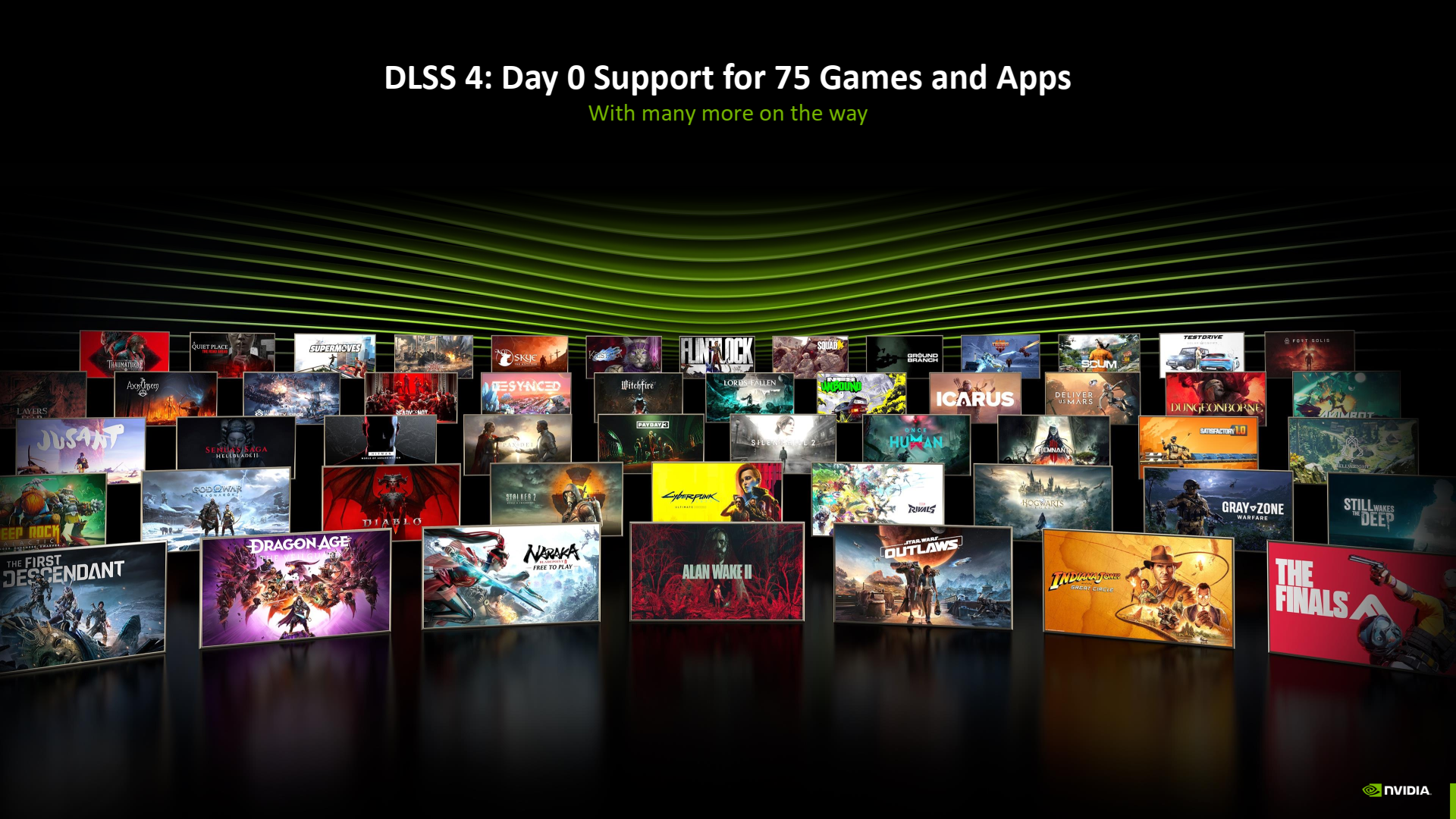
In addition to more interpolated frames, DLSS 4 introduces a second component – a newer, improved model. It features a Transformer-type neural network, whereas previous DLSS versions used a convolutional neural network type. The new model is expected to somewhat enhance the quality of the DLSS upscaling component, the Ray Reconstruction feature (introduced in DLSS 3.5), and likely temporal reconstruction as well – because Nvidia mentions improved image stability between frames, resulting in less shimmering, ghosting, motion blur, and flickering.
This part of DLSS 4 will also work on older GPUs, starting with the GeForce RTX 2000 series.

However, multi-frame interpolation is limited to the new RTX 5000 cards. Ironically, this is despite the fact that it doesn’t actually rely on any special hardware units. This comes as a surprise because frame interpolation in the previous DLSS 3 depends on specific hardware units in Ada Lovelace chips. DLSS 4, however, has moved away from this and uses only Tensor Cores, making it, in a sense, more of a software-based solution (within the context of still being a neural network running on the tensor hardware accelerators). The performance of these Tensor Cores is higher in the new generation, but even so – if DLSS 4 multi-frame generation can work on, say, the RTX 5070 or future RTX 5060, then at least the higher-end models of previous generations should theoretically have enough tensor core performance to handle it as well. Nvidia has admitted that support for older GPUs could theoretically be added, but as of now, nothing has been promised.
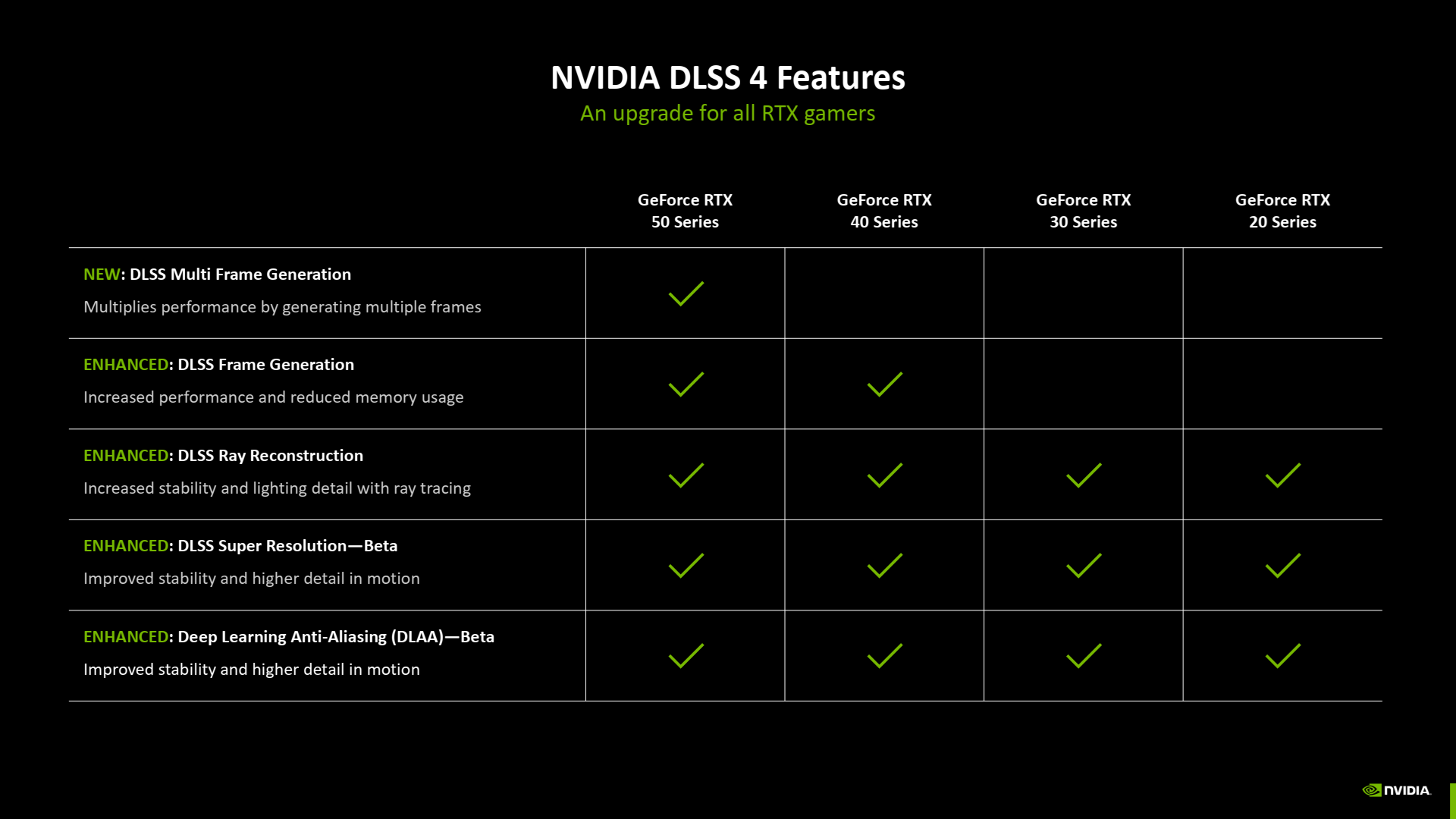
Currently, the situation appears to be that the new multi-frame “FPS interpolation” will only be available on RTX 5000 cards. GeForce RTX 4000 cards will continue using single-frame generation in DLSS 3.x mode, while GeForce RTX 3000 and RTX 2000 cards will not have Nvidia’s frame generation available to them at all.
Reflex 2 for better latency
Speaking of Reflex, Nvidia is introducing the second generation of this technology, called Reflex 2, with the release of the GeForce RTX 5000 series. This includes a technique called Frame Warp, which aims to partially improve game responsiveness when using multi-frame generation.
Reflex 2 works by incorporating adjustments to the frame based on the real movement of the mouse cursor. This input can be obtained independently of the game engine, allowing the GPU driver to have slightly newer information about keyboard and mouse inputs after rendering the frame than what was available when the frame has originally started to be calculated.
When Reflex 2 is enabled, the frame is modified before being sent to the monitor – it can be globally shifted with perspective/depth corrections based on how you moved the mouse to adjust your view. In the adjusted frame, the driver also redraws the cursor or crosshair into the correct position. Missing data at the edges of the frame is filled in through interpolation, which may cause artifacts or errors. (In general, such meddling with frames outside of the game’s engine can always lead to potential visual inaccuracies or faults compared to a frame directly rendered by the game, this is the same case as with frame generation features.)
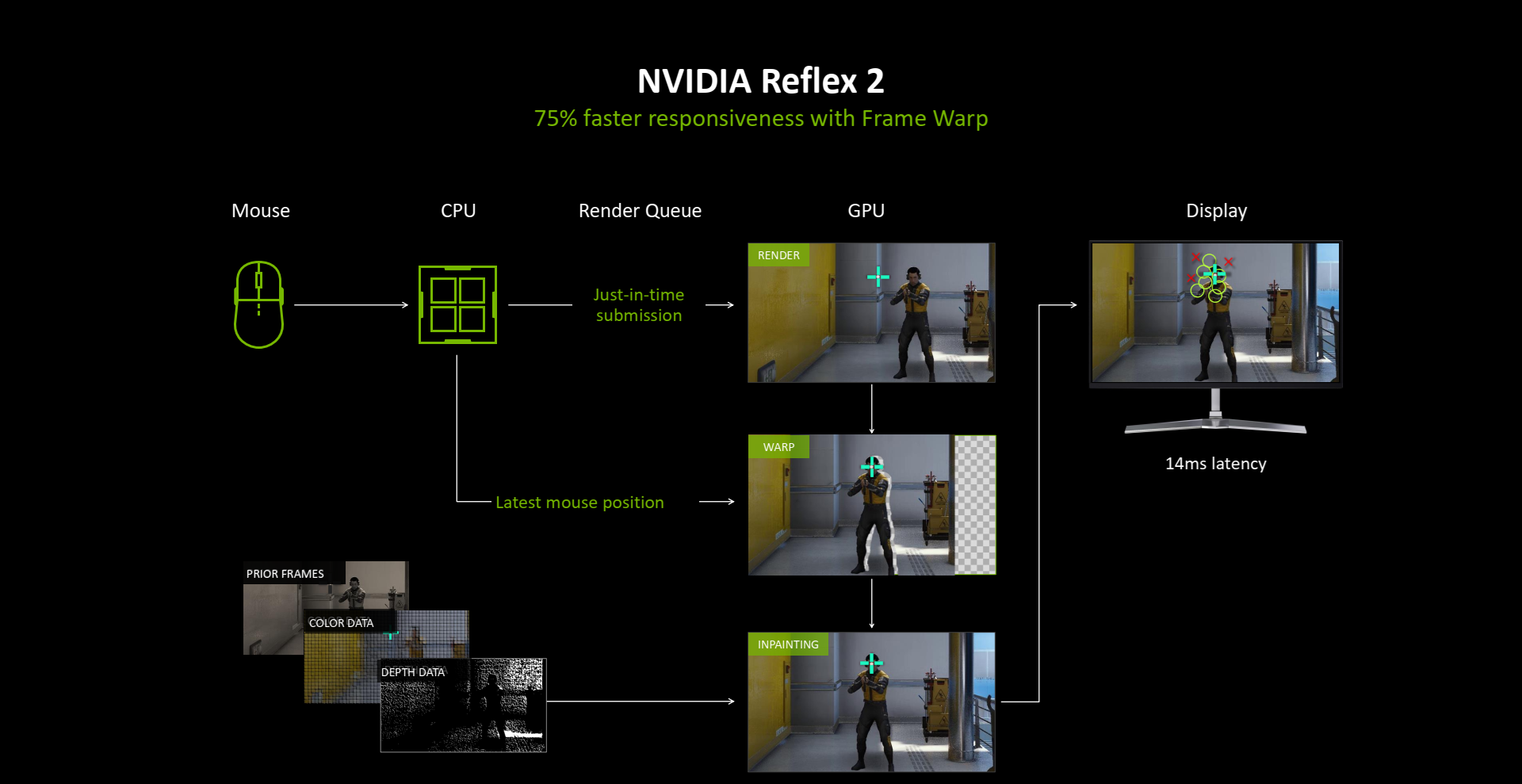
It is probably clear that only some changes can be reflected in such a modified image, not anything. As with frame generation, Reflex 2 can’t know about things that the game knows should happen at a given moment but that haven’t yet been seen in the frame available to the Reflex 2 feature (but here the limitations are harsher then for frame generation, because Reflex 2 can’t look at the next frame for reference). So the latency reduction achieved by Frame Warp is just partial, it doesn’t necessarily apply to everything that is displayed on the screen.
Reflex 2 with this Frame Warp feature should apparently only work without generating frames for the moment. The intended use of this feature is for competitive gaming, it probably has limited usefulness outside of eSports (if you’re playing in single-player, extremely suppressed latencies probably aren’t a big deal for you).
„AI“ textures, materials and lighting
Nvidia wants to use the mentioned Neural Shaders for various software technologies for games. Among them is the Neural Texture Compression technique – the application of a neural network to the compression and presumably also the decompression process of textures, which is supposed to bring a slightly better compression ratio compared to the commonly used formats that are used for texture compression in games now. Experiments with such formats have already been published (not just by Nvidia), but it may take some time before these techniques make it into any games.
Next, Nvidia mentions the Neural Radiance Cache technique, where inference via a neural network is used to speed up the lighting calculation (presumably by approximating and caching information, which will be faster than a full calculation despite using a neural network). Rendering with Neural Radiance Cache is supposed to skip the analysis of a significant portion of the light rays, the question of course is how noticeable an effect this will have on quality.
Of a similar nature are the RTX Skin and Neural Materials techniques. Here too, a neural network is to be used to approximate certain qualities and characteristics of materials. In this role, a simple neural network is intended to replace more complex simulations of such materials, such as the penetration of light under the surface of skin.

RTX 5000 coming to market this week
You can already partially see how it all works in practice in the reviews of Blackwell cards. At HWCooling we tested a GeForce RTX 5090 Founders Edition directly from Nvidia. This card will become available for purchase on January 30, which should also be the date when the significantly cheaper GeForce RTX 5080 becomes available. We discussed the specs of all the cards here:
- Read more: GeForce RTX 5090, RTX 5080, RTX 5070 Ti and RTX 5070 in detail
- Read more: Nvidia introduces mobile GeForce RTX 5000: Blackwell for laptops
Sources: Nvidia
English translation and edit by Jozef Dudáš
⠀
⠀