


With the launch of the Radeon RX 9060 XT, AMD announced a second-half upgrade to its FSR suite, codenamed Project Redstone. Although the official debut is slated for December 10, we’ve already had an early look thanks to enhanced ray-traced reflection reconstruction shipped with Call of Duty: Black Ops 7. In this preview, we assess the impact on image quality and benchmark performance on the Radeon RX 9060 XT and RX 9070 XT.
In June, with the launch of the Radeon RX 9060 XT, AMD announced a major update to its FSR4 technology, codenamed Project Redstone, for the second half of 2025. To achieve higher image quality and performance, it is supposed to utilize machine learning and AI acceleration units found in the latest Radeon RX 9000 series models.
AMD has already announced it will reveal details about FSR Redstone on December 10th. It is set to include multiple technologies. The first one we can get acquainted with in advance is Ray Regeneration, designed for higher-quality image reconstruction in effects utilizing ray tracing.

Ray Regeneration appears to be an alternative to Nvidia’s Ray Reconstruction technology. Setting aside quality and performance impact for now, the implementation in Call of Duty: Black Ops 7 already reveals one crucial difference compared to Nvidia’s tech. Nvidia’s Ray Reconstruction is part of the DLSS technology bundle and works in conjunction with it, being tightly integrated into the DLSS pipeline, whereas AMD’s Ray Regeneration can be toggled independently of which upscaling method is chosen.
The first game to offer Ray Regeneration is Call of Duty: Black Ops 7. Since the official unveiling of the FSR Redstone package is still pending, AMD hasn’t shared any details on how Ray Regeneration works or how it’s implemented in the game.
The only effect for which the game utilizes ray tracing is reflections. Surprisingly, ray tracing only functions in the multiplayer game mode. In the cooperative campaign, setting ray tracing for reflection quality has no effect, and the game only uses screen space reflections. Yet, it’s arguably in the campaign where you’d appreciate them more than in multiplayer, where enabling ray-traced reflections has a significant performance impact.
There are already numerous tests online conducted on Radeon RX 9070 XT cards. These often mention that performance doesn’t differ when using the default denoising algorithm versus Ray Regeneration. However, it depends more on the settings. On the less powerful Radeon RX 9060 XT, I achieved different results with most settings. Performance with Ray Regeneration was measurably lower than with the default denoising algorithm.
For the tests, we used the recently reviewed pair of Radeon RX 9060 XT Gaming OC Ice and RX 9070 XT Gaming OC Ice in the white Ice edition, which Gigabyte has newly added to its lineup.


Here, for example, are the results for the Radeon RX 9060 XT with global detail settings on Extreme at 1920 × 1080 resolution. Even with Ray Tracing Reflections on the lower “Low” quality setting, the average frame rate drops from 158 to 63 frames per second, accompanied by worse reflection denoising quality. After enabling Ray Regeneration, the average frame rate dropped to 49 fps. And with reflection quality on High, the result was even worse. With maximum reflection and denoising quality, we’re down to just 38.5 frames per second. That’s no longer comfortable for playing, and you can’t do without FSR 4.

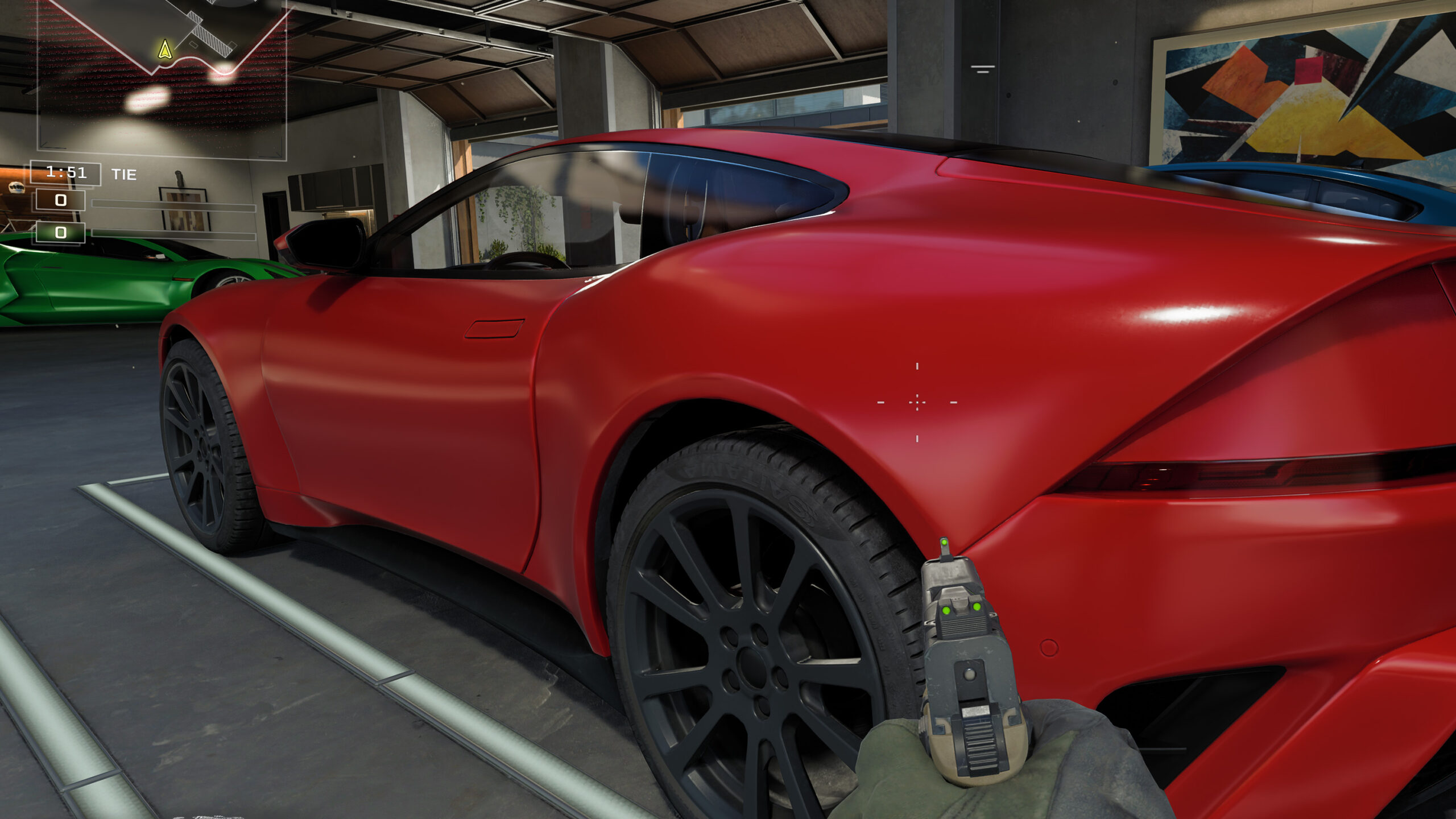
In still images, Ray Regeneration’s benefits aren’t as obvious as the improvement to reflections when you’re moving. The next set of images compares three modes: classic screen-space reflections (SSR), ray tracing on Radeon with the default noise filtering (denoiser), and Ray Regeneration. In the first screenshot, however, you can see the reflections don’t line up exactly with the structure that extends into the water.


RT Off (SSR High) | RT High + RT Denoiser Default | RT High + RT Ray Regeneration
In the next set, the camera is moving downward. You can see that as the sky and buildings slide off the screen, they also disappear from the water’s reflection. When the buildings fade out of the reflection, it looks very unnatural. With screen-space reflections (SSR), their reflections are replaced by vague smudges, whereas with ray tracing the sky and buildings stay visible in the water.
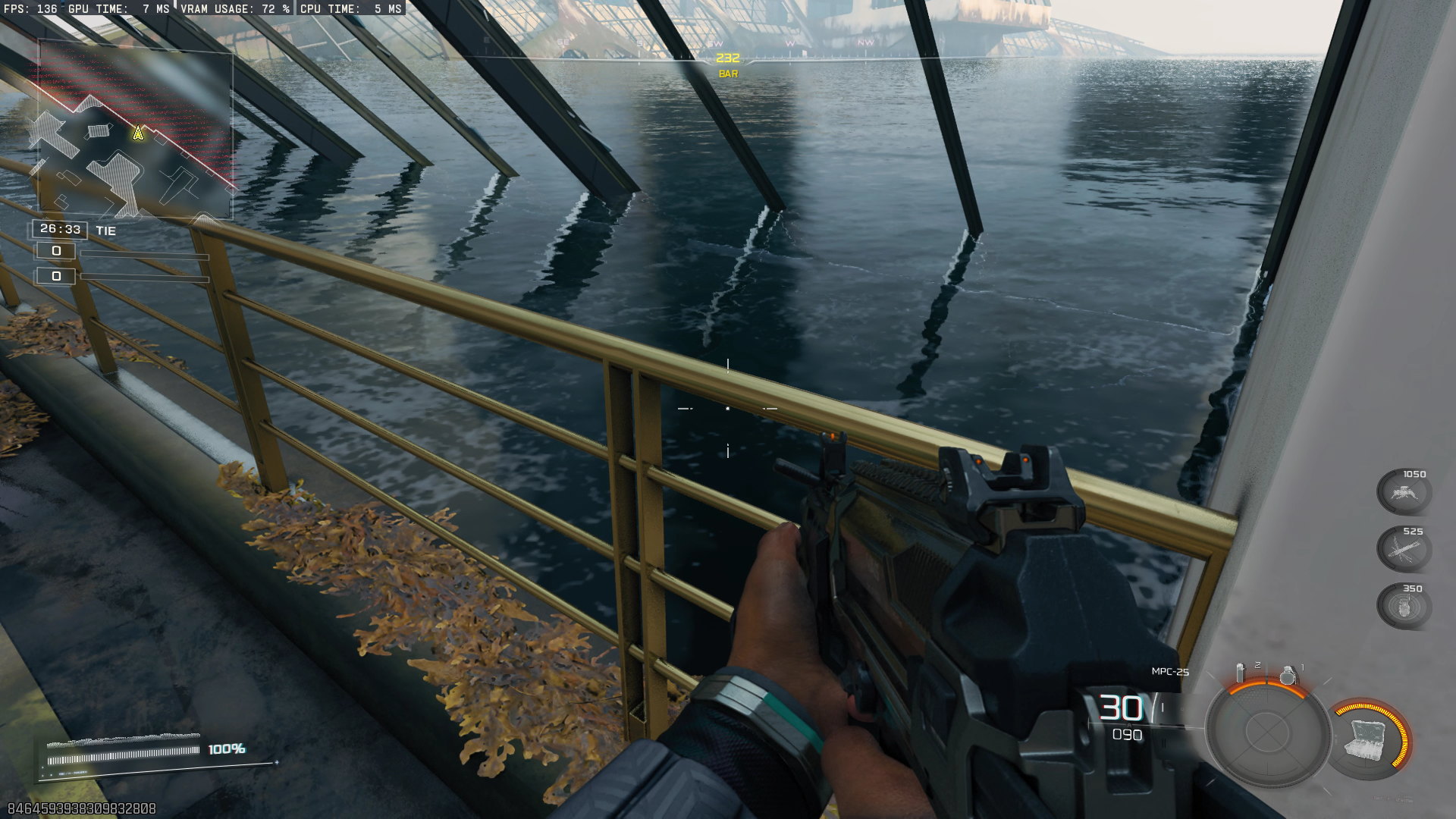
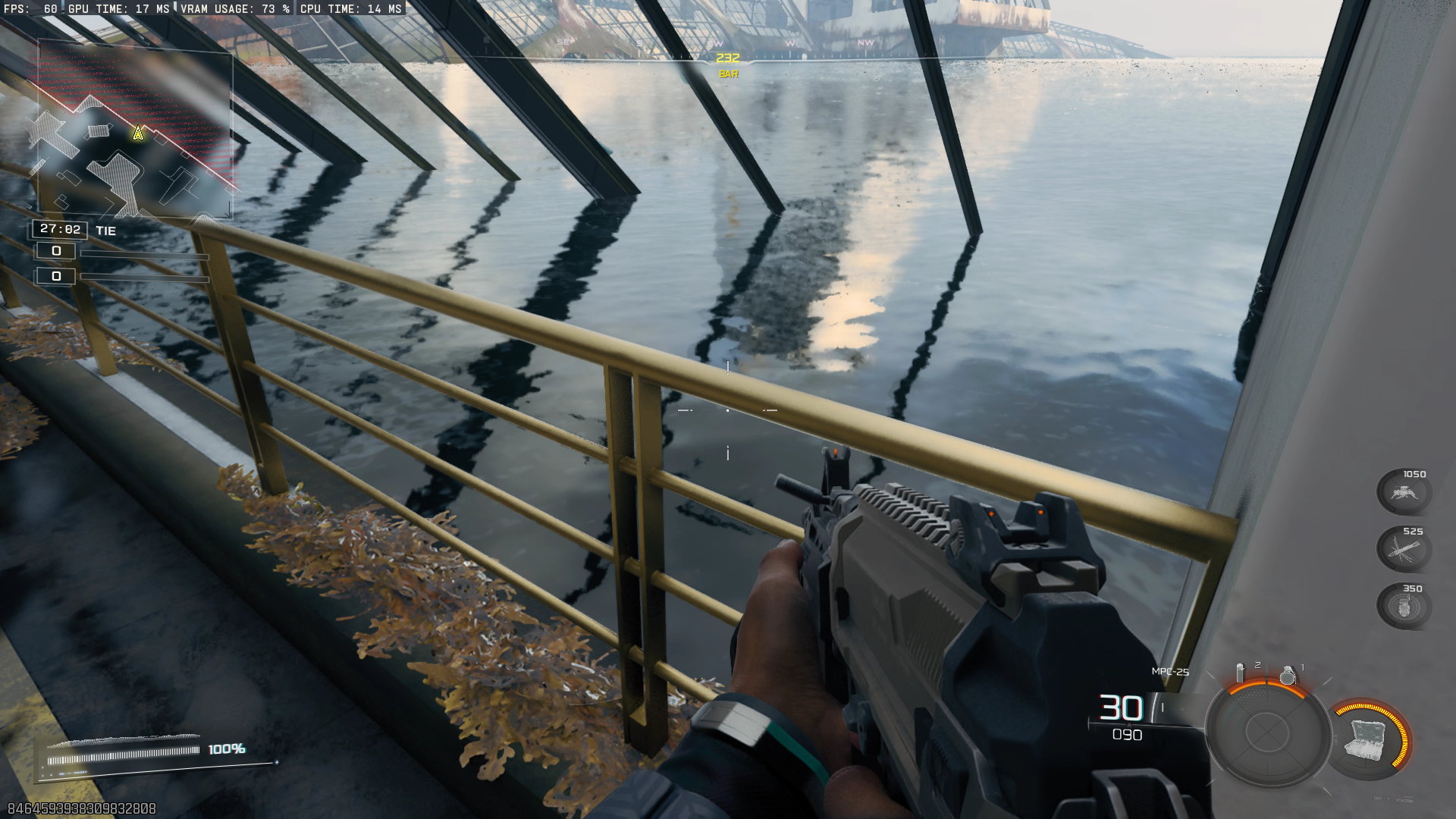

RT Off (SSR High) | RT High + RT Denoiser Default | RT High + RT Ray Regeneration
With the denoiser Default, a static frame can look better on some materials, showing more detail. Its big drawback is that when a reflection gets occluded and then revealed again, the affected areas lose detail and only snap back as more samples accumulate. Instead of a crisp reflection, the previously covered parts show a blurry patch. In motion, you can see this in the following video: in the bottom half with default Denoiser, once the movement stops, the reflection on the water surface gradually sharpens as more samples are gathered. With Ray Regeneration, a similar issue appears only in a thin strip around the weapon.
The footage is slowed from 120 to 30 fps, and the view is a 2× zoomed crop—mainly to mitigate YouTube’s compression. Even on a 1920 × 1080 monitor, set playback quality to 4K; otherwise, aggressive lossy compression will wipe out most of the fine detail.
RT Reflections Off, RT Reflections Low, RT Reflections High
Další sada snímků ukazuje srovnání kvality odrazů bez ray tracingu, s ray tracingem na nízkých detailech a s ray tracingem na maximálním nastavením high. Na obou nastaveních ray tracingu je ještě srovnání výchozího filtru pro odšumování (Ray Tracing Denoiser: Default) s filtrem FSR Ray Regeneration (Ray Tracing Denoiser: FSR Ray Regeneration).
Ray Tracing Reflections Off | Ray Tracing Reflections High + Ray Regeneration
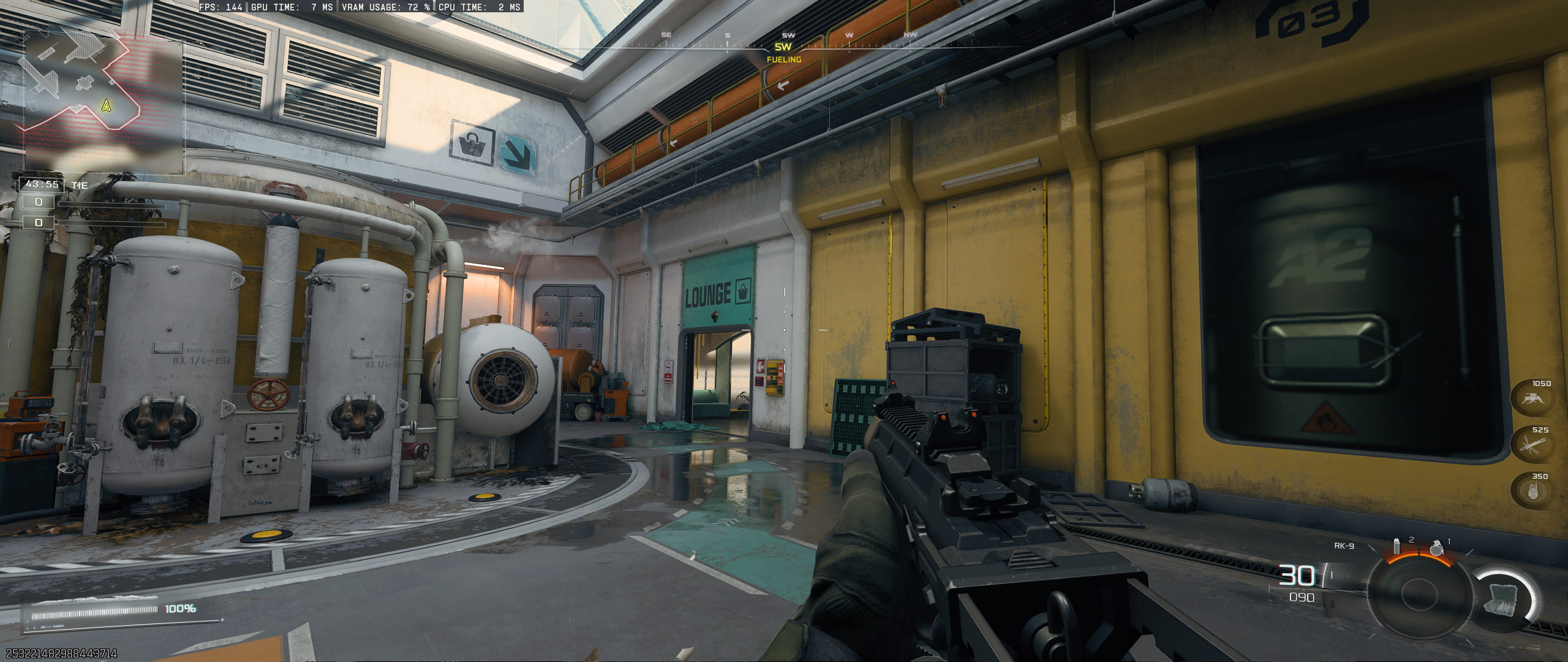

Ray Tracing Reflections Off (full resolution) | Ray Tracing Reflections High + Ray Regeneration (full resolution)
Ray Tracing Reflections Low + Denoiser Ray Regeneration | Ray Tracing Reflections High + Denoiser Ray Regeneration
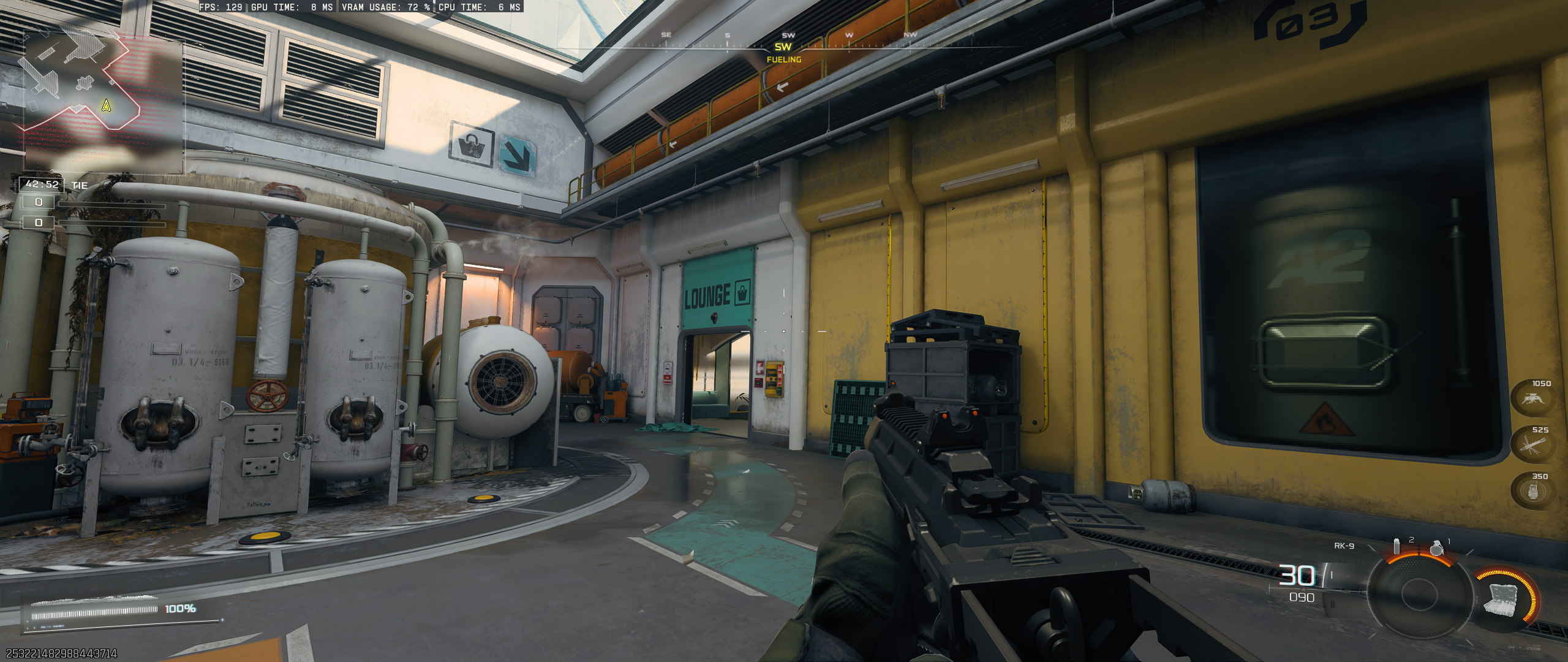
RT Reflections Low + Ray Regeneration (full resolution) | RT Reflections High + Ray Regeneration (full resolution)
Ray Tracing Reflections Low + Denoiser Default | Ray Tracing Reflections Low + Denoiser Ray Regeneration

RT Reflections Low + Default (full resolution) | RT Reflections low + Ray Regeneration (full resolution)
Ray Tracing Reflections High + Denoiser Default | Ray Tracing Reflections High + Denoiser Ray Regeneration
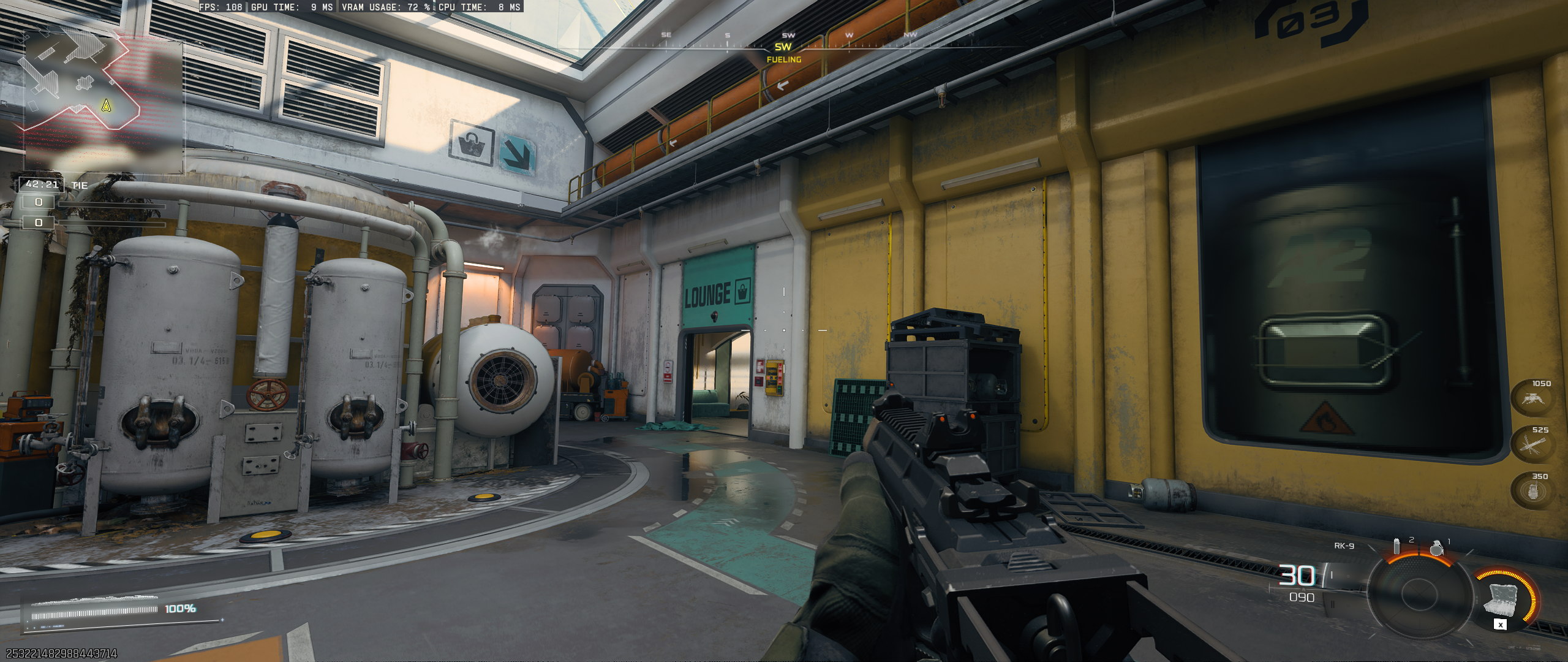
RT Reflections High + Default (full resolution) | RT Reflections High + Ray Regeneration (full resolution)
⠀
⠀



interesting, when I check benchmarks on youtube I see people running RT high 1080p at Extreme in high 50s with this setup. That must be because they enable upscaling with FSR4 and that just upscales instead of creating true 1080p frames.