


We owe you the second part of the tests for Zephyrus Duo. In addition to encryption, encoding, tests of memory and SSDs, this article provides detailed performance evaluation under Nvidia OptiX interface, display measurements, and most importantly, an in-depth analysis of operational characteristics. Heating, power and clock management are captured for the first time in detailed flowcharts across all modes (Turbo, Performance and Silent).
Blender – CPU and GPU comparison
We are introducing a new type of test in which we want to show you the differences between CPU and GPU rendering and at the same time take a closer look at thermal management, clock speed and consumption in practice and not just maximum or average values as in the previous sections.
So, we compare the run of the BMW test in the latest version of Blender, where in addition to the classic CPU and GPU render using CUDA, we also have the opportunity to use the new Nvidia OptiX, which uses new hardware resources of RTX graphics cards. While CUDA works with shaders, OptiX also uses RT cores and tensor cores for acceleration. Such a more complex involvement of computing units brings higher performance and efficiency is at a better level. At the same time, the application support is already quite decent and advanced. For an overview of the editors supported by the Optix API, see the Nvidia website. Nvidia is serious about this interface and has been developing “studio” drivers for some time, in addition to game drivers which are better and faster optimized for changes in supported applications.

In the first graph, you’re looking at the progress of the CPU clock speed during rendering. The classic CPU mode starts somewhere around 4500 MHz and decreases towards 3700 MHz which is expected due to temperatures and power limitations. With CUDA, you can see a large drop to 2200 MHz, but then a return to 4.5 GHz+. But the most interesting is Optix, where there is practically no drop in power and the clock speed is kept between 4.5 – 4.7 GHz.

The CPU Package consumption more or less corresponds to what you saw in this clock speed. CPU render starts with a high value and then decreases as we are limited by power/temperature and power reduction protects the processor from damage. In CUDA mode, the decrease is repeated, which also meant a reduction in clock speed. In the process, however, there is a difference of 30 W. However, OptiX is somewhere completely different, with 40 W consumption is many times lower than the other two modes.
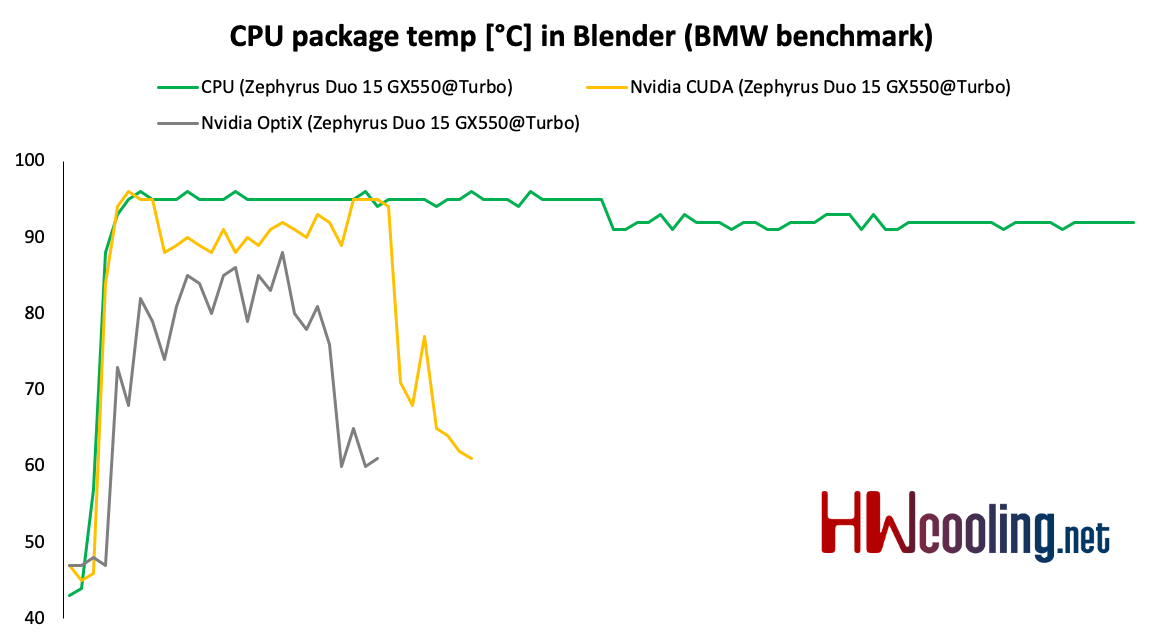
Processor temperatures will be based on the previous two graphs and thus clock and consumption. The CPU thus stays above 90 degrees with slight drops. Using CUDA, the CPU still works, but not so much and lower temperatures below 90 degrees could be expected. However, not really an extra large difference can be seen. Conversely, in OptiX mode, temperatures are again significantly lower than in the other two. Here, however, I think that the values are slightly distorted, as the cooling system will be overheated by the graphics, which will be reflected in the higher temperature of the processor, as their cooling is interconnected.
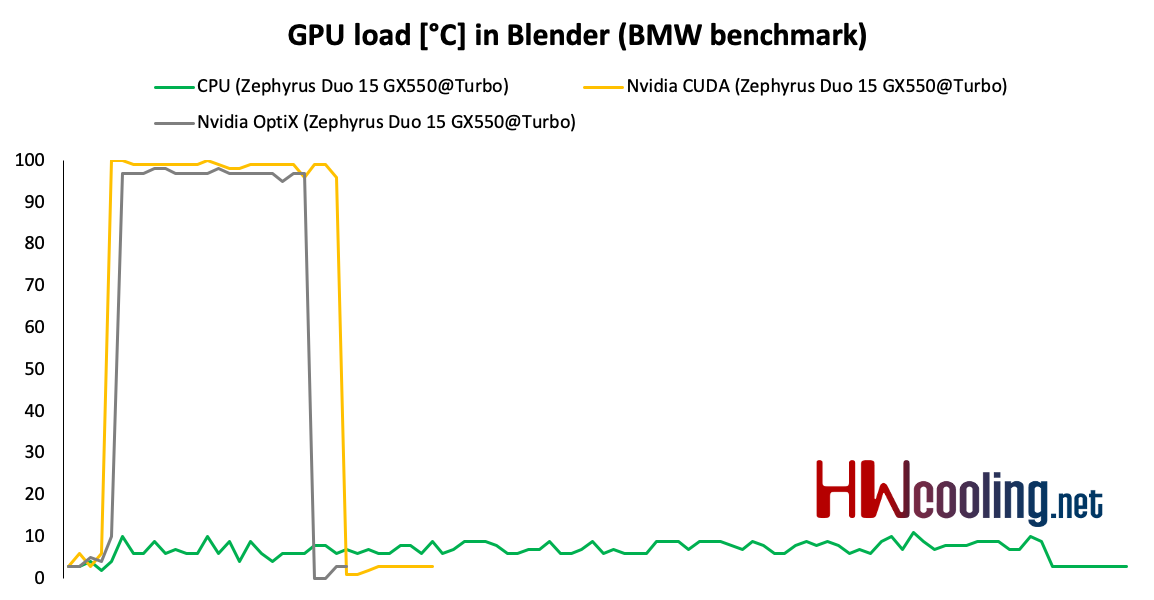
The load on the graphics in CPU mode is practically minimal, on the contrary, in CUDA and OptiX you can see the full load.

The load also corresponds to the clock speed, where it is interesting that with the OptiX they climbed up to almost 2 GHz, which is really unprecedented in notebooks, especially in the Max-Q versions. In CUDA we are some 200 MHz lower and the CPU mode is, of course, at a minimum as the GPU is not used.
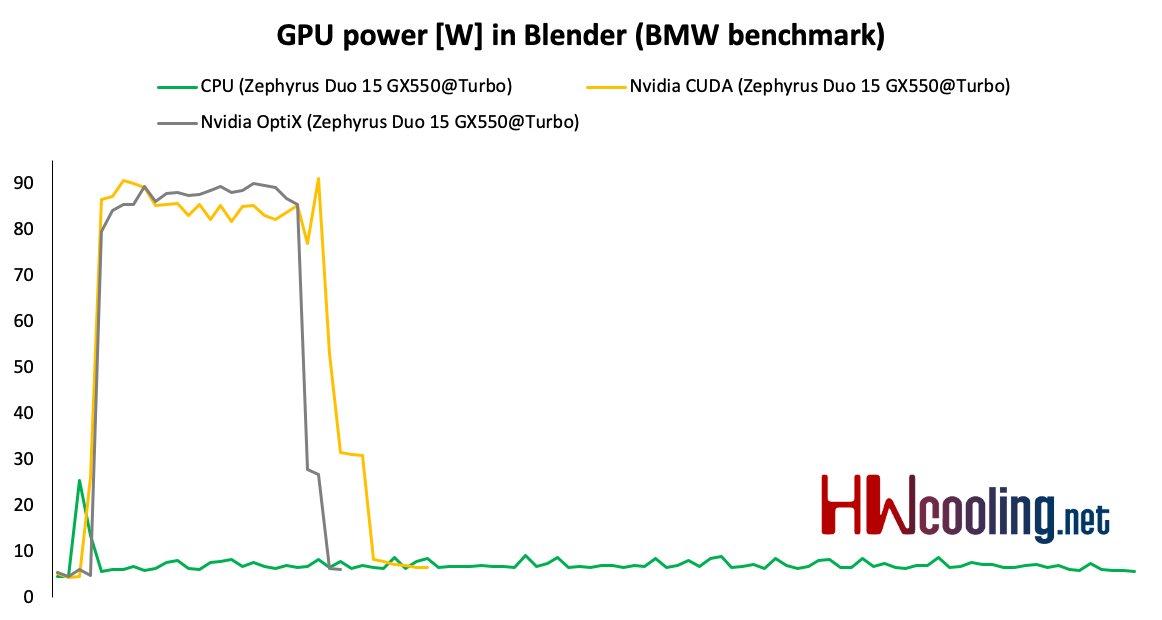
The consumption of the graphics card copies the load and clock graphs, so the CUDA and OptiX modes take around 90 W and in the CPU mode it takes practically nothing.

Finally, a look at GPU temperatures. With the CPU mode, the effect of influencing the second component by uniform cooling is again present. A large part of the chip works in CUDA and therefore the temperature rises to 75 degrees. On the contrary, with OptiX it does not reach even 65 °C and the temperature curve itself is less steep. This is logical, as a smaller part of the die is used, which does not create such a load.
Most important, however, is the final time, where OptiX clearly won, which is almost 20 seconds faster than CUDA, which is a 43% increase in speed. The CPU mode is an order of magnitude slower, compared to OptiX up to 5× and compared to CUDA 3.5×.





