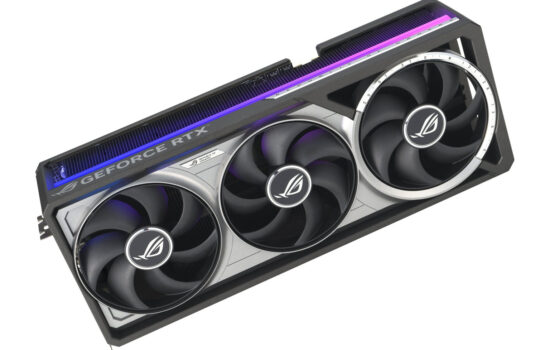
Nvidia skipped the RTX 4050 in its GeForce RTX 40 lineup, leaving only the aging RTX 3060 and 3050 as budget options. The new GeForce RTX 5050 replaces both and adds modern features and standards. It’s the weakest—but also the cheapest—Blackwell-architecture card and can run every game at lower resolutions without without major sacrifices in image quality. That said, its price still makes the RTX 5060 the more attractive choice.
Fan behavior, noise level
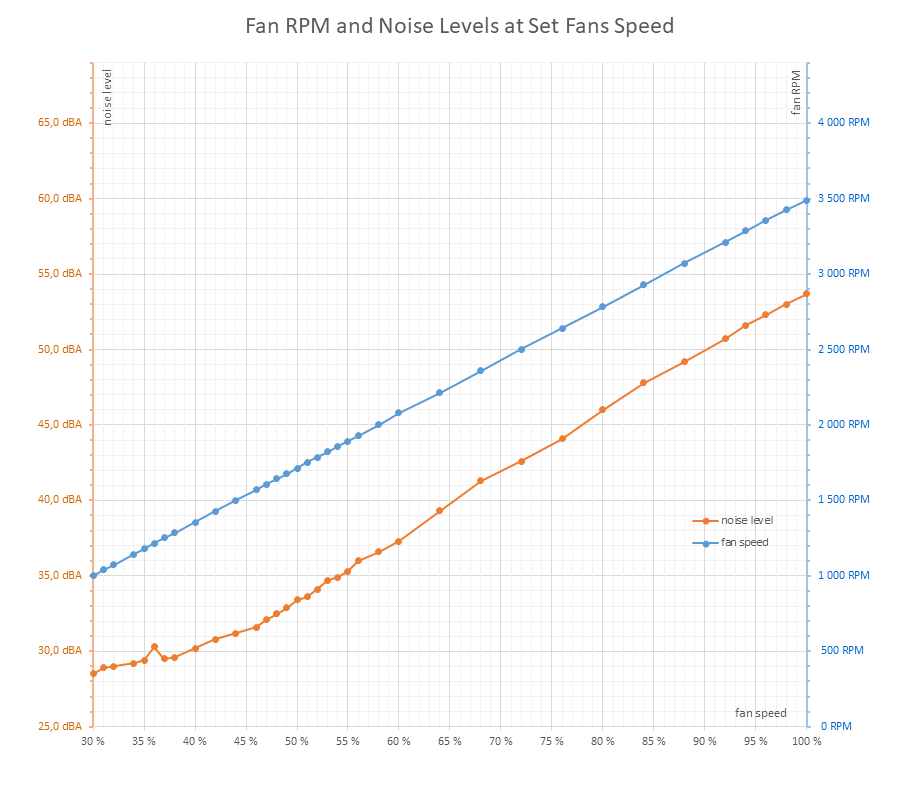
The fan speeds can be adjusted in a range from 30–100%, which corresponds to fan RPMs between approximately 1000–3490 RPM (28.5–53.7 dBA). All fans are connected via a splitter to a single header.
At minimum RPMs, the noise level shown on the meter was 28.5 dBA, which is below the device’s measurable range.
Under load, the fan speeds may seem high, but the impellers are low-profile and have a small diameter, resulting in airflow comparable to that of higher-performance cards with slower fans. As a result, despite the higher RPMs, the card remains very quiet under load, staying in the lower end of its operating range even when warmed up.
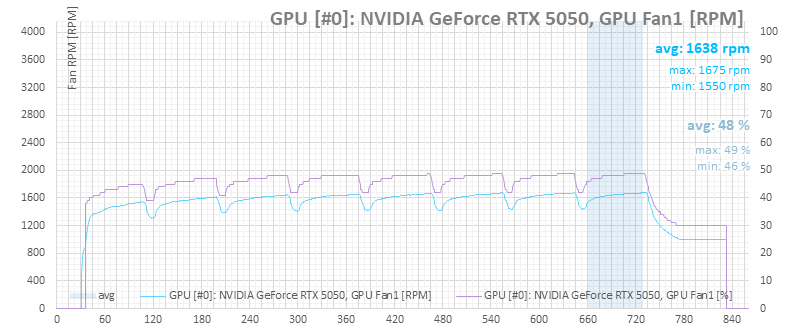
The fan RPMs on a warmed-up card vary slightly depending on the test and GPU load, ranging between 1640–1724 RPM, which translates to a noise level of 32.5–33.4 dBA. It’s not completely silent, but it is exceptionally quiet. During nighttime silence, it may be audible, but under normal daytime conditions, it’s barely perceptible. In most builds, the CPU cooler will likely be the louder component.
Cyberpunk 2077, RT Medium, 2560 × 1440
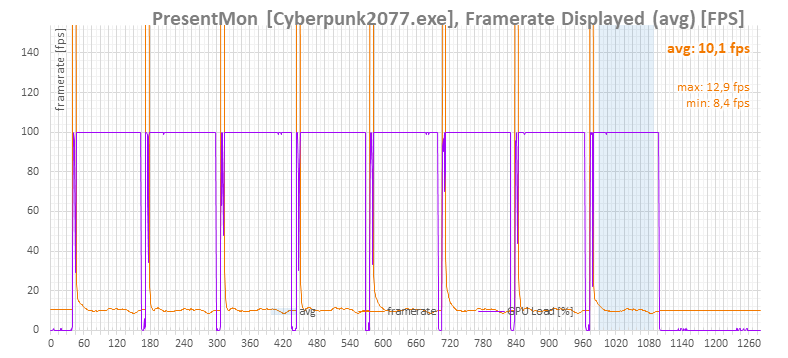
For testing the operational characteristics of higher-end graphics cards, I typically use Cyberpunk 2077 with RT Medium settings at 3840 × 2160 resolution. However, for the budget RTX 5050, this setup is too demanding, resulting in an average frame rate of just 10 fps.
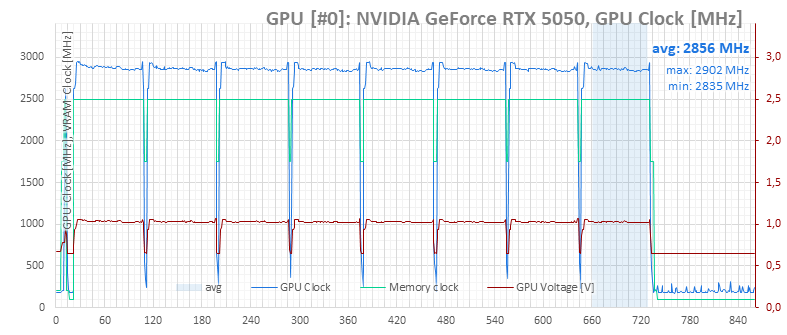
Therefore, we’ll primarily focus on a lower resolution of 2560 × 1440. The benchmark consists of eight consecutive runs. The graph always shows the last run, from which the average values for the warmed-up card are calculated.
At the lower resolution, the GPU is fully utilized and the card operates at its power limit. Even so, the average 26 fps is not suitable for smooth gameplay, so even at 2560 × 1440, you’ll need to rely on DLSS and possibly lower detail settings.

The warmed-up GPU clock speed ranges from 2835 to 2902 MHz, with an average of 2856 MHz.
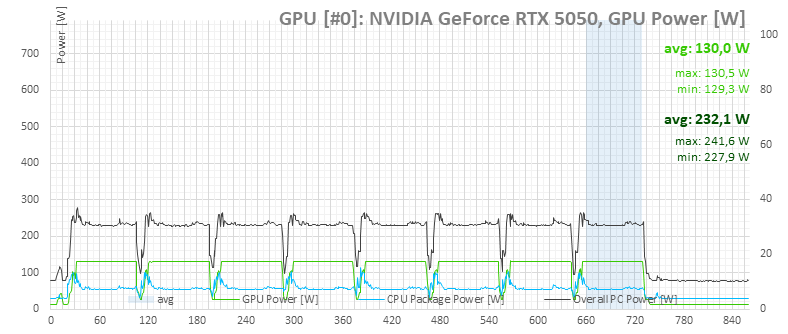
According to the power monitoring (light green data line), the card maintains a power draw around 130 W, matching the power limit.
The darker color in the graph represents the total power consumption of the PC, measured with a UT71E multimeter. Under load, the average power consumption of the system was just 232.1 W.
The average GPU temperature reached a maximum of 67.0 °C, while memory peaked at 68 °C. The fans could likely run a bit slower.
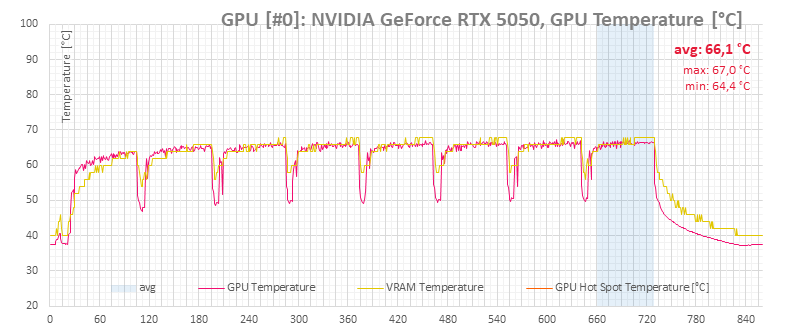
In this test, fan speeds peaked at 1675 RPM under load.
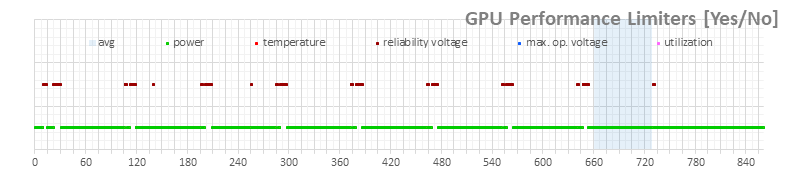
Monitoring data indicates that under load, GPU Boost hits the power limit.</p
Cyberpunk 2077, RT Medium, 3840 × 2160
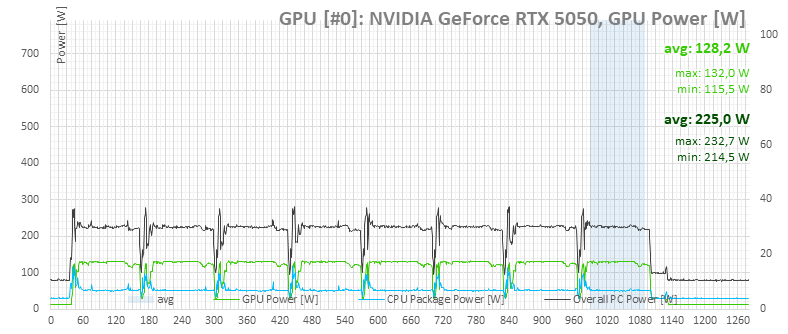
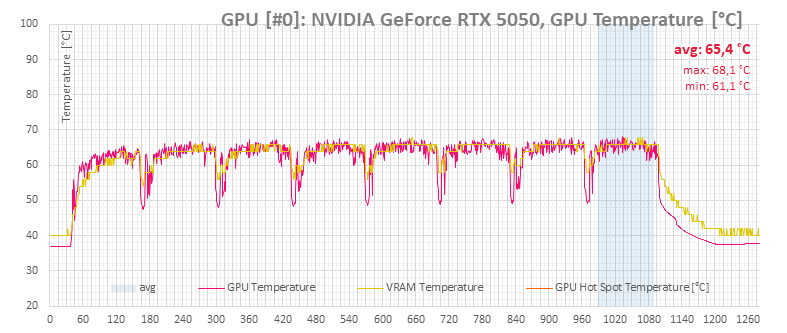
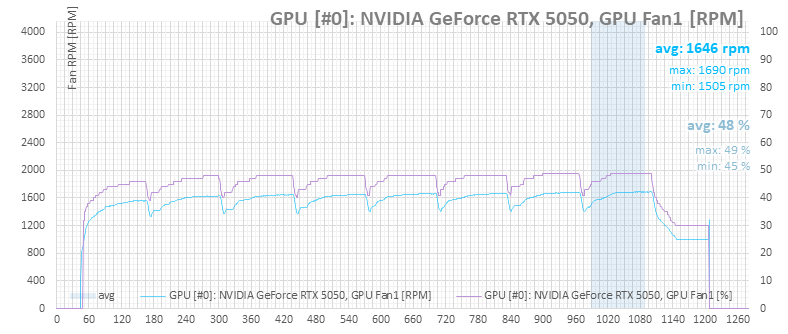
Additionally, here’s the usual benchmark suite from Cyberpunk 2077 with RT Medium settings at 3840 × 2160 resolution, commonly used in tests of more powerful cards. Again, it’s eight consecutive runs, though this test took significantly longer to complete.
Monitoring shows 100% GPU usage (purple in the graph below), but since the card doesn’t stick to its power limit, the chip likely isn’t fully loaded and the benchmark doesn’t run as it should—instead of 68 seconds, it stretches beyond 100 seconds due to low frame rates.
This is also evident from the higher clocks; the warmed-up GPU clock ranges from 2857 to 2917 MHz, with an average of 2895 MHz.
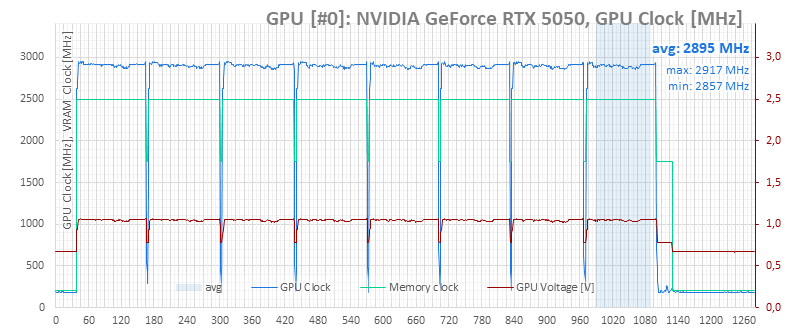
The light green line shows that the card no longer sustains its power limit, with dips visible—particularly at the end of the test, power consumption drops from 130 W to 115 W. Total system power also drops to 225 W.
The average temperature is slightly lower, with similar peak values.
Fan RPMs remain comparable.
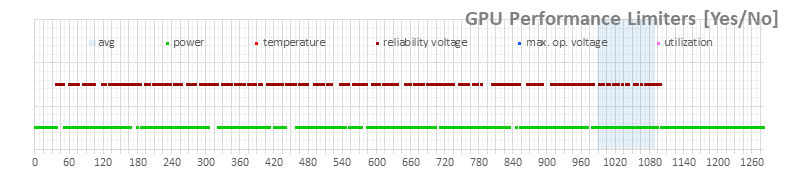
The GPU Boost limits indicate the card isn’t just hitting the power limit; the more significant factor is the reliability voltage limit—the card reaches the voltage ceiling for sustained load on the voltage/clock curve.
⠀