


The Gigabyte GeForce RTX 5070 Ti AERO OC 16G targets gamers moving away from flashy RGB setups and pitch-black components, opting instead for an all-white aesthetic. Its elegant design and massive cooler take it clear that it’s built for demanding gamers who want more than just the best price-to-performance. Beyond its unconventional look, it also delivers slightly higher performance thanks to factory overclocking and excellent operational characteristics.
The RTX 50 series GeForce cards feature a redesigned clock speed and fan control system. Current overclocking utilities no longer offer the option to set a temperature limit, and the temperature limit value is also no longer displayed in applications like GPU-Z or HWiNFO. While the “Thermal Limit” indicator still appears in boost-related diagnostics, it no longer seems to function as an actual indicator.
I discovered this while trying to manually find the temperature limit, which is no longer shown in GPU-Z. So, let’s tweak the fan control settings and get to it.
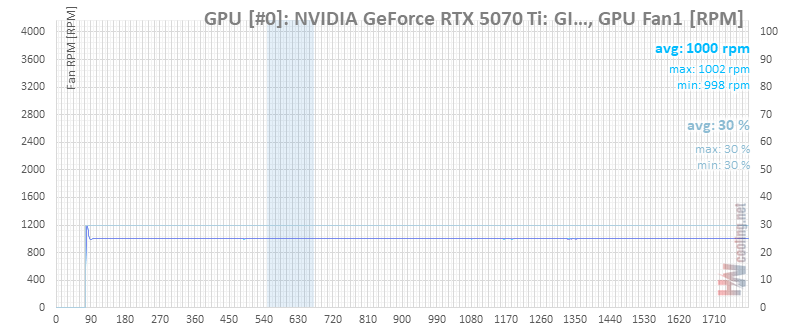
First, I manually set the fan speed to 30%, the lowest adjustable level, which corresponds to 1,000 RPM. At the same time, I increased the power limit to the maximum 350 W.
Then, I launched MSI Kombustor and waited. After about nine minutes, it seemed like the temperature was stabilizing at around 80°C. Power consumption remained at its maximum, and the card’s clock speeds didn’t drop significantly. So, I covered the front and top of the case, and around the 1,100-second mark, I even blocked the rear fan. Yet, it still seemed like that wouldn’t be enough.

The thermal limit still didn’t activate, so around the 1,300-second mark, I ran Cinebench to add some extra heat from the processor inside the case.
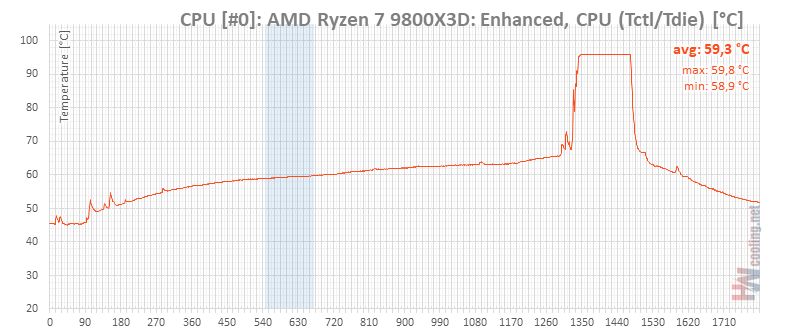
I hadn’t noticed that the card’s power consumption had already started to drop slightly. The processor probably sped up the process a bit. However, the GPU’s performance was now clearly being throttled by the GPU Boost control. You can see it on light green line showing board power consumption.

This is also evident in the GPU clock speed and voltage. Somewhere between 87 and 88°C, the GPU clock started to drop as the control system limited power consumption.

However, the GPU Boost limiter indicators still suggest that the card has been throttled solely by the power limit the entire time.

We’ll see if Nvidia or the developers of monitoring utilities do anything about this. As for this Gigabyte card review, we can conclude that in a reasonably ventilated case, the card can keep its temperatures in check even at minimum fan speeds. At 1,000 RPM and 31 dBA, the cooler is only audible from a few dozen centimeters away.
⠀


