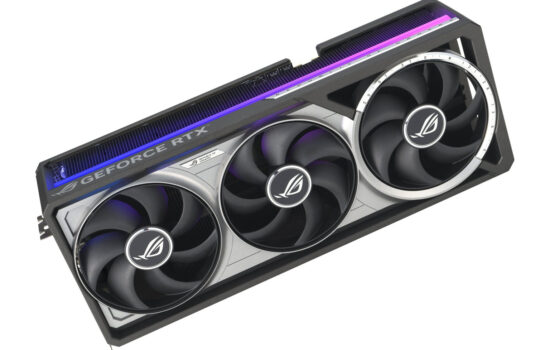
MSI’s Gaming series cards no longer sit at the top of the company’s lineup—they’ve now moved into the mid-range segment. Still, they offer an excellent mix of features and performance. A card like the GeForce RTX 5070 is likely to be popular among gamers, as it should handle sub-4K gaming comfortably for the next few years and remains relatively affordable. Let’s see how the RTX 5070 12G Gaming Trio OC compares to other models we’ve already tested.
A detailed description of the new technologies brought by Nvidia’s new graphics cards has been compiled by Jan Olšan in the article Blackwell: GeForce RTX 5000 architecture and innovations. It introduces the individual graphics chips Nvidia is using in the new cards, the new GDDR7 memory type, and also covers changes in cache memory, GPU compute units, updates to shaders and tensor cores, as well as improved compute units for ray tracing. The new generation of GeForce also brings support for new standards such as DisplayPort 2.1b and PCI Express 5.0.
With the new generation of cards, DLSS capabilities are evolving as well. It now supports Multi Frame Generation, which allows the generation of up to three intermediate frames, and introduces Nvidia Reflex 2, the second generation of its latency-reduction technology. This includes Frame Warp, which adjusts object and camera motion in rendered frames based on the player’s most recent input device movement data received just before the already rendered frame is displayed. A more detailed explanation can be found in the aforementioned article.
The GeForce RTX 5070 uses Nvidia’s third released chip based on the Blackwell architecture. It carries the code name GB205 and comes equipped with 6144 stream processors, 192 texture units, and 80 raster units. Unlike higher-end models with a 256-bit bus and 16 GB memory, it features a narrowed 192-bit memory bus, resulting in a reduced total memory capacity of 12 GB.
For a detailed comparison of RTX 5070 specifications with similar GeForce models, refer to the table below. We now turn our attention to the Gigabyte card itself.
| RTX 5070 Ti | RTX 5070 | RTX 4070 Ti Super | RTX 4070 Ti | RTX 4070 | |
| Shader cores | Blackwell | Blackwell | Ada Lovelace | Ada Lovelace | Ada Lovelace |
| Nvidia CUDA cores (SP) | 8960 | 6144 | 8448 | 7680 | 5888 |
| RT cores | 133 TFLOPS | 94 TFLOPS | 102 TFLOPS | 93 TFLOPS | 67 TFLOPS |
| Tensor Cores | 1406 AI TOPS | 988 AI TOPS | 706 AI TOPS | 641 AI TOPS | 466 AI TOPS |
| Boost Clock | 2,45 GHz | 2,51 GHz | 2,61 GHz | 2,61 GHz | 2,48 GHz |
| Base Clock | 2,3 GHz | 2,16 GHz | 2,34 GHz | 2,31 GHz | 1,92 GHz |
| Memory | 16 GB GDDR7 | 12 GB GDDR7 | 16 GB GDDR6X | 12 GB GDDR6X | 12 GB GDDR6 12 GB GDDR6X |
| Memory Bus Width | 256-bit | 192-bit | 256-bit | 192-bit | 192-bit |
| Memory Bandwidth | 896 GB/s | 672 GB/s | 672 GB/s | 504 GB/s | 504 GB/s |
| Max. resolution | 4K at 480Hz or 8K at 120Hz with DSC | 4K at 480Hz or 8K at 120Hz with DSC | 4K při 240 Hz at 8K or 60 Hz with DSC, HDR | 4K at 240 Hz or 8K at 60 Hz with DSC, HDR | 4K at 240 Hz or 8K at 60 Hz with DSC, HDR |
| Standard Display Connectors | 3× DisplayPort, 1× HDMI | 3× DisplayPort, 1× HDMI | 3× DisplayPort, 1× HDMI | 3× DisplayPort, 1× HDMI | 3× DisplayPort, 1× HDMI |
| PCI Express | Gen 5 | Gen 5 | Gen 4 | Gen 4 | Gen 4 |
| Nvidia Encoder | 2× 9th gen. | 1× 9th gen. | 2× 8th gen. | 2× 8th gen. | 1× 8th gen. |
| Nvidia Decoder | 1× 6th gen. | 1× 6th gen. | 1× 5th gen. | 1× 5th gen. | 1× 5th gen. |
| length | by manufacturer | 242 mm | by manufacturer | by manufacturer | 244 mm |
| width | by manufacturer | 112 mm | by manufacturer | by manufacturer | 112 mm |
| height | by manufacturer | 2 slots | by manufacturer | by manufacturer | 2 slots |
| Total Graphics Power | 300 W | 250 W | 285 W | 285 W | 200 W |
| Supplementary Power Connectores | 2× 8pin PCIe (adapter) or 1× 300 W PCIe Gen 5 | 2× 8pin PCIe (adapter) or 1× 300 W PCIe Gen 5 | 2× 8pin PCIe (adapter) or 1× 300 W PCIe Gen 5 | 2× 8pin PCIe (adapter) or 1× 300 W PCIe Gen 5 | 2× 8pin PCIe (adapter) or 1× 300 W PCIe Gen 5 |
MSI GeForce RTX 5070 12G GAMING TRIO OC
In the past, Gaming series cards topped MSI’s lineup, but today they sit more in the middle, with other better-equipped models above them. Still, they offer a solid mix of features – an above-average cooler and good operating characteristics.
The card comes factory-overclocked. The advertised typical boost clock is raised from the reference 2497 MHz to 2610 MHz. Actual working clock speeds in games are nearly 200 MHz higher, depending on chip load and power consumption. The GPU clock behavior under load can be found in the chapters focused on operating characteristics. The GDDR7 memory runs at the standard 28 Gb/s.

In its class, it doesn’t offer a dual BIOS. However, I don’t consider this a drawback, as the card in its default settings behaves similarly to models with a dual BIOS in silent mode, so you likely won’t miss having a “Silent” switch. Only premium models fare significantly better in terms of noise levels.

The power limit is set to the reference 250 W, adjustable within a range of 175–280 W, which corresponds to -30% to +12%. In monitoring, the trio of fans is split between the fan 1 and fan 2 headers. The rear fan is connected to Fan 1, while the other two are on a splitter connected to Fan 2.


HWiNFO provides more data from the card than GPU-Z. Monitoring sensors available are visible in the included screenshot.

The packaging is simple. On the back of the box, the manufacturer highlights the features and technologies used in the card. Notable mentions include Stormforce fans with seven blades and a cooler featuring a nickel-plated copper base that cools both the GPU and memory. Core Pipes refer to heatpipes with a square cross-section at the base, which allows for better heat transfer from the copper base and between the heatpipes themselves. Lastly, there’s mention of a metal backplate with thermal pads and airflow cutouts.


Along with the basic accessories such as a manual and a standard power adapter, the package includes an adjustable support bracket for the card. It isn’t screw-mounted – by rotating a ring at the bottom, you can extend the top section, adjust it to the right height, and lock it in place by securing the ring.

⠀