


Many ASUS graphics cards let you remove the fan shroud without breaking the warranty seal. We did that last time with the ASUS Prime RTX 5070 and swapped its fans—noisier than usual at low speeds—for Arctic P12 Slim fans. However, standard 25 mm fans usually provide higher static pressure and can cool more quietly. Let’s see how the card performs with the top-of-the-line Noctua NF-A12x25 and its successor, the NF-A12x25 G2.
I’ve already tried several deshroud setups on the Asus TUF GeForce RTX 5070 Ti. So far, none of the replacements have meaningfully outperformed the stock fans. However, the ASUS Prime RTX 5070 isn’t as quiet out of the box as the TUF, so a fan swap makes more sense here.
I covered the operating characteristics of the Prime GeForce RTX 5070 in a review a few months ago. On the tested sample, one of the fans was noisier than the others, which made the card more audible than it could have been. It wasn’t completely silent even at minimum RPM. In short, it was an ideal candidate for fitting higher-quality fans.

However, the cooler’s dimensions don’t match standard case fan sizes very well. The card is fairly narrow and 30 cm long, which makes it too long for two 120 mm fans but not long enough for three. Three 92 mm fans would probably fit best, and we’ll be testing them in later articles as well.

The heatsink under the shroud is split into two fin stacks.

This makes it possible to mount two 120 mm fans so they cover most of the heatsink’s fin surface. That’s quite clear to see with the fans removed.
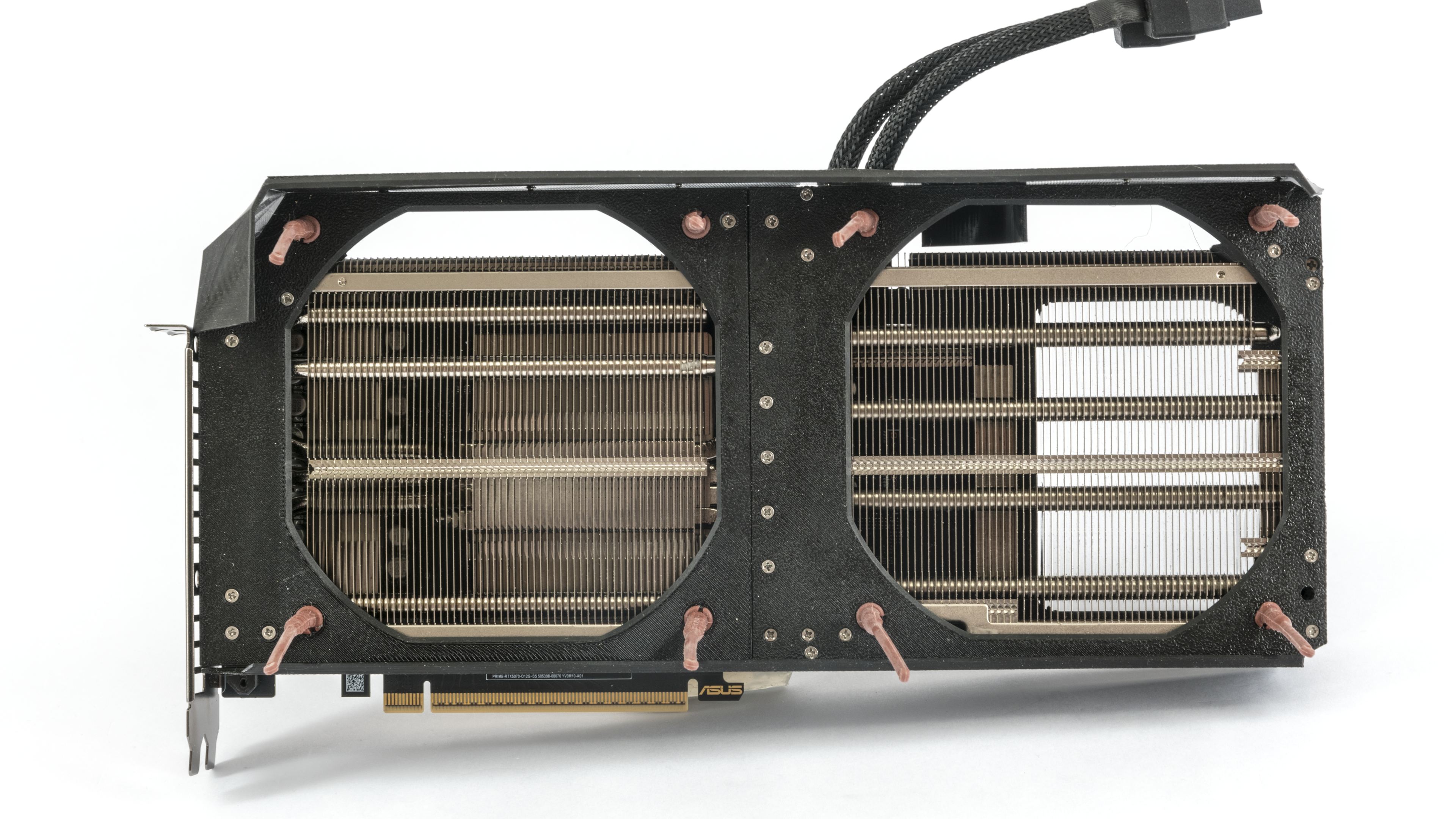

I’ve reworked the frame for the fans. It fits the heatsink and the card’s mounting holes better, and it’s more rigid. It’s made from ten pieces fastened with screws into plastic, but it’s still just a prototype, and I can already see a number of things I’d approach differently.


This is how it comes off the 3D printer in black PET-G. That’s probably fine for a prototype; for long-term use I’d definitely recommend a flame-retardant filament. In the photos below, it’s shown with first-generation Noctua NF-A12x15 fans.


Two 120 mm fans are wider than the stock triple-fan setup on the Asus Prime RTX 5070, so they overhang the sides of the card. As a result, some of the airflow will miss the heatsink. However, the overhang should help pull cool air under the card, and I also used it to direct airflow over the power connector.
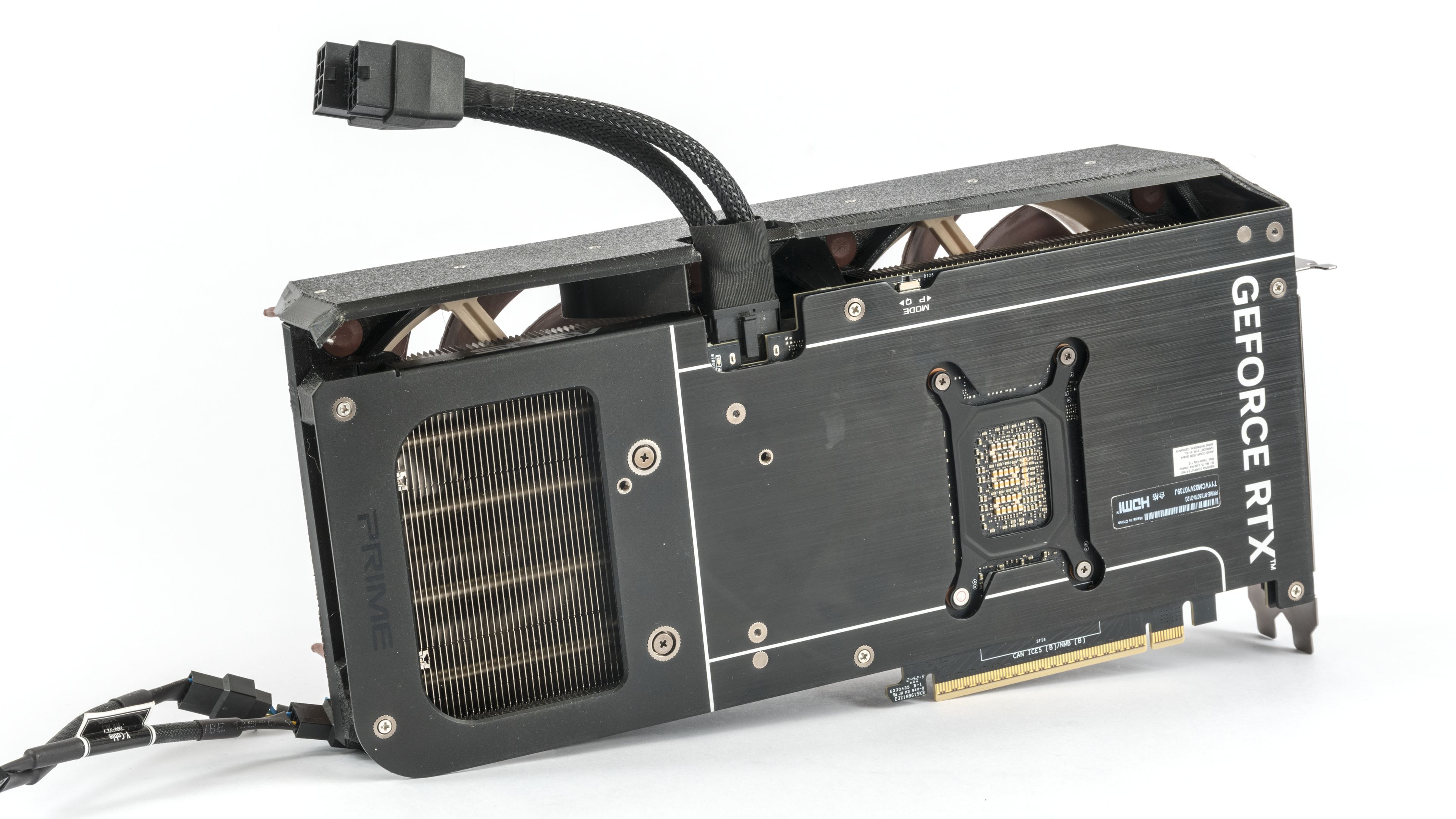
Another approach is to close off the opening under the fan to channel more air through the heatsink.
On the side facing the motherboard, the shroud sits very close to the fins and extends all the way down. There’s only a small gap at the bottom beneath the heatsink, so most of the cooler’s airflow should exit on the outer side of the card.

Last week, Noctua also sent me a set of second-generation fans, so we can test and compare both variants right away.


I fitted a rubber gasket under the fans to dampen vibrations and improve the seal between the heatsink and the fans. However, this probably won’t have as much impact on the results because the fan overhang isn’t sealed.

In the previous article, where I mounted a pair of low-profile fans from Arctic on the card, I only had anti-vibration fan mounts for 25 mm fans, so I had to add spacers. Noctua sells silicone pins that address this as well and are “compatible” with fan frames of all common thicknesses up to 25 mm.


First, we’ll look at the card’s cooling performance across the full fan-speed range with first-generation Noctua NF-A12x25 fans, and then with the new NF-A12x25 G2
⠀




I’m surprised that cheap Arctic slims are better at low noise levels than the regular Noctuas. Save the money, I guess.
Wouldn’t it be better to have the fans spinning in the opposite direction to avoid turbulence?
It wouldn’t be correct to say the P12 Slim is better than Noctua’s NF-A12x15. It’s more accurate to say that at low fan speeds, the differences in noise are so small you won’t hear a difference.
Note (as I pointed out in chapter three): at minimum RPM, all the fans are so quiet that their generated noise drops below the self-noise of my Class 2 sound level meter (CEM DT-8852). These sound level meters have a lower measurement limit of 30 dBA, and the fans’ noise drops below that even at a short microphone distance. That’s why the orange noise curve is flat at approx. 29 dBA the start, even though it should, strictly speaking, keep falling with lower RPM.
https://www.hwcooling.net/wp-content/uploads/2025/09/asus-prime-rtx-5070-deshroud-dual-noctua-nf-a12x25-g1-noise.png
Additionally, sound level meters typically have about ±1 dB(A) of measurement uncertainty (this one is ±1.4 dB(A)), so differences of roughly that size shouldn’t be given much weight.
In practice, it’s the same: at 500–600 RPM, the fans aren’t audible unless you put your ear very close to them. Above 30 dBA, the differences in noise levels start to grow and at higher speeds, Noctua pulls ahead. But if you’re replacing the fans on the graphics card with 120 mm ones, it’s probably to make the card quieter—not to run them at 1,700 RPM.
Generally speaking, at low fan speeds, the real-world gains from Noctua fans are negligible.
On the topic of counter-rotating fans and turbulences: with case fans that have a high-sided frame around the fan impeller and are spaced apart, it’s much less of an issue than with typical GPU fans, which sit in shroud very close together and have only a little or no rim around the impeller.
I think the overall design matters a lot. How else can we explain that while 2x P12 Slim on Asus Prime 5070 proved to be successful, 3x P12 Slim performed worse than the stock Asus TUF 5070 Ti? Maybe it’s good to have the fans vertically oversized, or the 3x P12 Slim were too close to each other.
https://www.hwcooling.net/asus-tuf-geforce-rtx-5070-ti-a-deshroud-s-3x-arctic-p12-slim/6/
I wonder what the performance would be like with an NF -14 for more of a coverage in the finstacks
Yes, it would definitely be interesting to know what the results would look like with 140 mm Noctua fans. Unfortunately, we can’t cover all possible combinations. 🙂
Hi Adam, can you share the 3d print files? 🙂
Hi Simon,
do you need it soon, or can it wait a bit? It’s still just a prototype and needs some tweaking. I’m planning to publish a test of the Prime RTX 5070 with Arctic P12 Pro by the end of the month, so I’ll try prep the STL and include it there.
BTW, it’s designed for mounting with M2 screws into plastic — are you okay with that? (Though gluing it might work too.)
…or he can make a certain protruding shape on the leg models and then use the boolean tool in Blender on the main piece 😛