


Many ASUS graphics cards let you remove the fan shroud without breaking the warranty seal. We did that last time with the ASUS Prime RTX 5070 and swapped its fans—noisier than usual at low speeds—for Arctic P12 Slim fans. However, standard 25 mm fans usually provide higher static pressure and can cool more quietly. Let’s see how the card performs with the top-of-the-line Noctua NF-A12x25 and its successor, the NF-A12x25 G2.
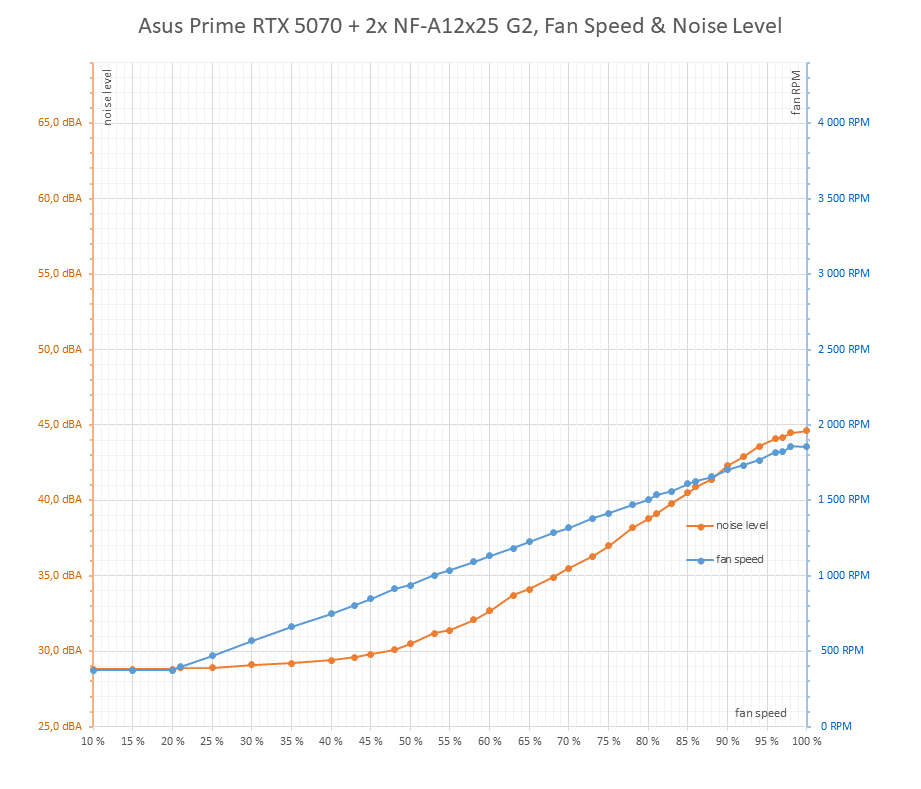
First, a reminder of rpm behavior and noise levels with the first-generation fans:

The maximum fan speed is lower than the previous generation, around 1800 rpm according to specs. These are fans from a kit with two variants, PPA and PPB; the first spins slightly faster, while the second runs about 60–80 rpm lower.
Even in the second generation they don’t reach the same airflow at maximum speed as the original stock fans. The cooler therefore has less overhead, and temperatures can’t be pulled down as far as with the bundled 3200 rpm units. But this is more about reserve capacity in case of overheating. Few users would want to tolerate the Prime running long-term with fans at 2500 rpm or higher due to noise.
Manual Fan Speed from 30 % to 100 %, step 5 %
We’ll measure how the card’s operating characteristics change across the whole fan range. For time reasons I again used short Cyberpunk benchmark loops with the RT Medium profile at 2560 × 1440 resolution with DLAA.
Before the main batch, one warm-up loop with four runs at 45 % fan performance was executed. That isn’t shown in the charts below, which start with the first measurement at 25 %. Going lower isn’t practical, because with low rpm and GPU temperatures over 85 °C, the regulation already begins to clamp GPU power noticeably, dropping clocks and performance.
fan performance was then increased in 5 % steps from 25 to 100 %. Each step included four benchmark loops. Delays between runs were only a few seconds, so the system stayed heated throughout testing.
I’ll take values from the fourth loop, occasionally from the third if the last one had issues.
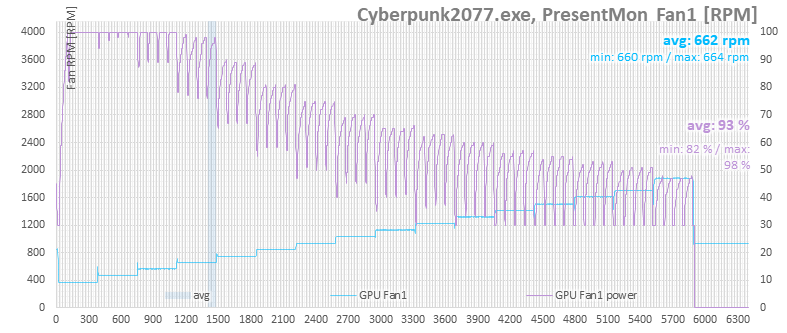
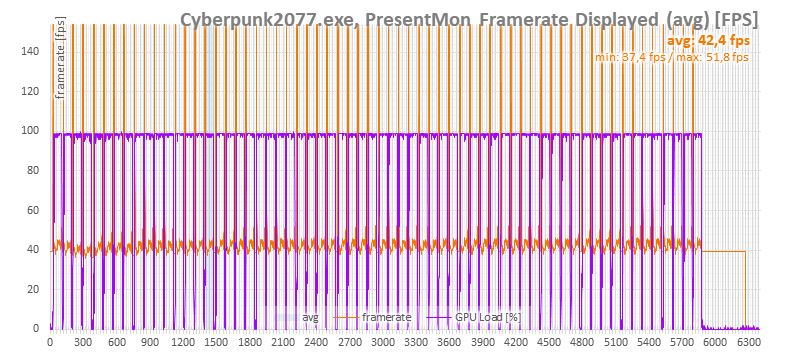
This chapter summarizes operating behavior across the full fan range. These are simple figures; detailed results for each setting appear in interactive charts in the next chapter.
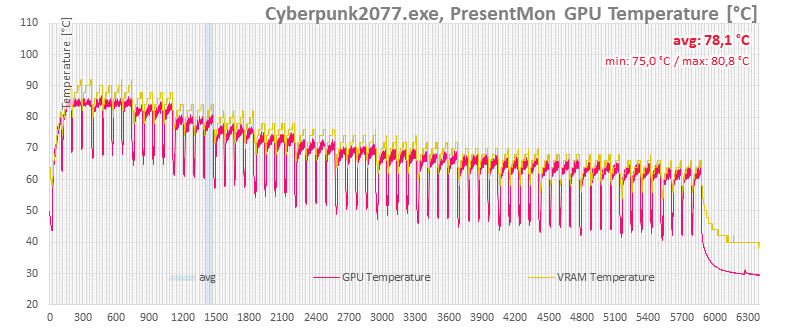
The purple curve again shows what fan speed the card’s BIOS auto-control would set. It doesn’t correspond to actual rpm, since the fans weren’t connected to the card but regulated externally. Automatic control tries to push maximum fan performance at 25, 30, and 35 % PWM, because the G2 fans run slower than the first generation at these levels.
The next chart shows CPU temperatures. These also demonstrate that stronger GPU cooling contributes to slightly lower CPU temperatures.

Performance differences don’t change dramatically.
On the GPU clock charts it’s clear that higher cooling capacity translates into slightly higher clock speeds.
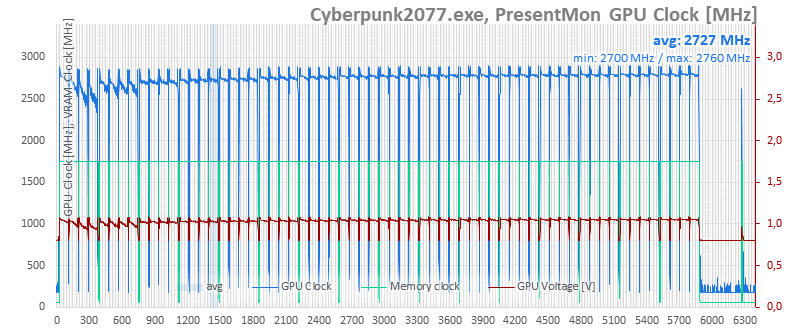
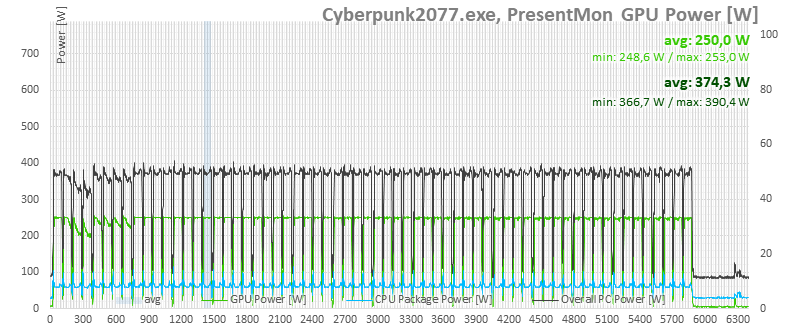
In the power draw chart there’s no difference at higher rpm either, except that the card throttles power in the first and second settings. This is because at 25 and 30 % fan output, the NF-A12x25 G2 spins slower with less airflow, leading to higher GPU temperatures.
⠀






I’m surprised that cheap Arctic slims are better at low noise levels than the regular Noctuas. Save the money, I guess.
Wouldn’t it be better to have the fans spinning in the opposite direction to avoid turbulence?
It wouldn’t be correct to say the P12 Slim is better than Noctua’s NF-A12x15. It’s more accurate to say that at low fan speeds, the differences in noise are so small you won’t hear a difference.
Note (as I pointed out in chapter three): at minimum RPM, all the fans are so quiet that their generated noise drops below the self-noise of my Class 2 sound level meter (CEM DT-8852). These sound level meters have a lower measurement limit of 30 dBA, and the fans’ noise drops below that even at a short microphone distance. That’s why the orange noise curve is flat at approx. 29 dBA the start, even though it should, strictly speaking, keep falling with lower RPM.
https://www.hwcooling.net/wp-content/uploads/2025/09/asus-prime-rtx-5070-deshroud-dual-noctua-nf-a12x25-g1-noise.png
Additionally, sound level meters typically have about ±1 dB(A) of measurement uncertainty (this one is ±1.4 dB(A)), so differences of roughly that size shouldn’t be given much weight.
In practice, it’s the same: at 500–600 RPM, the fans aren’t audible unless you put your ear very close to them. Above 30 dBA, the differences in noise levels start to grow and at higher speeds, Noctua pulls ahead. But if you’re replacing the fans on the graphics card with 120 mm ones, it’s probably to make the card quieter—not to run them at 1,700 RPM.
Generally speaking, at low fan speeds, the real-world gains from Noctua fans are negligible.
On the topic of counter-rotating fans and turbulences: with case fans that have a high-sided frame around the fan impeller and are spaced apart, it’s much less of an issue than with typical GPU fans, which sit in shroud very close together and have only a little or no rim around the impeller.
I think the overall design matters a lot. How else can we explain that while 2x P12 Slim on Asus Prime 5070 proved to be successful, 3x P12 Slim performed worse than the stock Asus TUF 5070 Ti? Maybe it’s good to have the fans vertically oversized, or the 3x P12 Slim were too close to each other.
https://www.hwcooling.net/asus-tuf-geforce-rtx-5070-ti-a-deshroud-s-3x-arctic-p12-slim/6/
I wonder what the performance would be like with an NF -14 for more of a coverage in the finstacks
Yes, it would definitely be interesting to know what the results would look like with 140 mm Noctua fans. Unfortunately, we can’t cover all possible combinations. 🙂
Hi Adam, can you share the 3d print files? 🙂
Hi Simon,
do you need it soon, or can it wait a bit? It’s still just a prototype and needs some tweaking. I’m planning to publish a test of the Prime RTX 5070 with Arctic P12 Pro by the end of the month, so I’ll try prep the STL and include it there.
BTW, it’s designed for mounting with M2 screws into plastic — are you okay with that? (Though gluing it might work too.)
…or he can make a certain protruding shape on the leg models and then use the boolean tool in Blender on the main piece 😛