





While testing the GeForce RTX 5060 Ti, I encountered a recurring issue with active PCIe lanes. On PCIe 5.0 motherboards, the card often fails to run in x8 mode even in a x16 slot, starting instead in slower x1, x2, or x4 modes. The same behavior occurred across three RTX 5060 Ti models from MSI, Gainward, and Asus. The issue likely stems from how these motherboards handle compatibility with PCIe 5.0 graphics cards using eight lanes.
What’s next?
So far, I haven’t encountered a similar issue with Radeon cards. It’s reasonable to expect that AMD has tested the combination of AMD processors, AMD chipset motherboards, firmware, and drivers more thoroughly with Radeons than with competing GeForce cards, which AMD likely only gets access to after their release. Moreover, AMD hasn’t yet released PCIe 5.0 cards with fewer lanes, so there’s no way to verify whether they might encounter similar issues.
I can’t claim the same issue never occurred on the test rig with more powerfull GeForce RTX 50 cards using all 16 lanes—but it only happened a few times across hundreds of system startups. I only noticed it when repeated measurements of the RTX 5090 differed in some tests from earlier results. The difference was larger than normal measurement error, prompting me to investigate further. I wasn’t in the habit of checking the number of active lanes after each PC start, since I’d never noticed a card starting up with fewer lanes than it should.
If you encounter a similar issue yourself, you’ll probably take a more straightforward approach. My main goal was to determine when the problem occurs, on what hardware, when it doesn’t, and how to reproduce the issue so I could report it to Nvidia and Gigabyte support. I’m currently in touch with both – we’ll see how it turns out.
So far, Gigabyte support has only replied that lane deactivation is normal behavior, and that the RTX 5000 series is not the first to work this way. The number of active lanes may drop as low as one, and when the driver detects higher load, it calculates the required bandwidth and activates the appropriate lanes. They state that this behavior is mainly controlled by the graphics card, not the motherboard—which seems to contradict other available information on the topic.
Even so, I tested it to be sure, and I was never able to get the number of active lanes to increase, no matter how much load I put on the card—it always ran in the same configuration it booted with. The bus does switch to a power-saving mode, and its speed and bandwidth vary depending on load, but that’s due to switching PCI Express versions, not activating additional lanes.

Based on the performance comparison between startup states where GPU-Z detected either eight active lanes or just one, it didn’t look like the inactive lanes ever turned on. I also couldn’t find any instance under load where the disabled lanes became active.
I later contacted Gigabyte again, this time with the full set of test results outlined in this article. They replied that their R&D department is currently verifying and testing the findings, and that they will follow up with the results of their investigation.
Better check – you can’t tell by eye
It’s hard to say how many motherboards are affected by the PCIe lane detection issue with the RTX 5060 Ti, or how many people might be running into the same problem without knowing it. I may have just had extremely bad luck and ended up with the only model that struggles even with the latest BIOS, or it could be a broader issue that simply hasn’t been noticed yet.
Even though it’s not hard to find out that the slot isn’t running at full speed, few people would think to check, and even fewer would notice a reduced PCIe lane count. Especially since it’s not consistent – sometimes the card boots with fewer lanes, sometimes not. It’s further obscured by the fact that PCI Express routinely switches to a slower interface version when the graphics card is idle to save power. So far, no one else seems to have reported the same issue. On most motherboards, lane detection likely works without any problems.
The computer boots normally, and everything looks and behaves as expected. Unless you run benchmarks and compare performance at different bus states, you won’t see a performance drop at first glance. The only test where the drop is very noticeable is PCI Express bandwidth in 3DMark, where the differences can be multiple times. But in other tests, the performance drop usually isn’t significant enough to be immediately noticeable.
Even in many common functionality tests, you might not notice a slower bus even when benchmarking – as can be seen from some of the measured results. And as you probably already know from comparisons of performance differences between PCI Express generations. For example, in 3DMark Time Spy, the performance difference with half the lanes is within the margin of error.
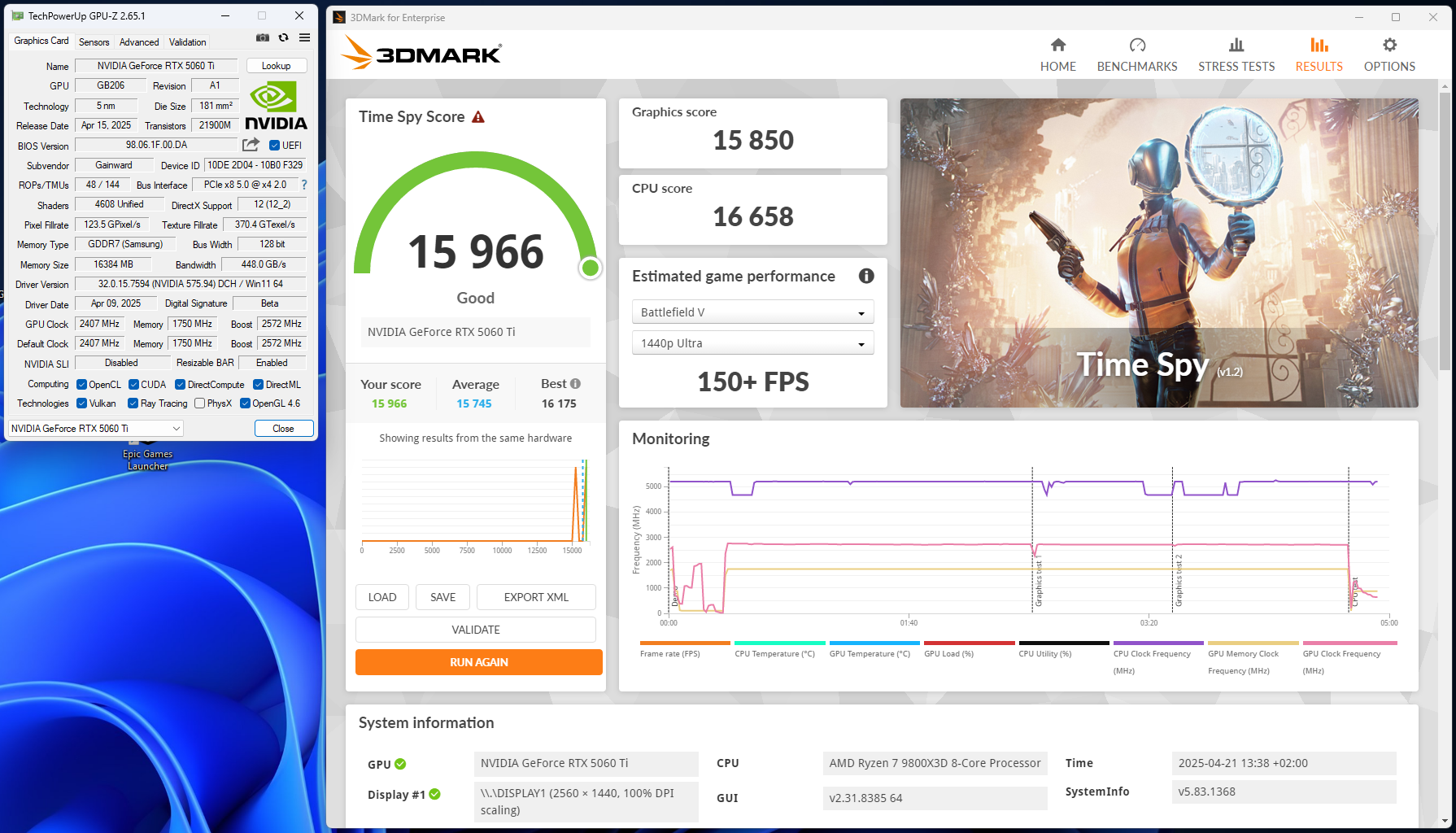

You won’t go wrong if you check whether the bus is working as it should when installing a new card. It’s definitely something you should do when installing a PCIe 5.0 card into an older setup where the BIOS hasn’t been updated for a long time.
The same goes for new builds – shipping a system with a motherboard running default settings and an outdated BIOS is still a common practice, and it’s likely no one will check the bus bandwidth or the number of active lanes. With older PCI Express versions, problems usually occurred only if someone installed the card in the wrong slot or added components to slots and connectors that shared lanes with the x16 slot. It didn’t used to happen that a card would initialize incorrectly when everything was physically fine.
But after this whole ordeal, I definitely recommend that if you’re planning to upgrade to a graphics card with PCI Express 5.0 in an older system, update to the latest BIOS version available before installing the new card. Don’t just assume it’s unnecessary because it hasn’t been an issue in the past. You might save yourself from having to remove the card and reflash the motherboard using your old graphics card.
English translation and edit by Jozef Dudáš




The 8GB version is the one you should be testing for PCIe bottleneck, not the 16GB.
I don’t think it matters much in this case. Interestingly, the biggest performance drops happen with settings that are actually less demanding on memory.
Mobos Asus strix z370-h
CPU QTJ1 (i9-10980HK)
Ram 2x16gb ddr4
Rtx5060Ti 8gb…
Damn! Always downgrade to pcie 2.0 instead pcie 3.0 like my old rtx3060ti!
Windows 10 (last driver) and debian Linux bookworm kernel 6.12.32 (driver 575)
Considering plus last firmware official