





The processor, also referred to as the central processing unit (CPU), is the most fundamental and the most important part of a computer. It is the part that executes all tasks (instructions) that are fed to the computer through program code. At the same time, peripheral devices, RAM and storage (hard drives, SSDs, oreven tape in the past) are connected to it in various ways. It is therefore truly the central element of a computer.
Cores
Within the processor chip itself, we can distinguish blocks providing various functionalities. The most essential component is the so-called cores, which perform the processing of program instructions, i.e., the core functionality of the CPU. From a functional standpoint, each core is essentially one processor—today’s processor practically always includes multiple CPUs (cores). We will discuss the functioning of the core itself in the last chapter.
Caches
The original concept of a computer assigned working memory to the processor, which evolved into RAM. Quite soon, it was discovered that operating memory usually has lower access speed and data transfer rates than the processor is capable of working at, and the CPU often cannot continue its work because it waits for data to arrive from memory or for sent data to be written to memory.
This problem is solved by caches. Their purpose is that they are smaller but much faster than RAM. The processor can thus keep the most frequently used or currently processed data in them and work with them faster than RAM itself would allow—but changes made to data in the cache must then be written back to the operating memory. Today’s processors usually have several hierarchies of caches, where the first-level cache has the highest performance (the shortest access time, i.e., latency, and the highest data throughput for reads and writes) because it is closest to the execution and load/store units in the CPU core, but the lowest capacity, usually single digits to double digits of kilobytes.
The second-level cache has a higher capacity (on the order of hundreds of kilobytes to a few megabytes), but longer latency and lower throughput, and so on. Most commonly, processors have three levels of caches (L1, L2, L3), with the last one being shared by multiple or all cores. Additionally, processors sometimes have a system-level cache (SLC), which is considered distinct from a regular last-level cache because not only CPU cores but also other parts of the processor (SoC), such as NPUs for AI acceleration, can access it. The SLC can sometimes be associated with the memory controller.
Interconnection of cores and other blocks
The cores must be connected to some type of bus or interconnect logic that makes them a single processor. This logic ensures that all cores can access operating memory and synchronize the contents of their caches with it (it is important to ensure that no core works with old contents of RAM after another core has changed it in its cache—this change must first be reflected back to RAM so that other cores do not work with incorrect data values). The interconnect logic in a processor can have various topologies similar to network topologies—it can be fully connected (crossbar switch, where each core has a direct connection to every other), ring (ring bus), or mesh type. Sometimes various combinations are used, for example, pairs of ring interconnections bridged at certain points.
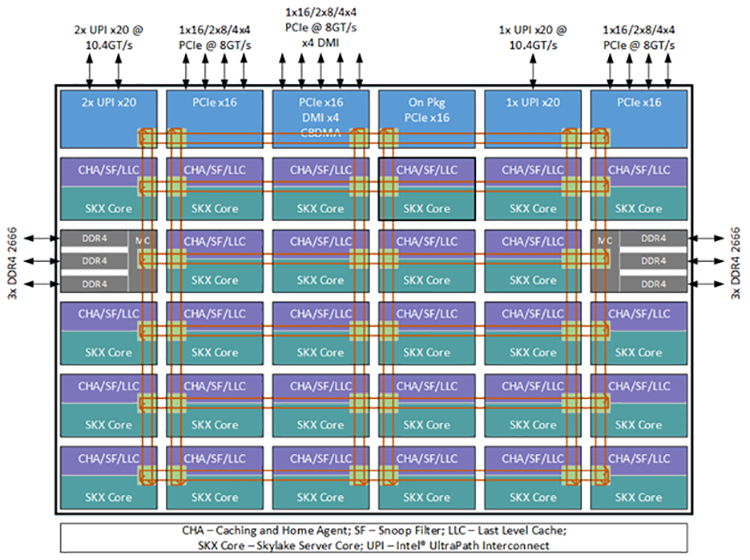
Similarly to how the processor contains interconnect logic for transferring data, it must also contain other systems: for example, a system for distributing the clock signal across the chip and a system of conductors that bring electrical current from the motherboard into and distribute it within the chip. Power delivery in modern processors is complex—it requires several different voltage rails and requires very precise voltage regulation (incorrect voltage regulation can easily damage the chip). Large portion of the processor’s contacts are actually used for delivering voltage and for ground connections today.

Connectivity and memory controllers
Today’s processor directly contains blocks providing various connectivity within themselves, which are also connected to the CPU’s internal interconnect. The most important of these is the memory controller which works with RAM on memory modules, driving the memory and performing data accesses. PCI Express connectivity controllers provide this standardised hardware interface connectivity, through which peripherals including GPUs, as well as storage in the form of NVMe SSDs, are connected to the processor. An additional chipset (or platform controller hub) is also connected via PCI Express connectivity or its modified derivatives. Processors may also have integrated controllers for USB or other interfaces (I2C, SPI Flash for connecting the firmware chip, and others) and video outputs from their integrated GPU.
Some of this connectivity features are functionality that has moved into the processor from previously separate chipsets. This is why it is sometimes stated that the processor contains an integrated northbridge (by which the integrated PCI Express controller is typically meant) or a southbridge (which refers to USB controllers or SATA interfaces for hard drives, optical drives, and the like). These are historical terms going back to how the individual chips of chipsets in personal computers used to be nicknamed.
Integrated peripherals
Various other functions have been gradually added to processors alongside the CPU cores. Today CPU typically contains an integrated GPU providing functions corresponding to a graphics card (using a portion of RAM as graphics memory), although some desktop CPUs and server CPUs do not contain one. More recently, an NPU, an accelerator designed for AI workloads, has been added to the processor. Along with the GPU, multimedia blocks (engines) for video compression and decompression may be integrated. In the future, various other components may be added according to the needs of computers—some mobile processors already integrate, for example, a Wi-Fi and Bluetooth wireless connectivity adapter, or a 5G mobile data network modem (these adapters usually require an additional chip for the analog functionality of the radio transmitter and receiver themselves).
Control units, microcode
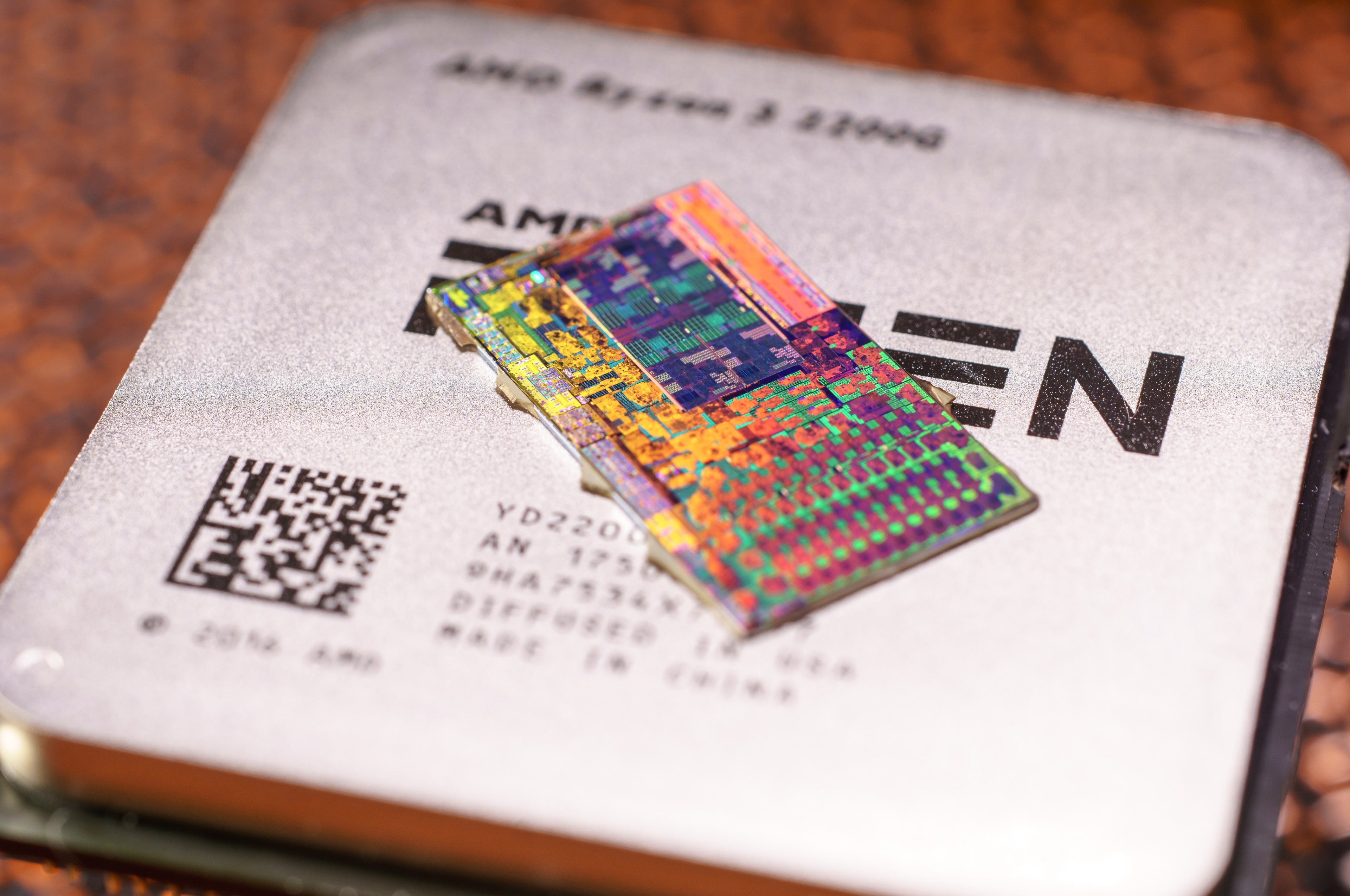
Today’s SoC is an extremely complex system and usually has some control unit of its own, which contains its own separate embedded core or cores running firmware, or may even have many different firmwares for its various components (referred to as microcode for the CPU cores). These control units and their firmware are not normally visible to the user and their software; they run in the background and ensure the proper initialization and operation of the CPU cores visible to the computer user and various running software. These control units can also implement various security technologies and protections—for example, checking authenticity (cryptographic signatures) of firmware and the operating system as they are loaded during computer boot.
RAM near the processor
Main memory (RAM) is a separate component outside the processor, just like permanent storage (SSD, HDD). To save space and for benefits it can bring in reducing power consumption, processors sometimes have RAM chips (usually mobile types like LPDDR, e.g., LPDDR5X) mounted directly on the processor which is referred to as on-package memory. They are not integrated directly into the CPU in the sense of being on the same chip—they are merely soldered onto the same substrate.

The advantage of this approach is that the conductors are shortened compared to the situation where they first pass through the substrate, then one set of contacts to the printed circuit board forming the motherboard, and only then to the memory chips. From an architectural standpoint, however, this mounting works the same as if the memory were mounted on the motherboard. But it is possible that in the future, integrating memory on the processor package will actually bring faster and more powerful connections between RAM and the CPU than we have today.
The article continues on the next page…
⠀




If anything doesn’t seem factually correct to you, please let us know—either in the comments or by email at info@hwcooling.net. I’ll forward everything to the author. The goal is to make sure that everything in the article is correct.