Image “upscaling” technologies have already won over most gamers. But there is still a camp of staunch opponents who prefer a faithfully rendered image over one “made up” by artificial intelligence. On a Radeon RX 9060 XT with AMD FSR 4, we’ll look at why that reading is inaccurate and how the new algorithms can turn low-resolution frames into images with a level of detail comparable to honest native-resolution rendering.
We outlined the evolution of FSR technology and the innovations introduced in each generation in an earlier article. With the latest Radeon RX 9000 series, we’ve received the fourth generation. The differences between each generation are summarized in this table:
| Feature | FSR 1.x | FSR 2.x | FSR 3.x | FSR 4.x |
| Upscaling Type | Spatial | Temporal | Enhanced temporal + optional frame generation | ML-accelerated upscaling + optional frame generation |
| Combines data from multiple frames (temporal upscaling) | No | Yes | Yes | Yes |
| Frame Generation | No | No | Yes (optional) | Yes (optional) |
| Quality without frame generation | Sharper image compared to basic interpolation | Significantly higher detail quality, sharper and more stable image | Greater image stability compared to FSR 2, reduced ghosting, added support for native AA, support for Anti-Lag 2 | Best quality – fewer artifacts, sharper and more stable than FSR 3 |
| Utilizes dedicated hardware | No | No | No | Yes, requires RDNA 4 AI accelerators (FP8/AI cores) |
| GPU Availability | All modern chips | All modern chips | All modern chips (if supported by the game) | Only Radeon RX 9000 (RDNA 4+) |
The following table also summarizes the recommended default settings for various resolutions and quality modes. Generally, for 1080p resolution, you should use Quality mode; for 1440p, Balanced mode; and for 4K, Performance mode. However, with the improving quality of upscaling, you can now choose less demanding FSR settings even at lower resolutions, and the result will be comparable to what you previously got with higher-quality modes.
| AMD FSR 4 Quality Mode | Description | Scale factor | Input resolution | Output resolution |
|---|---|---|---|---|
| Native AA | “Native AA” mode provides an image quality superior to native rendering with a modest performance cost. | 1.0× per dimension (1.0× area scale) (100% screen resolution) |
1920 × 1080 2560 × 1440 3440 × 1440 3840 × 2160 |
1920 × 1080 2560 × 1440 3440 × 1440 3840 × 2160 |
| Quality | “Quality” mode provides similar or better than native image quality with a significant performance gain. | 1.5× per dimension (2.25× area scale) (67% screen resolution) |
1280 × 720 1706 × 960 2293 × 960 2560 × 1440 |
1920 × 1080 2560 × 1440 3440 × 1440 3840 × 2160 |
| Balanced | “Balanced” mode offers an ideal compromise between image quality and performance gains. | 1.7× per dimension (2.89× area scale) (59% screen resolution) |
1129 × 635 1506 × 847 2024 × 847 2259 × 1270 |
1920 × 1080 2560 × 1440 3440 × 1440 3840 × 2160 |
| Performance | “Performance” mode provides image quality similar to native image quality with a major performance gain. | 2.0× per dimension (4× area scale) (50% screen resolution) |
960 × 540 1280 × 720 1720 × 720 1920 × 1080 |
1920 × 1080 2560 × 1440 3440 × 1440 3840 × 2160 |
In current games, you’ll encounter FSR third and fourth generation. Just a reminder: with FSR 3, AMD added frame generation to upscaling. Compared to FSR 2, the image is more stable, suffers less flickering, and retains details better. Frame generation increases smoothness but requires a higher base FPS (around 60+); otherwise, artifacts appear and latency increases. Another new feature is Native AA mode for higher-quality anti-aliasing. Since FSR 3 runs via shaders, it also works on Nvidia and Intel cards.
Modern upscaling techniques rely heavily on the ability to gather data from multiple frames to render images at higher resolutions. Rather than guessing or estimating new data, these algorithms primarily reuse information from earlier frames. This was already evident with how FSR 3 worked. In the previous generation of FidelityFX Super Resolution, image reconstruction didn’t require specialized machine learning hardware.
Put simply, the lower number of samples used in rendering a single frame is more than compensated by the larger number of samples available from previous frames. In fact, this can result in even more total samples than in a fully rendered frame, so the algorithm doesn’t need to make as many assumptions. There’s plenty of data to work with—it just isn’t entirely up to date. Most of it can be used as is, some of it needs minor corrections to account for changes between frames, and only where the differences are too large is more complex reconstruction necessary.
Another benefit of combining data from multiple frames is improved visual stability over time. With traditional rendering, even small changes in the scene can lead to noticeable differences between frames. For example, if a sample shifts slightly and lands on a different object or material, the pixel may suddenly change color or disappear. This causes textures to shimmer, edges to flicker, or thin lines—like wires or mesh fences—to appear broken. This improved temporal stability is often what people mean when they say that upsampled images can look better than those rendered at native resolution.
Now, compare the image from the previous chapter—where the image was reconstructed from a very low number of samples—with how temporal upscaling in FSR 3 handles reconstruction.
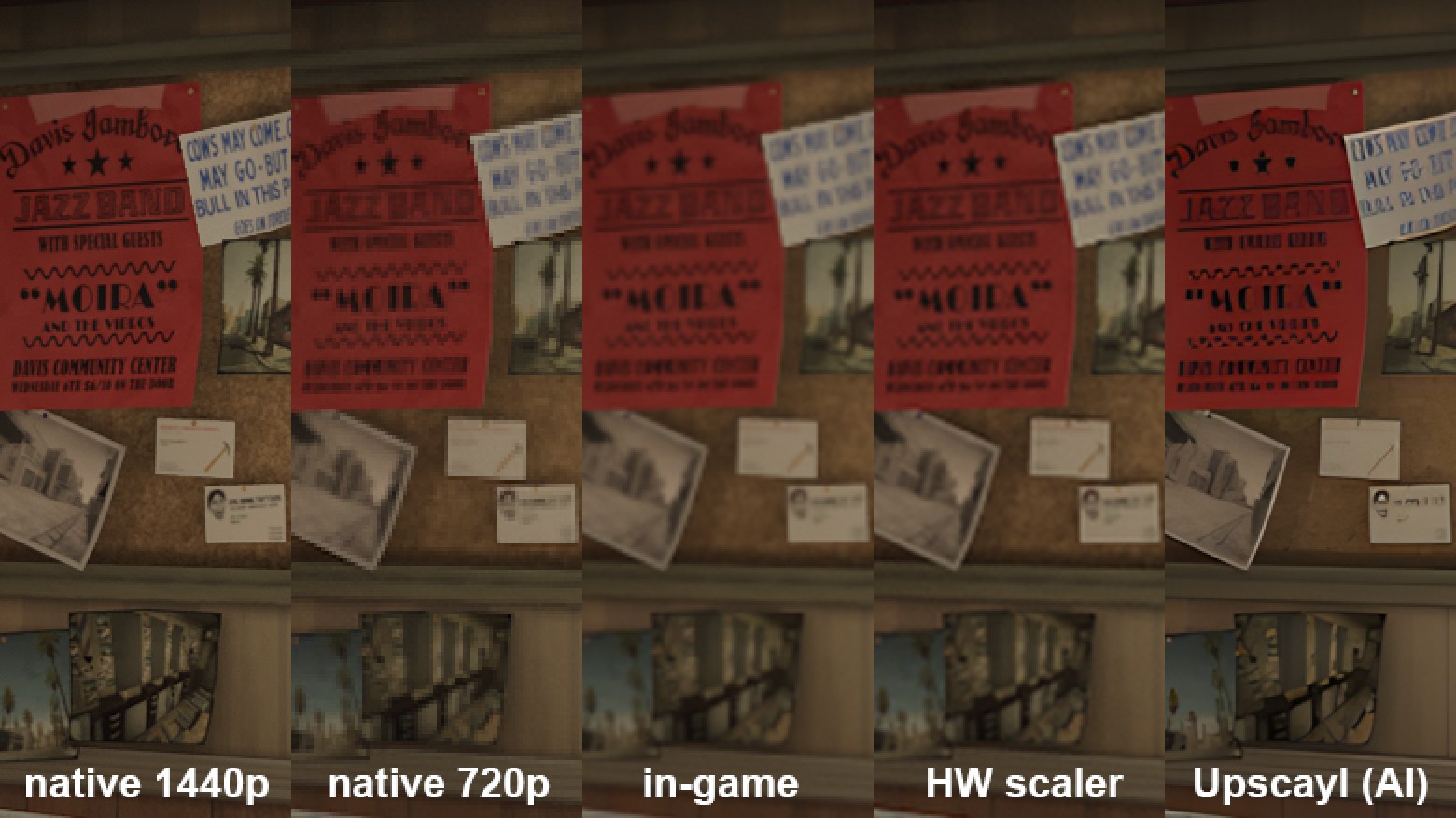
Even with lower upscaling quality, some loss is noticeable, mainly in texture detail, but the text remains readable, and the image retains far more information than with simple “enlargement.”
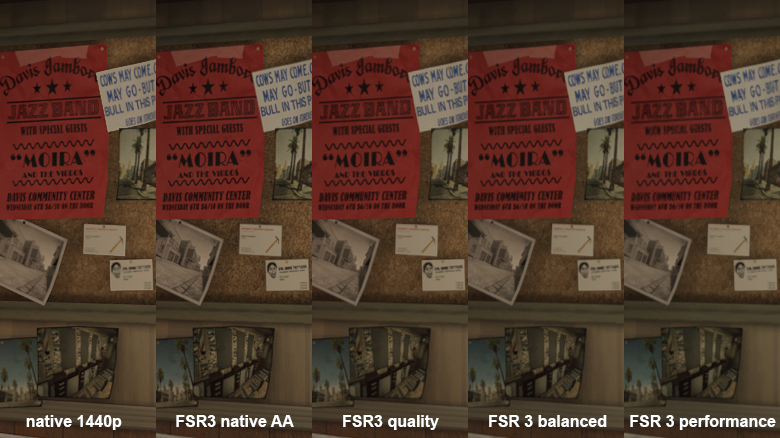
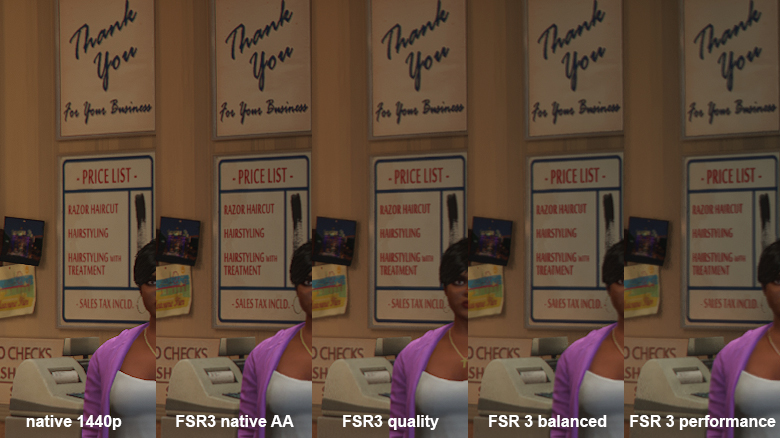
FSR 3 struggled with image reconstruction in areas where there were insufficient samples from previous frames or where significant changes occurred between frames. Typically, these are regions where an object moved rapidly, covering different parts in each frame.
When reconstructing these areas, FSR utilizes not only the rendering result from previous frames but also additional information that helps the algorithm fill in the gaps. However, it doesn’t perform this as flawlessly as FSR 4, so you’ll see typical artifacts—often a kind of dotted grid pattern. Similar artifacts also appear around the edges of objects moving relative to the scene.
You can see this clearly in the interactive comparison below. If not, a pair of traditional comparison images is provided below. On the left is GTA V with maximum details and ray tracing at 2560 × 1440 resolution using FSR 3 mode; on the right is the same scene with FSR 4 mode enforced.
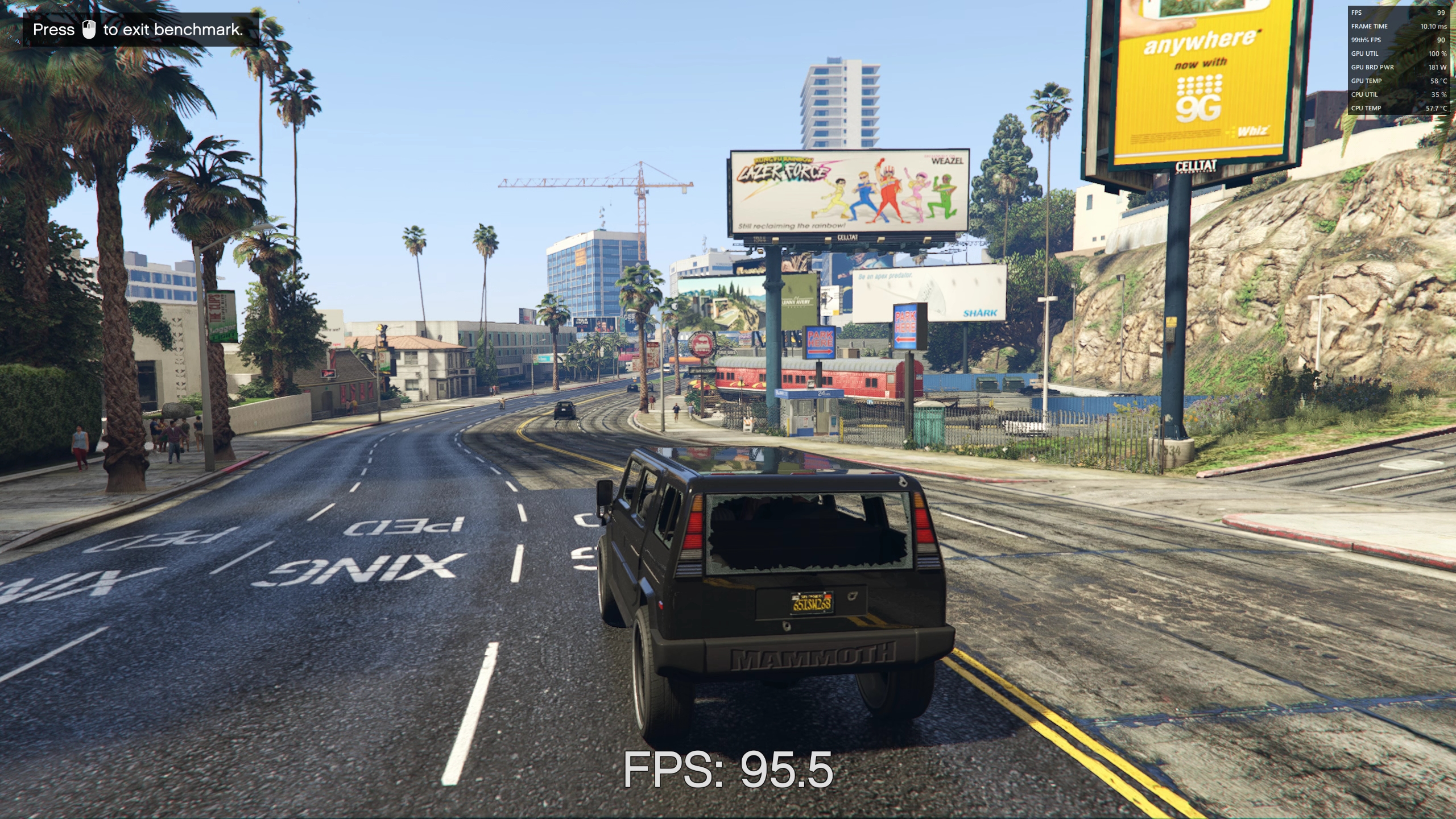

FSR 3 | FSR 4
⠀