Asus TUF GeForce RTX 5070 Ti: 2× Noctua NF-A12x25 Deshroud

A few days ago, I <a href=”https://www.hwcooling.net/en/asus-tuf-rtx-5070-ti-a-closer-look-at-thermal-paste-effects/”>tested how repasting affects the thermals and noise</a> of Asus’s TUF GeForce RTX 5070 Ti. Today, we’ll take it a step further. We’ll take advantage of the fact that the card’s design allows easy removal of the shroud and and mount different fans directly onto the heatsink—in this case, a pair of Noctua’s classic NF-A12x25. We’ll measure how the noise profile changes while keeping temperatures under load the same.

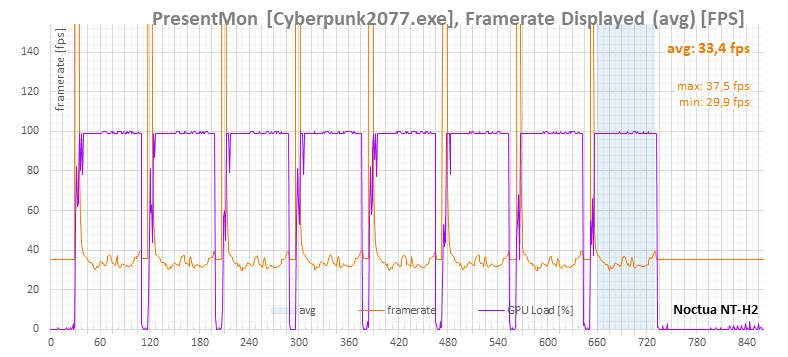
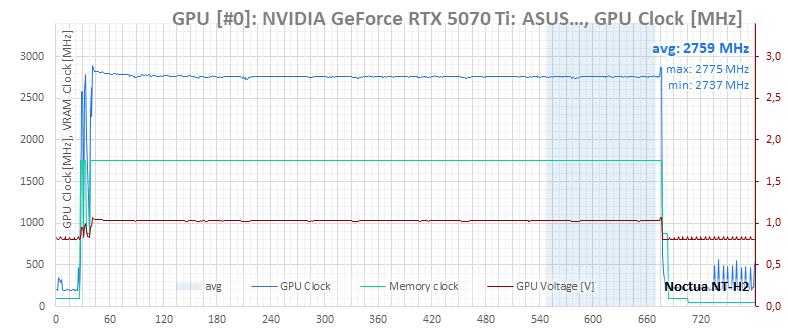
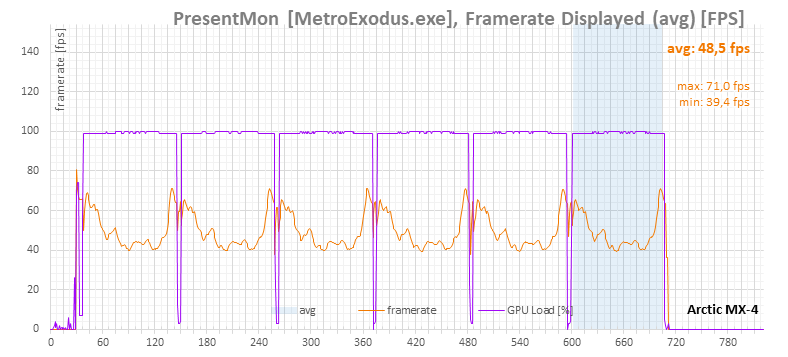
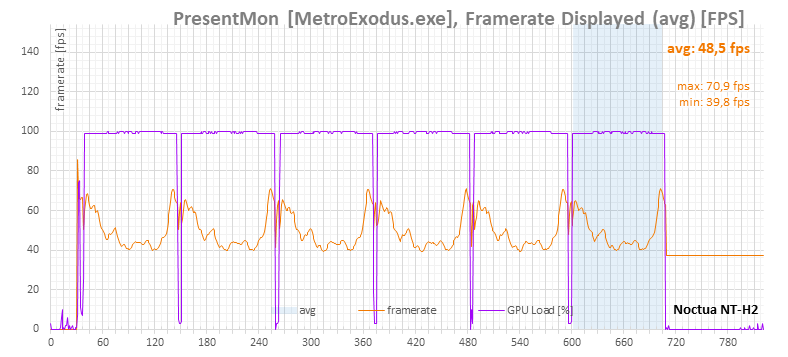
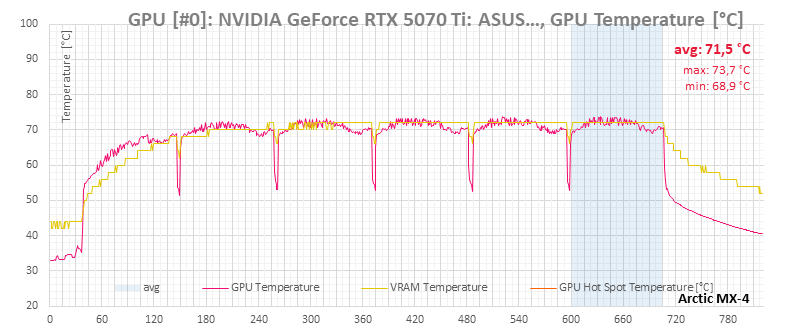
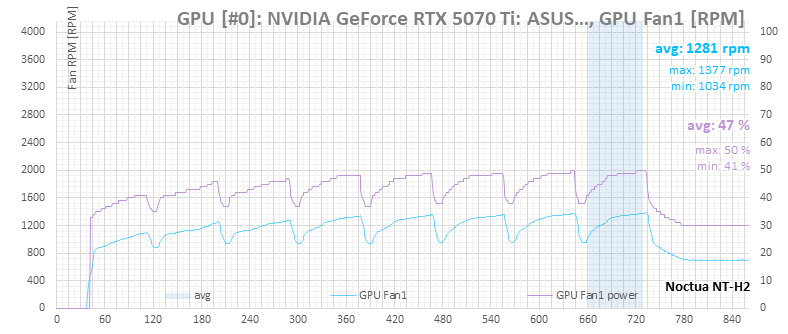
In the previous article, I measured performance with Arctic MX-4 paste applied in a 0.25 mm layer. This time, I tried Noctua NT-H2 applied in a thinner 0.12 mm layer.

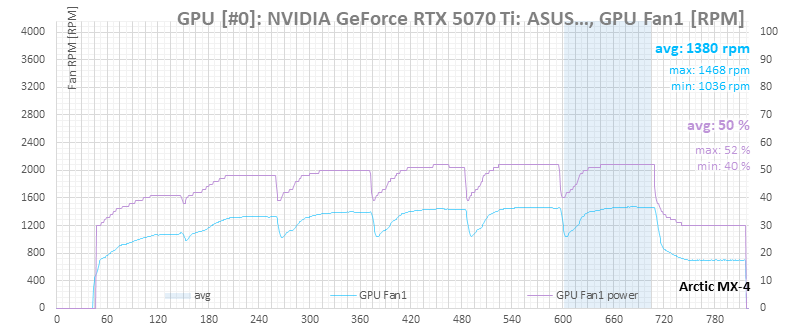
The difference in measured temperatures and other properties was no greater than typical measurement error. The graphs below compare NT-H2 with MX-4. All subsequent measurements with the Noctua fans use NT-H2, with the heatsink screws tightened to 0.2 N·m.

In each graph, the baseline measurement is with Arctic MX-4; hovering over it should switch to the NT-H2 results. If that doesn’t work, both sets of measurements are also provided in expandable images below the graphs.

Cyberpunk 2077 Benchmark, 4K


Arctic MX-4 | Noctua NT-H2


Arctic MX-4 | Noctua NT-H2


Arctic MX-4 | Noctua NT-H2


Arctic MX-4 | Noctua NT-H2


Arctic MX-4 | Noctua NT-H2

F1 24, 4K


Arctic MX-4 | Noctua NT-H2


Arctic MX-4 | Noctua NT-H2


Arctic MX-4 | Noctua NT-H2


Arctic MX-4 | Noctua NT-H2


Arctic MX-4 | Noctua NT-H2

Metro Exodus Benchmark, 4K


Arctic MX-4 | Noctua NT-H2
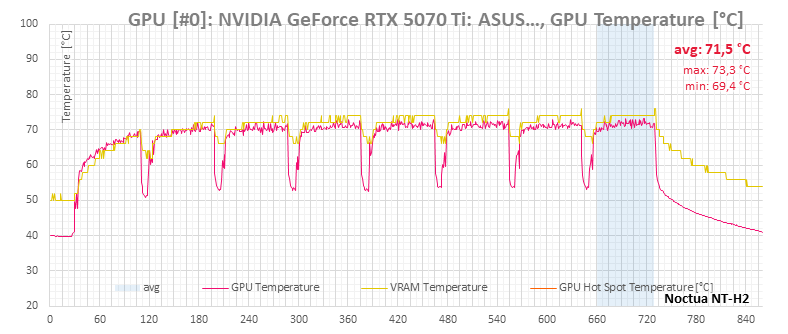

Arctic MX-4 | Noctua NT-H2
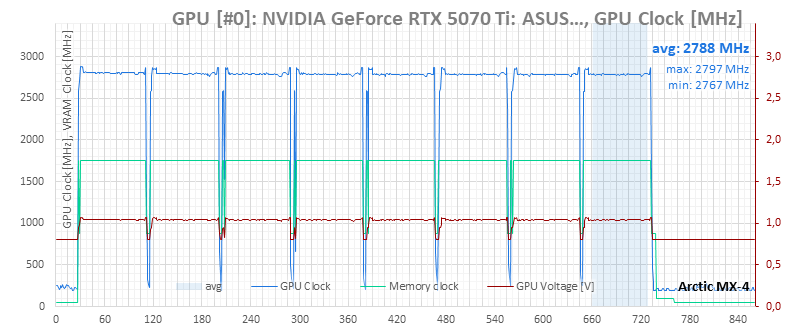

Arctic MX-4 | Noctua NT-H2


Arctic MX-4 | Noctua NT-H2


Arctic MX-4 | Noctua NT-H2

⠀

The most interesting (and craziest) Asus hardware at Computex

The Computex tradeshow this year seems to involve various anniversaries for many companies. In the case of Asus, the company is celebrating 20 years of its “premium” gaming brand, ROG. We visited the booth Asus has at the trade show as well and will show you some of the new hardware the company brought to its booth—because of this anniversary, much of it is quite extraordinary and forms a celebratory lineup called ROG Edition 20. Read more “The most interesting (and craziest) Asus hardware at Computex” »

Asus ROG Equalizer: Robust 12+4pin connectors that don’t burn?

Failures of the 12V‑2×6 power cable (formerly 12VHPWR) have become the scourge of recent GPU generations. Especially for Nvidia cards pushing this power standard, but also for a few Radeon models using these connectors. Various attempts to work around or mitigate the risks have popped up; this time, Asus is introducing the Equalizer special‑purpose cable for its power supplies, that aim to prevent connector melting in several ways. Read more “Asus ROG Equalizer: Robust 12+4pin connectors that don’t burn?” »

Asus ProArt PF120: The most efficient fan at low noise level

It wants to go head‑to‑head with the Phanteks T30-120 fan, while also having a slight edge in every respect. That’s Asus’s marketing—and now comes reality in HWCooling’s in‑depth analysis. The ProArt PF120 fans are truly something exceptional and worth paying attention to. High cooling efficiency and elegant daisy‑chaining are just the beginning. The overall design of Asus’s fans is impressive. Read more “Asus ProArt PF120: The most efficient fan at low noise level” »

Leave a Reply

Your email address will not be published. Required fields are marked *