


The TUF GeForce RTX 5070 Ti has a heatsink large enough to mount 140 mm fans. Swapping them is easy: remove a few screws and lift off the shroud with stock fans without breaking the warranty seal. We’ll use that to try a niche option—the low-profile 140 mm Arctic P14 Slim PWM PST. The card gets wider but keeps a reasonable height and, at similar temperatures, runs way quieter.
Deshroud with 2× Arctic P14 Slim PWM PST, full fan operating range
The working RPM range is smaller than with the stock Axial-tech fans. At the same RPM, P14s are much quieter. Because fans blow in all directions now, the card will likely be a little louder once it’s shrouded.
At 10% PWM they won’t hold a steady speed, but from about 400 RPM up they’re stable. At those speeds, noise is below the meter’s measurement range.
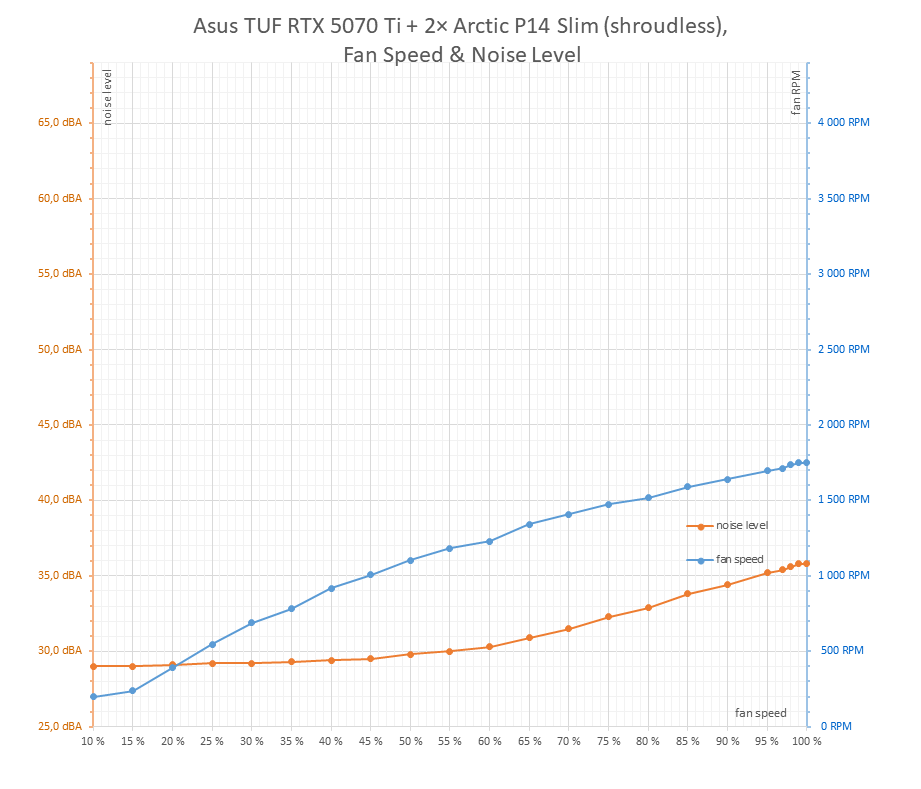
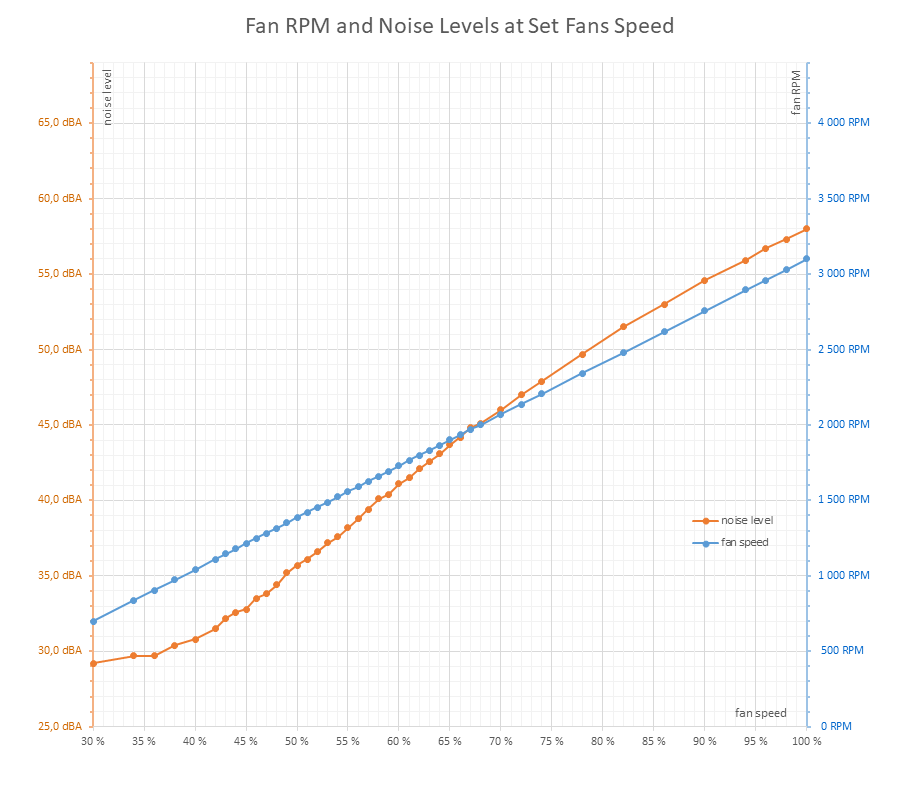
2× Arctic P14 Slim PWM PST | 3× Asus Axial-tech Fan
Manual Fan Speed from 20 % to 100 %, step 5 %
We’ll measure how the card’s behavior changes across the full fan operating range. I will use short loops of the Cyberpunk 2077 benchmark with the RT Medium preset at 3840 × 2160 and DLAA.
Before the main batch, there’s a warm-up loop with four passes at a fixed 45% fan speed. It’s trimmed from the charts below, which begin with the first measurement at 20% fan speed. Going lower usually isn’t worthwhile: at very low RPM and GPU temperatures above ~85 °C, the control logic starts to cut GPU power, which pulls down clocks and performance.
Fan speed then increases from 20% to 100% in 5% steps, with four loops for each setting. Only a few seconds separate runs, so the system stays warmed up. Reported values come from the fourth loop (or the third if the last run had an issue).
First, we’ll look at summary charts with results from the pair of Arctic P14 Slim fans across their full operating range. These are simple images; detailed results for each setting are shown in the interactive charts in the next chapter.
With the fans at the minimum tested 20%—roughly 400 RPM—the GPU’s average temperature already peaks near 90 °C, i.e., the temperature limit. As a result, the controller begins to reduce GPU power to keep heat in check.
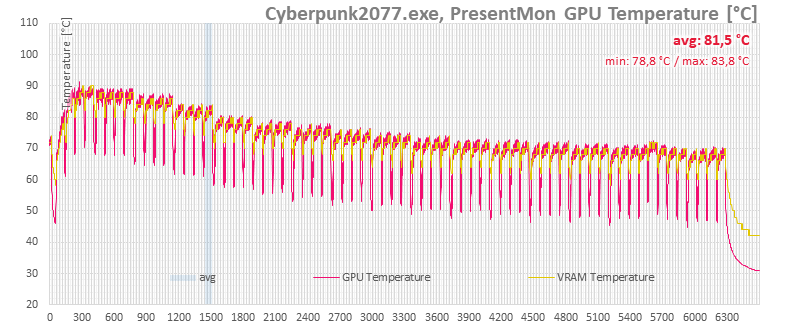
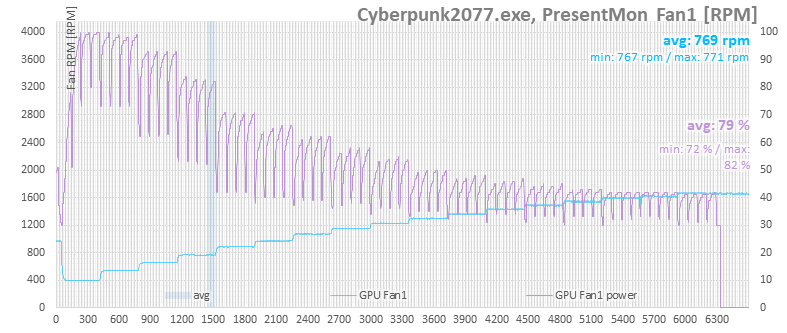
On the purple line you can see what the card’s BIOS auto fan control would request. This doesn’t reflect the fans’ actual RPM, because the P14 fans aren’t connected to the card—we’re controlling their speed externally. The controller would push the fans to maximum at the 20% and 25% steps. At 30% fan duty, the GPU temperature no longer hits the thermal limit.
In the next chart you’ll see CPU temperatures. Ignoring the initial segment—when the case components likely aren’t fully warmed up—from roughly 35% fan speed onward it’s clear that higher RPMs also help slightly improve CPU cooling.
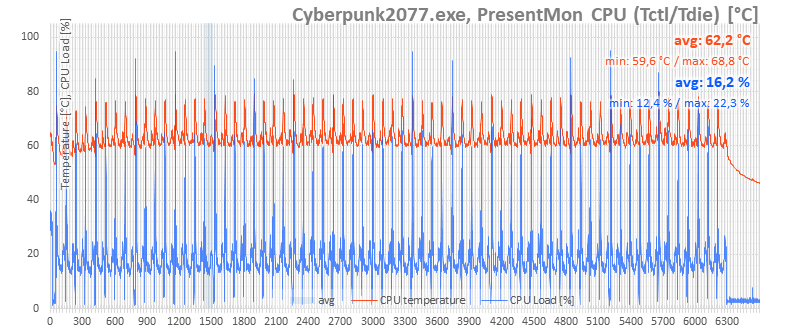
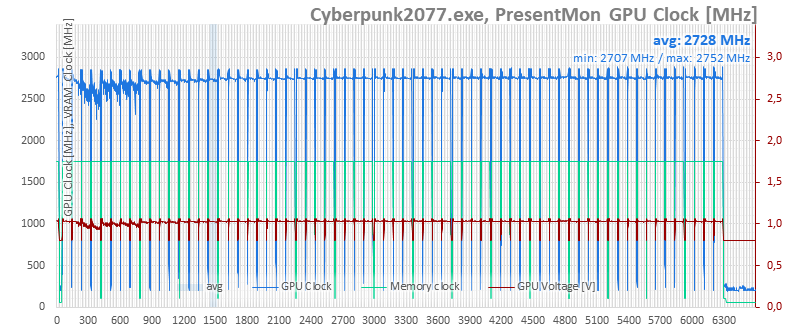
The GPU clock charts show that at low fan speeds the cooling is insufficient: the card hits its thermal limit and reduces the chip’s clocks and voltage, which also lowers power draw. By the third setting (30% fans), the major drops are gone. After that, with the GPU running cooler, performance rises marginally.
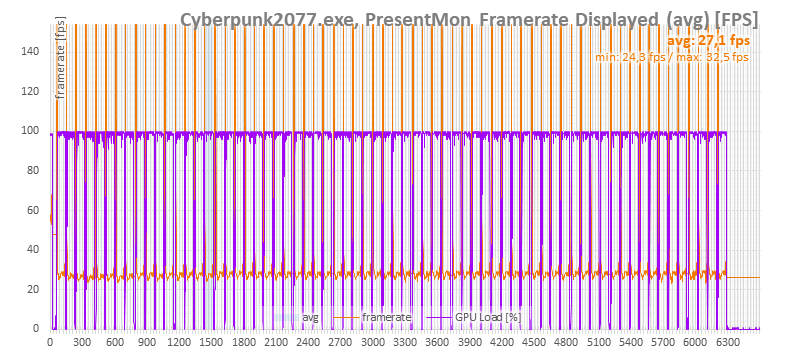
Lower performance is mostly visible in the initial runs; after that, as fan speed increases, it improves by only a few tenths of a frame per second each time.
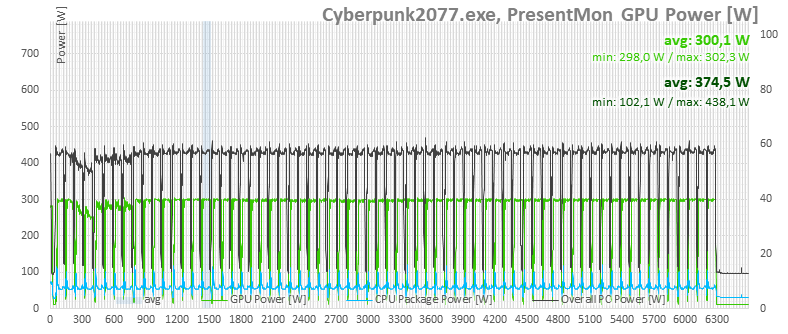
The power chart clearly shows how clock throttling—together with a drop in voltage—reduces the card’s power draw.
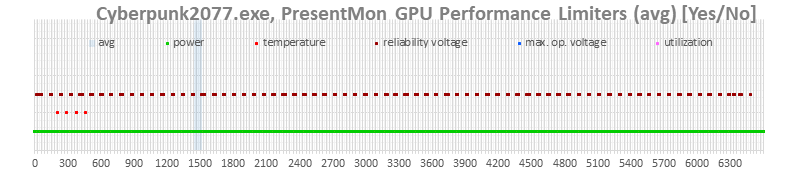
In the last chart, you can see which limits were active at each moment. The controller reports hitting the temperature limit only in the first run, although in the second run—with the fans at 25%—it still throttles clocks more aggressively than at higher fan speeds.
⠀


