


The TUF GeForce RTX 5070 Ti has a heatsink large enough to mount 140 mm fans. Swapping them is easy: remove a few screws and lift off the shroud with stock fans without breaking the warranty seal. We’ll use that to try a niche option—the low-profile 140 mm Arctic P14 Slim PWM PST. The card gets wider but keeps a reasonable height and, at similar temperatures, runs way quieter.
Before we get to the summary chart, a brief reminder: this card was repasted, and its GPU runs a few degrees hotter than the other sample with the original phase-change pad. That likely makes it slightly louder than it would be otherwise.
What matters most here is how the card’s noise changes at the same temperatures. The next chart plots noise on the horizontal axis and temperature on the vertical.
With the pair of Arctic P14 Slims at low RPM, the fans are so quiet that readings fall below the sound-level meter’s range. From about 90 down to 78 °C, the noise line sits on the meter floor and is nearly vertical. As temperature drops further, the line moves farther away from the one with the original fans. The notch on the orange line is a measurement quirk—the values are maxima, and a brief temperature spike landed a few tenths of a degree higher.
The lower the temperature, the more the 140 mm setup pulls away from the stock fans. Unfortunately, these 140 mm fans top out around 1700 RPM, so the GPU temperature bottoms out at about 71 °C. With a shroud to guide airflow, it could likely go a bit lower, at the cost of slightly higher noise.
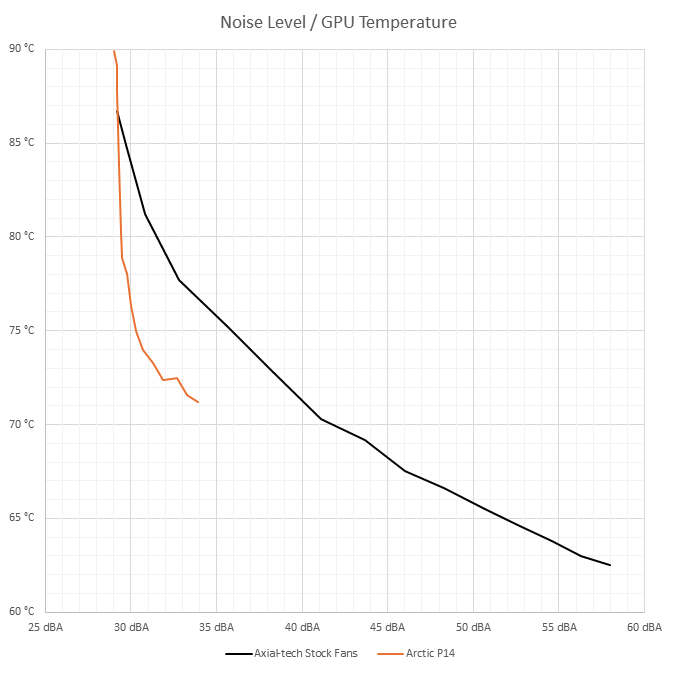
However, with the original fans—at the cost of much higher RPM (and vastly higher noise)—you can push the GPU below 63 °C. So with the stock fans you get significantly more thermal headroom.
Even so, the results surprised me enough that it’s worth repeating the whole test run to rule out a measurement error. I’m also curious to see how it performs with standard 140 mm fans.
The biggest downside is that the already wide TUF RTX 5070 Ti is even wider with 140 mm fans, protruding more than 6 cm from the edge of the I/O bracket. You’ll need a wide case; if it can take a 140 mm fan on the rear panel, you should be fine.

English translation and edit by Jozef Dudáš
⠀


