


We don’t typically disassemble graphics cards in our reviews—and for good reason. Once you take one apart, it’s hard to get it to behave exactly like it did in its original state, especially after replacing the factory thermal paste. With manufacturers who don’t skimp on thermal paste, repasting may not bring any improvement at all. In detailed measurements, we’ll look at how different paste and mounting pressure affect the card’s behavior.
Every now and then, readers comment on the lack of teardown photos in our graphics card reviews. I get it—I’m curious too about what various gadgets look like on the inside. But disassembling graphics cards has one major pitfall—factory-applied thermal paste and thermal pads.
In graphics card reviews, my priority is to test the cards in the same condition as they arrive from the manufacturer. Sure, it might be interesting to see how a card’s behavior changes when the thermal paste is replaced—but very few people choose a card based on a review with the plan to disassemble it and repaste it the moment they bring it home. Hardly anyone wants to “fix” something themselves on a card for which they just paid hundreds, or thousands, of dollars.
Many years ago, when manufacturers used all sorts of hard, chewing-gum-like or low-quality pastes, repasting might have made sense. Since then, though, power consumption has multiplied and cooling requirements have significantly increased. Manufacturers understand that it doesn’t pay to skimp on thermal paste or its application—if they save on paste, they’d have to spend more on the cooler to stay competitive. These days, unless you’re using the best thermal pastes available, repasting could actually make things worse.
It may seem like there’s nothing to mess up and that anyone can do it. You’ll even come across well-meaning advice suggesting you change the paste regularly because it degrades over time. I would actually advise against it unless there’s a serious reason. It’s not without risk—and unless you do it regularly and know what you’re doing, there’s no guarantee you’ll improve anything by repasting.
Unlike CPUs—where the paste is typically applied to a large metal heat spreader that contacts the entire chip surface—graphics card coolers are usually in direct contact with the silicon. If you’re not regularly repasting your GPU, it’s hard to judge how much paste to apply and how to spread it across the chip’s surface.
With a CPU, it’s no big deal if part of the heat spreader ends up dry. With a GPU, that should never happen. On the other hand, if there’s too much paste, it can create a thick layer that actually impairs heat transfer.

If it ain’t broke, don’t fix it
You’re definitely doing the right thing if you run a stress test on a brand-new card and use GPU-Z or HWiNFO to log its operating characteristics. Don’t forget to note down the ambient temperature, too. Only consider repasting if the card’s performance noticeably deteriorates—don’t do it “preventively.” I wouldn’t say this if I didn’t have bad experiences with repasted cards that ended up in my tests. I can’t recall ever receiving a repasted card that was in better condition than when it left the factory. Occasionally, someone treats manufacturer samples as disposable, assuming they’ll be worn out during testing. For low-cost products, manufacturers usually don’t mind sending out samples for reviewers to do as they please.
Apparently, even the manufacturers themselves have had bad experiences with some reviewers. That’s probably why many review guidelines now include a note to measure the card’s behavior before any disassembly.
For graphics cards costing north of a thousand dollars, manufacturers typically only have one or two samples of each model in our region—which have to be passed between several reviewers. It’s rare for a repasted card to behave exactly as it did originally. Temperatures can vary by several degrees—which affects fan speeds, noise levels, and, depending on how much the temperature changes, potentially also clocks and performance.
That’s why we have an unspoken agreement with manufacturers not to disassemble the cards. I also remind all manufacturers from time to time that I don’t want to test any cards that someone has already taken apart. I usually test most cards as the first or second reviewer—so over time I’ve become a bit complacent and don’t check as thoroughly. That backfired recently when testing the TUF RTX 5070 Ti from Asus.

During the photo shoot, I didn’t notice that one of the screws had a warranty seal pierced by a screwdriver. I only realized this later, when I was investigating why fan speeds in silent mode were unusually high fort the model from TUF family. The results also didn’t stack up well against other tests of the same card that are available online.
By an incredible stroke of luck, I ended up receiving two units of that exact card from Asus (second one was mistakenly shipped to me instead of going elsewhere). The second one didn’t have a broken seal, so I could retest it right away. After analyzing its operating characteristics, it was clear that the originally planned comparison of “normal production variance” between two different units of the same model was off the table.
But since I now had the disassembled card on hand anyway, I figured—why not take another look under the cooler and try the repasting process again? This time, we’ll apply the thermal paste in a way that’s different from most guides.
⠀




Very interesting article. I believe more and more manufacturers have moved to using quality thermal interfaces, so your results (slightly worse than stock after repasting) isn’t that surprising.
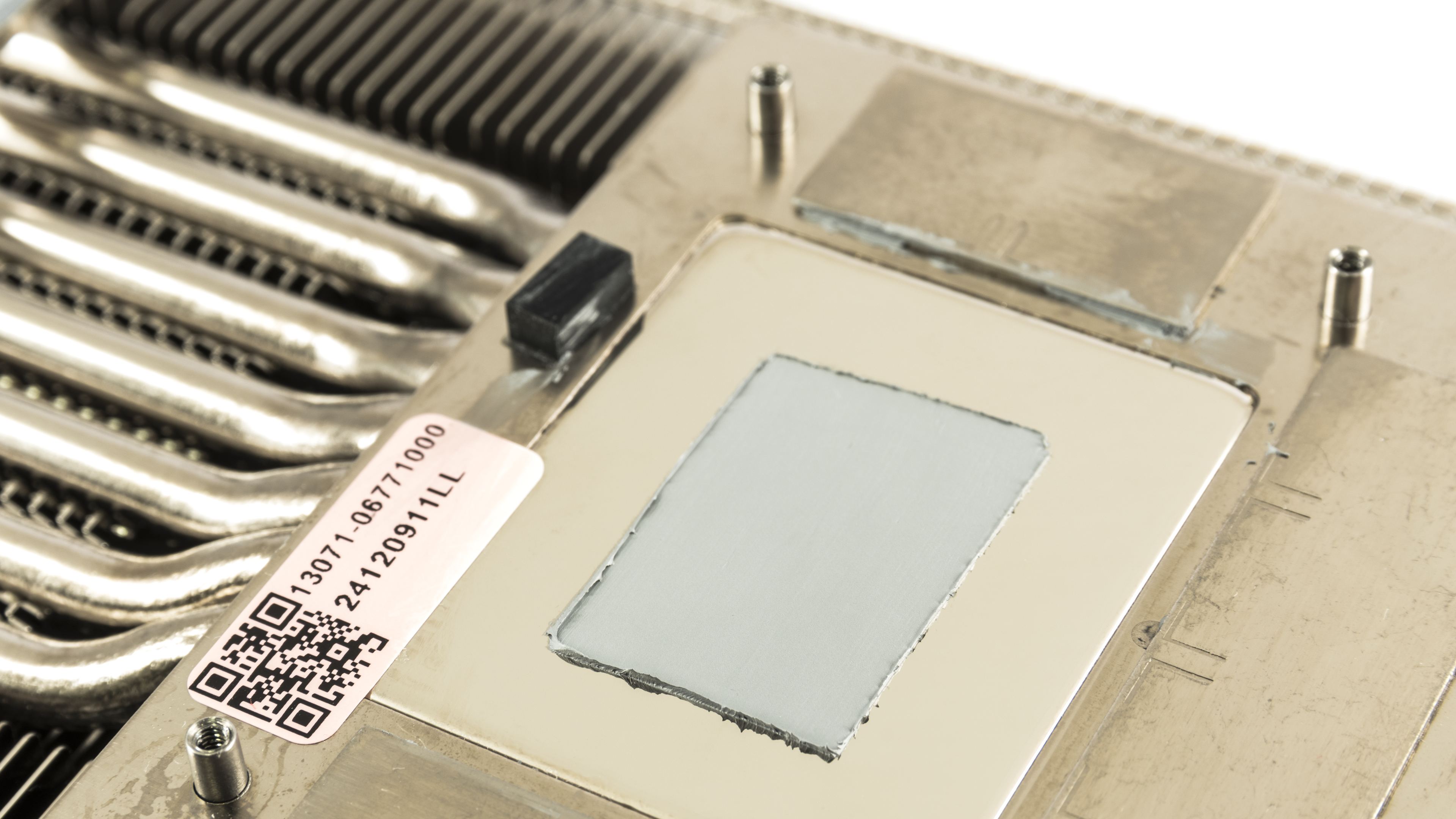
Based on what I know, a popular material they use are phase-change thermal pads like the Honeywell PTM7950, which performs excellently on low mounting pressure/direct die applications, and are very resistant to the pump-out effect which causes deterioration of performance long-term. Regular thermal paste meant for CPUs can suffer from pump-out pretty quickly.
Didn’t Asus use phase change material? Why did your card have paste on it?
Sure. I received two units of the same graphics card for review. One had already been disassembled by a YouTuber, who replaced the original phase-change thermal pad with thermal paste. That card performed worse than expected—and worse than the unit that still had the original thermal pad—so I tried to fix it by reapplying thermal paste.
It is better now but still doesn’t match the other unit’s operating performance, but I’m not sure how much of that comes down to the silicon lottery.