


We don’t typically disassemble graphics cards in our reviews—and for good reason. Once you take one apart, it’s hard to get it to behave exactly like it did in its original state, especially after replacing the factory thermal paste. With manufacturers who don’t skimp on thermal paste, repasting may not bring any improvement at all. In detailed measurements, we’ll look at how different paste and mounting pressure affect the card’s behavior.
First, let’s recap the results of the card from a recent review, without disassembly:
Cyberpunk 2077, RT Medium, 3840 × 2160 (Q mode)
Second unit with an original thermal pad

Average GPU clock speed was 2777 MHz, with a minimum of 2745 MHz and a maximum of 2790 MHz.

The card stayed near the 300 W power limit.

According to monitoring, the temperature of the warmed-up GPU is 71.8 °C and the memory is at 74°C, both quite decent values.

Maximum fan speeds reached 1226 RPM.

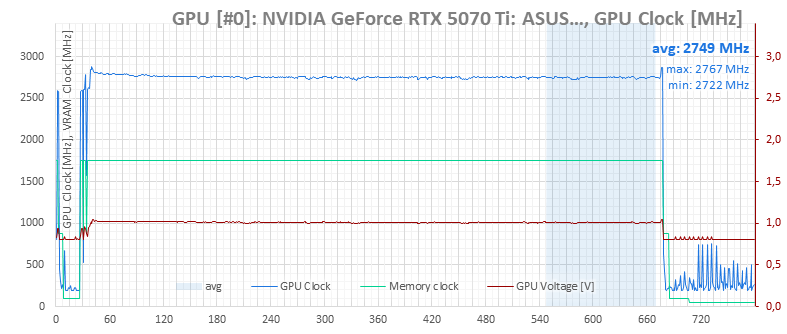
Clocks, Temperatures & Fan Speeds—F1 24, 3840 × 2160 (Q mode)
Second unit with an original thermal pad

Average GPU clock speed was 2749 MHz, with a minimum of 2722 MHz and a maximum of 2767 MHz.
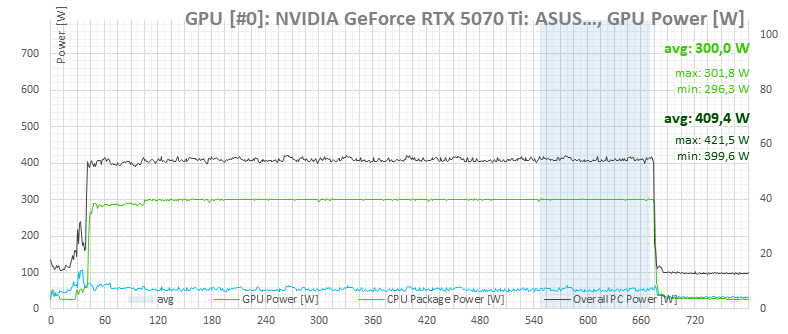
The card’s power consumption is 300 W.
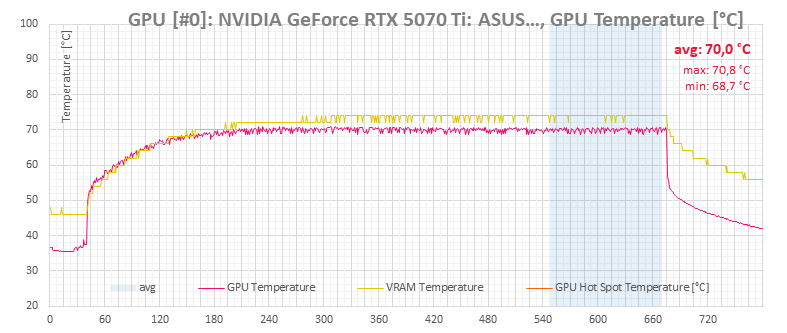
According to monitoring, the temperature of the warmed-up GPU is 70.8 °C and the memory holds at 74 °C most of the time.
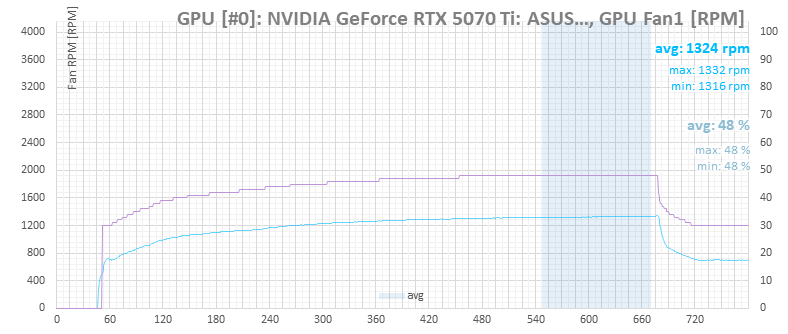
Maximum fan speeds hovered around 1330 RPM.
Clocks, Temperatures & Fan Speeds—Metro Exodus Enhanced Edition, 3840 × 2160 (Q mode)
Second unit with an original thermal pad

Average clock speed is 2756 MHz, minimum at 2692 MHz, maximum at 2805 MHz.

The card’s power consumption stays at the power limit almost the entire time.

The temperatures hold steady at 74 °C, the chip hit a maximum of 72,2 °C.

Maximum fan speed was 1330 RPM.

⠀




Very interesting article. I believe more and more manufacturers have moved to using quality thermal interfaces, so your results (slightly worse than stock after repasting) isn’t that surprising.
Based on what I know, a popular material they use are phase-change thermal pads like the Honeywell PTM7950, which performs excellently on low mounting pressure/direct die applications, and are very resistant to the pump-out effect which causes deterioration of performance long-term. Regular thermal paste meant for CPUs can suffer from pump-out pretty quickly.
Didn’t Asus use phase change material? Why did your card have paste on it?
Sure. I received two units of the same graphics card for review. One had already been disassembled by a YouTuber, who replaced the original phase-change thermal pad with thermal paste. That card performed worse than expected—and worse than the unit that still had the original thermal pad—so I tried to fix it by reapplying thermal paste.
It is better now but still doesn’t match the other unit’s operating performance, but I’m not sure how much of that comes down to the silicon lottery.