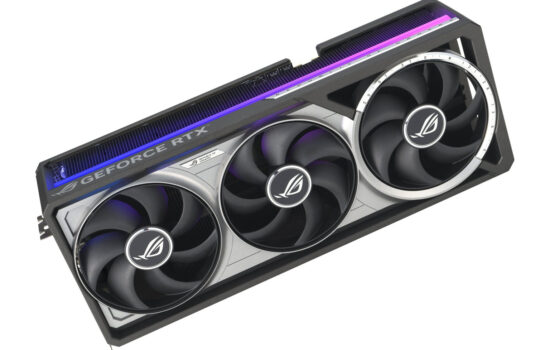
Nvidia surprised many by changing the boost limits on the new GeForce RTX 50 series, removing the option to set a temperature limit during overclocking. Now, only the power limit is adjustable, and specs list only the GPU’s maximum temperature. We’ll look at how this affects GPU Boost compared to the RTX 30 series, what happens to clock speeds and performance when limits are hit, and how to tell if your GeForce is overheating.
The testing was done in the F1 24 benchmark, which I often use for GPU thermal and power behavior tests. It’s a practical gaming scenario, fairly repeatable, and runs long enough to warm up the card properly.
The first series of tests will be on the RTX 3080 Founders Edition, where we can assume the GPU Boost regulation works exactly as Nvidia intended.
GeForce RTX 3080 FE, Default Settings, Default Thermal Limit of 83 °C
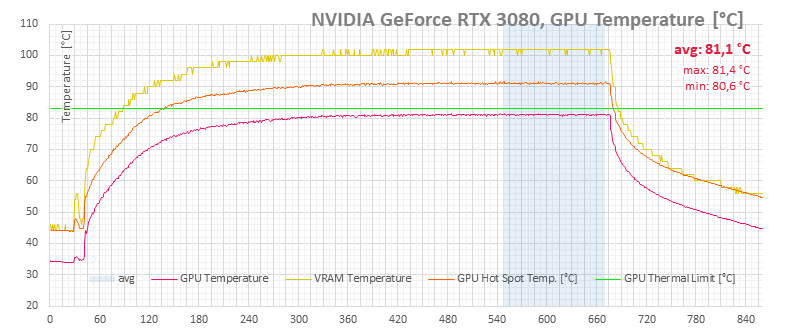
First, let’s see how the RTX 3080 behaves at its default regulation settings in a well-ventilated case. The default power limit is 320 W, and the thermal limit is 83 °C. In this configuration, there’s nothing remarkable to observe—the cooler can easily keep the 320 W card just below the thermal limit under load. The first data set with default settings confirms this.
Each graph includes four data lines. The green horizontal line marks the thermal limit (83 °C). The red line shows the GPU core temperature (an average from multiple on-die sensors for an accurate reading). Orange represents the GPU Hot Spot—the hottest point on the die. Yellow indicates GDDR6X memory temperatures.
In this test, the overall temperature of the chip does not reach the limit. The hot spot temp is slightly higher at 91 °C, but it doesn’t seem to have an effect on the regulation.
In the graph showing limit indicators, the green light stays on throughout the load test. This means the GPU clocks are constantly being capped by the card’s power limit.

The average GPU clock is 1,751 MHz. You can see that as the core temperature rises, the clock speed drops slightly. This isn’t directly due to thermal throttling but because higher temperatures increase power consumption, so the power limit kicks in and pulls the clock down.

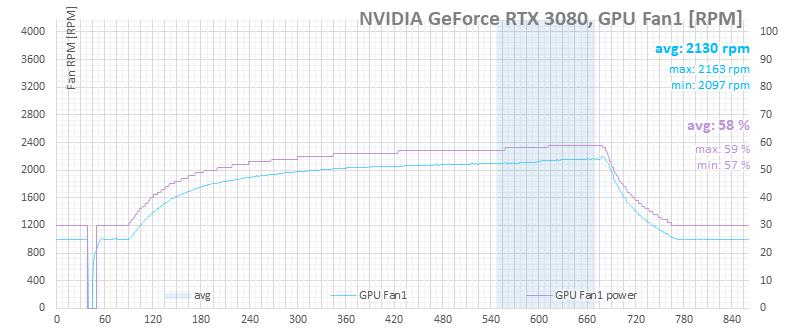
On the fan speed chart, you’ll notice the curve lags slightly behind the temperature curve. Initially, fan speed ramps up quickly, then climbs more gradually in the second half.
The power limit should be 320 W, and monitoring shows a value just a few watts lower. The power consumption curve is nearly flat, indicating the card is strictly adhering to the power cap, with minor discrepancies likely due to monitoring inaccuracies.

You can adjust both the power and thermal limits using common overclocking tools. GPU Boost then manages clock speeds based on whichever limit is reached first. By default, these two limits are linked—increasing the power limit also raises the thermal limit, and vice versa. However, in most tuning tools, you can separate them.
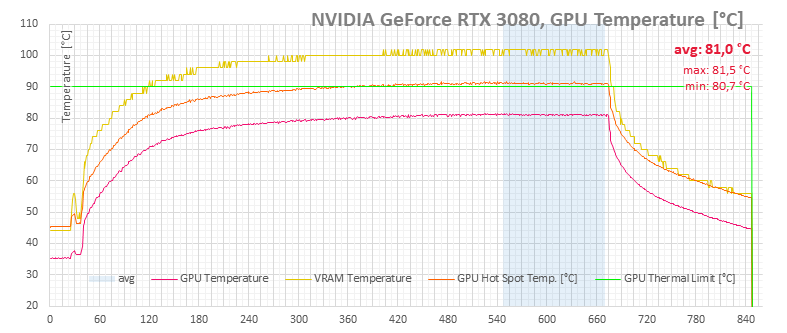
GeForce RTX 3080 FE, Default Settings, Thermal Limit Raised to 90 °C
In the next test set, we separate the limits and increase the thermal limit to 90 °C. Compared to the previous setup, the card’s behavior barely changes. The red thermal limit indicator never appears, and the temperature, clock, and power graphs differ only within normal measurement error.
The higher thermal limit also doesn’t affect fan speed regulation. The fans don’t slow down; they clearly stick to the predefined temperature-to-RPM curve.
Any differences fall within the margin of error.


GeForce RTX 3080 FE, Default Settings, Thermal Limit Lowered to 70 °C
Lowering the thermal limit to 70 °C doesn’t seem to cause any major changes in behavior either. The only noticeable difference is that the red thermal limit indicator finally appears on the graph, but otherwise the card behaves as if it were still at 83 °C.
The red core temperature line intersects the green limit line after about 120 seconds, meaning the GPU eventually reaches the reduced 70 °C threshold.

However, in the limit indicator graphs, it’s clear the card doesn’t treat hitting the user-defined thermal limit as an actual throttle condition. The thermal limit flag only triggers when the GPU reaches about 78 °C. Even at 81 °C, the card is still bouncing between power and thermal limits.

Fan speed control also doesn’t seem to react noticeably to this setting.

It’s faintly visible in the clock speed chart: when the GPU is supposedly on the thermal limit, the clock speed line is slightly less “spiky” compared to when the power limit was the bottleneck.
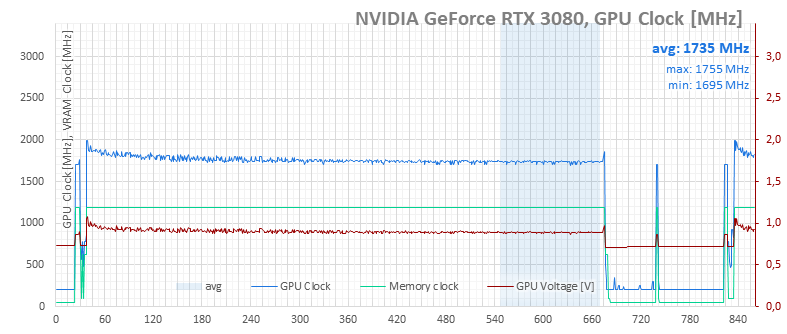
On the power consumption charts (card and system), the impact is negligible—just a few watts at most.

GeForce RTX 3080 FE, Default Settings, Thermal Limit Lowered to 77 °C
Setting the thermal limit to 77 °C shows virtually no change either. Core temperatures keep rising, GPU clocks don’t drop significantly, and power consumption remains stable.
The fans continue to ramp up steadily. A slightly more noticeable RPM increase appears when the average core temperature stabilizes around the standard 83 °C limit, with the hot spot hitting 92 °C.
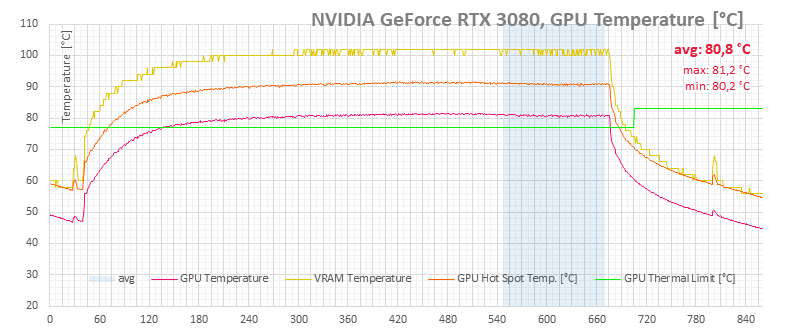
The only real difference compared to the 70 °C limit chart is the reduced amount of red in the thermal limit indicator. This suggests the control algorithm acknowledges the adjusted limit but doesn’t make meaningful changes to other parameters.

You might also notice a small bump in the fan speed chart—a brief increase after the card repeatedly hit the thermal limit for about a minute.

However, it doesn’t show up in the clock speeds or the power consumption.


⠀