


When Asus, Noctua, and Nvidia team up, it’s clear the result won’t be a compromise. For those who find the RTX 5090 already too expensive, the GeForce RTX 5080 Noctua OC Edition offers a unique combination of a massive heatsink and three top-tier Noctua NF-A12x25 G2 120 mm fans. An air cooler capable of keeping a powerful 360 W card at low temperatures with the fans spinning at just under 700 RPM is something you rarely encounter.
I guess don’t need to introduce the GeForce RTX 5080 anymore. A detailed description of the new technologies brought by Nvidia’s new graphics cards has been compiled by Jan Olšan in the article Blackwell: GeForce RTX 5000 architecture and innovations. It introduces the individual graphics chips Nvidia is using in the new cards, the new GDDR7 memory type, and also covers changes in cache memory, GPU compute units, updates to shaders and tensor cores, as well as improved compute units for ray tracing. The new generation of GeForce also brings support for new standards such as DisplayPort 2.1b and PCI Express 5.0.
With the new generation of cards, DLSS capabilities are evolving as well. It now supports Multi Frame Generation, which allows the generation of up to three intermediate frames, and introduces Nvidia Reflex 2, the second generation of its latency-reduction technology. This includes Frame Warp, which adjusts object and camera motion in rendered frames based on the player’s most recent input device movement data received just before the already rendered frame is displayed. A more detailed explanation can be found in the aforementioned article.
The GeForce RTX 5080 is not new; we have already tested several models on HWCooling:
- Nvidia GeForce RTX 5080 FE
- Asus ROG Astral GeForce RTX 5080 OC Ed.
- Gigabyte GeForce RTX 5080 Gaming OC
- MSI GeForce RTX 5080 Suprim SOC
Let me recap the basic parameters—the RTX 5080 is the second most powerful model in the GeForce RTX 50 series. It uses the second largest chip, the GB203, with an area of 387 mm² and 45.6 billion transistors. The chip has 10,752 active stream processors, 336 texturing units, and 112 rasterization units. For accelerating ray tracing computations, 84 cores are available, and for tensor computations, 336 cores. The chip has a base clock of 2295 MHz, a boost clock of 2617 MHz, and the stated card power limit is 360 W. The RTX 5080 is equipped with 16 GB of GDDR7 memory at 30 Gb/s, communicating with the chip via a 256-bit bus for a total bandwidth of 960 GB/s.
I’ll add more detailed specifications just in the form of a table comparing it with the nearest models.
| GeForce RTX 5090 | GeForce RTX 5080 | GeForce RTX 4090 | GeForce RTX 4080 Super | GeForce RTX 4080 | |
| Shader cores | Blackwell | Blackwell | Ada Lovelace | Ada Lovelace | Ada Lovelace |
| Nvidia CUDA cores (SP) | 21760 | 10752 | 16384 | 10240 | 9728 |
| Texture Mapping Units | 680 | 336 | 512 | 320 | 304 |
| Render Output Units | 176 | 128 | 176 | 112 | 112 |
| RT cores | 318 TFLOPS | 171 TFLOPS | 191 TFLOPS | 121 TFLOPS | 113 TFLOPS |
| Tensor Cores | 3352 AI TOPS | 1801 AI TOPS | 1321 AI TOPS | 836 AI TOPS | 780 AI TOPS |
| Boost Clock | 2.41 GHz | 2.62 GHz | 2.52 GHz | 2.55 GHz | 2.51 GHz |
| Base Clock | 2.10 GHz | 2.30 GHz | 2.23 GHz | 2.29 GHz | 2.21 GHz |
| Memory | 32 GB GDDR7 | 16 GB DDR7 | 24 GB GDDR6X | 16 GB GDDR6X | 16 GB GDDR6X |
| Memory Bus Width | 512-bit | 256-bit | 384-bit | 256-bit | 256-bit |
| Memory Bandwidth | 1792 GB/s | 960 GB/s | 1008 GB/s | 736 GB/s | 717 GB/s |
| Max. resolution | 4K at 480Hz or 8K at 120Hz with DSC | 4K at 480Hz or 8K at 120Hz with DSC | 4K at 240 Hz or 8K at 60 Hz with DSC, HDR | 4K at 240 Hz or 8K at 60 Hz with DSC, HDR | 4K at 240 Hz or 8K at 60 Hz with DSC, HDR |
| Standard Display Connectors | 3× DisplayPort, 1× HDMI | 3× DisplayPort, 1× HDMI | 3× DisplayPort, 1× HDMI | 3× DisplayPort, 1× HDMI | 3× DisplayPort, 1× HDMI |
| PCI Express | Gen 5 | Gen 5 | Gen 4 | Gen 4 | Gen 4 |
| Nvidia Encoder | 3× 9th gen | 2× 9th gen | 2× 8th gen | 2× 8th gen | 2× 8th gen |
| Nvidia Decoder | 2× 6th gen | 2× 6th gen | 1× 5th gen | 1× 5th gen | 1× 5th gen |
| length | 304 mm | 304 mm | 304 mm | 304 mm | 304 mm |
| width | 137 mm | 137 mm | 137 mm | 137 mm | 137 mm |
| height | 2-slot | 2-slot | 3-slot | 3-slot | 3-slot |
| Total Graphics Power | 575 W | 360 W | 450 W | 320 W | 320 W |
| Supplementary Power Connectores | 4× 8pin PCIe (adapter) or 1× 600 W PCIe Gen 5 | 3× 8pin PCIe (adapter) or 1× 450 W PCIe Gen 5 | 3× 8pin PCIe (adapter) or 1× 450 W PCIe Gen 5 | 3× 8pin PCIe (adapter) or 1× 450 W PCIe Gen 5 | 3× 8pin PCIe (adapter) or 1× 450 W PCIe Gen 5 |
And now we’ll focus on the Asus card itself.
Testing the ASUS GeForce RTX 5080 16GB GDDR7 Noctua OC Edition
(RTX5080-O16G-NOCTUA)
Asus had the GeForce RTX 5080 in four model series—Prime, ProART, TUF, and ROG Astral. Prime is the cheapest, TUF is in the middle of the offering, and ROG Astral models are premium. A few months ago, they added a specialty created in collaboration with Noctua—the ASUS GeForce RTX 5080 16GB GDDR7 Noctua OC Edition.

It sits somewhat apart from Asus’s existing model series. Aside from the cooler, in terms of features, it is similar to the TUF GeForce RTX 5080. However, it has a slightly larger heatsink than the TUF. It lacks some functions offered by the premium ROG Astral series. But when it comes to features in terms of cooler dimensions, its performance, and operational characteristics, it is the best-equipped RTX 5080 in Asus’s lineup.
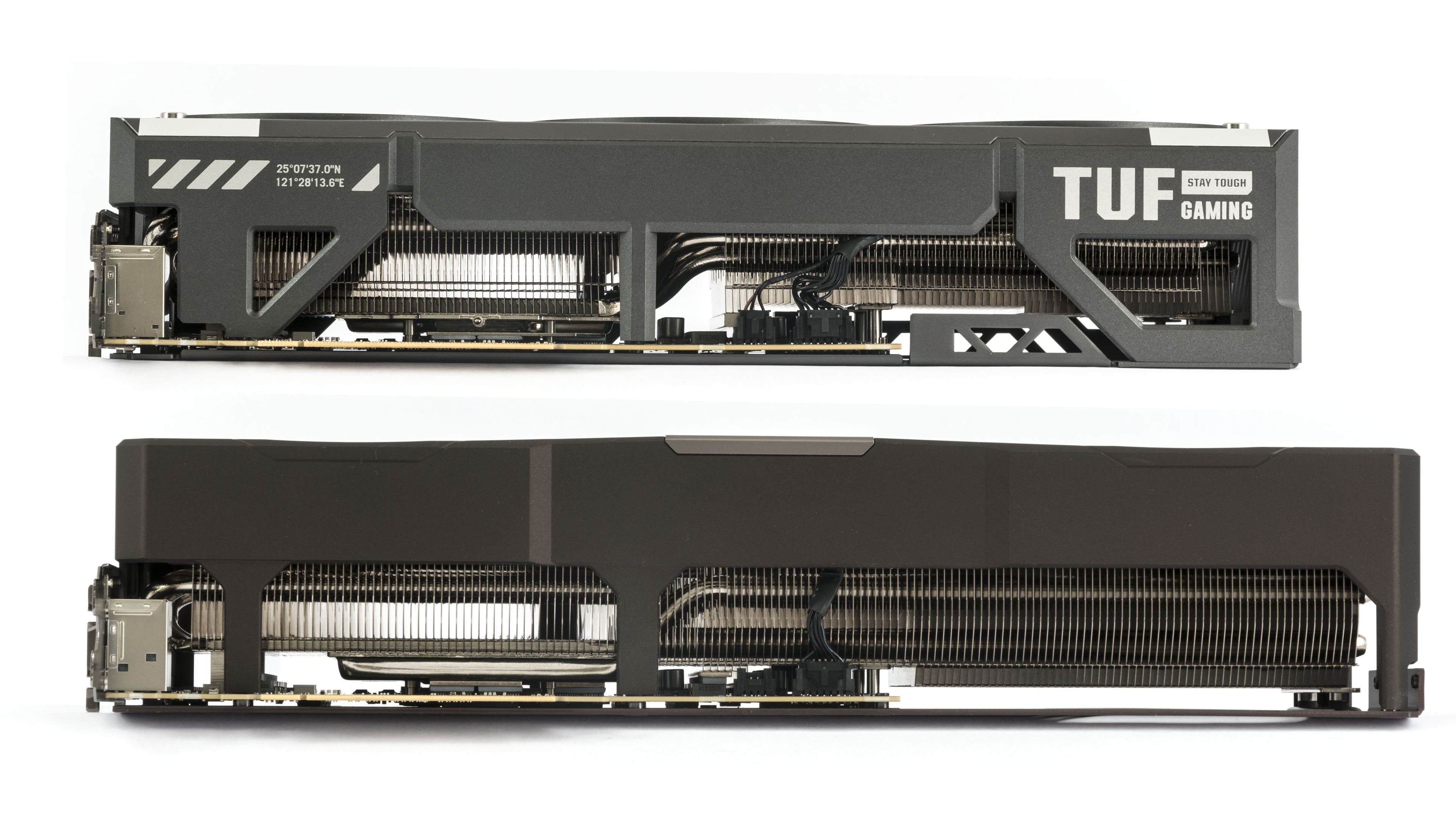
Prices currently start at around 1520 EUR. Thus, the price sits just a bit below the level of the highest model, the Asus ROG Astral RTX 5080 OC.
From the model designation, it’s clear that the card is factory overclocked. The manufacturer slightly increased the stated typical clock in the BIOS from the reference 2617 MHz to 2700 MHz. It is thus clocked a bit lower than the ROG Astral with its stated typical GPU Boost clock of 2760 MHz.
The power limit is at the reference 360 W; it can be reduced by up to 31 % to 250 W, or increased by up to 25 % to 450 W. In terms of the maximum power limit, it gives you more headroom for overclocking than the original ROG Astral with its 400 W limit. At least with the BIOS available at launch.
The card has two BIOSes—Quiet and Performance. Unusually, the quieter Quiet mode is set as the default. As usual, both BIOSes don’t differ dramatically in terms of parameters. They have the same chip and memory clocks, as well as preset power limits. The difference is only in the cooling control settings.
In Quiet mode, the fans run at lower speeds at the same temperatures than in Performance mode. Slightly lower clocks and performance are a side effect of the differently set fan control curve. With higher temperature, the card’s power consumption increases slightly, and with rising power consumption under the same power limit, the GPU clocks decrease marginally.

The monitoring in GPU-Z shows only the usual data as on other models. No additional sensors. What probably disappointed me the most was the lack of monitoring for current on the individual pins of the power connector, as is the case with cards from the ROG Astral series.
GeForce cards typically have two headers reserved for fans, with separate control and speed monitoring. In the case of three fans on a card, manufacturers usually (but not always) solve this by connecting two fans to one header via a splitter.
On the tested model, the fans at the edges are connected via a splitter to the Fan 1 header, and the middle fan is connected to the Fan 2 header.


The next set of images shows the values stored in the Quiet BIOS. In GPU-Z, the only apparent difference is the BIOS version label. The differences in performance are smaller than in noise, so we will test performance in the quiet mode. However, we will measure the operating characteristics in detail on both BIOSes.


The application HWiNFO can obtain the most information from the monitoring of most cards. The list of sensors available for the tested card in the latest version of the application can be seen in the image below.

On the back of the packaging, the manufacturer presents the features and technologies utilized by the card. Because the card is built on a similar foundation as the TUF RTX 5080, it lacks some of the premium elements offered by the ROG Astral.
First mentioned is the cooler with a trio of 120mm NF-A12x25 G2 fans, support for 0dB cooling technology, and a ventilated backplate. It further mentions the cooler with an optimized vapor chamber, a phase-change thermal interface material, and MaxContact technology for improving the contact between the chip and the base.
Longer lifespan is ensured by Auto-Extreme technology with one-pass soldering and GPU Guard for more stable mounting of the GPU on the PCB.
And finally, it mentions the GPU Tweak III software for monitoring and configuring the card, MuseTree, and a free one-month trial version of Adobe Creative Cloud.


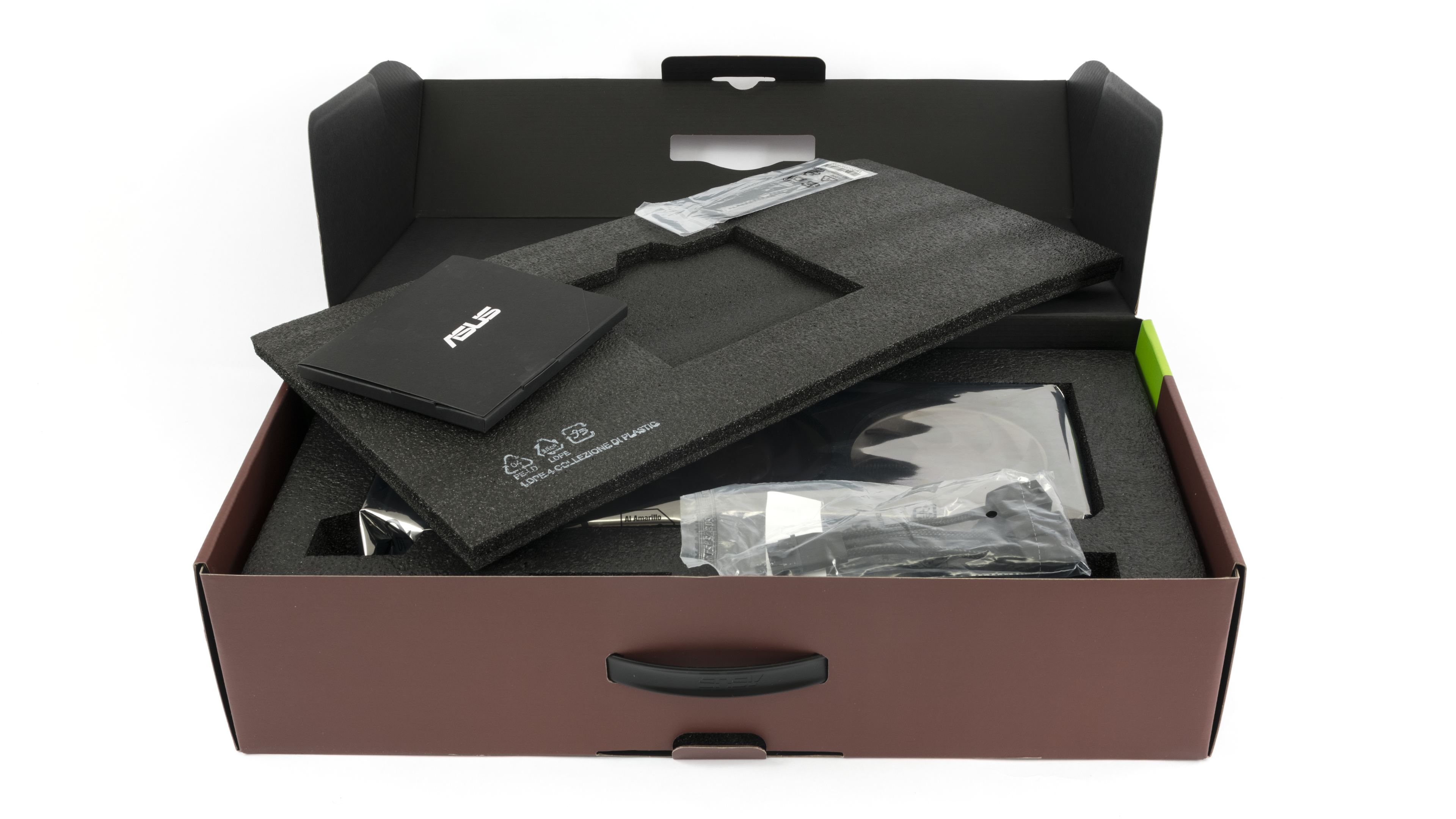
In the accessories, you will find a brief installation guide, leaflets with other manuals, a thank you card, a cable tie made of dual-sided hook-and-loop fastener, and a power adapter from three 8-pin connectors to a 12V-2×6 connector. And an anti-sag bracket, which prevents excessive stress on the PCB.

Asus includes an adjustable support bracket with its heavier cards, which you can use to prop up the card in cases with a PSU shroud.
However, in standard ATX cases with seven expansion slots and a shroud right below the motherboard, there is less space under a four-slot card. A standard-length bracket doesn’t fit under a four-slot card, so a special shortened variant is also included in the accessories. Just like the original one, a PH screwdriver bit for the screws also fits inside it.

We’ll take a look at the card’s design in the following chapter
⠀
⠀






it seems even on Q mode it may get outside of the silent zone when pushed hard enough…
I know, I know, all the other cards are worse, but if even 3 of these fans struggle it means a lot about the power output of modern cards, doesn’t it?
What matters most is what a “quiet” graphics card means to each individual — it’s a pretty subjective thing.
At just under 700 RPM, it’s extremely quiet. At night, when everything is silent, you can hear it if you put your ear close to the card. From a typical distance of about a meter, even on an open test bench, I can’t hear it at all. But my hearing isn’t what it was twenty years ago.
However, considering the temperatures the card reaches, there’s still some headroom to lower the fan speed by adjusting the fan curve. Throughout the day, I’ll be running additional tests across the full fan-speed range in Cyberpunk and will add line charts of clock speeds and temperatures to the article.
Without V-Sync, the coil whine is still more noticeable under load than the fans themselves—even in Q-Mode—though it’s quieter than on other cards with the same performance. The tougher part might be keeping the CPU just as quiet and getting the heat out of the case without adding noise.
I haven’t precisely tuned G2 fans yet, but 700RPM would be somewhere in the range of upper limit, for G1 that was around 670, the Q profile seems to be willing to push above that if heated enough instead of limiting the heat to ensure fans won’t spin up, requiring manual tuning
which to be fair is expected of Noctua products as they don’t tune for absolute silence as general audience expects much less, but their high quality allows to achieve it with some extra effort
the coil whine though absolutely shouldn’t be there, that’s something most companies seem to neglect the most, I know it’s hard to control and there’s a ton of variance between specific items, but at this price point it’s unexcusable
I’d say even more: it’s unexcusable at any price point that isn’t explicitly cheapened cutting all costs for the last pennies, unfortunately… getting components and accessories that don’t suffer from that is nearly impossible, like… I’m not gonna try dozens of different units of a monitor to pick the one with least whine, right?
At least when it comes to temperatures shown in the monitoring, they’re fine—even at minimum fan speeds.
https://www.hwcooling.net/en/asus-geforce-rtx-5080-noctua-oc-ed-16gb-review-silent-monster/20/
Does GPU watercooling even make sense anymore? The graphics cards are becoming quieter and cooler with each new generation, even without deshrouding.
Yes, some cards are now quiet enough that the main source of noise is elsewhere. For example, in my test rig I often find the CPU cooler is louder, because I have the fan curve set to ramp up whenever any core goes over 80 °C.
It would be more appropriate to say that it depends on the circumstances. The key difference is that liquid cooling moves the GPU’s heat to a radiator mounted away from the card, making exhausting hot air easier when the radiator is properly positioned in the case. With an air cooler, you still need to figure out exhausting the heat from the case.
It’s a bit different from processors. With a CPU, the priority is cooling a small area—the CPU itself and the surrounding VRM (voltage regulation modules).
A good block on GPU usually reduces hotspots on the die and VRAM, but it can worsen cooling of the other components. But on a graphics card, there are many hot parts spread across the entire PCB. That’s why having fans directly over the hot zones usually works best. Full-cover blocks solve the problem of cooling components, but this is an expensive and complicated solution. If, instead, the manufacturer uses a cheaper AIO cooler on the GPU and a card-mounted fan to cool the other components, it usually isn’t dead silent. The pump can also be noisy unless the manufacturer keeps it under control.
Air cooling, in contrast, is simpler, cheaper, and generally more reliable. When paired with a large heatsink with enough surface area, it can be a very competitive option.
Personally, I prefer air cooling for its ease of use, consistent long-term performance, lower risk of failure and its reliability.
Thank you for the info.
I’m building a PC with Ryzen 9 9950X and RTX 5070 Ti. The CPU is cooled by a custom liquid loop with one 420mm and one 280mm radiator. I just can’t decide whether to include the GPU in the loop. The full cover waterblock by Bykski costs about $100.
Since a water cooled graphics card does not heat up other components, such as SSD, RAM, chipset, etc, I’ll probably go with the waterblock. My radiator space should be enough for that.
There’s actually a true specialist in our country who focuses on fully liquid-cooled builds. I’ll write to Gabo (from TichéPC) — you might get a response full of hands-on experience. 🙂