


On most mid-range Asus graphics cards, the shroud is easy to remove. We already tried classic 120 mm fans on this card, but they do not suit its narrow, long PCB: they make the card much wider and still fail to cover the heatsink along its full length. A trio of 92 mm Noctua fans fits better on the 30 cm card, and the range includes the low-profile NF-A9x14 for noticeably quieter cooling at lower speeds overall.
Before we delve into the results with the Noctua fans, let’s look at the card’s behavior with the stock fans. The first graph shows the card’s noise level still with the stock fans. The card’s control allows you to set their performance in the range of 30–100%. This corresponds to an operating range of 700–3200 rpm. Because something was clicking in one of the fans, the cooler’s noise level was at 32.1 dBA even at the low 700 rpm. And this raised the card’s noise level across the entire speed range.

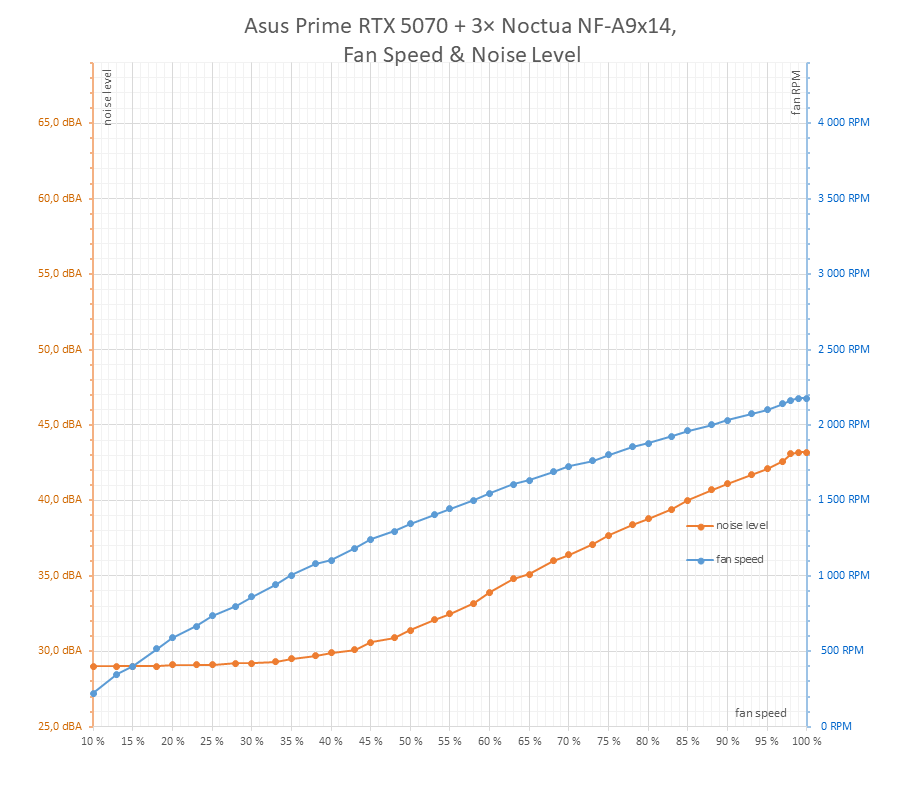
The next graph shows the noise level with the trio of Noctua NF-A9x14 fans. After connecting to the control panel, they start spinning at 10% PWM and run at maximum at 98–100% PWM.
At lower speeds, the noise curve is flat. The reason is that the fan noise is below the measuring range threshold of the sound level meter (30 dBA). The fans are almost inaudible at low speeds, and the meter’s own noise floor is higher than the fan noise.
We’ll measure how the card’s operating characteristics change across the entire range of fan performance. Due to time constraints, I’ll use short loops of the Cyberpunk benchmark with the RT Medium profile and a resolution of 2560 × 1440 pixels with DLAA.
Before the whole batch, one warm-up loop runs with three passes and fan performance at 40%. This is not visible in the graphs below; they start with the first measurement with fans set to 100%. The fan performance then gradually decreases by 5% from 100% to the lower limit of the measured range. For the card with stock fans, it ends at 30%, which corresponds to the settable minimum. For the card with the Noctua fans, it ends at 20%. Testing at 15 and 10% usually doesn’t make sense because at low fan speeds and GPU temperatures over 85 °C, the control starts to significantly throttle the GPU power draw, and with it the clocks and performance, and the noise level can no longer be measured with the used sound level meter.
With each setting, three test loops run. Between individual test runs, there are delays of only a few seconds, so the system remains heated during testing. I will read the measured values from the third loop, exceptionally from another if there is some problem with the last measurement.
Asus Prime GeForce RTX 5070 (stock, 3× Axial-Tech Fan)
In this chapter, we’ll go through how the card behaved across the entire range of fan performance. First, there will be simple graphs with the entire test run, where everything is visible together. Specific measurement values for each setting can be found in the interactive graphs in the next chapter.
At the lower limit of the tested range, i.e., at 30% fan performance, the graphics chip temperature was at a maximum of 85.2 °C and averaged 84.0 °C. At maximum fan speeds, the average temperature dropped to 59.2 °C.

The next graph shows fan speeds on the light blue data series. The fans were connected directly to the card, but their speeds were set manually using the Fan Control application.
At the lower limit, they start at around 700 rpm at 30% performance. At 100%, they run at 3200 rpm.
The purple curve in the graph shows the set fan performance. The light blue one corresponds to the current rpm on the Fan 1 header.
At minimum speeds, when the GPU temperature exceeds 85 °C, throttling of the chip’s power draw occurs, leading to a reduction in clocks and thus a drop in performance.

The next graph shows temperatures (in red) and total CPU utilization (in blue). As the fan performance on the card decreases, the airflow in the case slows down, and with it, the CPU temperature rises slightly.

Performance differences don’t change dramatically. With a cooler chip, clocks rise slightly, and with them performance; the difference increases only by tenths of frames per second.
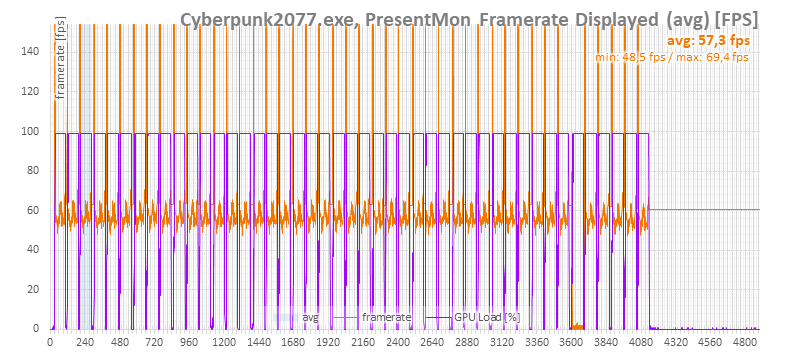
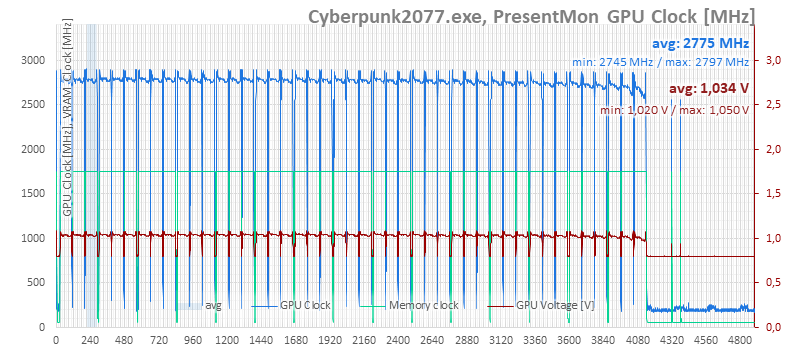
This is more visible in the GPU clock speed than in performance. Towards the end, when the card began to overheat at low fan speeds, more significant clock drops can be seen. Between 30% and 100% fan performance, the difference is roughly 100 MHz.
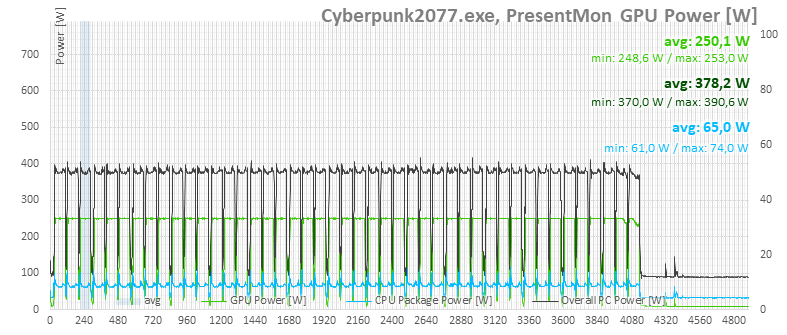
For reference, we also have graphs of power consumption for the entire system and for the card itself according to monitoring. In the first run, where chip temperatures were already too high, it’s visible that GPU boost also throttled the card’s power. In the subsequent runs, the card is evidently running at the edge of its power limits.

⠀





Love this content.
Glad to this performed comparable to the A12X25. Interested to see how the A9X25 would improve the performance.
Some tests with the NF-A9x25 fans should be published this Friday, if nothing goes wrong. 🙂