Monitors usually offer a very similar and rather unremarkable design in black or grey. Gaming models are trying to break out of this stereotype, with various red elements or RGB lighting. However, the world of professional monitors is virtually black and white, and MSI thought it would bring some colour to this environment, and not a grey one, but an “Ultramarine” one at that. That’s a colour particularly associated with Renaissance artwork.
Image properties
We tested the display properties using the Datacolor Spyder5Elite probe. The display has a 27-inch IPS panel with a traditional 16:9 aspect ratio, 2560×1440 px resolution, anti-glare finish and even bezels on three sides. An interesting feature of the display is the 75Hz refresh rate combined with Free Sync, while it also works with G-Sync in unofficial compatibility mode. The manufacturer claims 95% coverage of the sRGB spectrum, 1000:1 contrast and 4ms GTG response time. The maximum brightness reaches 300 nits on paper, falling short of even the base HDR spec. It’s also only an 8-bit panel with 16.7M colours, so it’s not quite suitable for professional graphics use.
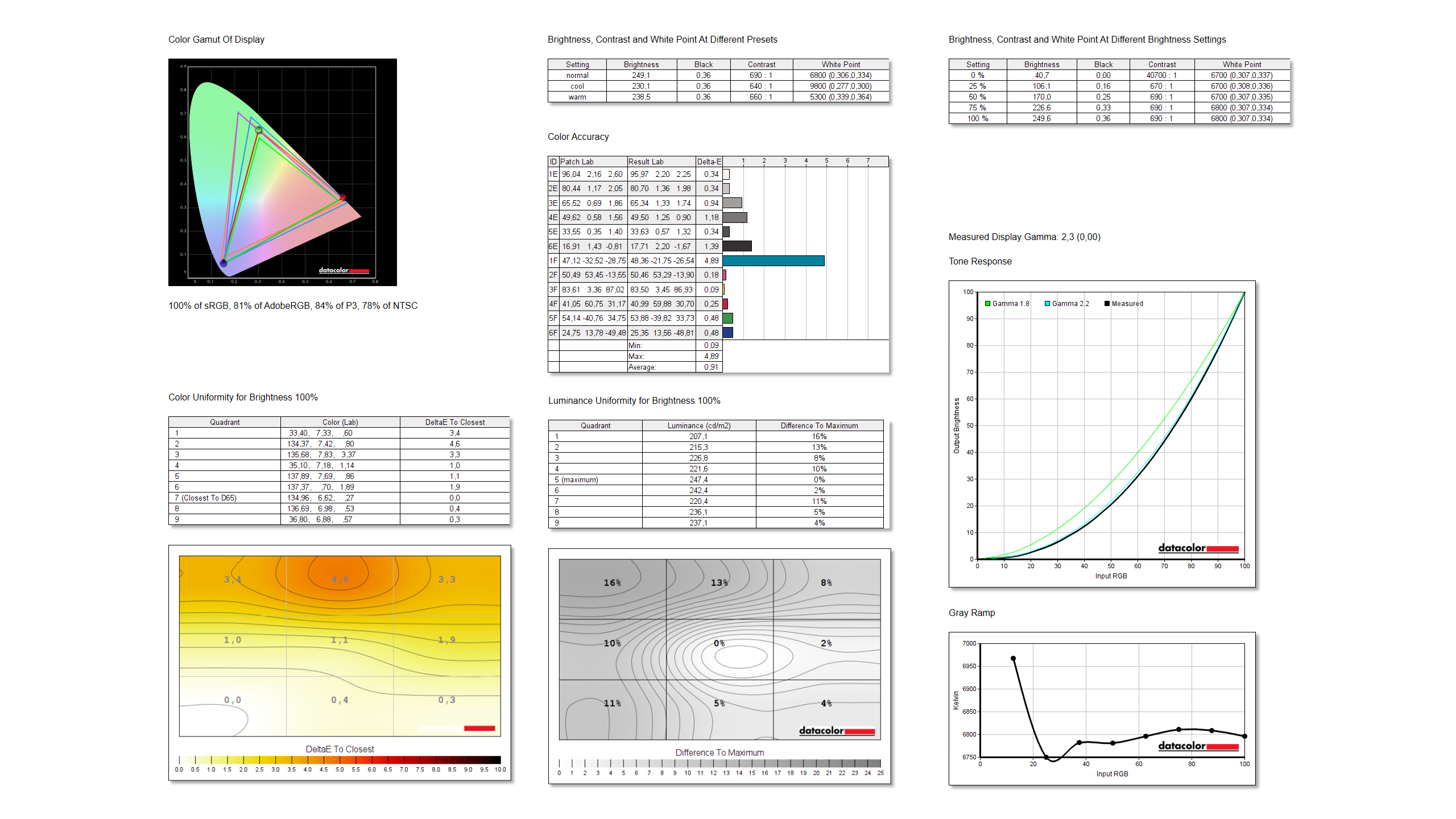
We compared the display quality in the basic mode, which is the mode the monitor will be in right out of the box. We measured 100 % sRGB, 81 % AdobeRGB, 84 % DCI-P3 and 78 % NTSC. These are slightly worse numbers than we’ve seen with the Philips 27E1N5600HE, but better than the manufacturer claims. Conversely, the brightness is significantly lower at 249 nits. Surprisingly good is the average Delta E colour deviation of 0.91, which is one of the best values we’ve measured so far. As the black display test already told us, the uniformity is also at a very good level, and we can’t fault anything here either. The display offers only one gamma mode, which corresponds to a value of 2.3. Three colour modes, which offer different temperatures from 5300 to 9800 K. The highest measured contrast at 100% brightness was 690:1 in the normal colour mode, where the maximum brightness of 249 nits was also achieved.
Input Lag and Response Time
We also measured the input lag on the monitor in multiple Response Time modes.

The basic setting with Response Time off achieves a response time of 10.1 ms, which is a very good value that can be the envy of many gaming models. Switching the Response Time gradually brings us to a minimum value of 9.2 ms in Fastest mode, which is also an interesting improvement. The next picture will tell us better which of the Response Time modes to choose.
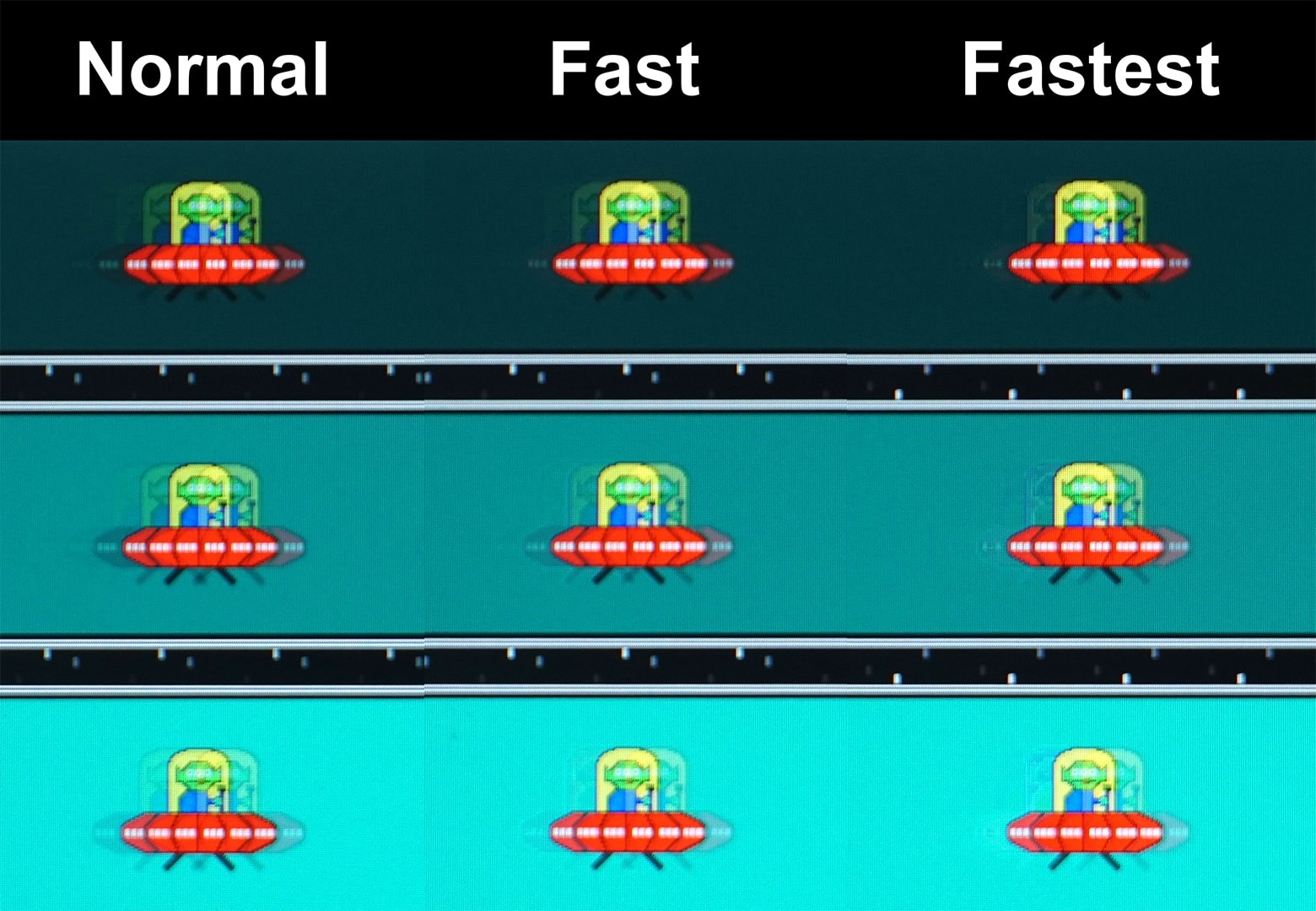
On the manufacturer’s website you can find information about 4 ms response time GTG, i.e. pixel refresh rate. In the fast mode the difference is very minimal, but some improvement in minor ghosting can be observed. On the contrary, the fastest mode already suffers from inverse ghosting. Thus, of the available modes, Fast seems to be the most suitable for both lowest input lag and minimizing ghosting without undesirable inverse ghosting, although the real change from normal is really only cosmetic.