


Nitro+ AMD Radeon RX 9060 XT OC is Sapphire’s top-tier 16GB RX 9060 XT model. Alongside powerful cooling and excellent operating characteristics, the manufacturer also bets on stylish looks and prominent ARGB lighting—elements that help it fit right into popular PC design cases. If you’re building a PC for gaming at the lower 1080p and 1440p resolutions and care about aesthetics, it’s certainly worth considering.
The card is equipped with a cooler featuring an atypical shroud design. Unlike the more powerful Nitro+ RX 9070 XT, it no longer has a connector hidden in the rear of the card under the backplate, but rather a classic 8-pin connector routed to the side. Compared to the more powerful variant, it’s also noticeable that there was greater pressure on manufacturing costs for the cheaper model. Instead of lacquered perforated metal, the shroud now uses a plastic imitation. Both cards are shown in the image below, with the RX 9060 XT in front and the RX 9070 XT behind.
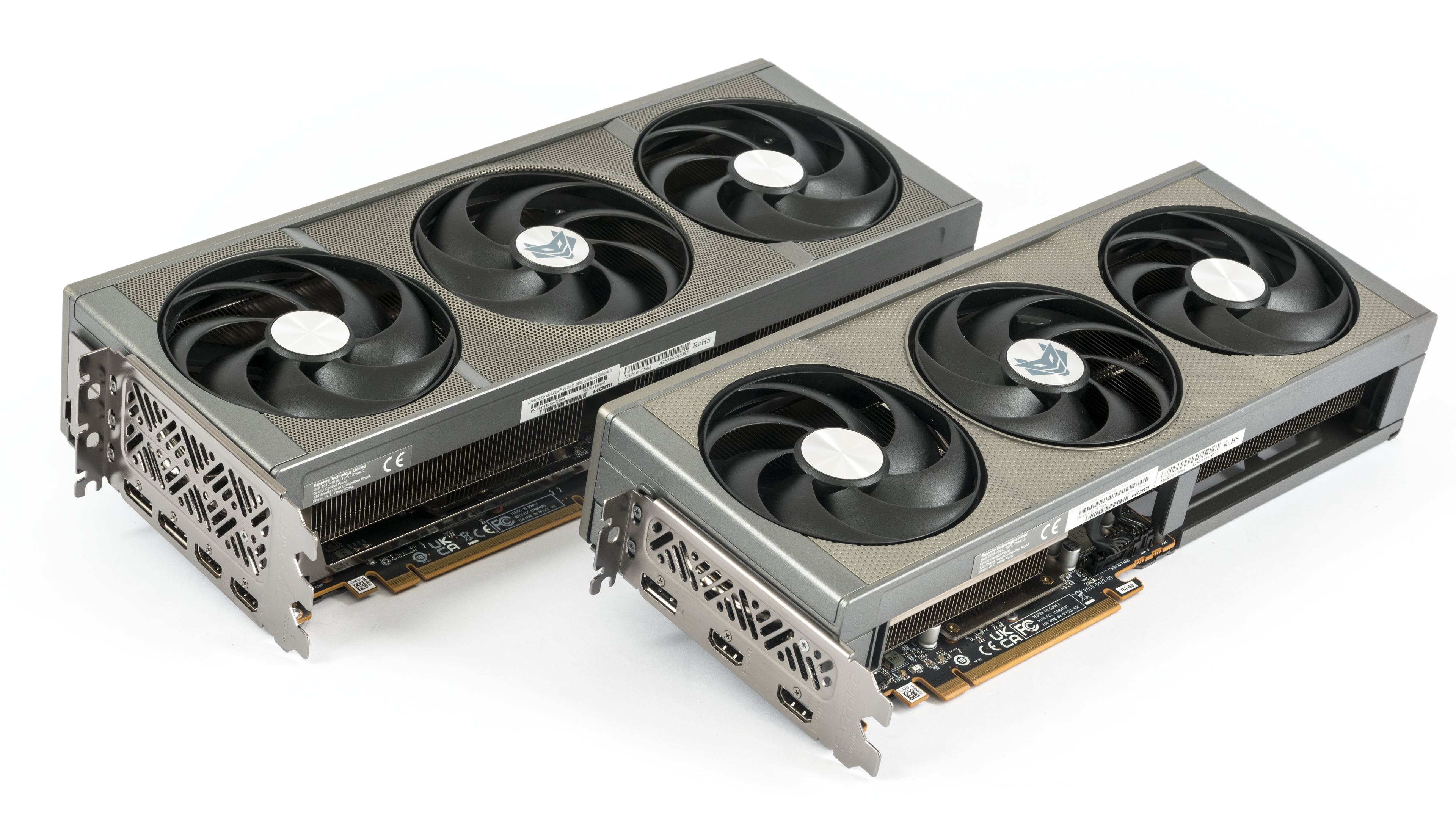
In the previous photo, both cards look similarly sized, but that’s rather an optical illusion. The RX 9060 XT is a few centimeters shorter, not as tall, and also has smaller fans. In the second photo, the difference between the two cards becomes more apparent.

Set into the plastic shroud with a grey metallic finish are three counter-rotating fans that blow air down onto a heatsink with transverse fin stacks.


The rear of the PCB is protected by a metal backplate. In the rear section behind the PCB, there is an opening through which air can flow freely through part of the fin stack directly upwards over the card. The robust shroud also provides greater support for the card, partly because it’s screwed to the PCIe bracket.


The heatsink has a base made of thick copper plate, from which heat is transferred by composite heat pipes. It cools both the graphics chip and the memory.

Heat from the MOSFETs is transferred via thermal paste to smaller bases, which then conduct it into the tall fins on the heatsink.

>A large portion of the fin stack is freely pass-through; the opening extends partly under the middle fan as well. In this regard, the card actually scores a point against the Nitro+ RX 9070 XT; the more powerful model had foam on the fin stack protecting the power cable from the fins, and a large portion of the fins was choked.


The fans have impeller diameters of 9 cm and a height of roughly 9 mm.


The fans use a single-screw quick-swap system: loosen the screw, swing the fan out, slot in the replacement, push it into the connector, then tighten the screw.

From the side, you can see that in the rear section behind the PCB, the heatsink fins could have been a bit longer—there is enough space above the backplate. Even with shorter fins, however, the heatsink is more than capable of cooling the card effectively.


Along the lower external edge of the shroud is a long strip of translucent plastic. It is illuminated by many addressable RGB LEDs. Enthusiasts of colorful LEDs will adore the Nitro+.

The card’s weight is just 995 grams, placing it among the lighter models. But for a 182W card, even a lighter cooler provides more than sufficient cooling capacity.

The card is 30 cm long. Its width exceeds the PCIe bracket by just under three centimeters. Its height is just under six centimeters, and it fits within a three-slot space.


Auxiliary power is supplied via a single 8-pin connector oriented with its latch facing upwards. It’s positioned in the middle of the card, so you probably won’t be able to route the cable as neatly as with the more powerful variant.

The connector selection is sparser than on most current cards. Instead of the usual three DisplayPort connectors and one HDMI, the card has only two HDMI 2.1b connectors and one DisplayPort 2.1a. The DisplayPort supports UHBR13.5 mode, while GeForce cards already support the faster UHBR20 mode.

That should suffice regarding the card’s design; in the following chapters, we will look at the test results.
⠀
⠀





Honeslty, with how slow advancement in this tier is, there’s a very good argument for getting the Nitro on build so the thing will live as long as possible.