





The Prime series is one of Asus’s newer product lines, aimed at budget-minded customers. By combining lower prices with solid features, it delivers an attractive price-to-performance ratio—and that goes for graphics cards, too. The Prime GeForce RTX 5070 12GB OC Edition is one of the most affordable options currently available. Yet it avoids the typical pitfalls of low-cost models—clearly, Asus didn’t skimp where it matters.
Fan behavior, noise level
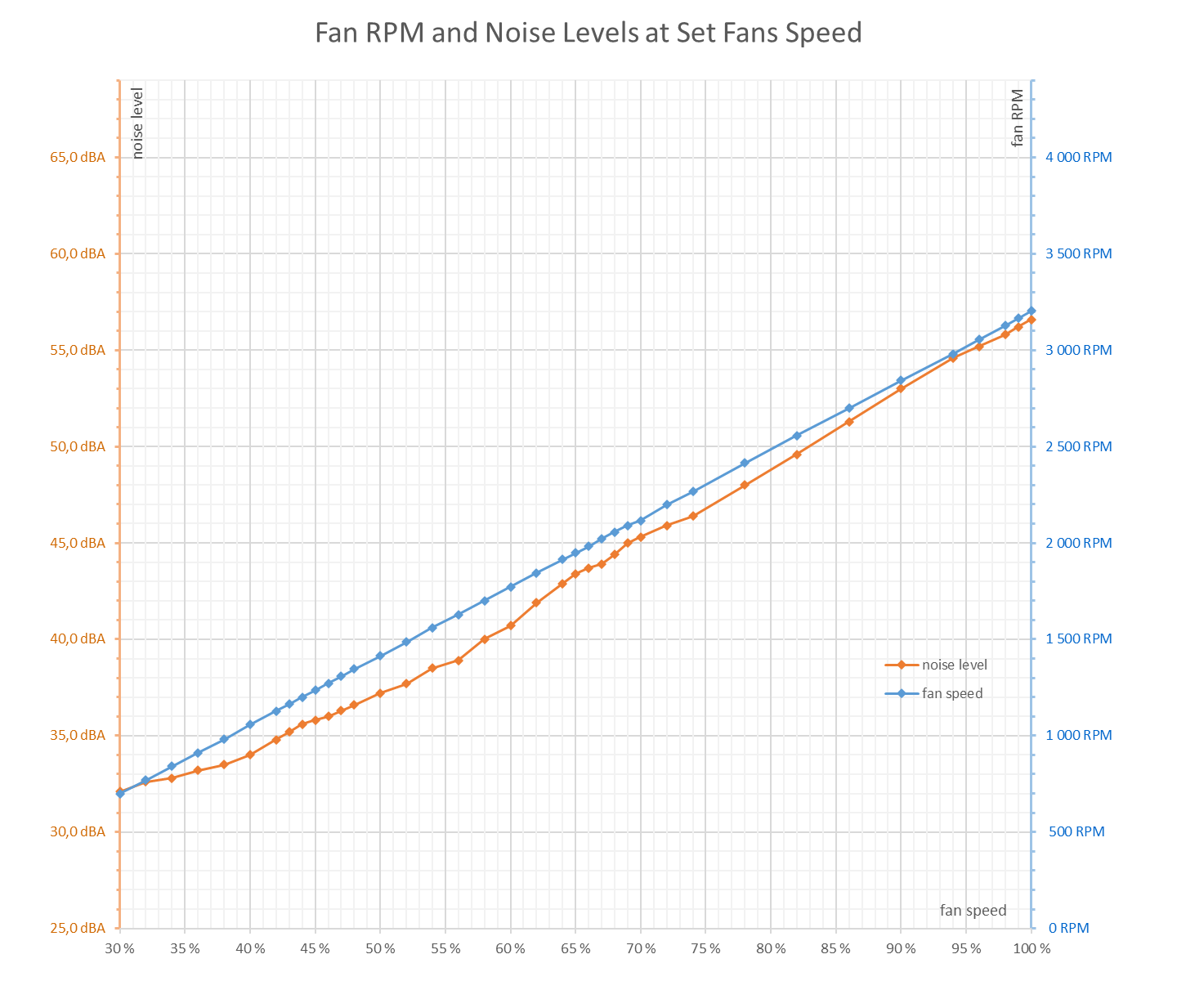
Before diving into the noise measurements, it’s worth noting that the test unit had one noticeably louder fan compared to the other two. While the middle and rear fans were nearly silent and registered just 29 dBA at their minimum 700 RPM, the fan near the bracket produced a rustling noise even at low speeds, pushing the noise level up to 32.1 dBA.
At higher RPMs, this noise turned into a distinct rattling. I disassembled the cooler to inspect whether any plastic parts or burrs were rubbing, but all clearances seemed sufficient to rule that out. Unlike the other two fans, this one remained audible even when manually spun outside the shroud.
The test unit likely reflects a downside of the more durable – yet sometimes noisier – ball bearings used in the fans. Unfortunately, based on just one sample, it’s impossible to tell whether this is a common issue or simply bad luck with an outlier.
When TechPowerUp reviewed the RTX 5060 Ti with a similar cooler, they didn’t report such issues, and the card achieved lower noise levels at minimal fan speeds than the TUF-series model. The Prime RTX 5070, on paper, should also be quieter at 1230–1280 RPM than most GPUs in the same segment. However, with this particular sample, the problematic fan’s bearings or motor were more audible.
In Quiet mode, this might get drowned out by the rest of the system fans, but in Performance mode, a clear clicking noise was noticeable at 1800–2000 RPM.
If all three fans matched the quality of the quieter ones, noise levels in the lower RPM range could be at least 3 dBA lower, potentially making the card quieter than the Gigabyte RTX 5070 Gaming, which costs about 90 USD more and measured 33.8–34.8 dBA in silent mode. The tested Prime RTX 5070 reached 35.8–36 dBA in Q mode. In Performance mode, the fans ramped up to 1800–2000 RPM, where noise levels hit 42–45 dBA – about 2–3 dBA higher than what’s typical for more budget-oriented GPU series.
The lowest manually settable fan speed is 30%, corresponding to 700 RPM. With low-profile fans, this typically keeps overall noise below the sound meter’s detection threshold. In this case, the overall noise level was just 29 dBA with only the quieter fans running—until the third, noisier fan kicked in and raised the card’s total noise output to 32.1 dBA. At full speed (100%), all three fans spun at 3200 RPM, generating 56.6 dBA.
Cyberpunk 2077, RT Medium, 3840 × 2160 (P mode)
The first set of measurements comes from the Cyberpunk 2077 benchmark, set to RT Medium at 3840 × 2160 resolution. This configuration fully loads the GPU. It consists of eight back-to-back benchmark runs.
The graph shows the last run, from which the average value for a warmed-up card is calculated.

The GPU clock speeds ranged between 2692 and 2760 MHz with an average of 2726 MHz.

According to power monitoring (light green data series), the GPU held steady at its 250 W limit under load. However, based on indicators, the GPU Boost seems voltage-limited, which conflicts with the light green line showing a stable power draw right at the limit.
The darker color in the chart represents total system power draw, measured with a UT71E multimeter. The system consumed around 366 W under load, which is relatively modest by today’s standards. This is largely thanks to the GPU’s lower power consumption, and also because the CPU isn’t as heavily taxed compared to setups with more powerful cards.

Average GPU temperatures during testing stayed below 70 °C, and memory temperatures remained at a low 72 °C. The new generation of GeForce cards doesn’t display hotspot data in monitoring tools.

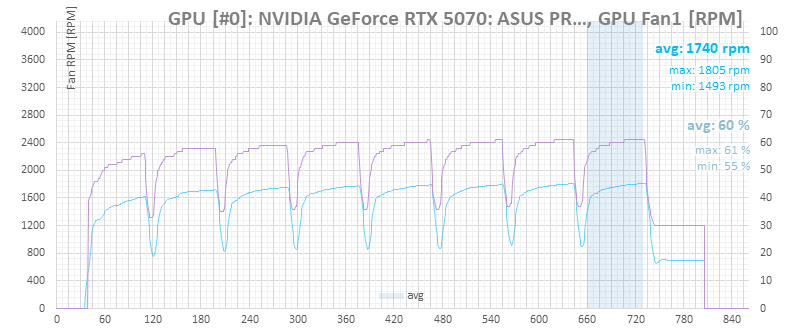
Fan noise at maxima around 1800 RPM was average at best.

⠀





