


It would be unfair to highlight only the exceptional radiator performance of the Arctic P14 Pro A-RGB fans in the title. They’re remarkably appealing in other scenarios as well. Whether they’re more attractive than the Fractal Design Momentum 14 RGB is something you’ll have to judge for yourself. In many respects, these new fans have the upper hand—though it must be said their manufacturing costs are somewhat lower.
Everything changes with obstacles
So far, we have described how static pressure and airflow measurements are made under conditions where the fan has no obstacles in its path. In practice, however, fans do not usually blow into an empty space, but have a filter, grille or radiator in front of or behind them, the fins of which need to be pushed through as efficiently as possible.
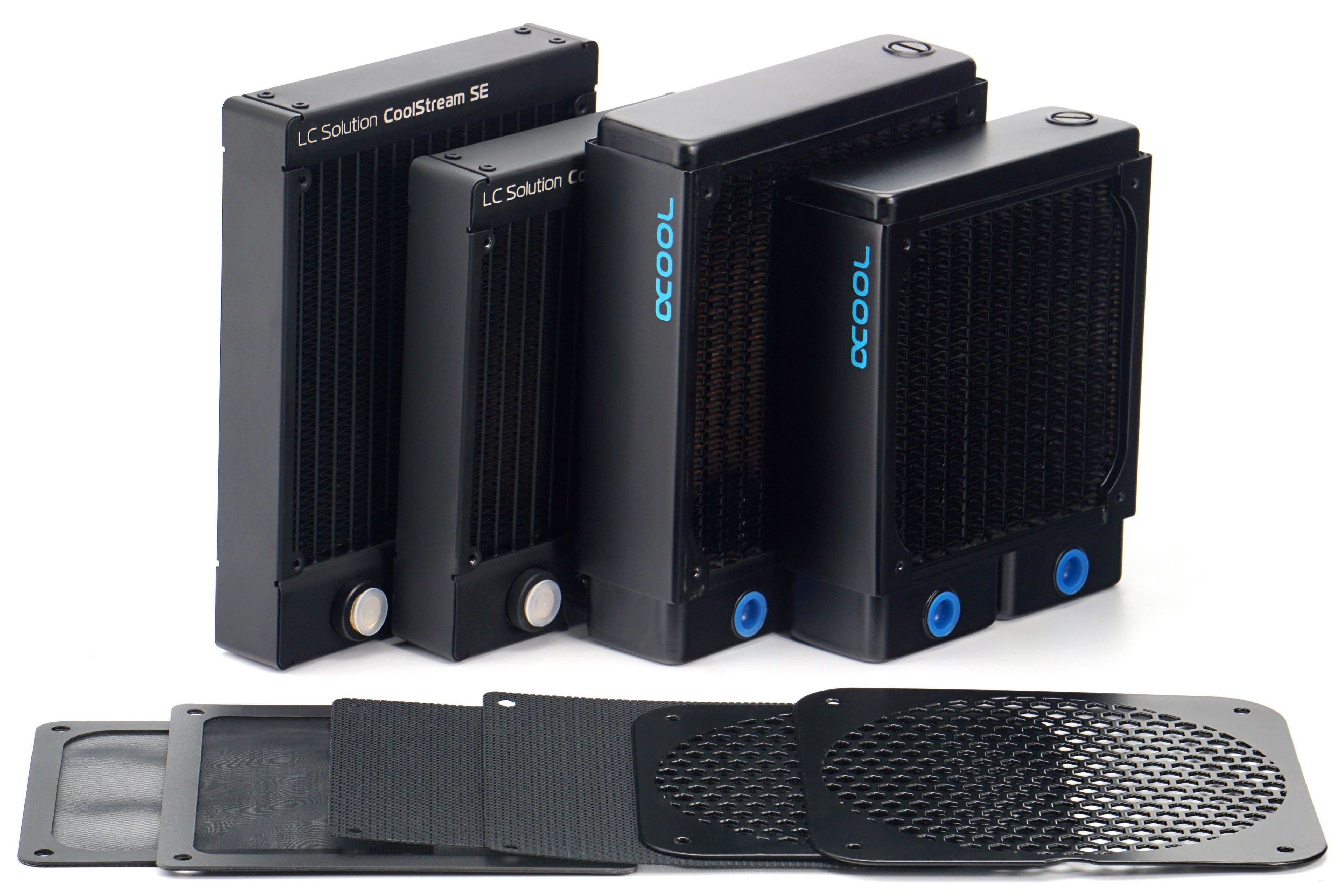
We will also measure both airflow and pressure through practical obstacles for the reasons stated above. These include two types of filters that are usually used in PC cases. One fine – nylon and the other plastic with a thinner mesh. One other obstacle is the hexagonal grille perforated at 50%, on which the vast majority of fans – intake and exhaust – are installed. In some cases, we measure the effect of the obstacles on the results at positions (behind or in front of the impeller) that are used in practice. All obstacles are both pushed through to detect pressure drops, but also pulled through, which in turn speaks to the impact on airflow.

We use two radiators that differ in thickness and fin density. The EK CoolStream SE120/140 is 28 mm thick and the FPI is 22, the Alphacool NexXxoS XT45 v2 is thicker (45 mm) but with less FPI. CoolStream’s fin disposition is also similar in parameters to AIOs. The results on the NexXxoS will again be attractive for those who build their own water cooling loops, where the fans should work well even at low speeds – hence the lower fin density.
These obstacles and especially the radiators, but also the grilles, increase the mechanical resistance in front of the fan, resulting in higher noise levels. However, we will still tune the fan speeds to the specified noise levels of 31 to 45 dBA. Naturally, the speeds will always be lower than when testing without obstacles, but we will maintain the noise levels for clarity. The different noise levels with and without obstacles will only be at maximum power. In this mode it will also be nice to see how the fan design works with the obstacle and in which case the noise level increases more and in which less.




If we’re looking for other 140mm candidates to compare this to, it would be nice to see how you rate the InWin AN series; I know from practical experience it seems to slurp through foam filters with aplomb.
They have a min RPM of 900. For me that’s a massive dealbreaker
I assume we’re talking about InWin fans? Yes, for a 140 mm model, even 900 RPM can already be aerodynamically noisy for some people. 🙂
That is only if managed by PWM mode, not DC (voltage).
I argue it doesn’t matter that much today as every 4-pin (PWM-mode) fan can also be controlled by DC-mode by the motherboard and most software used.
Voltage (DC) is somewhat less fine-controled (steps), but still good enough to not notice the difference in everyday usage.
Basicall all motherboards support both modes and using LibreHardwareMonitor (used by fancontrol (fancontrol is the GUI)), makes usage of both modes easily.
https://www.cybenetics.com/evaluations/fans/50/
The issue here I see is that no one except hwbusters have tested these Diamond-rated airflow-baddies yet, and they only relied on PWM-mode (for finer granularity testing obviously). 850 RPM minimum thus.
So we don’t know – unless e.g. Commodore Jeep-Eep tells us – how they behave in DC-mode.
You’re right—with some fans, DC voltage control results in lower speeds than PWM control. However, it can also be the other way around—PWM can sometimes achieve lower speeds than DC. It’s individual. As for how it works in the case of the mentioned InWin fan, Commodore Jeep-Eep will have to clarify. Of course, motherboards have the option for DC control, but sometimes the voltage they can supply to the fan is too high and does not reach the minimum at which the fan can spin only symbolically, at low speeds.
…and on the other hand, some fans respond perfectly to PWM and with DC regulation they click or have fluctuating RPM, etc….such as the TT TF 12Pro. 😉
Under my use conditions I’ve yet to have anything I’d call objectionable, though I do tend to be a ‘set the fan curve aggressive because better to burn bearings then sound’ type.
Should read: silicon
Good day,
answer the question below please about these Inwin AN140 fans DC-mode behaviour.
Starting fan speed, minimum fan speed, maximum fan speed, erratic behaviour, how fine-tuned is the control?
Thanks!
“slurp through foam filters with aplomb”, I really don’t understand what that means 😀
A new explanation please. You wanted to inform they make loud noises through nylon dust filters, grills etc.?
Nylon filters should not significantly increase noise; in fact, they may even have the opposite effect—achieving lower noise. This is typically at lower airflow (since part of the filter’s surface is always blocked—otherwise it wouldn’t work, haha… and that results in a drop in pressure/flow). Higher noise is unlikely because the structure of a nylon filter usually does not promote turbulence that increases noise. On the contrary, it tends to smooth airflow, eliminating microturbulence at the intake and thus reducing noise. It doesn’t always happen, but sometimes, with certain aerodynamic fan designs, it does. 🙂
They are insanely loud, like drown out a sound bar loud.
As I mentioned in the previous comment—the way to lower noise is by reducing the RPM through regulation.
Can I add non-ARGB fans to ARGB P14 PRO on a radiator? Or should they all be of the same kind?
Mixing the fans (P14 Pro with P14 Pro ARGB) is definitely possible. From a technical standpoint it might even lead to more attractive results, since each variant at comparable speeds will produce slightly different tonal peaks, making the cooling a bit quieter overall. So yes, go for it—if you don’t mind the aesthetics and the fact that not all the fans will look the same. 🙂
My InWin 140mm Neptunes bottom out at 900rpm, but I have to run them at a minimum of 1100rpm to avoid quite loud bearing rattle on my top radiator fans. I plan to replace them with these Arctic ones.
Neptune AN140? Are you sure the sound you’re hearing comes from the bearings? Quite a few fans become noisy at the very bottom of their speed range, where the motor itself starts to struggle—right at the threshold of what it can reliably operate at. This is especially common with DC control at low voltage. In any case, yes—using Arctic P14 Pro A-RGB fans with PWM control should allow you to reach significantly lower stable speeds, without increased non-aerodynamic noise. 🙂
It is not in the “Fans Archivy”! Please, fix that.
We’re aware of this. It’s not something we haven’t considered, and it can called a “bug” on the site. Even though the article has the correct category, unfortunately it doesn’t appear in that category’s listing. We hope to fix this in the future. At the moment, there’s nothing I can do about it. I’m sorry, but that’s just how it is.
Lol I have these fans… they are so noisy I’m replacing them not even a week later. The build quality is exactly what you think 100$ will get you. They are exactly what they should be, cheap fans with decent performance that takes a hit on literally every other factor. Fans are ugly as sin. They sound like a mf wind turbine which is completely unnecessary with an aio of any size. It is crazy after buying these hearing all the hype they still get. By far the ugliest thing in my pc right now. You can see through the front plate to the ugly magnetic connector. The fittings are plastic. There’s like 50 wires coming out of the pump if you actually want to control your fans and pump separately. Lmao I could just keep going for days……
The Pro fans have a lot better noise profile in the 800-1200rpm range compared to the regular and A-RGB versions. But they have other issues in the lower rpm range. Staring behavior is terrible, they go to high rpm and then back down.
I returned them too, I rather buy Noctua NF-A14x25 G2 PWM or NF-A12x25 G2 PWM even if they cost a ton more, I already spend half the money on Arctic and quality is very inconsistent, like 8 out of then has weird motor noise, F12/F14 was way better in quality.
It will probably depend a lot on how each fan interacts with the type of obstacle. That is, in terms of acoustic profile… of course, some differences between ARGB and non-ARGB versions due to materials exist, but it’s definitely nothing dramatic if we’re only talking about the fan sound—without an obstacle. With an obstacle it can, of course, be different. The number of possible situations (with obstacles) is basically endless. There are really many possible combinations. 🙂
Yes, the Arctic P14 Pro A-RGB are noisy fans if you run them at maximum speed. After regulating them to lower RPMs, which is possible (so everything is fine), they don’t have to be that loud anymore. You just need to slow them down. This can be done via PWM or DC. 🙂
you’re really not too smart…lol 😉
I wouldn’t go so far as to say Erik isn’t “smart,” but it’s true that those fans (Arctic P14 Pro A-RGB) are more attractive than the situation described in the comment above might suggest.
Thanks for the Artical, only really two questions, how much are these and what’s the noise (db) rating? I could only see N/A. I’ve ordered and recieved two x 140mm extra case fans because my gaming temps were insane. These are Thermaltake Riing blue leds only spin max 1400RPM but make max 22.5dba. Good price at £23.00 the pair. I was reaching silly temps with an I9 14900k and RTX4090. Changing cpu to a Ryzen 9950X3D and upgrading from a good brand 360mm to NZXT 420mm aio should also help. TY for the article once again.
You can find the answers to both of your questions in the test. N/A is not indicated in either of these cases. We only use that label for the MTBF value. 🙂
Hello,
I have a question : which one is better between the Max and the Pro ?
(as a WC radiator fan, and as a case fan)
I should say it’s strange you cannot achieve low noise with P14Max, because it can run at very low speed.
The P14 Pro will be the more suitable fan for your use case. I’d say in every respect. The P14 Max doesn’t allow for such low speeds (as the P14 Pro does). At least, not in the revision we tested (and that revision very likely hasn’t changed to this day?) via PWM control. 🙂
Not exactly scientific, but I’m getting a super annoying whine, almost like a very faint vacuum cleaner at lower RPMs.
https://imgur.com/a/OogMLaT
The bottom graph is my ambient environment, the middle graph is the fan at 20% PWM, and the top graph is 32% PWM where I can most acutely hear the noise. Unobstructed open air BTW. I think the noise I’m hearing is the one right around 4200-4400hz
It’s the same with all of my samples and the more I have in my system, the more they amplify that frequency. I can hear the noise from ~23% to ~34% PWM. It’s a shame because that’s an important range I would otherwise like to make use of.
I see on your testing there’s a small spike around 4800Hz on your 39dba chart. Do you think that’s what I’m hearing? What is usually responsible for a constant 4200Hz noise that occurs only within certain RPM ranges?
Thanks in advanced!
Thank you for the message with the detailed specification of the testing environment.
On your spectrogram, the tonal peaks appear mostly at lower frequencies, which is also illustrated by our graphs. Whether it is 117 Hz or 175 Hz also depends on the fan speed setting.
It is true that we do have a tonal peak before 5 kHz in the graphs at speeds around 1000 RPM, but its intensity (noise level) is relatively low. Nevertheless, it cannot be ruled out that with some particular setting this tonal peak may become stronger and that it is what you are hearing. It is possible. 🙂