Motherboards with AMD X870 chipsets are already in stores. Unlike the older models designed for the AM5 platform, also compatible with Ryzen 9000 processors, X870 motherboards must support the USB4 interface, and there are more minor changes. We start our analysis of motherboards with the new AMD chipsets with the Asus model – the TUF Gaming X870 Plus WiFi. The mid-range also has a strong VRM.
Less than two months after the release of AMD Ryzen 9000 processors, new motherboards with X870 and X870E chipsets are coming out. In the context of the tested model (TUF Gaming X870 Plus WiFi), we will look at the features of the X870 chipset. Those do not differ from those of the older B650E chipsets, which it follows, in any way. The south bridge is formed by one chip (instead of two – X870E) Promontory 21.

There are “only” eight PCIe 4.0 lanes brought out of it, there can be a maximum of four SATA ports, and the number of USB ports is also half compared to X870E (6× 10 Gb/s, 1× 20 Gb/s), but there are still two USB4 ports provided by the ASMedia ASM4242 external controller. The presence of USB4 is a requirement unlike on older boards, but, for example, one of the newest B650E boards – the Gigabyte B650E Aorus Pro X USB4 – also already had it. That’s the one we’ll mainly be comparing the Asus TUF Gaming X870 Plus WiFi to.
For information on how the individual AMD 800 series chipsets differ, see this article.
| Parameters | Asus TUF Gaming X870 Plus WiFi | |
| Socket | AMD AM5 | |
| Chipset | AMD X870 | |
| Format | ATX (305 × 244 mm) | |
| CPU power delivery | 19-phase | |
| Supported memory (and max. frequency) | DDR5 (8000 MHz) | |
| Slots PCIe ×16 (+ PCIe ×1) | 2× (+ 0×) | |
| Centre of socket to first PCIe ×16 slot | 91 mm | |
| Centre of socket to first DIMM slot | 56 mm | |
| Storage connectors | 2× SATA III, 4× M.2 (1× PCIe 5.0 ×4: 80 mm + 1× PCIe 4.0 ×4: 80 mm + 1× PCIe 4.0 ×4: 42–110 mm) | |
| PWM connectors for fans or AIO pump | 8× | |
| Internal USB ports | 1× 3.2 gen. 2×2 type C, 1× 3.2 gen. 1 type A, 4× 2.0 type A | |
| Other internal connectors | 1× TPM, 3× ARGB LED (5 V), 1× RGB LED (12 V), jumper Clear CMOS | |
| POST display | no (but has EZ debug LED) | |
| Buttons | none | |
| External USB ports | 2× 4 type C, 4× 3.2 gen. 2 type A, 3× 3.2 gen. 1 type A, 1× 2.0 type A | |
| Video outputs | 1× HDMI 2.1 | |
| Network | 1× RJ-45 (2,5 GbE) – Realtek RTL8125BG, WiFi 7 (802.11 a/b/g/n/ac/ax/be), Bluetooth 5.4 | |
| Audio | Realtek ALC1220P (7.1) | |
| Other external connectors | – | |
| Manufacturer's suggested retail price | 335 EUR |
Asus TUF Gaming X870 Plus WiFi
At the suggested price of 335 EUR, it is categorically a mid-range motherboard. There are both cheaper and more expensive models with the X870 chipset in the Asus offer. From the cheaper ones, there’s the Prime X870-P (WiFi) and from the expensive ones the ROG Strix (X870-F Gaming WiFi and X870-A Gaming WiFi). The TUF Gaming X870 Plus WiFi is somewhere between those.

The physical format of the Asus TUF Gaming X870 Plus WiFi motherboard is ATX, i.e. 305 × 244 mm. There are only two PCI Express slots – a 16-lane one connected to the processor and a 4-lane one (in a PCIe ×16 housing). The latter (PCIe ×4) is located on the bottom of the motherboard’s PCB, so with a large enough spacing so as not to be blocked even by thick graphics cards.


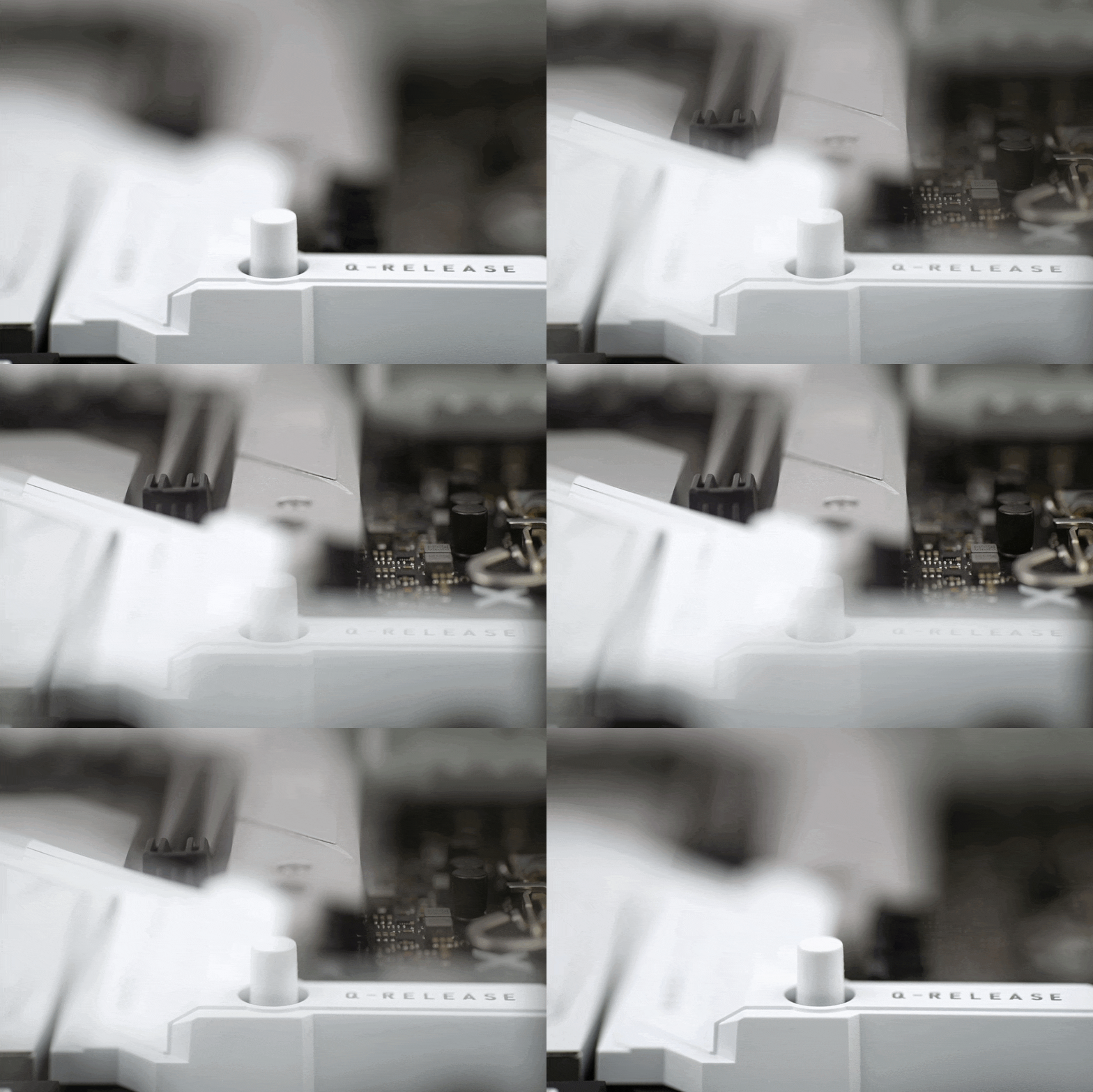
What is notable is the latch of the first slot, or the Q-release mechanism. This is, as it used to be on older Asus boards, “remote”, or on the right edge of the motherboard, and unlike the horizontally sliding mechanism of the latch itself on, for example, the ROG Strix Z790-A Gaming WiFi II, this one is vertically hinged. You can see that Asus is trying different options and looking for the optimal solution.

The layout of the M.2 slots is as follows: the first, above the PCIe ×16 slot, is traditionally a PCIe 5.0 slot. Lower down, below the PCIe ×16 slot, are three more M.2 slots for SSDs, all with PCIe 4.0 ×4 support, with the second and third slots sharing a larger cooler.
The fourth M.2 slot is without a cooler, but is the only one with above-standard support for formats ranging from 42 mm through 60, 80, up to 110 mm. Only 80mm SSDs can be installed in the other three slots. Always only with PCI Express interface support. The SATA interface is not supported by any of the M.2 slots.

The mechanism for securing the (M.2) SSDs themselves has also been innovated. It is again screwless, but instead of a rotary lock there is a spring-loaded lock with an angled ramp. Thanks to it, after inserting the SSD into the connector on the other side, you only need to push it in and the installation is complete. Gigabyte has had a similar system for some time now, and it’s definitely a step forward in terms of installation convenience.

The power delivery is 19-phase, of which 16 phases are for Vcore. The MOSFET voltage regulators used are MPS2325 (Monolithic Power Systems). Already based on the VRM’s components lineup, it’s clear that even the Ryzen 9 9950X will not cause any “problems”. Everything is significantly oversized, including the coolers. These are monolithic (two pieces of aluminum, 316 + 123 g) with longitudinal fins.


Under the VRM heatsink, there is one more hidden heatsink for cooling the USB4 controller. This one has 9 vertical fins for a change, quite tall ones (12 and 18 mm).

The USB4 controller itself is, as mentioned, from ASMedia – the ASM4242. Connected to it are two type-C (USB) connectors, which brings us to the rear I/O panel.

The USB-C ports are 40-gigabit (USB4), the USB-A ports then combine various standards from 3.2 gen. 1 (4×), through 3.2 gen. 2 (3×), up to a single port of the 2.0 standard. The latter is also reserved for updating the BIOS of the board even without a processor. The WiFI antennas don’t screw on, but snap on via push-pins, which is also one of the features Asus used with the aim of making the installation more convenient.

There’s a full set of 3.5-millimeter jacks for audio connectivity, but no optical S/PDIF connector.
Please note: The article continues in the following chapters.