


It arrived quietly, but we had been looking forward to it for a very long time. In its form factor, the Phanteks T30-140 fan works wonders and often defeats everything that stands in its way. Yes, even the Noctua NF-A14x25 G2 PWM is often the “next in line”, albeit at the cost of a thicker profile (and therefore worse compatibility). Airflow is exceptionally high (and consequently cooling performance) through obstacles. Larger fans now have a new dominant model.
Base 6 equal noise levels…
There are several options by which to normalize the test modes for fans. In the previous chapter, we wrote that perhaps the least appropriate option is equal speed.
Settings according to the same static pressure or flow are for consideration, but we find it most sensible in the long term to normalize the measurement modes according to the same noise levels. Firstly because decibels are a logarithmic unit and all others scale linearly, but mainly because you can orientate fastest by the same noise levels. The easiest way to compare the efficiency of fans is just by how they perform at the same sound pressure level. Of all the options, this is the one that most people can best imagine and bounce off of when considering other variables.
The individual noise level modes are adjusted from low levels continuously to higher levels. All users will find their results in the tests, regardless of whether they prefer very quiet operation at the limit of audibility or whether high performance is paramount.
The quietest mode corresponds to 31 dBA, followed by 33 dBA, and for each additional mode we add 3 dBA, which always doubles the noise level (36, 39, 42 and 45 dBA). Finally, we measure the fans at maximum power. Here, each one already has a slightly different noise level, which we also report. If there are missing measurements between the results for any of the fans, this means that it was not possible to set the target noise level. Either because its minimum speed exceeds the quietest mode of 31 dBA or vice versa because the fan is quieter than 45 dBA at maximum power.
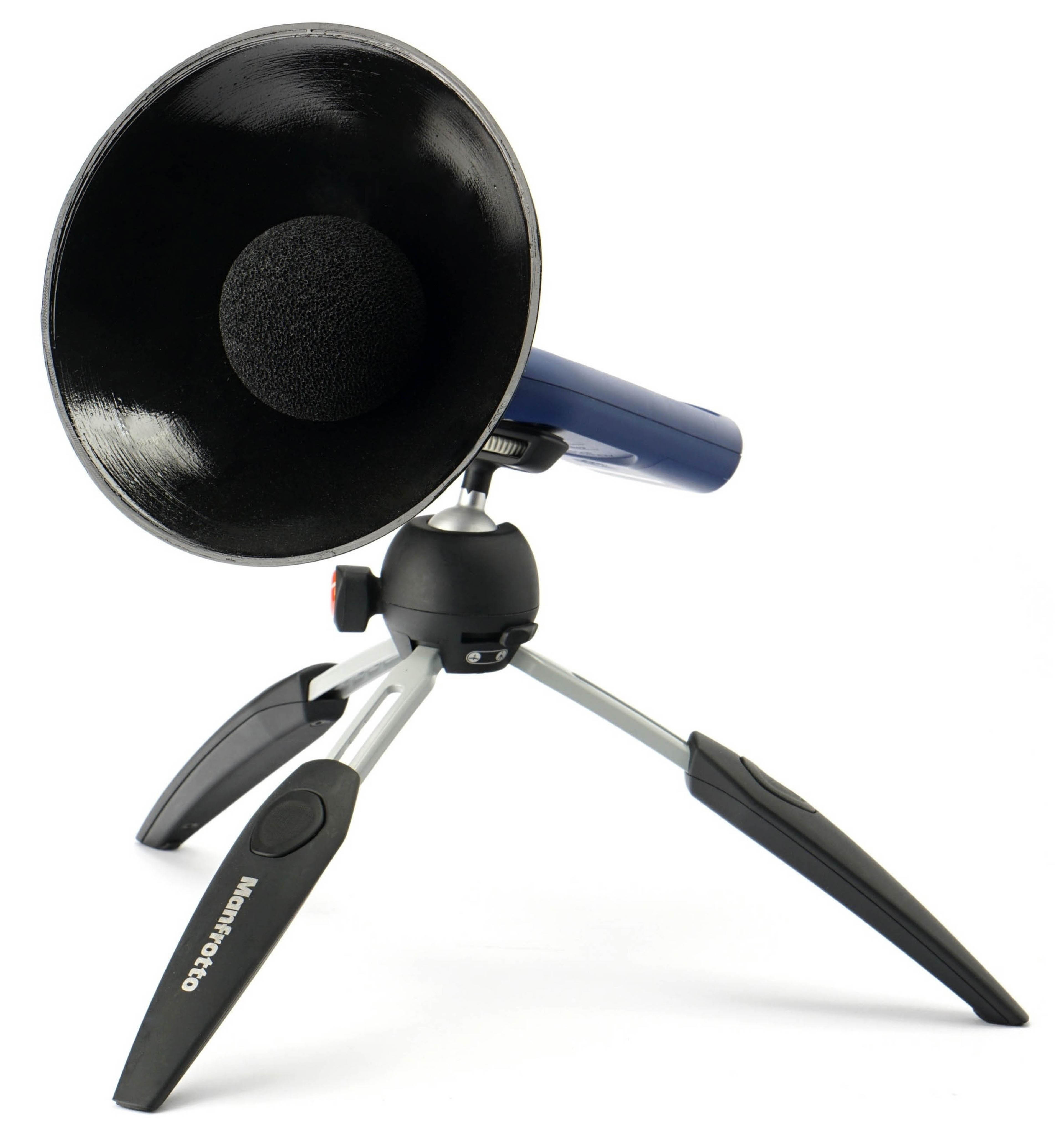
It is important to add that our noise level measurements are incomparable to the values quoted by the fan manufacturers in their specifications. One of the reasons is because we use a parabola-shaped collar around the sensor of the noise meter, which increases sensitivity. This is important in order to distinguish and set to the same noise level even modes at very low speeds, especially 31 dBA.
The noise meter next to the fan is quite close for sufficient resolution. The distance between the frame and the sensor is 15 centimeters. The sensor is positioned in such a way that there is no distortion or that the noise level measurements are not affected by airflow. Therefore, the noise meter is centered perpendicularly to the frame that defines the depth of the fan. Everything is always at the same angle and at the same distance. We use an inclinometer and markers to set the distances precisely and always the same.

We use a Reed R8080 noise meter to measure noise levels. This allows real-time averaging of samples, which is important for fine-tuning individual modes. We tune the fans until the specified noise level is reached to two decimal places, for example 31.50 dBA. The noise meter is the only instrument we calibrate inside our testlab. The other instruments have been calibrated by the relevant technical institutes. However, in the case of the noise meter, calibration is required before each test and we therefore have our own calibrator. This is already calibrated externally according to the standard.



One photograph labeled “v2” is intended for the main teaser:
Can you help me understand the importance of “Static pressure through a through a thicker radiator” when we also have “Airflow through a thicker radiator”? It seems to me that the airflow is the end result and static pressure is just one variable that leads to that resulting airflow. You get a fan like the Endorfy Fluctus 140 that rates high on static pressure at 31dB but then underperforms on airflow at the same dB against other fans that had lower rated static pressure.
Static pressure through a radiator represents a scenario where the measured value reflects the combined effect of the fan and the radiator. In contrast, the results labeled Static pressure w/o obstacles are influenced solely by the fan itself.
Typically, a radiator (or any obstacle) reduces static pressure. If the obstacle does not provide sufficient resistance, pressure leakage occurs, and we measure lower values as a result.
From a practical perspective, however, these values are not critically important. It’s important to understand the conditions under which static pressure is measured — regardless of whether an obstacle is present or not. The measurement is performed at zero airflow, with the tunnel sealed.
When measuring Airflow through a radiator, the situation is essentially the opposite. Speaking of “zero static pressure” would be somewhat inaccurate (since even the tunnel itself introduces a small amount of resistance), but this resistance is very low. In that case, airflow restriction is determined primarily by the obstacle itself.
Static pressure measured through a radiator may correlate better than airflow values in extremely restrictive environments—but such conditions do not represent typical real-world scenarios.
Is the answer clear enough and satisfactory or is there something that needs to be further clarified? 🙂
This helps very much. Thank you for taking the time to explain it so clearly for me.
What a waste of a fan
What facts are you basing that on? In certain situations, when things are set up properly, the Phanteks fan can actually be number one. 🙂
Could you explain why 120mm G2 Noctua beats T30-120, but T30-140 beats Noctua 140mm G2? Is Noctua 140mm G2 for some reason worse than 120mm version? For example at 31dBA 140mm Noctua on thick/thin radiators has less airflow than 120mm version
Could you please provide specific situations or measurements? I’m not able to work with the term “beats” on its own—it’s too vague. What exactly do you mean by that? Please elaborate in more detail so it’s clear what needs to be explained. 🙂
Hello – I am not skilled in Electronics. I ordered the 3x pack of this Phanteks T30-140, can I run them – all three of them – off of one 3A “PUMP_SYS2” header on my motherboard?
Hi, connecting the Phanteks T30-140 fans should be fine even at maximum speed—assuming the connector is designed to handle higher current loads. These fans don’t come close to 3 A even at peak draw during startup, etc. 🙂
First, I registered to say thank you for the test: it’s not so easy to come by so much data of this nature! So many good 140mm fans in there. I wish it had been there when I made my case/AIO fan purchases a few months back.
Second, I found this fan disappointing: its niche seems to be airflow at max speed, whereas its 120mm predecessor had this reputation of having both great airflow when needed and some degree of quietness while remaining effective, when not. Which in my mind equates to a good exhaust fan in a PC case, but not as fit as an intake or radiator fan: You get 5xP14 Pro for the price of one of these, for a lower noise level and more effectiveness in most cases.
While it certainly isn’t bad, to me, your tests mostly highlight that Arctic has made something remarkable with its “Pro” line for radiators, and Fractal deserves quite a bit of credit for its Momentum 14 over the airflow/noise performance for standard case fans. While I like Fractal as a case manufacturer, they weren’t on my radar for their fans, at all.
So the only thing I’d criticise on this test is the title: T30-140 doesn’t look as efficient as it should be, even though it certainly isn’t inefficient! The only thing that feels completely inefficient to me is Arctic selling a “Max” line whose very name looks deprecated in any role but as an exhaust fan. The P12/14 Max’s market positioning doesn’t make much sense to me.
Also just a quick note: your infographics are showing thickness for the Arctic P14 fans at 25mm. All P14 variants (vanilla, Pro, Max, Silent) but the Slim ones are 27mm thick, which can matter in some niche cases.
Could you please point me to where this is stated that way? In the specification tables, in the second chapter, I can only see 27 mm everywhere. I tried to correct it, but there was nothing to fix… I must be overlooking something. 🙂
Of course, the fan profile thickness is important—it shapes the characteristics, both positively (mainly higher static pressure) and potentially negatively (worse compatibility). 🙂
Thank you for the comment, for registering, and for sharing your user experience. Could you elaborate on what specifically disappointed you about the Phanteks 30-140 fan, or in which aspect it failed to meet your expectations? Based on the test results, it performs exceptionally well across virtually all scenarios.
Yes, it is significantly more expensive than the Arctic P14 Pro while offering very similar cooling efficiency, but we can certainly discuss the specific characteristics that make the Phanteks fan considerably more expensive and, in some areas, slightly ahead. It’s similar with Noctua (NF-A14x25 G2), where the measurable differences are minimal, yet the price difference is dramatic. 🙂
Hello, Thanks for the great in-depth testing of the fans,
I want to give my opinion, so correct me if I’m wrong,
I’m not expert in this technical stuff, so i will give all I concern in consumer / user way.
I’m on way researching to upgrade from Arctic P14 Pro (Non ARGB) fans Front Intake Fans, Rear fan and probably the next 420 AIO (Arctic Liquid Freezer 3 PRO 420) to The T30-140mm for my ROG Hyperion Case BTF,
So there are bit of small comparion between the Arctic P14 Pro and T30 140
After reading and looking so much graph of results, and analyze,
I can say that, the main issue of T30-140mm is the “Noise”. Like the 120mm version.
TL;DR
Since the test of fans mostly use Noise-Normalized as the baseline for the measurement so this is has bad effect for the T30 or even another fans which also has the same rated noise or worse.
All I can see from the each rated target dBA (31 – 45) – the RPM is lower compared to the Arctic P14 Pro (Non ARGB),
Then since the Noise-Normalized is the baseline for the other most of tests, actually gives Domino Effect, as the T30 has high noise which produce targeted in lower RPM which also result less CFM and less of Static Pressure, I know I also saw like one or two, T30-140 dominates the Arctic P14 Pro.
When i saw on max RPM, the T30 like dominating most of the test, so I really thought that if the test were RPM-Normalized like same RPM testing for the the next test, I’m pretty sure to speculate that the T30 can really dominates most.
So I’m sure the T30 140 fans are OK only the “Noise” which make it looks bad in the graph, but actually they are good if all compared in same RPMs not focusing on the noise.
I’m not telling all of this, and summerizes the tests result are false or bad example, No, I’m not think like that.
But in consumer way of thinking, The speed (RPM) is will be the main baseline for the performance not the noise, at least for me (Idk if most people think the same as mine)
I’m ok with fan noise, I’m not playing 100% RPM all the time,
maybe ones that disagree probably focused on the less noise.
Well the Noctua NF-A14x25 G2 or Arctic P14 Pro has better acoustics, and Price to performance.
I’ll might get the T30-140 and replace the P14 Pro soon
Thank you.
Between phanteks t30 140 and sudokoo mach 140 which one do you recommend?
Thanks for your question. We haven’t tested the Mach140 fan (only the Mach120), so we can’t make any definitive claims or go into too much detail, haha.
That said, based on our experience with fans of very similar geometry, I’d expect their aerodynamic characteristics to be very close. In practice, I don’t think you’d notice much of a difference in cooling performance between them. 🙂
Hello, what would you recommend for exhaust fans Noctua G2 or the Phanteks T30 because in the SSUPD Meshroom D case for it’s best configuration I will need a 120 mm exhaust fan and a 140 mm exhaust fan was thinking if I should go noctua or phanteks route
Haha, that’s a very difficult question. Both Noctua and Phanteks fans are top-notch. With the Phanteks fans in this particular application, there is also no downside in terms of possible incompatibility (with something) due to their greater thickness. At the same time, all the fans we are talking about here can be slowed down to sufficiently low speeds. I’m sorry, but I won’t pick specific models in this case. That would be rather irresponsible. The results will almost certainly be very similar, perhaps even indistinguishable in practice. 🙂