





The new AMD Radeon RX 9000 cards with RDNA4 architecture bring higher performance and a suite of technologies to make gaming more enjoyable and improve responsiveness. We’ll focus on the technologies available to gamers and what stands behind names like Anti-Lag 2 or FidelityFX Super Resolution (FSR4). The videos show how Anti-Lag reduces latency and how FSR boosts frame rates with demanding detail settings.
To measure latency on Radeon GPUs, you can try using the AMD Frame Latency Meter, which we introduced shortly after its release.
For a quick demonstration, we’ll test two games. To showcase the classic driver-enforced Anti-Lag, we’ll use Cyberpunk 2077, which — at least at the time of testing — didn’t yet have Anti-Lag 2 integrated. The game is also known for noticeable input latency.
You can see the practical difference in the slow-motion footage. The video was recorded with a Sony RX10 II mirrorless camera at 1000 frames per second and slowed down to 25 fps. The image quality isn’t great, as extremely short shutter speeds were required, which in turn meant using high sensitivity settings.
This time, we’re sticking to just one configuration and two games, as the measurement was done manually – by recording footage and counting frames. Although this is laborious and time-consuming, unlike software-based methods or tools like OSRTT, it provides a very accurate picture of how the monitor and Anti-Lag actually behave in real time – and whether any issues occur in the entire input-to-display chain.
This is as close to real-life testing as it gets – we use a mouse mounted on a robotic arm driven by a stepper motor, and then measure how long it takes for mouse movement to appear on the screen. In the video, an LED indicates the moment the motor takes its first step. At that point, the mouse itself hasn’t moved yet — it takes a few microsteps for the motor to get going, and the mouse movement becomes visible after 3 to 4 milliseconds. From that moment, we count how many frames — and therefore milliseconds — it takes for the cursor movement to appear on the screen.
One major advantage in this test is access to an extremely fast QD-OLED panel. Traditional LCDs require several milliseconds to realign liquid crystals properly, and even after a single screen refresh, residual ghosting can remain. Achieving the correct shade often requires two or three redraws. In contrast, OLED displays can switch pixels on and off in just fractions of a millisecond.
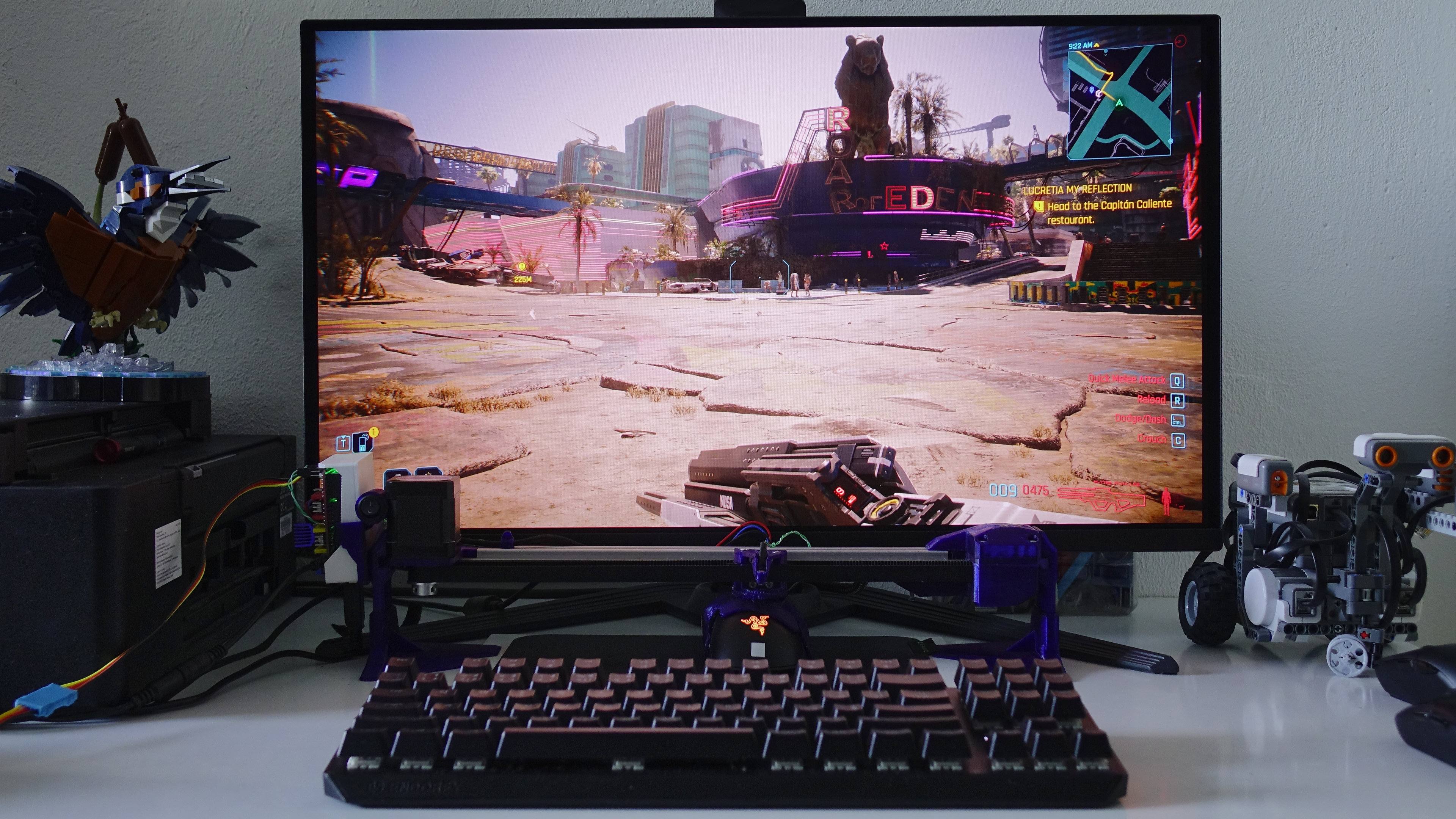
The extreme redraw speed that OLED displays offer compared to conventional LCDs plays a key role in our Anti-Lag testing — and you can clearly see the difference in the slow-motion footage. While a typical 60Hz monitor refreshes once every 16.66 ms, a 360Hz OLED panel can refresh every 2.77 ms. On slower panels, player input response can be delayed by up to 16.7 ms purely due to refresh intervals, but on the OLED panel used here, the refresh delay never exceeds 3 ms. On the other hand, Anti-Lag technology, which helps improve frame timing, can be even more beneficial on slower monitors.
Cyberpunk 2077 and Anti-Lag
Cyberpunk 2077 features a large open world and complex, performance-intensive graphics. This also affects the game’s responsiveness, which tends to be worse than in most other titles. At lower framerates, screen feedback noticeably lags behind mouse movements. It’s one of those games where Anti-Lag significantly improves playability – especially on weaker graphics cards.
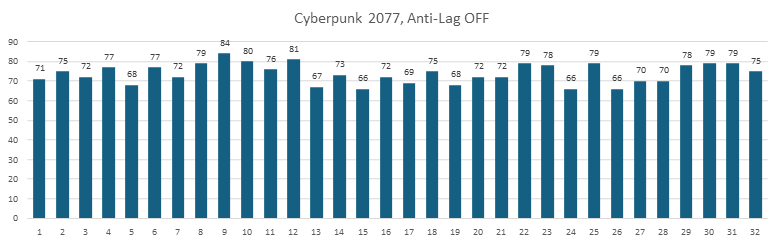
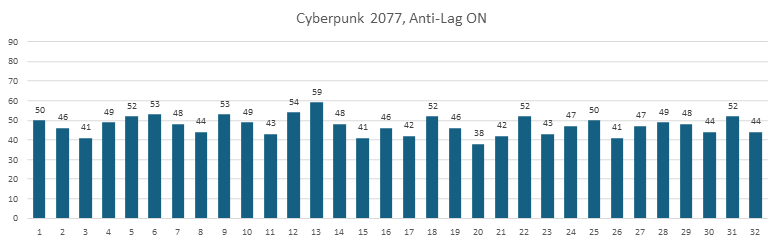
Total system latency is the sum of delays from various components, starting at the mouse and ending with the monitor. As such, measured values can vary widely, and a few tests are not enough. The pair of graphs below shows 32 measurements comparing latency with Anti-Lag enabled and disabled in AMD Software.
Average response time without Anti-Lag is 73.9 ms. When enabled, that drops to 47.3 ms on average.
The slow-motion video below shows two representative recordings chosen to reflect the average latency observed in testing.
⠀




Some issues with your photos, the second photo from the first comparison doesn’t open at 1440p for me, the one with the arches seem to open the same fsr 3 photo for both of them. I stopped there.
Sorry about that — the thumbnails opened the correct images, but some text hyperlinks pointed to the wrong links. This should be fixed now. Thank you for letting me know.
FSR4 is a big improvement indeed, but, I own a 6800XT and whilst I will see an increase in framerates with the new cards I am afraid that comparing the price of the cards with a 20-30fps increase doesn’t add up for me especially when their new unified architecture is set to hit next year.