





Results-wise, it’s an absolute top performer. This holds true even in combination with various obstacles. In other words, the competing Phanteks T30-120 often ends up merely as the “next in line.” And the Mach120 has aesthetic advantages over it as well. The operation of the Sudokoo (Mach120) fan is also characterized by lower vibrations. You also get high maximum airflow along with reliable operation even at low speeds.
Mounting and vibration measurement
Naturally, each tested fan must first be properly mounted. With all that we want to measure, and with the kind of precision that is required for relevant measurements, even the smallest details matter. The whole mounting system is quite complex and we are happy to have fine-tuned it to maximum satisfaction. Even if it meant hundreds of hours of tinkering. What’s so complicated about it? There’s more.
The fans are installed to the multi-purpose bracket. The substrate is a 2 mm thick metal plate to which the fan is attached, or the fan is attached together with an obstacle (e.g. a filter, hexagonal grille or liquid cooler radiator).
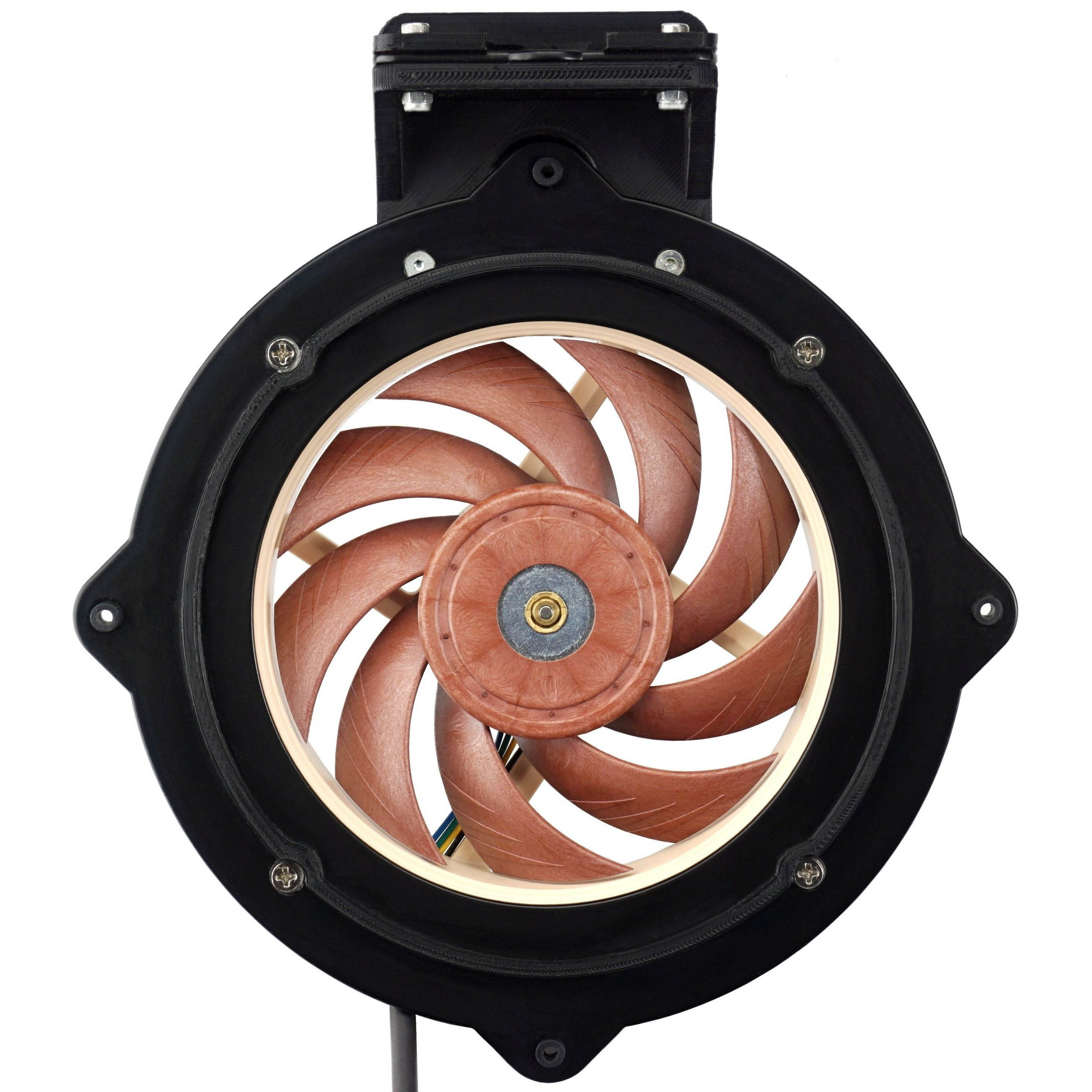
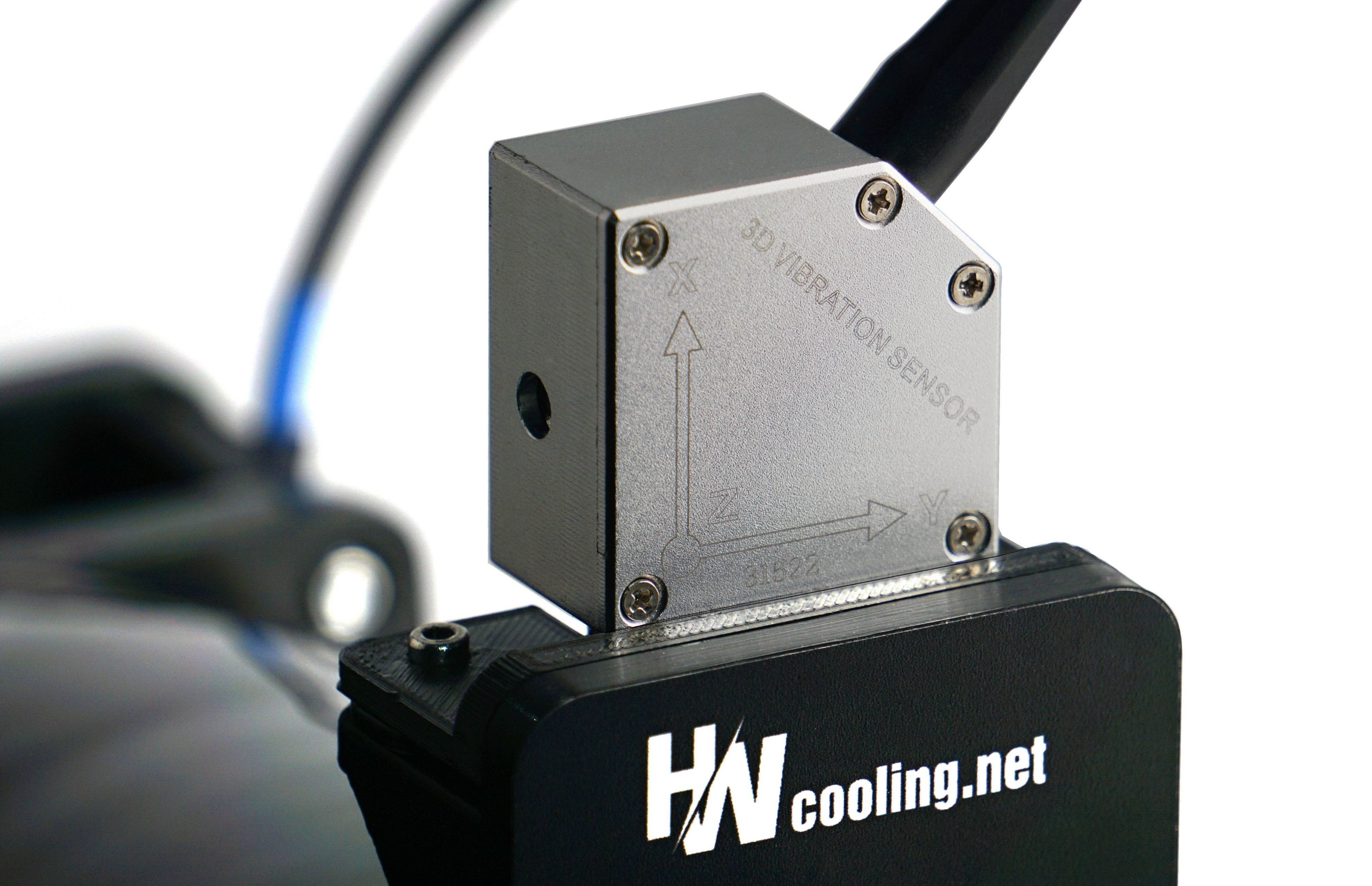
For correct and always equal pressure, the fans are always tightened with the same force with a torque screwdriver. If this were not the case, joints and clearances in the assembly could arise, in short, uneven conditions with undesirable distortion. For example, also for vibration measurement. On top of the fan mount there is also a bracket for the three-axis vibrometer sensor. The latter is magnetically attached via a steel insert, on which the sensor exerts a force of one kilogram and, thanks to the stop, is also always in the same place and in the same contact with the rest of the structure. These are the basics in terms of repeatability of measurements.
In order to capture the intensity at the highest possible resolution, the tray of the holder cannot be too heavy and at the same time it must be strong enough not to twist. This would again cause various distortions. Therefore, we used a hard (H19) aluminium (AL99.5) plate for the construction of the holder, whose weight is just enough so that free movement is not significantly restricted.
To achieve the finest possible resolution for vibration measurement, soft rubber inserts are provided in the mounting holes through which the bracket is installed to the tunnel. And just behind these inserts are silent blocks with a very low hardness of 30 Shore. These are also used so that the vibrations of the fans don’t spread to the tunnel skeleton. If this were to happen, then for fans with more intense vibrations, this secondary noise component, which is not related to the aerodynamic sound of the fan, would also be reflected in the noise measurement results.

This is where it is good to have ideal conditions, even though they are unattainable in practice, because fan vibrations will always be transmitted to the case skeleton to some degree. But each cabinet will react differently to them, or rather the final noise level will depend on a number of factors, starting with the materials used. Therefore, it is a good idea to filter out this extra noise component in tests and in practice take into account the measured vibration intensities. The higher these vibrations are, the higher the noise addition has to be taken into account.
The silent blocks are naturally formatted to offset the bracket a bit from the rest of the tunnel, otherwise they wouldn’t make sense. This creates a gap that is sealed across the entire surface with a soft foam seal with closed cell structure (i.e., it’s airtight).
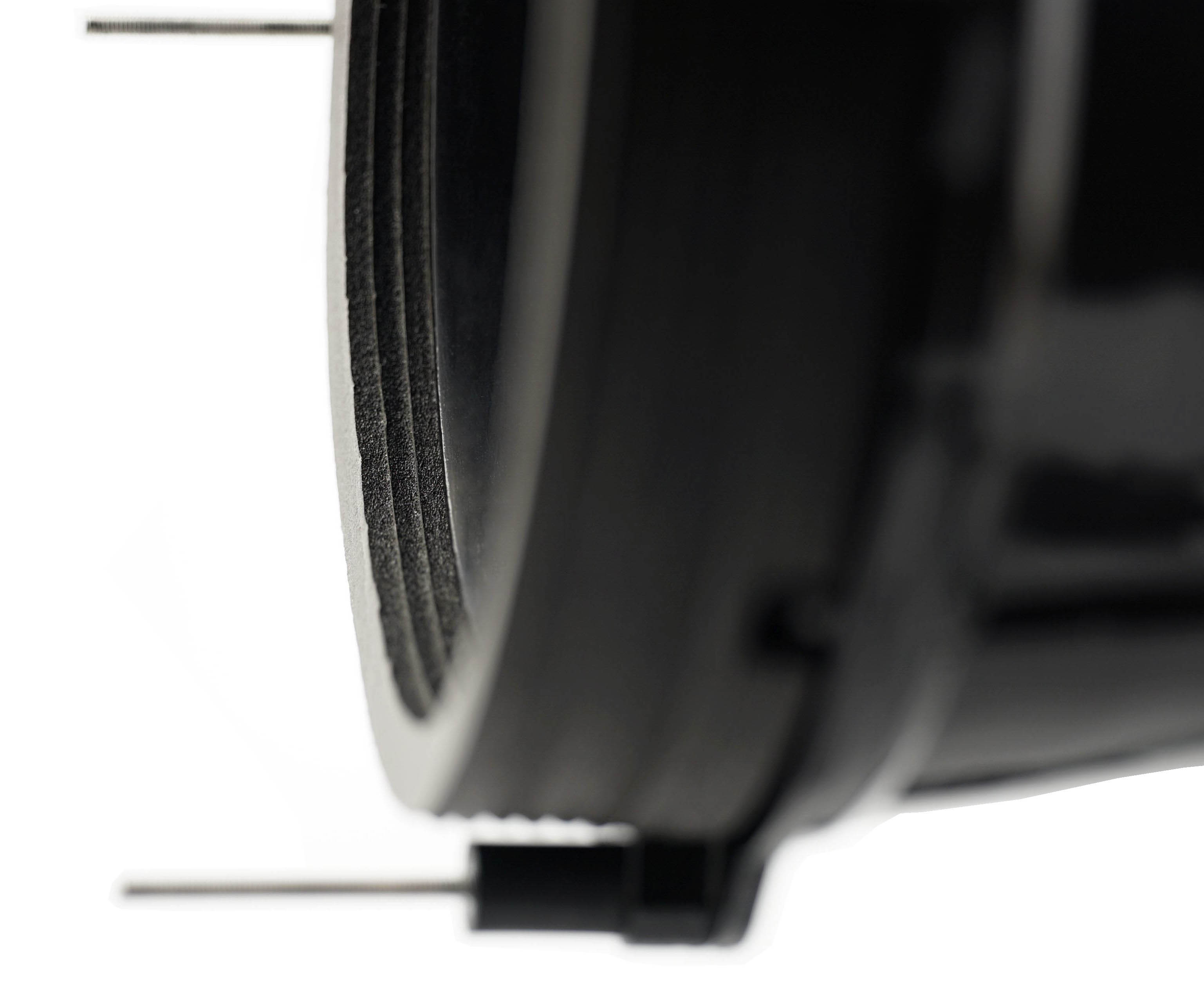
To properly center the fan impeller in relation to the other elements, the bracket includes a protruding frame that follows the inner contour of the seal. And to make matters even more complicated, the frame with the tested fan is pressed against this seal by a small force of compression springs, which in turn is set with the highest possible resolution for vibration measurement in mind and at the same time so that sufficient pressure is generated to maintain a flawless seal.
Vibration is measured with a Landtek VM-6380 vibration meter. It records the vibration speed (in mm) per second in all axes (X, Y, Z). For quick orientation, we calculate a 3D vector from the measured values and graph the “total” vibration intensity. But you can also find your results if you are only interested in a specific axis.
The most complicated part of the tunnel is behind us, and we’ll move on in the next chapter. But we will still stay at the beginning of the tunnel, we will just turn to the peripheries on the sides.




Would it be possible to add a starting noise metric for those who use the fan-stop below a selected temperature threshold? Some fans are so bad at this that it is literally better to always have them running. They click loudly at the start or overshoot the target RPM and whirr. Something like the loudest measured dBA to reach their minimum RPM. It would be similar to vibrations, catching the offenders that exceed 31 dBA.
I swear that a fan from Dark Rock Pro 4 used to scare the heck out of me while I was lost in thought, and it suddenly started spinning with its signature loud bang.
Yes, that’s a good idea. Could you please outline a proposed measurement methodology — how you imagine it should look? Personally, I’m not entirely sure, and if we’re going to take this on, I’d like it to be exactly according to your expectations. I can’t promise we’ll add these measurements immediately in the next test, but I’ll make a note of it. 🙂
I’m happy that this idea sounds reasonable. I’ve already explained the basic concept. The main points would be:
– The same test conditions as for the regular measurements, but I don’t think it’s needed to test against all the obstacles, probably check no-obstacles and a thick radiator, and if the results are too similar, then cut it to no-obstacles only.
– The target RPM would be the fan’s minimum RPM.
– The noise reading should come as the highest measured dBA from fan start until stabilizing at the constant RPM. It should be checked how capable the meter is in catching short noises.
– The noise value should either be listed or stated as <= N dB, where N is the background noise threshold. Whether the 31 dB is suitable for better reliability (due to meter limitations) and for consistency with other tests, or something lower, like 29 dB, could be used for better approximation and extending the measurement range for quality fans, is up to you.
Well, in any case, it is useful information, but it has a few downsides.
1) since the intensity of mechanical waves (sound) is not constant over time but constantly changes, it is more sustainable (and more repeatable) to tune the RPM so that the average value of the fan noise stabilizes at some specific number.
2) in this case the maximums would be measured in the period between the switched off state and settling at the desired level. And in case of the maximums, it can be very tricky (especially when the one doing the measuring doesn’t have an anechoic chamber). Therefore, if it were to be usable, I would probably repeat 10 measurements and exclude the 2 quietest and 2 loudest maxima and average the rest (correctly averaging dB is a bit more complicated, but I wouldn’t bother with that and would use a simple arithmetic average – in this case)
3) I would only measure for fans that support this feature (fan-stop). I wouldn’t force it through voltage regulation, because there are fans that don’t respond well to DC regulation (like TT TF 12 Pro – my own experience).
…
Finally… I only use the fan-stop feature on the graphics card, as I have a well-ventilated case and I rarely game (in the last period 🙁 ). In the case of system fans, I prefer constant operation and rather regulate the RPM as needed. There are many fans that are inaudible at low speeds (except for DBB, perhaps) and even at low speeds they provide some airflow to the system. Besides, frequently stopping and starting the fan probably does not help its lifespan much. 😛
Thanks for the additional information and ideas. They will definitely come in handy when I can think intensively about this topic. 🙂
…and I forgot to add that many fans that support fan-stop have a good start-up (no loud ramp-up), and in that case Ľubo won’t measure anything because it will be below the resolution of the sound meter.
…sooooo 😛
Thank you for the breakdown of how things could be tested. When time allows, we will incorporate these measurements. I don’t want to promise when that will be, nor do I know if it will happen at all (simply because I won’t have the time), but I will try to figure something out. We’ll see what can be managed… 🙂
I think it would be quite laborious.
Maybe a special issues, with a few selected representatives would be enough to accurately determine the laboriousness and benefit of such measurements…
Buuuuut with everything you have on your schedule… 😉
I expect the Noctua AIO to be released sooner 😀
At the moment, I don’t know anything whatsoever about a launch date for an AIO. That is, I have no more info than you do, based on the latest Noctua roadmap: Q2/2026. 🙂
I meant that you definitely won’t have time to look at this topic anytime soon 😛
…and I guess that Noctua will probably release an AIO sooner 😀
…which certainly won’t be sooner than Q2, I highly doubt even Q3′ 2026 😉
Well, let’s hope for Q2 2026. Of course, the date could still be moved, but… 🙂
Hi there, Thank you for these lovely reviews. I want to ask, I have a set of Lian Li CL wireless fans that came with the AIO im using. Would changing to something like these Sudokoo actually help and lower temps if Im after the most optimal setup or will it be wasting money in a sense?
Thank you. Regarding your question: first of all, we haven’t tested the Lian Li CL fans, so we can only estimate how they might perform.
Although these fans have a relatively thick frame (which effectively reduces the impeller cross-section compared to something like the Sudokoo Mach120, and may limit cooling performance), they do feature an efficient aerodynamic design. Based on that, I would expect their cooling performance to be fairly solid.
That said, the Mach120 will most likely achieve higher cooling performance while also offering a more favorable acoustic profile (thanks to a stiffer blade material that is less prone to vibrations). However, these differences may or may not be noticeable in practice—it’s difficult to judge without direct test results.
Also, these are quite different types of fans. The Lian Li models include RGB lighting, while the Sudokoo Mach120 is non-RGB, so they fall into slightly different categories altogether. 🙂
Awesome review, as usual. Thanks!
For a comparative performance on air cooler towers (say with a thickness of 40mm), would the thin or thick radiator test have a more representative performance?
It depends on the specific situation and also on the spacing between the heatsink fins. Results with a thicker radiator may be closer to what you’re looking for—but they don’t have to be. In general, though, these fans perform similarly across different radiators. It’s not common for the same fan model to show significantly different relative results on one radiator compared to another. 🙂
Did you notice a coil whine at low RPM? At 10% PWM or 500 RPM, it’s audible but better than a GPU coil whine. Gone after 800-900 RPM.
I’m having a stroke of bad luck with this new PC lol. I just returned an AIO for being defective.
Good point. At the lower end of the speed range, many fans tend to produce various non-aerodynamic noises.
We know the minimum speeds are around 450 RPM, and you’re mentioning roughly 500 RPM. At such low speeds, we don’t have spectrograph data available. Without any obstacle (bare fan), our measurements start at approximately 978 RPM (33 dBA mode). On a grille, which increases noise levels, the speeds in this mode are lower—and yes, we did record a narrow tonal spike at 3319.9 Hz.
That could very well be what you’re describing—PWM-related coil whine. For many users, this type of sound is probably less annoying than what we typically hear from graphics cards, since it’s a single tone and relatively weak (i.e., low in amplitude). Still, for users with higher sensitivity at that specific frequency, it may certainly be bothersome.
In general, very low speeds—where the fan is almost struggling to keep rotating—can (and often do) exhibit similar symptoms. 🙂
God this is incredibly in-depth, thank you so much. I replaced the set thinking they may have been defective, but after some research I also attributed this to low PWM duty cycle, tried to see if I could adjust the frequency, try different hubs and headers, and messaged the manufacturer.
In any case, I’m being too nit-picky, these are amazing fans. The noise profile of the airflow is pleasant all the way throughout, and zero vibrations unlike my Deepcool FD12s that came with the old pre-installed AIO in my case.
I did add some Arctic P12 Slims in pull on my radiator. Staggered the Sudokoo’s fan curve, so they don’t have to spin until there is real workload. It’s working out surprisingly well, they are quiet & strong enough that I can just cap max fan speed to when they start to resonate (think that’s the right term, pulsing heavy sound) and become unpleasant.
Thank you for the detailed contribution and an insight into your issue.
The DeepCool FD12 fans should not vibrate at lower speeds in a way that transfers vibrations to the radiator and then, for example, to the case. Based on our experience, this shouldn’t be happening—although of course, the Sudokoo Mach120 are on a higher level in this regard (partly because they use LCP). The trade-off, however, is their higher price.
The key thing is that your current setup leads to satisfaction and that’s what ultimately matters. 🙂
Perhaps mine were detuned ones that came with the AIO. It’s a pre-installed unit included in the Deepcool CL6600. The vibrations were at higher speeds, it seems to correlate with your measurements.
Actually these sets of 3 were only $85 CAD, and $25 for the P12 slims. A set of T30s cost $160 here, and RS120 MAXs $135. A set of new Noctuas would have been nice, but I’d have to pony up around $165. This ended up being the best bang for my buck option.