Asus’s efforts in the field of standalone PC fans are on the rise. After the premiere in the form of the ROG XF120, there is now the half-price TUF TF120, which also gives more attractive results in some applications. And that’s even compared to other, similar fans with ARGB LEDs. The geometry of the TF120 is quite sensible, which is why it often beats its competitors in its price range.
Evaluation
The TF120 fan was a pleasant surprise in the tests. Although Asus is not one of the established manufacturers of cooling components, it is now (with the TF120) a very strong competitor.
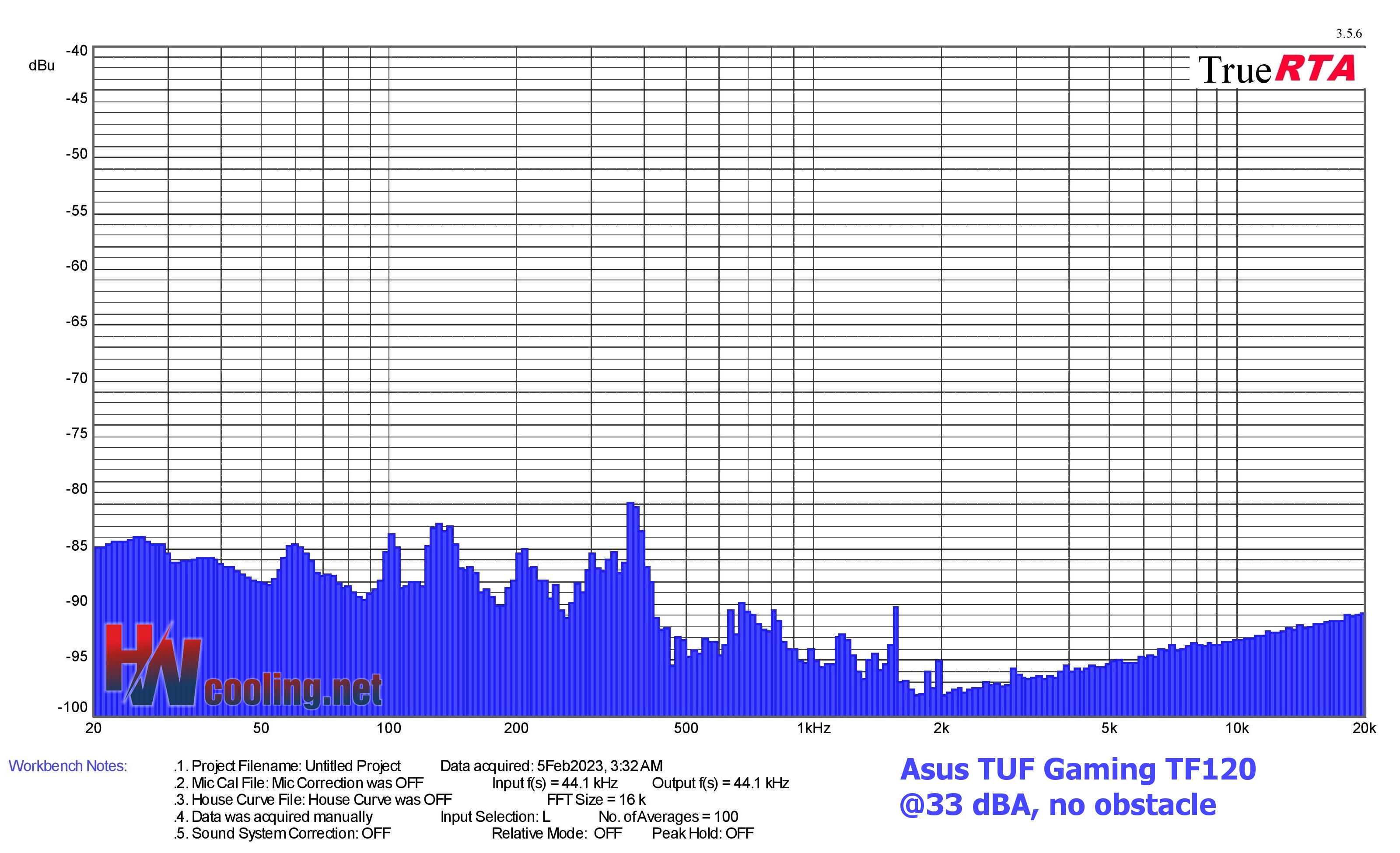
In a non-restrictive environment, the TUF fan delivers superior results not only compared to lighted fans, but overall. At very low speeds, it’s top-notch. For extremely low noise, this fan can also be slowed down to keep the motor and bearings quiet, although there is some sound in their band (1-2.5 kHz). In any case, you won’t find many more suitable alternatives for silent computers where LED lighting is a requirement. Especially when combination with nylon filters is required, for which the TF120 has above-standard support (i.e. variants with non-reinforced mesh are also compatible), which is not the case with many competing models.
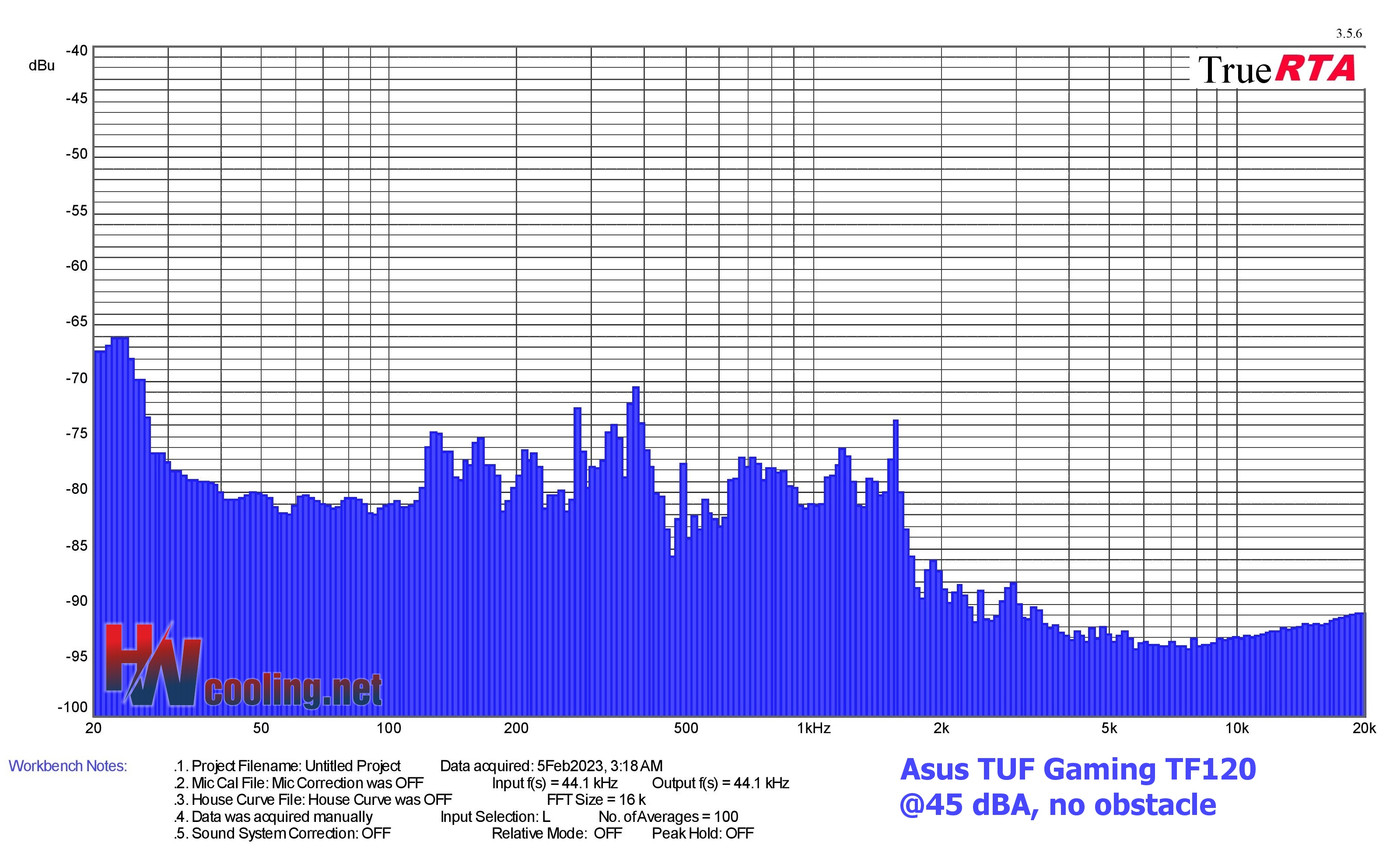
With obstacles, the efficiency of this fan for only average static pressure decreases, but it is still above standard and excellent considering the price. The results on a hexagonal grille are already mediocre and significantly weaker than, for example, the Arctic BioniX P120 A-RGB, but the advantage of the TUF is that never gets into resonant frequencies and the sound is thus considerably more pleasant. Around 1250 rpm we did notice increased vibrations, but at least these, unlike with the Arctic fan, are not reported in the sound spectrum. While they naturally stimulate the generation of secondary noise (e.g., by resonating the cabinet), the blade undulations themselves do not translate into the sound at these critical speeds. Sound frequencies are balanced, with no pronounced peaks.

Cooling performance for radiators is also decent, and it stands that, the less dense, the better. However, in the traditional “push” orientation (on the fins of the radiator), the efficiency of the TF120 decreases as the overall resistance of the environment increases, especially in the mid-range of speeds. This is due to lower static pressure in this position. Nevertheless, you’ll never go wrong by selecting the TF120 for your radiator. Especially when it is a cheaper system and typically a replacement of fans on an AIO cooler.
The vibrations were partly talked about. Outside of one critical band (45 dBA mode), vibrations are always quite low. At lower speeds (below 1150) the vibrations are always negligible. It’s already “worse” at the maximum, but it’s still not terrible.
The airflow to power draw ratio is average, perhaps a little above average considering the lower price range. That is, if we only take into account the power draw of the motor without the LEDs. With lighting, we measured a record 5.1 W. That’s, interestingly, twice the power draw of an idle Intel Core i3-13100F processor. Of course, this is due to the really high luminance, the highest in the tests so far. The brightness per unit of power draw is also high, so the fan is efficient in this respect as well. Importantly, the ARGB LED can also be significantly dimmed, the range is wide just as the speed range (275–2032 rpm) is wide.
So hopefully giving the TF120 the “Smart buy!” award now won’t be regretted later (with more lighted fans in comparison). This fan has a minimum of shortcomings and the airflow is always very high for the price. There are more efficient ARGB fans, for example in many scenarios the DeepCool FC120, which is considerably more expensive though. In contrast, the cheaper Gelid Zodiac with an even better price/performance ratio has significantly more negatives (and limitations) that are the result of more aggressive cost saving (than with the TUF Gaming TF120). Shortly, we’ll see what the Arctic P12 A-RGB has to say about this.
English translation and edit by Jozef Dudáš
| Asus TUF Gaming TF120 |
| + Suitable for every use |
| + Cooling efficiency (airflow/pressure per unit of noise) at a very high level |
| + High air flow and static pressure even through obstacles |
| + Very attractive price/performance ratio for a lighted fan |
| + Sound is always (regardless of use case) more pleasant than the vast majority of other fans |
| + Wide speed range |
| + Really powerful motor |
| + Very low speeds possible (stable from approx. 275 rpm) |
| + Quiet motor and bearing operation |
| + Super low, negligible vibrations at lower speeds |
| + Durable liquid bearings. Many fans in this price class have plain ones |
| + Rotor lighting with very high luminosity... |
| + ... and wide range (can be dimmed significantly) |
| - Relatively weaker static pressure in the mid-speed range in "push" orientation |
| - More intense vibrations around 1250 rpm |
| Approximate retail price: 14 EUR |