





The prices of the top-tier GeForce RTX 5090 cards are extremely high, so for most gamers, the GeForce RTX 5080 is likely the fastest graphics card they’re seriously considering. With no real alternatives nearby, the price range for the RTX 5080 varies widely. Premium models are pricey, and if you want more than a budget model, you’ll likely end up with a card like the TUF GeForce RTX 5080. Apparently, it should’ve been cheaper, but it’s still a safe bet.
Fan behavior, noise level
The fan speeds can be adjusted in a range from 30–100%, which corresponds to fan speeds of approximately 500–3400 RPM (28.8–59.3 dBA). The graph shows the speeds of the two outer fans, which peak at around 3300 RPM. They reach this at 98% power. Beyond that, only the middle counter-rotating fan continues to increase in speed, topping out 100 RPM higher.
At the lowest RPM setting, the noise level measured by the noise meter was 29 dBA, which is below its measurable range. At maximum, the recorded noise level was 62.8 dBA.
With the BIOS set to Performance mode (P mode), fan speeds during operational testing ranged from 1780–1900 RPM, resulting in relatively high noise levels of 44.4–46.4 dBA. This is slightly above average for most graphics cards.
In Quiet mode (Q mode), fan speeds stabilized between 1270–1350 RPM once the card was heated, equating to 34.9–36.3 dBA. While not exceptionally quiet, it’s noticeably better than average and can be considered among the quieter models. Noise levels are similar to RTX 5080 Suprim SOC from MSI or RTX 5080 Gaming OC from Gigabyte.

Cyberpunk 2077, RT Medium, 3840 × 2160 (P mode)
The first test data comes from Cyberpunk 2077 with RT Medium settings at 3840 × 2160 resolution. The test consists of eight consecutive benchmark loops. The graph shows the final loop, from which the average value of a warmed-up card is calculated.
The GPU was fully stressed during testing, running at the edge of its power limit.

The clock speed of the warmed GPU ranges from 2797 to 2827 MHz, averaging at 2902 MHz.

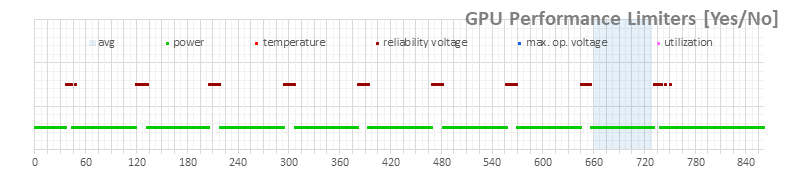
According to the power monitoring data (light green series), the card hovered just below 350 W. The specified power limit is 360 W, suggesting the card is slightly constrained below the stated specs. However, as shown in the final graph, the boost is clearly limited by power consumption – a behavior consistent across all RTX 5080 models tested so far.
The darker line in the graph represents total PC power consumption, measured using a UT71E multimeter. Under load, the average system power consumption was 495.2 W.

The average GPU temperature during peak load reached a maximum of 66.7 °C, with memory temperatures at 70 °C. These are excellent thermal results, albeit achieved at the cost of increased noise.

Even at just under 1800 RPM, the large fans are noticeably loud.

⠀





