While others have resigned from full-fledged motherboard tests long ago, we’re just kicking it off. Tests with differently powerful processors, without power limits, but also with limits set by Intel. And when we test performance, we also test M.2 slots, USB or Ethernet. Power draw analysis done at the level of individual branches, and thermal imaging with temperature tests (including SSD heatsink efficiency measurements) are a no-brainer.
Conclusion
We’ve put the MSI MAG B660M Mortar WiFi board through hundreds of tests and although we don’t have anything to compare it to yet, it seems to be a very good piece of hardware. We didn’t come across anything it couldn’t handle (and admittedly it was tested hard), and even when we compare some of the results to the MEG Z690 Unify’s results from CPU tests, this significantly cheaper board doesn’t perform badly and even the performance on it is often a hair higher while at the same time drawing less power. This shows a very decent efficiency even if the comparison across methodologies is a bit tricky. This is because not the same piece of CPU or memory was used and a different CPU cooler. But it’s the only stepping stone so far. However, there will be other boards coming soon for comparison that will be tested under the same conditions. Then we’ll see how efficient the B660M Mortar WiFi really is. Power management is always efficient under load.
It’s worse off-load in settings with no CPU power limits. The idle power draw is very high, up to 40W. By contrast, with the PL1 (125W) and PL2 (241W) settings as recommended by Intel, off-load power draw drops to almost a third, to 16W even with the Core i9. However, higher idle power draw may not always be the case, and this probably only applies to more powerful K models, which the board also treats more aggressively in other settings (around power saving features and the like) than more power-efficient CPUs, with which power draw is similarly low regardless of the PL profile choice.
Based on detailed measurements of power draw within the 24-pin ATX connector, we can conclude that regardless of the power limit settings the power draw from +12 V, +5 V and 3.3 V is constant. From +5 V and +3.3 V, the power draw doesn’t even change much – it’s the same under heavy processor load as in idle mode. This shows that both the DDR5 memory and the chipset do not go into power saving states off load. For the chipset, this is cross-confirmed by the temperature, which also doesn’t change much under load (and is around 50 °C on the B660M Mortar WiFi). On the +12 V supply of the ATX connector, the power draw varies according to the load on the graphics card. This is because the PCI Express slots are powered by these wires.
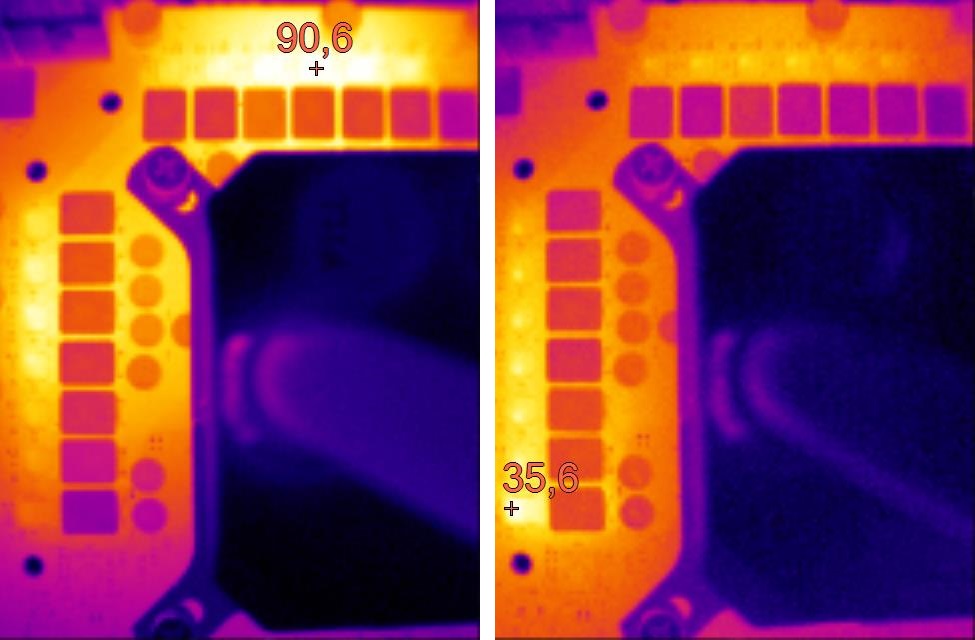
MSI has nothing to be ashamed of with the B660M Mortar WiFi’s power delivery quality. The board can handle the 250 W Ci9-12900K even without VRM heatsinks. The maximum temperature is at 90 °C though, and in worse conditions (than our test conditions), the situation could be worse, but it is still a good result. Moreover, with heatsink, the temperature will be at least 15 °C lower. And most importantly, this board is designed to work primarily with processors from lower classes (Core i5 and Core i7), which have significantly lower power draw. Still, the B660M Mortar won’t burn even under the most powerful Core i9s unrestricted by power limits.
In the M.2 slot speed tests, we didn’t notice any differences in performance, the speed with the Samsung 980 Pro SSD is virtually identical.The larger heatsink on the first slot naturally cools better though. But that difference in temperature will also be due to some extent to the inferior position of the bottom SSD under the graphics card (we’ve covered how SSD placement affects SSD temperatures in a thematic article separately). All USB port speeds are fine, but we stopped at the slower upload speed (125 MB/s) of the network adapter. Downloads are fine though, as expected – at the 2.5 Gb bandwidth limit (295 MB/s). So we’ll see how network chips other than the 8125BG will behave in this regard.
The question of how good the MAG B660M Mortar WiFi board is will be clarified over time by the results of other boards. For now, though, we can certainly commend it for power efficiency under load (and with Intel’s recommended power limits and beyond), for excellent features led by a robust VRM , super-fast USB ports including 3.2 gen. 2×2 and three 10-gigabit ports (the trade-off 5 Gb ports are not even on the back panel) or modern video outputs. The price of around 210 EUR/5100 CZK is still quite nice for a board with DDR5 memory support.
Notice: At the end of the week, we’ll expand the MAG B660M Mortar WiFi tests with performance measurements with the Core i5-12400 CPU. We didn’t have time to include them all at once and it might be better to have it separate for a start, split between two articles.
English translation and edit by Jozef Dudáš
| MSI MAG B660M Mortar WiFi |
| + Robust 14-phase power delivery (VRM)... |
| + ... it won't be surprised even by the Core i9-12900K without power limits |
| + Efficient power management under load – always high performance per watt |
| + A wealth of features even in a smaller footprint |
| + Up to four ultra-fast USB ports on the rear panel |
| + Two fast M.2 SSD slots |
| + Up to six SATA ports. Considering the Micro ATX format, this is above standard |
| + Decent price/value ratio among DDR5 motherboards |
| + One of the few better boards that does not have RGB LED elements |
| - The first PCIe ×16 slot is closer to the CPU socket |
| - With a no-power-limit setting, high idle power draw with more powerful CPUs (at least with the Ci9-12900K) |
| - Lower Ethernet speed in one direction (upload) |
| Recommended retail price: 209 EUR |
Games for testing are from Jama levova

Special thanks to Blackmagic Design (for licenses for DeNoise AI, Gigapixel AI and Sharpen AI) and Topaz Labs (for licenses for DeNoise AI, Gigapixel AI and Sharpen AI)