


Graphics card manufacturers usually fit low-profile fans. If you ever need to replace them, there’s a wide range of 25 mm-thick models to choose from. In most cases, however, using them will make your card occupy four slots. The alternative is to stick with low-profile fans. We’ll test what happens when we swap Asus’s factory-installed 100 mm Axial-tech fans for three slimmer NF-A12x15 from Noctua—and also what happens if they don’t spin at all.
Disconnecting the fans from the card’s headers removes its built-in ability to control them. If you plan to run the cooling in a semi-passive mode, the risk rises significantly that, for some reason, the fans won’t spin up when needed.
When controlling them via software, it only takes the control app not being launched, crashing, or failing to respond to rising GPU temperatures. The following graphs show what happens to the card when the fans never engage.
F1 24, 4K
Under normal circumstances, with adequate cooling, the framerate chart shows a jagged but essentially flat line. Here, you see a sharp drop as the card hits its thermal limit.
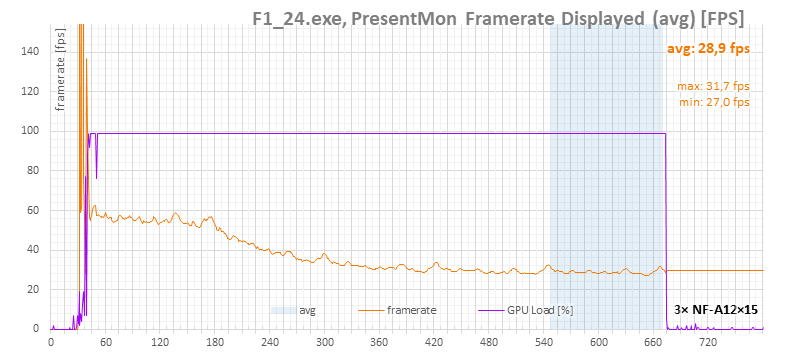
GPU temperatures climb rapidly until they reach the operational ceiling of 88 °C average die temperature. At that point, the card stays at its thermal limit and the regulation quickly starts throttling GPU performance.

This is clearly visible in its clock speeds, and even more so in the power draw chart just below.

The cause is obvious in the next chart—fan speed is 0 RPM, even as the card’s BIOS-level control, set for maximum performance, tries in vain to spin them up. They can’t—they’re connected to an external controller.

And here you can see how much the card reduces its power consumption. You could say it “passively” cools itself at about 135 W. Quotation marks because the case still has significant airflow from eight 140 mm case fans spinning at 700–800 RPM.

In the GPU Boost limit-cause chart, we see something not encountered in usual tests—a red indicator shows that the GPU has reached its thermal limit and is throttling.
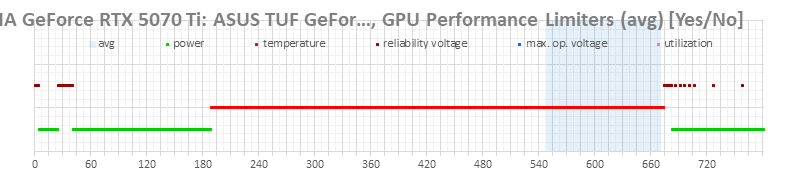
With strong case airflow, the GPU can still handle the lack of fan operation reasonably well, but it’s definitely not a good idea to run it this way long-term.
⠀






Hi, interesting results 🙂
Do you plan to do it with 2 A12x25 ? There are some deshroud kit for the Asus prime 5070 ti available and I’m really curious 🙂
Auto reply I saw you did it with the Tuf, results will be closer i guess 🙂
Hi, I’m not sure what you mean. The results for the dual NF-A12x25 setup are in the third chapter of the previous article:
https://www.hwcooling.net/asus-tuf-geforce-rtx-5070-ti-2x-noctua-nf-a12x25-deshroud/
If you’re asking about the new NF-A12x25 G2, I plan to ask Noctua for samples to test both dual and triple NF-A12x25 G2 setups, and dual NF-A14x25 G2 setup, and possibly 3× NF-A9x14 for other cards, since that size would fit better on 30 cm cards.
The Prime 5070 Ti seems to have a slightly shorter heatsink, so the dual NF-A12x25 should fit better—although I don’t have one to try.
Anyway, for the Prime, I’m planning to deshroud the already-tested black variant of the RTX 5070 Prime. One of its fans was noticeably louder, so I expect the noise reduction to be more significant in this case.
https://www.hwcooling.net/en/asus-prime-geforce-rtx-5070-white-o12g-review-revisited/14/
Why are all your cards noise levels at minimum fan speed around 30dBA? Like here with 3x 12×15 it’s 28.5dBA, with stock TUF fans it’s 29.2 dBA, the Gigabyte Aero is 30.5 dBA. But the fan speed difference is really big 200rpm-700rpm-1000rpm.
I’m looking for a gpu with inaudible fans at minimum speed, the only point I have is that the Prime is still inaudible at 900rpm, but your review says that’s 33dBA?
I apologize—this probably isn’t something I can explain simply. It’s more suited for a longer article than a quick reply.
First, the TLDR, then more detail:
Below 29 dBA, I’m hitting the limit of the sound meter—readings of 28.5–29 dBA reflect the device’s own noise, not that of the fans. That’s why some fans show identical values even when their RPMs differ dramatically (e.g., 200 vs. 900 rpm). In reality, something like a Noctua at 250 rpm or a TUF fan at 700 rpm is actually quieter than what the sound level meter can detect.
Whether a card is considered “inaudible” is quite subjective—it depends on your personal experience with other cards, as well as your setup and environment.
With Prime cards, the issue is that fan quality varies more than usual, so even at the same speeds, the noise readings can differ. Under load, the differences become clearly measurable, as noise levels rise into the range where the meter works reliably.
In more detail:
A key limitation of the used CEM DT-8852 sound level meter is its measuring range of 30–80 dBA. With current calibration, readings around 28.6–28.8 dBA reflect the internal noise of the meter itself (microphone, power supply, etc.), not the fans.
https://www.hwcooling.net/wp-content/uploads/2025/08/3pcs-nf-a12-15-measured.png
Since you can’t simply add the meter’s own noise to the fan noise, here’s a rough idea: by subtracting the 28.5 dBA baseline using this Excel formula 10*IMLOG10(10^(value/10)-10^(28.5/10)) you can get an estimate of the actual fan noise levels. For deshrouded card with noctua NF-A12x15 fans that would look something like this:
https://www.hwcooling.net/wp-content/uploads/2025/08/3pcs-nf-a12-15-adjusted2.png
However, this is just an estimate. I only publish values that I can measure reliably. In my charts, I only show values that I can actually measure within the limits of my equipment.
Noise levels at minimum speed: around 30 dBA
Many graphics cards show minimum noise levels around 30 dBA mainly because their BIOS enforces a lower limit on fan RPM (usually between 1000 and 1300 rpm). If the card registers 30 dBA, it means that’s already within the sound meter’s detection threshold, measured at 25 cm.
If a graph starts off with an almost flat line at the lower noise limit of 28.6–28.8 dBA—such as with the TUF RTX 5070 running at a minimum of 700 rpm—it usually indicates that the card’s noise level is below the measurable range of the sound meter in that part of the curve. In other words, it’s quieter than the equipment can detect (but also likely quieter than you’d hear from a typical distance).
https://www.hwcooling.net/wp-content/uploads/2025/03/asus-tuf-geforce-rtx-5070-noise.png
For other cards like the TUF RTX 5070 Ti, noise increases visibly from around 900 rpm onward:
https://www.hwcooling.net/wp-content/uploads/2025/07/asus-tuf-gaming-geforce-rtx-5070-ti-16gb-oc-edition-o16g-test-recenze-review-noise.png
The Gigabyte Aero RTX 5070 Ti uses different fans, with a larger diameter and broader blades. Its minimum speed is 1000 rpm. The noise graph doesn’t begin with a flat line—instead, the curve rises smoothly in line with the fan speed.
https://www.hwcooling.net/wp-content/uploads/2025/02/gigabyte-geforce-rtx-5070-ti-aero-oc-noise.png
For cards like the Noctua (at 250 rpm) or the TUF RTX 5070 Ti (at 700 rpm), the measured noise level sits around 28.6–28.8 dBA simply because the equipment can’t detect anything lower.
It’s important to note that these low idle values were recorded with manual fan control. During typical load, automatic fan speeds increase significantly (usually between 1100–2200 rpm), pushing card’s noise into the measurable range. When idle, all modern cards go into zero RPM mode having inaudible cooler.
Re: “Prime is still inaudible at 900 rpm”
The biggest misunderstanding I’ve come across in noise testing over the years is how subjective “inaudible” is. People have very different standards for what they consider quiet or noisy. Some describe certain cards as quiet—even though I know from comparisons that they’re relatively loud—while silence-focused users might complain that a card I call “quiet” is clearly audible to them.
Context also matters: in a system with multiple 120–140mm fans running at 800–1200 rpm or an air CPU cooler ramping to 1500 rpm, the GPU may seem quiet simply because it’s masked by louder components. In a silent build, that same GPU would not be inauidible.
Environment plays a role too. Daytime ambient noise masks PC sounds, but at night in a quiet room, even subtle fan noise becomes noticeable.
I do all my fan noise measurements at night on an open, passively cooled test setup with nothing else running in the room. From 0.5 meters away, I can already hear some fans even when noise levels are below 29 dBA. At 600 rpm, low-airflow fans can be audible from 0.5 to 1 meter—mainly if they have lower-quality motors or bearings. With premium fans at the same distance and speed, I often can’t tell by ear if they’re running.
For higher-performance fans with no motor or bearing issues, the noise tends to come from blade shape and airflow. Cards like the Pulse RX 9060 XT or most TUF models—with high airflow, large fan blades, and densely packed heatsinks—generate aerodynamic noise that’s still audible even at 700 rpm. You can tell they’re running just by listening.
In general, when my sound meter shows around 28.7 dBA (likely even lower in reality), I can’t hear anything from 0.5 meters away. But once the noise level exceeds 28.8 dBA, it starts to become audible from 0.5–1 meter.
At a distance of 2–3 meters in a quiet space at night, measured noise levels around 34–36 dBA are clearly noticeable—you can easily tell whether the fans are spinning or not.
As for the Prime cards inconsistencies, the biggest issue is the widely varying noise levels of individual fans—even under identical test conditions. If a Prime card is described as inaudible, it’s likely meant in the context of a typical PC setup—where other components like case fans or CPU coolers are louder and mask the GPU noise. Or if someone else describes card as inaudible, he could received a unit where all the fans were exceptionally well-balanced and quiet.
I tested six fans across two different Prime 5070 cards also individually, and the results differed dramatically for each fan. On the black Prime 5070, the loudest fan (located near the I/O bracket) registered 32.1 dBA at 700 rpm, while the center fan on the same card measured just 29 dBA.
On the white Prime 5070, it was the center fan that stood out as the loudest, measuring 30.1 dBA at 700 rpm, compared to 29.2 dBA for the first fan near the I/O bracket.
These readings were taken at idle, at the lowest fan speeds. Under load, however, the measurements are more consistent. Fan speeds typically rise to between 1300 and 1500 rpm, where the CN-DT8852 sound level meter operates reliably and provides accurate results for this class of equipment.
To complicate things further, the white Prime 5070 behaved differently under load compared to the black version. Despite similar GPU temperatures, the white model’s fans spun faster. This card uses a newer BIOS, so the difference may be due to changed fan curve settings—or possibly due to GPU hotspot behavior, which Nvidia no longer displays in the RTX 50 series monitoring tools.
See the following graphs (measured using the Quiet BIOS setting) for fan speeds and temperatures:
Fan Speeds:
Black Prime 5070:
https://www.hwcooling.net/wp-content/uploads/2025/05/asus-prime-geforce-rtx-5070-o12g-test-recenze-review-quiet-cp-graf-gpufan1.png
White Prime 5070:
https://www.hwcooling.net/wp-content/uploads/2025/07/asus-prime-geforce-rtx-5070-white-oc-edition-o12g-12gb-test-recenze-review-quiet-cp-graf-gpufan1.png
Temperatures:
Black Prime 5070:
https://www.hwcooling.net/wp-content/uploads/2025/05/asus-prime-geforce-rtx-5070-o12g-test-recenze-review-quiet-cp-graf-gputemp.png
White Prime 5070:
https://www.hwcooling.net/wp-content/uploads/2025/07/asus-prime-geforce-rtx-5070-white-oc-edition-o12g-12gb-test-recenze-review-quiet-cp-graf-gputemp.png
Thank you for the extensive answer.
“When idle, all modern cards go into zero RPM mode having inaudible cooler.”
I know, but I mainly play games where zero RPM either cooks my ssd/chipset, fans constantly start and stop which is pretty annoying if it goes from 0 to 1000-1300rpm, or it runs at 1000rpm which is too loud if case fans(P14 Argb) run at 600rpm. I run my P14 Argb at 1000rpm max while gaming, but they are usually at 800rpm.
“Environment plays a role too.”
I have the same case as your test build, three P14 Argb front, one top and one rear exhaust. I test as night with closed doors and windows so it’s as quiet as possible, case side panel is on and 1 meter away from me on the desk. I run two tests one with case fans turned off and one with 600rpm.
“At 600 rpm, low-airflow fans can be audible from 0.5 to 1 meter—mainly if they have lower-quality motors or bearings. Cards like the Pulse RX 9060 XT or most TUF models—with high airflow, large fan blades, and densely packed heatsinks—generate aerodynamic noise that’s still audible even at 700 rpm. You can tell they’re running just by listening.”
The Gamerock and the Gaming Trio OC I had made this motor noise at minimum speed which is around 1100rpm, I could not hear this from the Prime.
The TUF had this bearing noise(like it had no lube) but fortunately I could not hear it from 1 meter. I had the 5070Ti Prime, I could not hear it at 500rpm over my case fans at the same rpm, it was silent up to 800rpm and I started to hear it at 1000rpm, was acceptable at 1100rpm, loud at 1300rpm and way too loud at 1500rpm(like a vacuum cleaner). The TUF had a more pleasant noise, aside from humming at certain speeds no weird noises from fan motor/bearings I could hear, but the coil whine was quite bad on my sample.