A few weeks ago, I tested the classic black version of the Asus Prime GeForce RTX 5070. It stood out for its combination of very good thermals and acoustics and an attractive price. However, one of the fans was lower quality, making the card noisier than it should have been. I decided to retest it with the white version. The good news is that the fan issue didn’t recur. As for overall noise levels, though, there’s still not much improvement.
Fan behavior, noise levels
And now we get to why the retest. In the black version I previously tested, one of the fans was significantly louder during operation than the other two. While the middle and rear fans were inaudible at the minimum 700 RPM—with the sound meter holding steady at 29 dBA—the fan near the bracket produced a rustling noise even at minimum speed, and the sound level reached up to 32.1 dBA. At higher RPMs, it started to rattle. Unlike the other two, it was audible even when unscrewed from the shroud and spun by hand.
This also impacted the measured noise levels, as described in more detail in the earlier review. Because of the rattling fan, the cooler’s noise across the entire adjustable fan speed range looked like this:
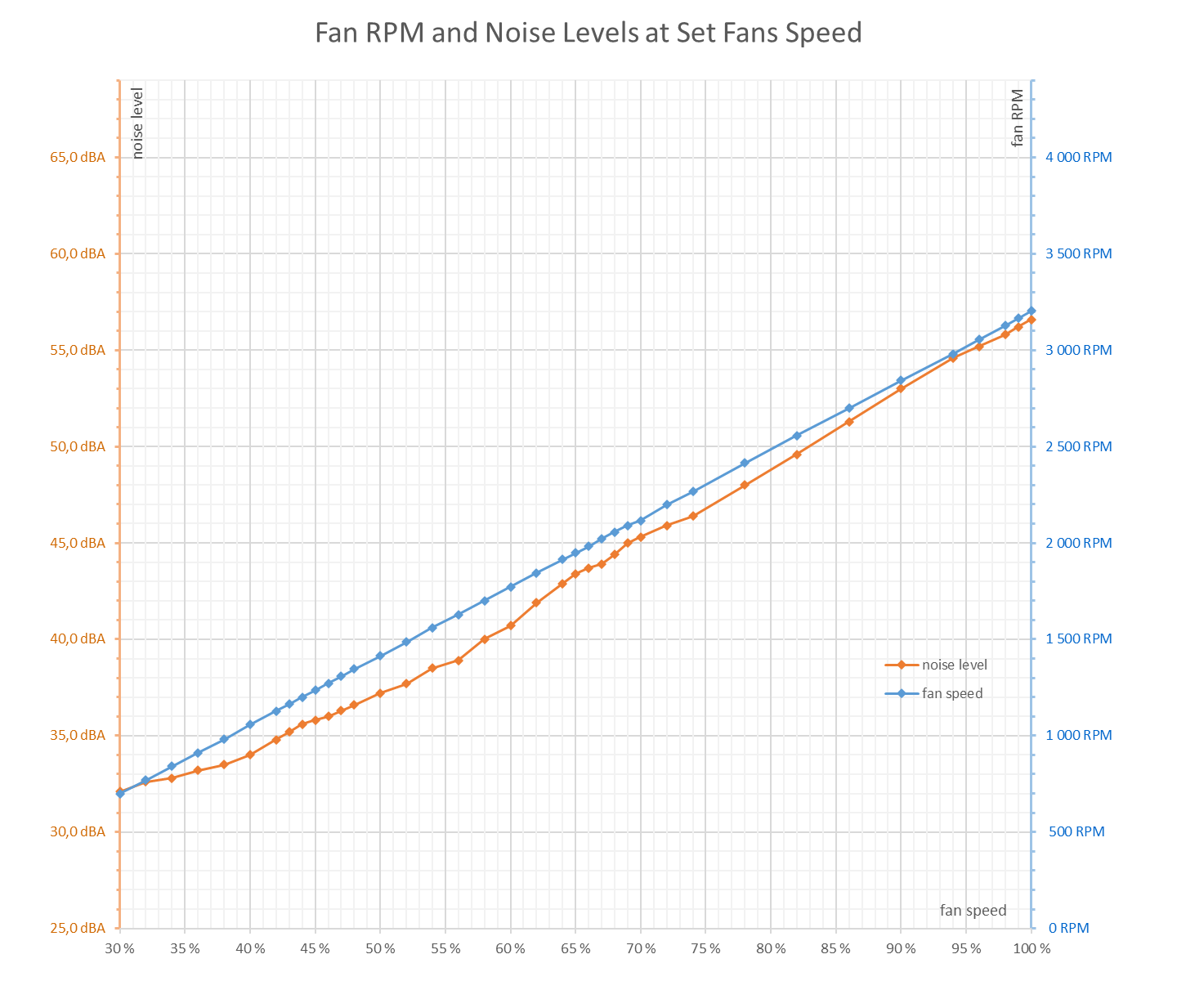
Asus Prime RTX 5070 O12G OC Edition from the previous review (with the rattling fan)
And this is how the white variant turned out, which was fitted with higher-quality fan units:

Asus Prime RTX 5070 O12G White
Unfortunately, even here it can’t be said that all fans were of equal quality. In this sample, the middle fan was a bit louder. Thankfully, it wasn’t rattling or producing any sharp tones—more of a quiet rustling. While the outer fans were practically inaudible at minimum RPM, the middle one was clearly distinguishable—you could easily tell whether it was spinning or not. It’s nothing dramatic; you likely wouldn’t notice it in a typical PC setup. But in a passively cooled system at night and in complete silence, it can still be heard from about a meter away.
While the two outer fans together pushed the sound meter to 29.4 dBA at 1050 RPM, the middle fan alone reached 31.5 dBA. All three running together were only slightly louder at 31.9 dBA. Even at 1300 RPM, the difference remained around 1 dBA.
I probably won’t test another unit because of this. On Asus’s higher-end models lately, I haven’t noticed parasitic noises at low RPMs. It seems there’s more variation between individual fan units on the Prime series than is usual for more expensive models.
This unit also seems to suffer somewhat from the fact that the fans use more durable—but sometimes noisier—ball bearings, in this case, two per fan.
Newer BIOS, noisier card?
More than that, what really surprised me were the higher fan RPMs under load compared to the black variant. I’ll admit, I’m not sure to what extent this is due to the newer BIOS, chip-to-chip variation, differences in thermal transfer from the GPU to the cooler, newer driver versions, or something else entirely.
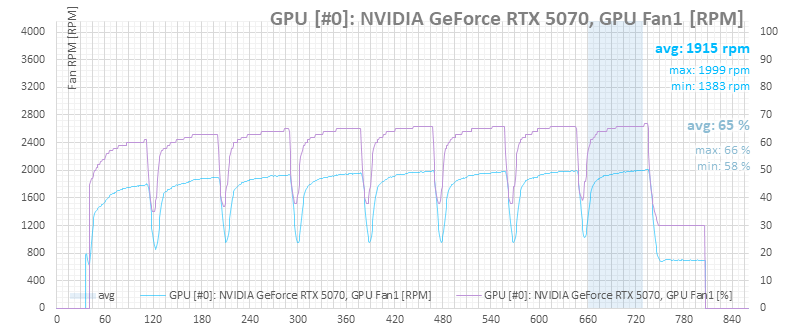
The average temperatures aren’t drastically different, but the temperature ramp-up on the white card under load is much sharper. That forces the fan control to ramp up speeds more quickly and to higher levels. In Performance mode, for instance, it hits 2000 RPM in Cyberpunk—whereas in the earlier test, the black variant reached only 1805 RPM. GPU temperatures differ by about 2 °C, not in the white card’s favor.
The load ramp-up is clearly steeper, and the power consumption graph has changed as well.
The result is that whatever the white card gains in acoustics thanks to better fans, it loses again due to the higher RPMs. Where the black card, with its problematic fan, hit 1800 RPM and 42 dBA, the white one reaches 41.6 dBA due to higher fan speeds.
Let’s look at the details:
Cyberpunk 2077, RT Medium, 3840 × 2160 (P mode)
For testing operating characteristics of high-end graphics cards, I use Cyberpunk 2077 with RT Medium settings at a resolution of 3840 × 2160 pixels. The test consists of eight benchmark runs in a row.
Performance between the two cards differs by just a tenth of a frame per second.

The difference in average GPU clock is minimal: 2726 MHz for the black version, 2712 MHz here. The minimum was 2685 MHz, the maximum 2752 MHz.

In the next power consumption graph (based on monitoring), there’s a slight difference in regulation behavior—the black version showed only a small variance, but the light green line wasn’t as straight.

According to sensor readings, peak GPU temperature during the final run hit around 69.4 °C—higher than before. On the other hand, memory temperature was lower: the other unit peaked at 72 °C, while this one stayed at 68 °C. But temperature ramp-up in the first run was noticeably sharper.

Higher temperatures also resulted in higher fan speeds.
Monitoring shows that GPU Boost is being capped by the voltage limit—same as in the black Prime RTX 5070 test.

⠀