


Gigabyte has put together a fan that combines ARGB LEDs, clever daisy chaining using connectors in the frame, and very good results on radiators. All of that for an attractive price. The design of the Aorus EZ Chain Fan 120 Ice seems to be optimized for use on radiators in particular. In fact, these are the cheapest ARGB fans with daisy chaining and this kind of efficiency that we’ve ever tested.
Everything changes with obstacles
So far, we have described how static pressure and airflow measurements are made under conditions where the fan has no obstacles in its path. In practice, however, fans do not usually blow into an empty space, but have a filter, grille or radiator in front of or behind them, the fins of which need to be pushed through as efficiently as possible.
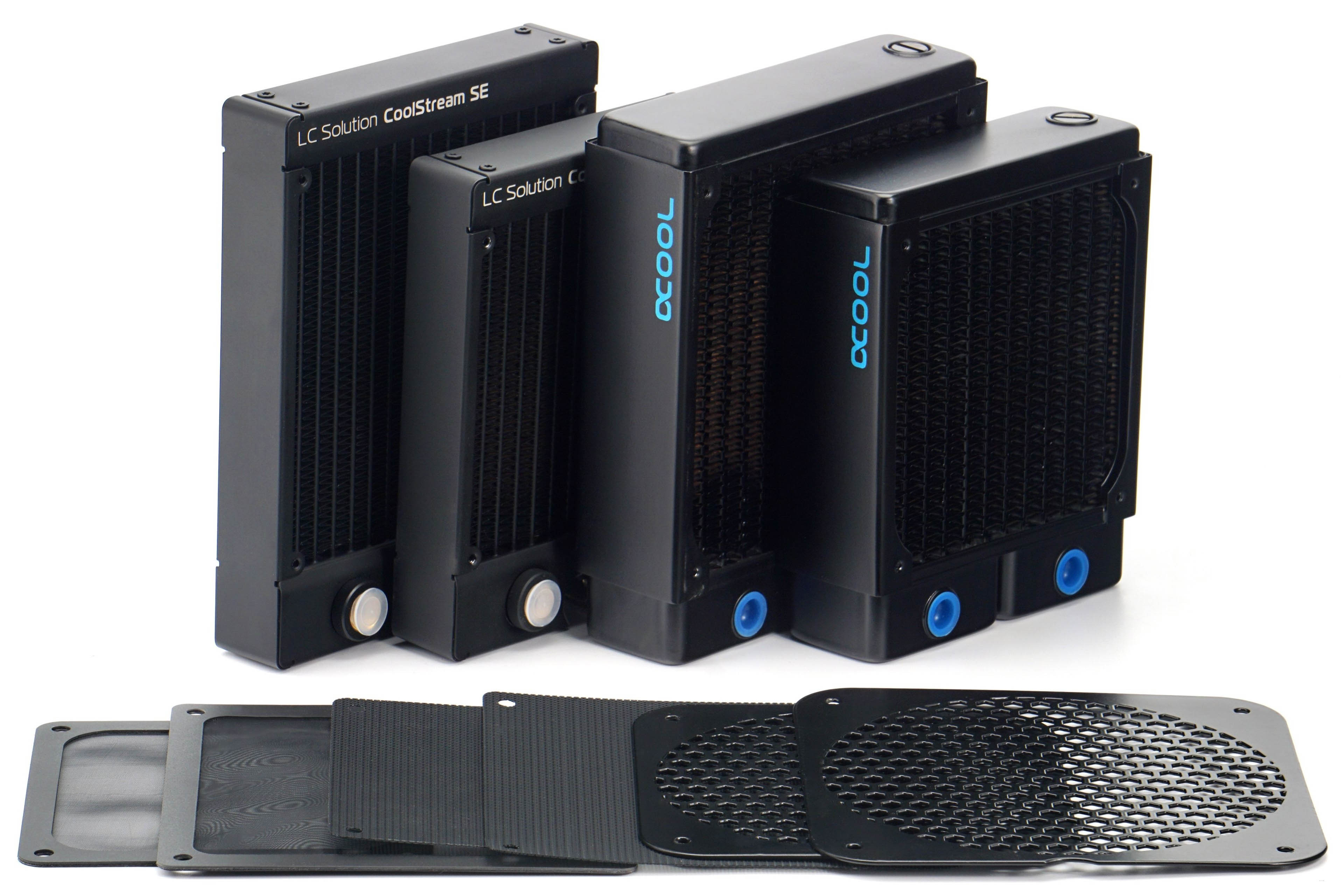
We will also measure both airflow and pressure through practical obstacles for the reasons stated above. These include two types of filters that are usually used in PC cases. One fine – nylon and the other plastic with a thinner mesh. One other obstacle is the hexagonal grille perforated at 50%, on which the vast majority of fans – intake and exhaust – are installed. In some cases, we measure the effect of the obstacles on the results at positions (behind or in front of the impeller) that are used in practice. All obstacles are both pushed through to detect pressure drops, but also pulled through, which in turn speaks to the impact on airflow.

We use two radiators that differ in thickness and fin density. The EK CoolStream SE120/140 is 28 mm thick and the FPI is 22, the Alphacool NexXxoS XT45 v2 is thicker (45 mm) but with less FPI. CoolStream’s fin disposition is also similar in parameters to AIOs. The results on the NexXxoS will again be attractive for those who build their own water cooling loops, where the fans should work well even at low speeds – hence the lower fin density.
These obstacles and especially the radiators, but also the grilles, increase the mechanical resistance in front of the fan, resulting in higher noise levels. However, we will still tune the fan speeds to the specified noise levels of 31 to 45 dBA. Naturally, the speeds will always be lower than when testing without obstructions, but we will maintain the noise levels for clarity. The different noise levels with and without obstacles will only be at maximum power. In this mode it will also be nice to see how the fan design works with the obstacle and in which case the noise level increases more and in which less.





While I understand the need to trim down the length of the charts, I miss being able to directly compare between 120 and 140 mm fans in one chart.
Perhaps an article can be made that updates every time a new fan review is posted, that includes all up-to-date charts for all fan formats? This will also make sharing the fan test results easier – the link will always lead to the latest data. Well, at least it would be the stop-gap solution before a proper database is created. Alternatively, add a filter option into the charts that let you toggle some data on or off, though I am not sure how feasible it is.
Another suggestion is to embed the links to the reviews of each fan into the charts themselves.
Thank you for your feedback on this matter. 🙂
We thought about how to do it and whether to do it at all – the separation of 120 mm from 140 mm format fans. In the end, we approached it like this, and maybe it would be a good compromise to release at some intervals (always at the end of the year) a complete database of the results, where both formats are included in one graph?
You have some good ideas about filtering, but here we encounter the limited possibilities of the interactive graphs we use. They are very outdated in their core and while it would be useful to completely rewrite (and modernize) them, unfortunately we don’t have the capacity to do that at the moment.